> For the complete documentation index, see [llms.txt](https://docs.nexthink.com/platform/llms.txt). Markdown versions of documentation pages are available by appending `.md` to page URLs; this page is available as [Markdown](https://docs.nexthink.com/platform/ja/user-guide/alerts-and-diagnostics/managing-alerts/creating-custom-monitors/detecting-issues-impacting-multiple-devices.md).
# 複数のデバイスに影響を与える問題の検出
{% hint style="info" %}
既存のアラートに関連するデバイスをNQLを使用して調査およびクエリする方法の詳細については、[アラートFAQ](/platform/ja/user-guide/alerts-and-diagnostics/alerts-faq.md#how-can-i-investigate-and-query-devices-associated-with-an-existing-alert)を参照してください。
{% endhint %}
アプリケーションおよびネットワークL2+チームが特定の領域でのグローバルな問題に事前に対応できるように、複数のデバイスに影響を与える問題を検出します。関連するアプリケーションの所有者に対して、そのアプリケーションに影響を与える問題を通知します。以下のユースケースを使用して評価します。
* 影響を受けるデバイスやユーザーの数(例:特定のアプリケーションクラッシュを含むデバイスの数)
* デバイス全体での頻繁な問題(例:すべてのデバイスにおける特定のアプリケーションクラッシュの回数)
両方のアプローチは重要で、多くの場合、お互いを補完します。監視トリガー条件を設定する際は、受信者に関連性のない問題でアラートや通知を避けるために、どちらのアプローチも使用できます。たとえば、すべてのデバイスの特定のアプリケーションクラッシュ数が20を超え、なおかつ5台以上のデバイスに影響を及ぼす場合、システムはアラートをトリガーします。その後、システムはアプリケーション所有者に通知します。
以下のセクションでは、2つのユースケースを詳しく説明します。
## 問題を持つデバイスまたはユーザーの数を監視する
複数のデバイスに影響を与える問題を積極的に監視するために、問題のあるデバイスまたはユーザーの数を検出します。
`devices` または `mobile_devices` の集計数を返す NQL クエリを作成します。
アプリケーションがフォアグラウンドで実行中に発生したクラッシュのみをカウントします。必要に応じて、`by` キーワードを使用して結果をグループ化します。システムはグループごとにアラートをトリガーします。
```
devices
| with execution.crashes during past 24h
| where binary.name = "outlook.exe"
| compute crashes = countif(process_visibility == foreground)
| summarize nr_of_devices = count() by entity
```
### **通知**
システムは、すべてのデバイスに対して一度に通知を送信します。クエリに `by` 句が含まれている場合は、各グループに個別に送信します。通知には、値としてデバイス数のみが含まれます。影響を受けたすべてのデバイスの詳細は、Nexthink Web インターフェイスで確認できます。
### **アラートの概要ダッシュボード**
[アラートの概要](/platform/ja/user-guide/alerts-and-diagnostics/responding-to-alerts/alerts-overview.md)ダッシュボードでは、アラートは単一の行に表示されます。または、グループ化が追加されている場合は、グループ化に関するコンテキストとともに、各グループのアラートが別々の行に表示されます。
***
## デバイス全体で頻繁に発生する問題を監視する
集計メトリック値に反映される、複数のデバイスにまたがる問題を検出します。
集計されたメトリック値を返す NQL クエリを作成します。必要に応じて、`by` キーワードを使用して結果をグループ化します。システムはグループごとにアラートをトリガーします。
```
execution.crashes during past 24h
| summarize
total_number_of_crashes = count(),
devices_with_crashes = device.count()
by binary.name
```
### **通知**
システムは単一のメトリックに対して通知を送信します。クエリに `by` 句が含まれている場合は、各グループに個別に送信します。通知には、条件で定義された各メトリックのしきい値違反の値に関する情報が含まれます。
### **アラートの概要ダッシュボード**
[アラートの概要](/platform/ja/user-guide/alerts-and-diagnostics/responding-to-alerts/alerts-overview.md)ダッシュボードでは、アラートはコンテキスト関連のラベルなしで単一の行に表示されます。グループ化が追加されている場合は、グループ化に関するコンテキストとともに、各グループのアラートが別々の行に表示されます。
NQL の詳細については、以下の NQL の例および [NQL データモデル](/platform/ja/understanding-key-data-platform-concepts/nql-data-model.md) ドキュメントを参照してください。
***
## NQL の例
以下に、モニターの作成および編集に役立つ NQL クエリの例を示します。クエリを確認し、作成または編集するモニターに最も類似したものを選択します。クエリをコピーし、例として提示されているしきい値を含め、ユースケースに合わせて調整します。
### アプリケーションの特定の Web エラーを検出する
この NQL クエリは、特定のアプリケーションについてエラー数とエラーが発生したデバイス数の集計値を返し、特定のエラーコードごとに個別にアラートをトリガーします:
{% code overflow="wrap" lineNumbers="true" %}
```
web.errors during past 1h
| where application.name in ["Jenkins"]
| where error.code !in [405, 404, 403]
| summarize nr_of_devices_impacted = device.count(), nr_of_errors = count() by label
```
{% endcode %}
### Web エラー率が高いアプリケーションを検出する
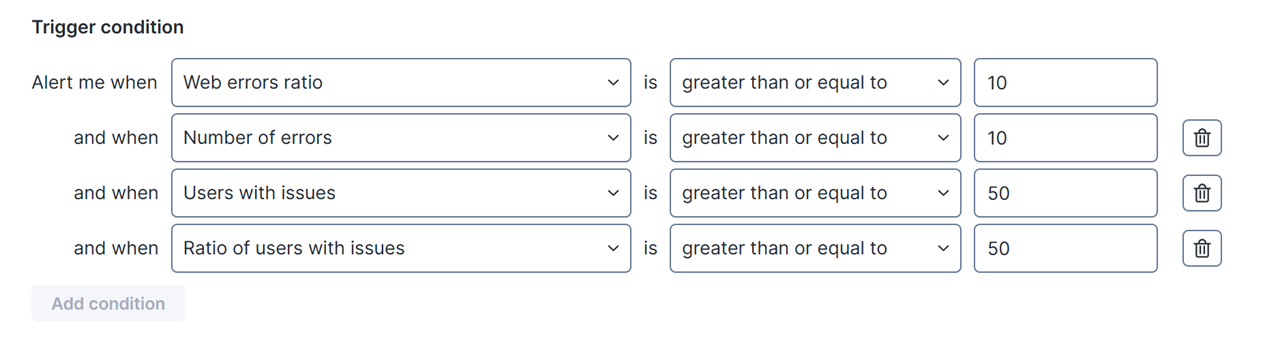
十分な使用量があり、誤検知を避けるために十分な問題が発生していることを確認するには、他のしきい値を選択してください。
{% code overflow="wrap" lineNumbers="true" fullWidth="false" %}
```
application.applications
| with web.page_views during past 60min
| where is_soft_navigation = false
| compute total_number_of_page_views = number_of_page_views.sum(), all_users = user.count()
| with web.errors during past 60min
| compute number_page_views_with_error = error.number_of_errors.sum(), users_with_errors = user.count()
| summarize web_errors_ratio = number_page_views_with_error.sum() * 100 / total_number_of_page_views.sum(), number_of_errors = number_page_views_with_error.sum(), users_with_issues = users_with_errors.sum(), ratio_of_users_with_issues = users_with_errors.sum() * 100 / all_users.sum() by application.name
```
{% endcode %}
### バイナリのクラッシュ数が多いことを検出する
{% code overflow="wrap" lineNumbers="true" %}
```
execution.crashes during past 24h
| summarize total_number_of_crashes = count(), devices_with_crashes = device.count() by binary.name
| sort total_number_of_crashes desc
```
{% endcode %}
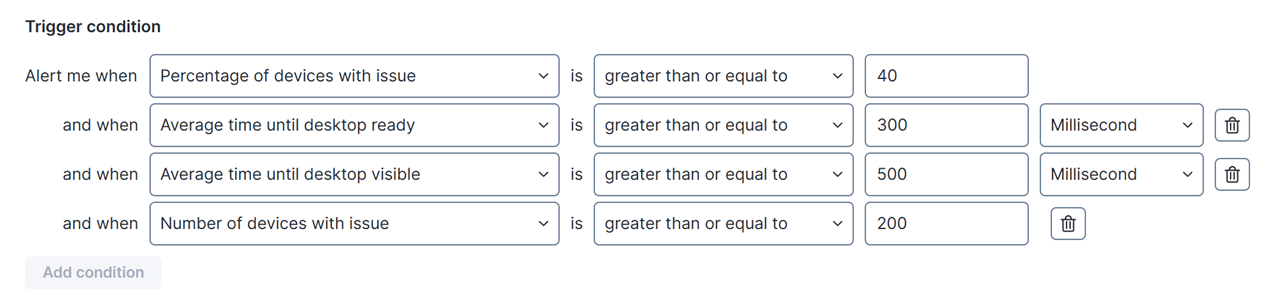
### 国別のジオロケーションで、起動時間が長いデバイスが多数あることを検出する
起動時間が長いとは、`time_until_desktop_is_visible>= 60s` と定義されます
{% code overflow="wrap" lineNumbers="true" %}
```
devices
| with session.logins during past 24h
| compute total_devices = device.count(), avg_time_until_desktop_ready = time_until_desktop_is_ready.avg(), avg_time_until_desktop_visible = time_until_desktop_is_visible.avg()
| include session.logins during past 24h
| where time_until_desktop_is_visible>= 60s
| compute number_of_device_with_long_login = device.count()
| summarize percentage_of_devices_with_issue = number_of_device_with_long_login.sum() * 100 / total_devices.sum(), average_time_until_desktop_ready = avg_time_until_desktop_ready.avg(), average_time_until_desktop_visible = avg_time_until_desktop_visible.avg(), number_of_devices_with_issue = number_of_device_with_long_login.sum() by public_ip.country
```
{% endcode %}
### デスクトッププールごとの平均 CPU キュー長が 3 以上の場合の仮想化アラート
{% code overflow="wrap" lineNumbers="true" %}
```
device_performance.events during past 30min
| where device.virtualization.desktop_pool != null
| summarize Average_cpu_queue_length = cpu_queue_length.avg() / number_of_logical_processors.avg() by device.virtualization.desktop_pool
```
{% endcode %}
---
# Agent Instructions
This documentation is published with GitBook. GitBook is the documentation platform designed so that both humans and AI agents can read, navigate, and reason over technical content effectively. Learn more at gitbook.com.
## Querying This Documentation
If you need additional information that is not directly available in this page, you can query the documentation dynamically by asking a question.
Perform an HTTP GET request on the current page URL with the `ask` query parameter, and the optional `goal` query parameter:
```
GET https://docs.nexthink.com/platform/ja/user-guide/alerts-and-diagnostics/managing-alerts/creating-custom-monitors/detecting-issues-impacting-multiple-devices.md?ask=&goal=
```
`ask` is the immediate question: it should be specific, self-contained, and written in natural language.
`goal` is optional and describes the broader end goal you are ultimately trying to accomplish on behalf of the user. GitBook uses it to tailor the answer towards what is most useful for that goal.
The response will contain a direct answer to the question and relevant excerpts and sources from the documentation.
Use this mechanism when the answer is not explicitly present in the current page, you need clarification or additional context, or you want to retrieve related documentation sections.