> For the complete documentation index, see [llms.txt](https://docs.nexthink.com/platform/llms.txt). Markdown versions of documentation pages are available by appending `.md` to page URLs; this page is available as [Markdown](https://docs.nexthink.com/platform/ja/user-guide/experience-optimization-classic/rating-devices-and-users-with-scores-classic/computing-scores-classic.md).
# スコアの計算(クラシック)
スコアはデバイスまたはユーザーに適用され、一つ以上の視点から各オブジェクトの評価を提供します。スコアの値は、特定の側面やさまざまな側面の組み合わせに対するオブジェクトの状態に依存します。
このようにして、スコアは低レベルの分析の複雑さをビジネス的な意義を持つ単一の数値に縮小します。例えば、ネットワーク接続性の複数の指標やその技術的詳細を扱う代わりに、これらの測定値をすべて組み合わせた単一のスコアを使用して、デバイスの接続性の状態をすぐに把握できます。
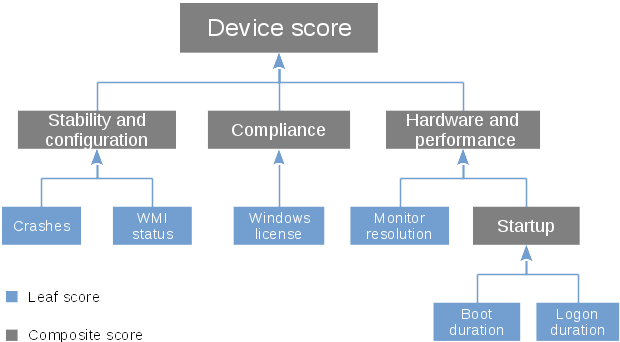
スコアは最大5レベルのツリー構造に編成されています。ツリーの最下位レベルのスコアは「リーフスコア」と呼ばれます。リーフスコアは、集計の計算またはデバイスやユーザーのフィールドの値に直接依存します。一方、階層の上位レベルのスコアは「コンポジットスコア」と呼ばれます。コンポジットスコアは、下位レベルのスコアに依存し、それ自体がコンポジットまたはリーフスコアである場合があります。
## リーフスコア
リーフスコアを計算するには、次の入力のいずれかを提供してください。
* **フィールド入力**: デバイスまたはユーザーオブジェクトに属するフィールドの値。
* **計算入力**: デバイスまたはユーザーに関するNXQL調査から得られた集計の値。
リーフスコアの最終的な値は、定義済みの範囲内の数値を取得するために、元の入力値(フィールドまたは計算)に正規化関数を適用することで算出されます。例えば、システム障害の数に基づくスコアで、0から10までの範囲(数が多いほど良い)を持つと仮定した場合、0故障を値10に、5故障以上を値0に、そして1から4の故障数を減少する中間値のリストにマッピングする正規化関数があるかもしれません。
### リーフスコアの更新
ユーザーまたはデバイスオブジェクトのフィールドを入力とするリーフスコアは、毎分更新されます。一方、計算入力を持つリーフスコアは、特定の時間または15分、1時間、6時間ごとに、それぞれの設定に従って1回、毎日更新されます。
## コンポジットスコア
コンポジットスコアは、直下のレベルにあるスコアの値を組み合わせることによって計算されます。下位レベルスコアを組み合わせるには、次のいずれかの操作を使用します。
* **平均**: 下位レベルのスコアを合計し、その合計をそれらの合計数で割ります。
* **加重平均**: 平均操作に似ていますが、各下位レベルスコアにその重要性を反映するために乗じる係数(重み)があります。
* **最小値**: 利用可能な下位レベルスコアの中から最小値を返します。
* **最大値**: 利用可能な下位レベルスコアの中から最大値を返します。
* **合計**: 下位レベルスコアを合計します。
* **乗算**: コンポジットスコアを構成する下位レベルスコアを乗算します。例えば、デバイスの合計ログオン時間は、平均ログオン時間にログオン数を乗じたものです。
### コンポジットスコアの更新
コンポジットスコアは、依存されているスコアが変更されたときに更新されます。階層の最下位レベルにあるリーフスコアを変更すると、上位のすべてのスコアの再計算がトリガーされる場合があります。
## スコアのスコープ
スコアは特定のデバイスまたはユーザーのグループに適用されることがあり、すべてには適用されません。このグループはスコアのスコープと呼ばれます。スコアのスコープを定義するには、対象オブジェクトをプロパティの条件でフィルタリングします。例えば、スコアをノートパソコンにのみ適用するには、そのデバイスタイプがノートパソコンに設定されているデバイスを返すフィルターをスコアのスコープとして設定します。
---
# Agent Instructions
This documentation is published with GitBook. GitBook is the documentation platform designed so that both humans and AI agents can read, navigate, and reason over technical content effectively. Learn more at gitbook.com.
## Querying This Documentation
If you need additional information that is not directly available in this page, you can query the documentation dynamically by asking a question.
Perform an HTTP GET request on the current page URL with the `ask` query parameter, and the optional `goal` query parameter:
```
GET https://docs.nexthink.com/platform/ja/user-guide/experience-optimization-classic/rating-devices-and-users-with-scores-classic/computing-scores-classic.md?ask=&goal=
```
`ask` is the immediate question: it should be specific, self-contained, and written in natural language.
`goal` is optional and describes the broader end goal you are ultimately trying to accomplish on behalf of the user. GitBook uses it to tailor the answer towards what is most useful for that goal.
The response will contain a direct answer to the question and relevant excerpts and sources from the documentation.
Use this mechanism when the answer is not explicitly present in the current page, you need clarification or additional context, or you want to retrieve related documentation sections.