> For the complete documentation index, see [llms.txt](https://docs.nexthink.com/platform/llms.txt). Markdown versions of documentation pages are available by appending `.md` to page URLs; this page is available as [Markdown](https://docs.nexthink.com/platform/ja/user-guide/administration/content-management/custom-trends-management/custom-trends-nql-examples.md).
# カスタムトレンドのNQLの例
## 実行クラッシュの追跡
実行クラッシュの日次件数を追跡します。
**カスタムトレンドの定義**
{% code overflow="wrap" lineNumbers="true" %}
```
devices
| include execution.crashes past 1d
| compute nb_crashes = number_of_crashes.sum()
| list nb_crashes , hardware.manufacturer
```
{% endcode %}
**カスタムトレンドデータの取得**
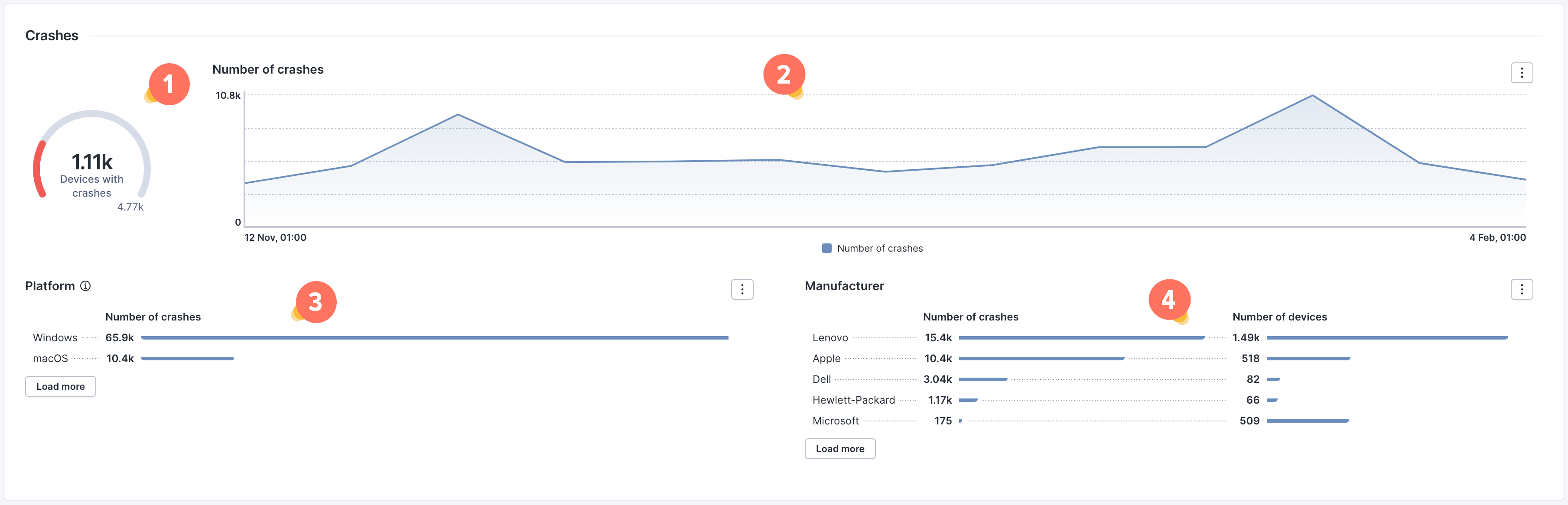
上記のトレンド定義を使用して、次のダッシュボードを作成できます:
1. クラッシュが発生したデバイス数とデバイスの総数を計算します。
custom_trend.#execution_crashes.snapshots during past 90d
   | summarize devices_with_crashes = device.countif(nb_crashes > 0), device_count = device.count()
2. 過去90日間のクラッシュ総数の日次変化を確認します。
custom_trend.#execution_crashes.snapshots during past 90d
   | summarize number_of_crashes_ = nb_crashes.sum() by 1d
custom_trend.#execution_crashes.snapshots during past 90d
   | where nb_crashes > 0
   | summarize number_of_crashes_ = nb_crashes.sum() by context.device_platform
   | sort number_of_crashes_ desc
custom_trend.#execution_crashes.snapshots during past 90d
   | where hardware_manufacturer != "VMWare"
   | where hardware_manufacturer != null
   | summarize number_of_crashes_ = nb_crashes.sum(), number_of_devices_ = device.count() by hardware_manufacturer
   | sort number_of_crashes_ desc
## Windows 11への移行の監視
Windows 11搭載デバイスの比率を時系列で追跡します。
**カスタムトレンドの定義**
{% code overflow="wrap" lineNumbers="true" %}
```
devices
| where operating_system.platform == windows
| list operating_system.name, hardware.type
```
{% endcode %}
**カスタムトレンドデータの取得**
{% code overflow="wrap" lineNumbers="true" %}
```
custom_trend.#windows_migration.snapshots during past 300d
| where hardware_type !in [virtual, null]
| summarize ratio_with_windows_11 = countif(operating_system_name == "*windows 11*")/count() by 1d
```
{% endcode %}
## 起動時間の監視
各デバイスの平均起動時間を追跡し、より軽量な構成の導入による効果を監視します。
**カスタムトレンドの定義**
{% code overflow="wrap" lineNumbers="true" %}
```
devices during past 1d
| include device_performance.boots during past 1d
| compute boot_duration = duration.avg()
| list boot_duration, hardware.type
```
{% endcode %}
**カスタムトレンドデータの取得**
{% code overflow="wrap" lineNumbers="true" %}
```
custom_trend.#boot_duration.snapshots during past 90d
| where (context.device_platform == "Windows" and hardware_type == laptop)
| summarize boot_duration_avg = boot_duration.avg() by 1d
```
{% endcode %}
## 起動時にアプリケーションクラッシュが発生したデバイスの監視
アプリケーションの起動時に少なくとも一度アプリケーションクラッシュが発生したデバイスの日次数を追跡します。
**カスタムトレンドの定義**
{% code overflow="wrap" lineNumbers="true" %}
```
devices during past 1d
| include execution.crashes during past 1d
| where crash_on_start == true
| compute crash_on_start_count = count()
| list crash_on_start_count
```
{% endcode %}
**カスタムトレンドデータの取得**
{% code overflow="wrap" lineNumbers="true" %}
```
custom_trend.#crashes_on_start.snapshots during past 300d
| where crash_on_start_count > 0
| summarize devices_with_app_crashes_at_start = count() by 1d
```
{% endcode %}
## 異なるバイナリバージョンのCPU使用率の監視
アプリケーションの平均CPU使用率をバージョン別に追跡します。
**カスタムトレンドの定義**
{% code overflow="wrap" lineNumbers="true" %}
```
devices
| include execution.events during past 1d
| where binary.name == "zoom.exe"
| compute CPU_usage_ratio = ((cpu_time.sum()) * (100)) / ((execution_duration.sum()) * (number_of_logical_processors.max())), last_version = binary.version.last()
| list CPU_usage_ratio, last_version
```
{% endcode %}
**カスタムトレンドデータの取得**
{% code overflow="wrap" lineNumbers="true" %}
```
custom_trend.#zoom_cpu_usage_ratio.snapshots during past 300d
| summarize c1 = CPU_usage_ratio.avg() by 1d, last_version
```
{% endcode %}
---
# Agent Instructions
This documentation is published with GitBook. GitBook is the documentation platform designed so that both humans and AI agents can read, navigate, and reason over technical content effectively. Learn more at gitbook.com.
## Querying This Documentation
If you need additional information that is not directly available in this page, you can query the documentation dynamically by asking a question.
Perform an HTTP GET request on the current page URL with the `ask` query parameter, and the optional `goal` query parameter:
```
GET https://docs.nexthink.com/platform/ja/user-guide/administration/content-management/custom-trends-management/custom-trends-nql-examples.md?ask=&goal=
```
`ask` is the immediate question: it should be specific, self-contained, and written in natural language.
`goal` is optional and describes the broader end goal you are ultimately trying to accomplish on behalf of the user. GitBook uses it to tailor the answer towards what is most useful for that goal.
The response will contain a direct answer to the question and relevant excerpts and sources from the documentation.
Use this mechanism when the answer is not explicitly present in the current page, you need clarification or additional context, or you want to retrieve related documentation sections.