> For the complete documentation index, see [llms.txt](https://docs.nexthink.com/platform/llms.txt). Markdown versions of documentation pages are available by appending `.md` to page URLs; this page is available as [Markdown](https://docs.nexthink.com/platform/ja/library-packs/software-asset-management/workflow_-microsoft-365-e5-license-optimization/configuration-guide_-microsoft-365-e5-license-optimization.md).
# 設定ガイド: Microsoft 365 E5ライセンス最適化
## はじめに
Microsoft 365 ライセンスを効率的に管理することは、コスト管理において重要です。 多くの組織は、正しいユーザーに正しいライセンスを割り当てることに苦労しており、無駄な費用が発生しています。 これに対応するために、Entra ID 内の自動化されたワークフローはプロセスを合理化します。 E5 ライセンスの保有者を検出し、再利用の同意を求め、E3 ライセンスへの移行を行うことにより、組織は時間を節約し、コストを削減できます。 Power BI Pro の消費データを活用することにより、ライセンス調整のためのユーザーのターゲティング精度を高めることができます。
このページでは、コンテンツの構成について案内します。
## コンテンツリストと依存関係
| タイプ | 名称 | 説明 | 依存関係 |
| ------------------------------------------------------------------------ | -------------------------------- | --------------------------------------------------------------------------------------------- | ------------------------------------------------------ |
| [ワークフロー](https://nexthink.gitbook.io/opd/user-guide/workflows) | Microsoft 365 E5 ライセンスの最適化 | ワークフローは、手動ライセンス再利用プロセスからの時間を節約し、不必要に割り当てられたライセンスからのコストを削減するために、E5 から E3 へのライセンス最適化プロセスを調整します。 | |
| [ライブダッシュボード](https://nexthink.gitbook.io/opd/user-guide/live-dashboards) | Microsoft 365 E5 ライセンス最適化 | ダッシュボードは、Microsoft 365 のライセンスコスト最適化ワークフローの結果を示します。 | |
| [アプリケーション](https://nexthink.gitbook.io/opd/user-guide/applications) | Microsoft 365: Power BI | アプリケーションは、Power BI Microsoft 365 アプリケーションを監視します。 | ワークフローのスケジュールクエリは、このアプリケーションデータを使用して適切なデバイスの範囲を選択できます。 |
| [キャンペーン](https://nexthink.gitbook.io/opd/user-guide/campaigns) | M365 E5 から E3 ライセンス - ワークフロー呼び出し | キャンペーンは、ユーザーにアプリケーションを使用しているかどうかを確認します。 | ワークフローパラメータがこのキャンペーンを有効にします。 |
## 構成ガイド
この Library pack を効果的に使用するためには、コンテンツが適切にインストールおよび設定されている必要があります。 以下は、コンテンツを使用前に正しくインストールおよび設定するための推奨ステップです。
### **ステップ 1) ライブラリパックコンテンツのインストール**
[Nexthink ライブラリ](https://nexthink.gitbook.io/opd/user-guide/nexthink-library)にアクセスし、必要なすべてのコンテンツをインストールしてください。
### **ステップ 2) キャンペーンの編集**
[キャンペーンの管理](https://nexthink.gitbook.io/opd/user-guide/campaigns/managing-campaigns)の管理ページに移動し、キャンペーンをレビューして編集してください。
各インストール済みキャンペーンについて、以下を確認してください:
* 送信者名とイメージをカスタマイズします。
* 質問をレビューして調整します。
* 使用する準備ができたらキャンペーンを公開します。
これらのキャンペーンに対して、以下の設定を推奨します:
| 名称 | トリガー | 優先度 |
| -------------------------------- | ---- | --- |
| M365 E5 から E3 ライセンス - ワークフロー呼び出し | API | 緊急 |
### **ステップ 3) Entra ID インテグレーションの設定**
まだ Entra ID が設定されていない場合、以下のガイドラインを参照してください。 Azure 管理者の助けを求めることをお勧めします。
Microsoft の Graph API を Nexthink Platform と接続するためには、2つのインテグレーションポイントが必要です。 1つのインテグレーションポイントは、data model のユーザーテーブルへの UPN のインポートに必要です。 もう1つのインテグレーションポイントは、API クレデンシャルを管理するために必要です。 詳細情報については、[ワークフローのための Entra ID インテグレーション](/platform/ja/library-packs/faq/entra-id-integration-for-workflows.md)を参照してください。
### **ワークフローパラメータの編集**
### **ステップ 4.1) ワークフローパラメータの編集**
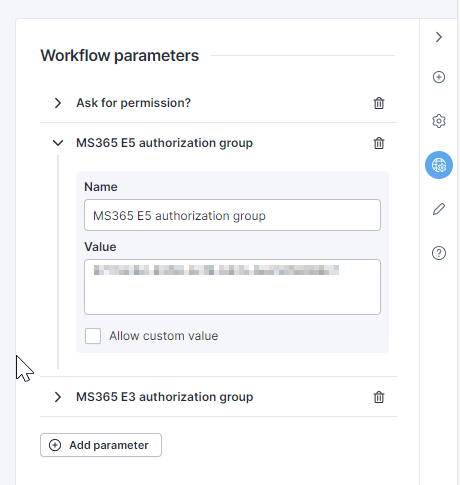
Microsoft 365 E5 ライセンス最適化ワークフローのパラメータは次のとおりです:
* **許可を求めますか?**: このパラメータは、ユーザーの同意有無でライセンスを最適化するオプションを制御します。 値は「はい」と「いいえ」から選べます。「はい」はキャンペーンをトリガーしてユーザーの同意を得ることを意味し、「いいえ」はユーザーの同意なくしてライセンスグループの割り当てを変更することを意味します。
* **MS365 E5 認証グループ**: このパラメータには、Microsoft 365 E5 ライセンス割り当てを制御する、Entra ID ライセンスグループの ID が含まれています。 このパラメータは、ローカルに割り当てられた ID で維持する必要があります。
* **MS365 E3 認証グループ**: MS365 E5 パラメータに類似して、このパラメータは E3 ライセンスグループを含みます。
ライセンスグループ ID
ワークフローパラメータの維持
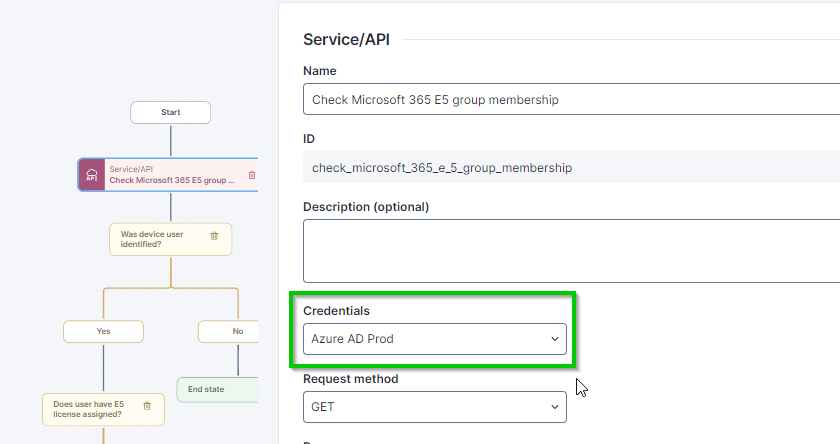
### **ステップ 4.2) ローカルで定義した API Thinklet のクレデンシャルの維持**
各サービス/API Thinklet は、ローカルで維持されるクレデンシャルを必要とします。 このステップで、すべての関連 Thinklet をレビューし、クレデンシャルを維持してください。
### **ステップ 5) スケジュールトリガーの定義**
このワークフローは主に、スケジュールトリガーを使用して自動的に実行されるように設計されています。 ただし、アドホック用途のために手動トリガーも可能です。
次のクエリは、ワークフロースケジュールまたは調査として使用できます。 このクエリは、Power BI の使用が検出されなかったすべてのデバイスを選択します。 その後、ワークフローはこれらのデバイスを使用している各ユーザーのグループメンバーシップをチェックします。 これらのユーザーがライセンスを持っていることを示すグループに属している場合、ライセンスを再利用できるかどうかを確認されます。
NQL を使用した Application Experience データ:
{% code title="コード" %}
```
1 devices during past 30d
2 | where login.last_login_user_name != null
3 | include web.events during past 30d
4 | where application.name == "Microsoft 365: Power BI"
5 | compute app_usage_ = event.duration.sum()
6 | include execution.events during past 30d
7 | where application.name == "Microsoft 365: Power BI"
8 | compute desktop_app_usage_ = execution_duration.sum()
9 | where app_usage_ == null and desktop_app_usage_ == null
```
{% endcode %}
ワークフローのためにデバイスを選択する別の方法は、Software Metering を使用することです。 この場合、90日のデータが利用可能です。 Software Metering のアプリケーション設定方法については、[Software Metering の管理](https://nexthink.gitbook.io/opd/user-guide/software-metering/managing-software-metering)ページを訪問してください。
NQL を使用した Software Metering データ:
1 devices
2 | include software_metering.events during past 90d
3 | where meter_configuration.nql_id == "microsoft_365_power_bi"
4 | compute desktop_app_usage = desktop_execution_duration.sum(),
5          web_app_usage = web_focus_time.sum()
6 | where desktop_app_usage == null and web_app_usage == null
## 使用ガイド
コンテンツは設定が完了し、使用準備が整いました。 使用概要および推奨事項については、使用ガイドをご覧ください:
[使用ガイド: Microsoft 365 E5 ライセンスの最適化](/platform/ja/library-packs/software-asset-management/workflow_-microsoft-365-e5-license-optimization/usage-guide_-microsoft-365-e5-license-optimization.md)
***
関連トピック
* [ワークフローの管理](https://nexthink.gitbook.io/opd/user-guide/workflows/managing-workflows)
* [Campaigns の管理](https://nexthink.gitbook.io/opd/user-guide/campaigns/managing-campaigns)
---
# Agent Instructions
This documentation is published with GitBook. GitBook is the documentation platform designed so that both humans and AI agents can read, navigate, and reason over technical content effectively. Learn more at gitbook.com.
## Querying This Documentation
If you need additional information that is not directly available in this page, you can query the documentation dynamically by asking a question.
Perform an HTTP GET request on the current page URL with the `ask` query parameter, and the optional `goal` query parameter:
```
GET https://docs.nexthink.com/platform/ja/library-packs/software-asset-management/workflow_-microsoft-365-e5-license-optimization/configuration-guide_-microsoft-365-e5-license-optimization.md?ask=&goal=
```
`ask` is the immediate question: it should be specific, self-contained, and written in natural language.
`goal` is optional and describes the broader end goal you are ultimately trying to accomplish on behalf of the user. GitBook uses it to tailor the answer towards what is most useful for that goal.
The response will contain a direct answer to the question and relevant excerpts and sources from the documentation.
Use this mechanism when the answer is not explicitly present in the current page, you need clarification or additional context, or you want to retrieve related documentation sections.