> For the complete documentation index, see [llms.txt](https://docs.nexthink.com/llms.txt). Markdown versions of documentation pages are available by appending `.md` to page URLs; this page is available as [Markdown](https://docs.nexthink.com/platform/ja/library-packs/security-and-compliance/workflow-chrome-update-compliance/usage-guide-chrome-update-compliance.md).
# 使用ガイド: Chrome アップデートコンプライアンス
### 概要
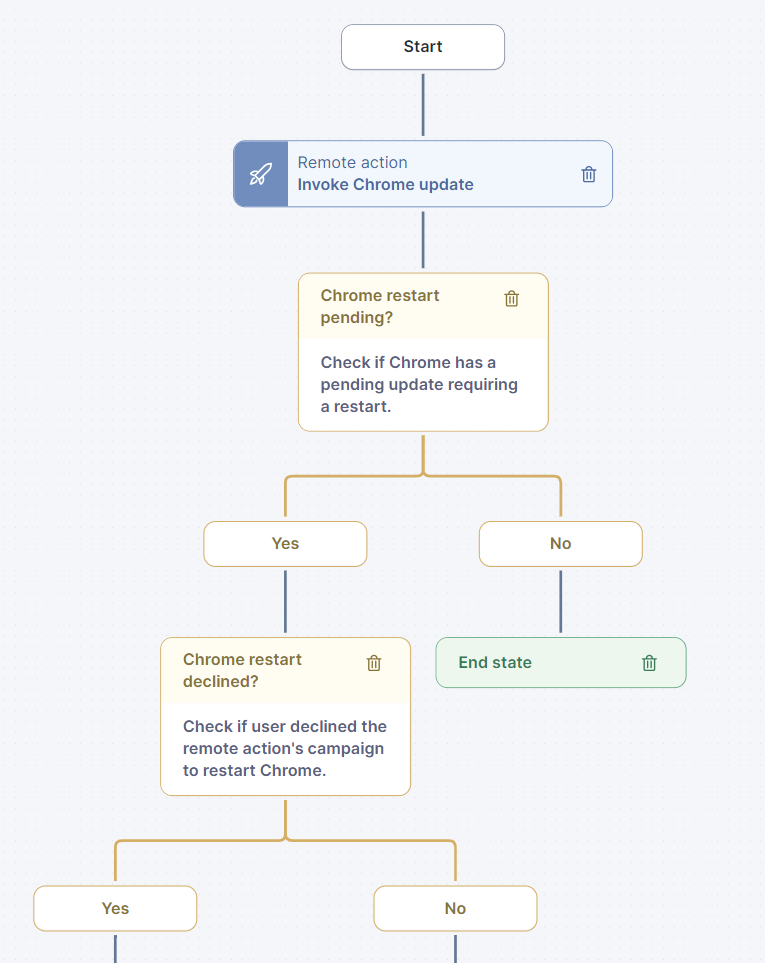
最新のwebブラウザを維持することはセキュリティと効率のために重要ですが、アップデートの管理は難しいことがあります。従業員はアップデートを怠ることがあり、企業のデバイス上でChromeのバージョンが古くなり、セキュリティリスクを引き起こし、生産性を制限することがあります。「ワークフロー: Chromeアップデート準拠」パックはChromeを最新に保つのを助けます。それは、実行中のChromeのバージョンが最新のものと一致するか確認し、一致しない場合は再起動を促します。 2回のプロンプト後に更新されない場合、自動的にChromeを再起動します。
Library packが適切に設定されていることを、設定ガイドに示された手順に従って確認してください。
[設定ガイド: Chromeアップデート準拠](/platform/ja/library-packs/security-and-compliance/workflow-chrome-update-compliance/configuration-guide-chrome-update-compliance.md)
### ワークフロー構造
このワークフローは、スケジュールトリガーを通じて自動で動作するよう設計されています。このセクションでは、このワークフローの主要な手順について説明します。
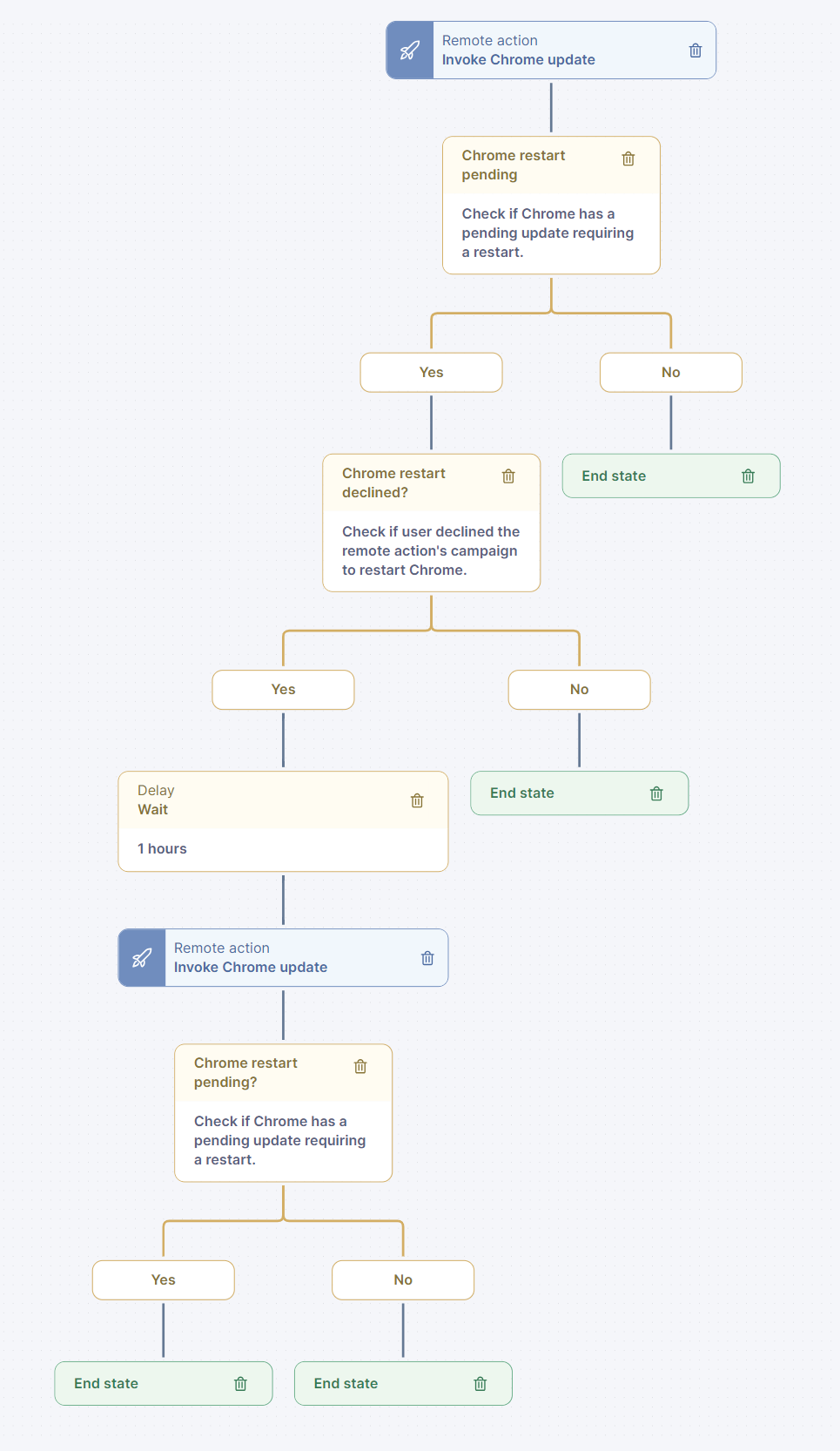
* ワークフローは、Chromeブラウザが保留中のアップデートのために再起動が必要かどうかを確認することから始まります。アップデートが保留中でなく、再起動が必要でない場合、ワークフローは処理を終了します。
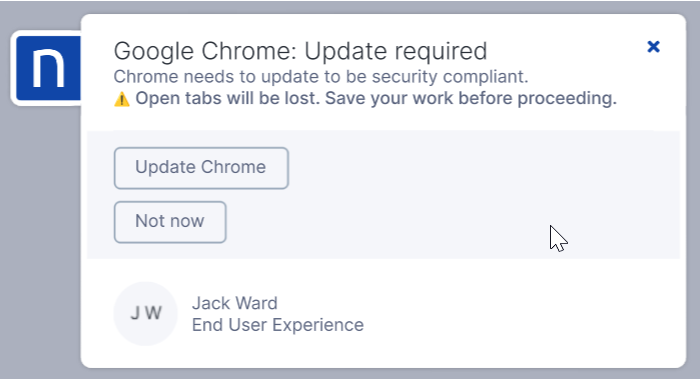
再起動が必要な場合は、ブラウザの再起動が必要であることをユーザーに知らせるcampaignが開始されます。
* ユーザーが同意する場合、リモートアクションがブラウザを再起動し、ワークフローは終了し、必要なアクションがとられたことを記録します。
* ユーザーがChromeブラウザの再起動を拒否した場合、ワークフローは遅延後に再試行します。このシナリオで、再起動がまだ必要で、ユーザーが再びChromeブラウザの再起動を拒否した場合、遅延後に強制的な再起動が実施されます。
関連トピック
* [ワークフローを管理](https://docs.nexthink.com/platform/ja/user-guide/workflows/managing-workflows)
* [リモート アクションを管理する](https://docs.nexthink.com/platform/ja/user-guide/remote-actions/getting-started-with-remote-actions)
* [キャンペーンを管理](https://docs.nexthink.com/platform/ja/user-guide/campaigns/managing-campaigns)
---
# Agent Instructions
This documentation is published with GitBook. GitBook is the documentation platform designed so that both humans and AI agents can read, navigate, and reason over technical content effectively. Learn more at gitbook.com.
## Querying This Documentation
If you need additional information that is not directly available in this page, you can query the documentation by asking a question.
Perform an HTTP GET request on the following URL with the `ask` and `goal` query parameters:
```
GET https://docs.nexthink.com/platform/ja/library-packs/security-and-compliance/workflow-chrome-update-compliance/usage-guide-chrome-update-compliance.md?ask=&goal=
```
`ask` is the immediate question: it should be specific, self-contained, and written in natural language.
`goal` is what the user is ultimately trying to achieve, the reason they need the answer. Sharing it helps GitBook give you a better, more relevant answer. A goal is most helpful when it describes the outcome the user wants rather than restating the question. For example, with `ask=how do I create an API token`, a goal like `automate deployments from our CI pipeline` lets GitBook tailor the answer to that use case.
The response will contain a direct answer to the question and relevant excerpts and sources from the documentation.
Use this mechanism when the answer is not explicitly present in the current page, you need clarification or additional context, or you want to retrieve related documentation sections.