> For the complete documentation index, see [llms.txt](https://docs.nexthink.com/platform/llms.txt). Markdown versions of documentation pages are available by appending `.md` to page URLs; this page is available as [Markdown](https://docs.nexthink.com/platform/ja/whats-new/2023/whats-new-2023.1.md).
# 2023年1月の新着情報
The version 2023.1 release date is January 16, 2023. リリースノートセクションとダウンロードリンクについては、コミュニティウェブサイトの[リリースノート](https://community.nexthink.com/s/knowledge#release_notes)を参照してください。
## デスクトップアプリケーション
Applicationsモジュール内でデスクトップアプリケーションを直接監視し、web、デスクトップ、またはその両方のアプリケーションでの従業員の体験に関する洞察を得ることができます。 あらかじめ用意されたダッシュボードと調査によって、アプリケーションの導入状況を迅速に評価し、問題を特定してトラブルシューティングを行うことができます。 詳細については、[デスクトップアプリケーション](/platform/ja/user-guide/applications/monitoring-applications/monitoring-desktop-applications.md) ドキュメントを参照してください。
## デバイスビューでのデスクトップアプリケーションイベント
デバイスビューでの従業員のデスクトップアプリケーション体験を可視化します。 デスクトップアプリケーションイベントとデバイスのパフォーマンスを関連付けて、デスクトップアプリケーションの潜在的な問題を特定し、トラブルシューティングします。 詳細については、[デバイスビュー](/platform/ja/user-guide/device-view.md) ドキュメントを参照してください。
## ライブダッシュボードのインポートとエクスポート
他の環境からライブダッシュボードをインポートします。 自分のダッシュボードを会社内外の他のユーザーと共有するためにエクスポートします。 これにより、Nexthinkコミュニティに参加し、他の人を助け、アイデアを共有し、ライブダッシュボードのコンテンツを他のユーザーやユーザーグループと共有することで価値実現の時間を短縮する機会が生まれます。 詳細については、[ライブダッシュボードの管理](/platform/ja/user-guide/live-dashboards/managing-live-dashboards.md) ドキュメントを参照してください。
## キャンペーンの多言語対応機能
Translate your campaigns into additional languages directly within the web interface to communicate with your employees in their own language. 詳細については、[キャンペーンの管理](/platform/ja/user-guide/campaigns/managing-campaigns.md) ドキュメントを参照してください。
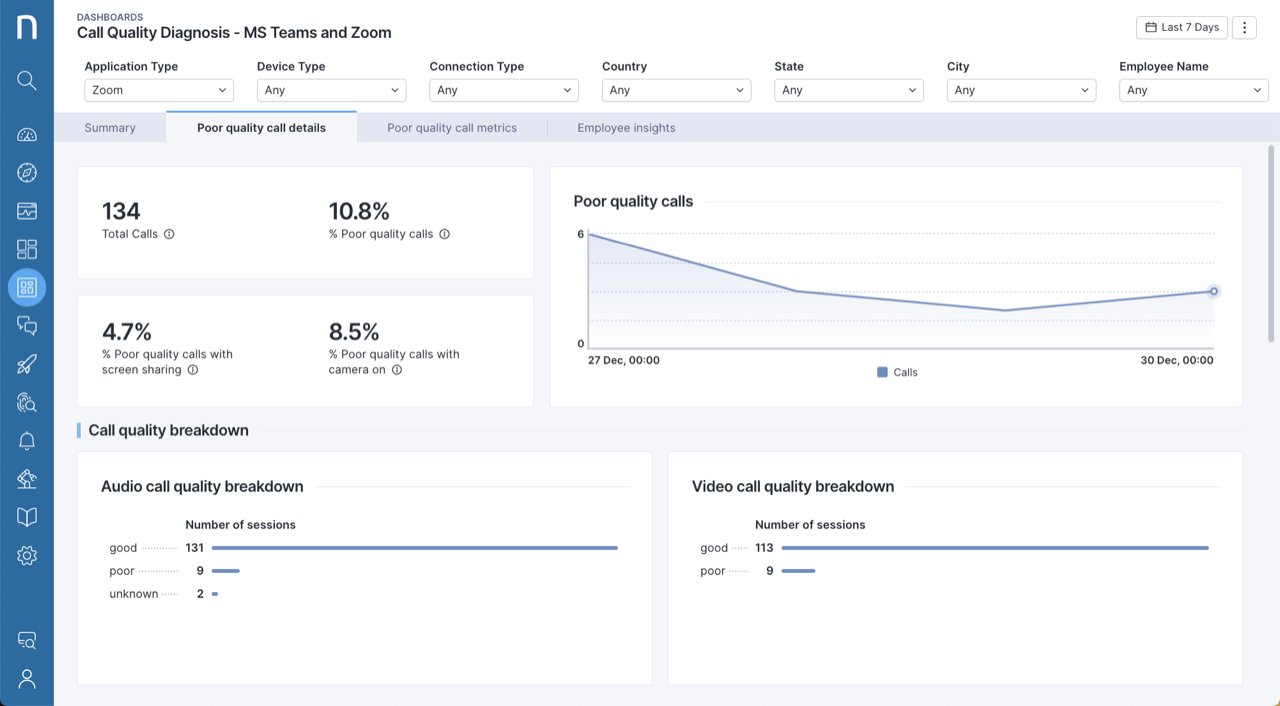
## コラボレーションエクスペリエンスにZoomを追加
既存のNexthinkデータとデバイスのパフォーマンスや接続、アプリケーションのパフォーマンスの洞察を関連付けて、Zoom通話の品質を監視し、潜在的な問題をトラブルシューティングします。 [Zoom用コネクタ](/platform/ja/configuring_nexthink/bringing-data-into-your-nexthink-instance/integrating-nexthink-with-third-party-tools/inbound-connectors/connector-for-zoom.md) ドキュメントを参照して、詳細を確認してください。
## 調査のための改善されたフィルター機能
調査にフィルターをより簡単に追加します。 ビジュアルエディタでは、オブジェクトプロパティや推奨メトリックに直接フィルターを追加できるようになりました。 詳細については、[ビジュアルエディタ](/platform/ja/user-guide/investigations/creating-investigations/visual-editor.md) ドキュメントを参照してください。
## パーソナライズされたランディングページ
ユーザープロファイルにデフォルトのランディングページを設定することで、サインイン後にチームが必要な情報を直接確認できるようにします。 この機能はロールアウトが完了した直後に利用可能になります。 詳細については、[プロファイル](/platform/ja/user-guide/administration/account-management/roles.md)ドキュメントを参照してください。
## デスクトップアプリケーション、NQL、ライブダッシュボード用の学習コース
* 更新された[Application Experience Management](https://learn.nexthink.com/learn/course/application-experience-management-exam/exam/application-experience-management)学習パスで、デスクトップアプリケーションのセットアップと使用方法について理解します。
* [NQLをマスターする方法](https://learn.nexthink.com/courses/how-to-master-nql)コースで、NQLの実験から習得に移行します。
* [学習カタログ](https://learn.nexthink.com/catalog)でアクセスできる4つの新しいコースを通じて、ライブダッシュボードチャートを最適に使用する方法を学びます。
## デスクトップアプリケーションの信頼性に関する可視性の向上
従業員ごとのクラッシュ数やこれらのクラッシュの影響を受けた従業員数について、改善されたレポートを使ってデスクトップアプリケーションの信頼性を調査します。 詳細については、[デスクトップアプリケーション](/platform/ja/user-guide/applications/monitoring-applications/monitoring-desktop-applications.md) ドキュメントを参照してください。
## アプリケーション概要ページでのデスクトップアプリケーションの監視
アプリケーション概要ページでデスクトップアプリケーションの使用状況とパフォーマンスを比較します。 使用量が最も多いデスクトップアプリケーションやパフォーマンスが最も低いものを迅速に特定します。 詳細については、[アプリケーションの監視](/platform/ja/user-guide/applications/monitoring-applications.md) ドキュメントを参照してください。
## APIクレデンシャル管理
OAuthクレデンシャルを生成し、新しいおよび将来的なNexthink Infinity APIへのアクセスを管理します。 詳細については、[API 認証情報](/platform/ja/user-guide/administration/account-management/api-credentials.md)ドキュメントを参照してください。
## デバイスビューとチェックリストの新しい機能の権限
特定のユーザープロファイルに権限を割り当てて、デバイスビューとチェックリストへのアクセスを許可または禁止します。 詳細については、[プロファイル](/platform/ja/user-guide/administration/account-management/roles.md)ドキュメントを参照してください。
## 改善されたライブラリ依存関係の管理
組み込みライブラリのコンテンツとその依存コンテンツを自動的にインストールします。 依存関係を特定し、組み込みコンテンツをすぐに使用できるように、直接インストールします。 詳細については、[Nexthinkライブラリ](/platform/ja/user-guide/nexthink-library.md) ドキュメントを参照してください。
## ユーザー入力遅延の監視
新しいメトリック「ユーザー入力遅延」を活用して、トラブルシューティングを改善し、従業員の体験をより正確に測定します。
## ジオロケーションデータを用いてインターネットサービスプロバイダーの情報を取得
従業員がインターネットにアクセスするために使用しているインターネットサービスプロバイダーとの接続問題を相関させます。
---
# Agent Instructions
This documentation is published with GitBook. GitBook is the documentation platform designed so that both humans and AI agents can read, navigate, and reason over technical content effectively. Learn more at gitbook.com.
## Querying This Documentation
If you need additional information that is not directly available in this page, you can query the documentation dynamically by asking a question.
Perform an HTTP GET request on the current page URL with the `ask` query parameter, and the optional `goal` query parameter:
```
GET https://docs.nexthink.com/platform/ja/whats-new/2023/whats-new-2023.1.md?ask=&goal=
```
`ask` is the immediate question: it should be specific, self-contained, and written in natural language.
`goal` is optional and describes the broader end goal you are ultimately trying to accomplish on behalf of the user. GitBook uses it to tailor the answer towards what is most useful for that goal.
The response will contain a direct answer to the question and relevant excerpts and sources from the documentation.
Use this mechanism when the answer is not explicitly present in the current page, you need clarification or additional context, or you want to retrieve related documentation sections.