> For the complete documentation index, see [llms.txt](https://docs.nexthink.com/platform/llms.txt). Markdown versions of documentation pages are available by appending `.md` to page URLs; this page is available as [Markdown](https://docs.nexthink.com/platform/ja/whats-new/2022/whats-new-2022.5.md).
# 2022年5月の新着情報
このページでは、Nexthink Experienceプラットフォームへの今後の変更を一覧表示します。
バージョン2022.5は利用可能で、6月8日から世界中で展開予定です。 リリースノートとダウンロードリンクについては、当社のコミュニティウェブサイトの[リリースノート](https://community.nexthink.com/s/knowledge#release_notes)セクションをご覧ください。
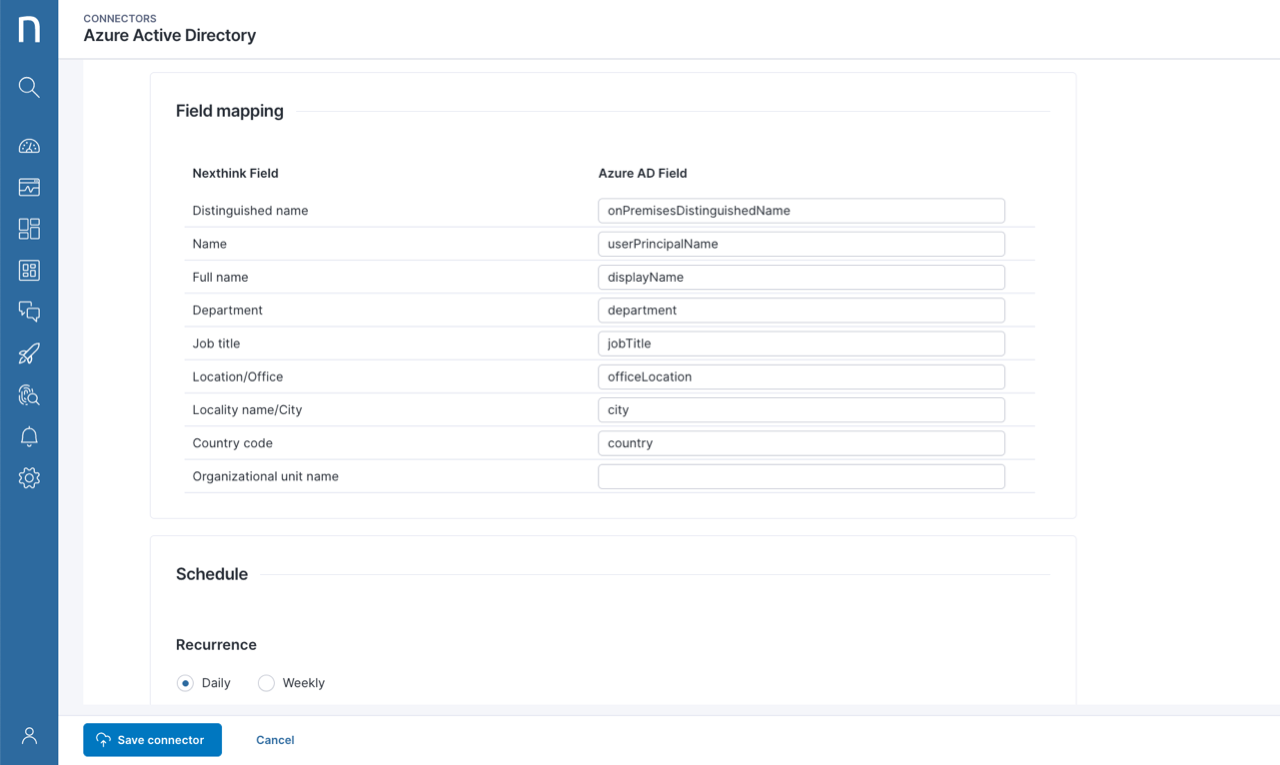
## Microsoft Azure Active Directory (Azure AD)向けコネクタの一般提供
Azure ADからの情報で従業員データを充実させましょう。 クラウドとオンプレミスの両方のActive Directoryインスタンスを使用してユーザーがログインするハイブリッド構成で、インポートコネクタの実装を強化するためにも使用できます。例えば、Microsoft Teamsで利用する場合などです。
## 新しいバルクデータエクスポートのスケジューリング機能
新しいスケジューリング機能でデータエクスポートを自動化します。 設定タブで毎時、毎日、毎週のオプション付きで定期的なエクスポートを計画します。 データエクスポーターが保存されると、スケジューリング頻度がデータエクスポーター一覧の新しい列として表示されます。
## ドキュメントの新しいURL形式
新しいURLメカニズムのおかげで、最新バージョンの製品ドキュメントに簡単にアクセスし、特定のページにリンクすることができます。 新しいURL形式に合わせてブックマークを調整することを忘れないでください。
以前のURL形式
新しいURL形式
---
# Agent Instructions
This documentation is published with GitBook. GitBook is the documentation platform designed so that both humans and AI agents can read, navigate, and reason over technical content effectively. Learn more at gitbook.com.
## Querying This Documentation
If you need additional information that is not directly available in this page, you can query the documentation dynamically by asking a question.
Perform an HTTP GET request on the current page URL with the `ask` query parameter, and the optional `goal` query parameter:
```
GET https://docs.nexthink.com/platform/ja/whats-new/2022/whats-new-2022.5.md?ask=&goal=
```
`ask` is the immediate question: it should be specific, self-contained, and written in natural language.
`goal` is optional and describes the broader end goal you are ultimately trying to accomplish on behalf of the user. GitBook uses it to tailor the answer towards what is most useful for that goal.
The response will contain a direct answer to the question and relevant excerpts and sources from the documentation.
Use this mechanism when the answer is not explicitly present in the current page, you need clarification or additional context, or you want to retrieve related documentation sections.