> For the complete documentation index, see [llms.txt](https://docs.nexthink.com/platform/llms.txt). Markdown versions of documentation pages are available by appending `.md` to page URLs; this page is available as [Markdown](https://docs.nexthink.com/platform/ja/references/database-information-and-organization/application-startup-duration.md).
# アプリケーションの起動時間
{% hint style="warning" %}
この手順は、NexthinkエンジニアまたはNexthink認定パートナーによってのみ実行されるべきです。 ヘルプや支援が必要な場合は、Nexthink認定パートナーに連絡してください。
このドキュメントはMicrosoft Windowsプラットフォームに適用されます。
{% endhint %}
## 概要
\_アプリケーションの起動時間\_は、業務にとって重要なデスクトップアプリケーションを起動するのにかかる時間です。 これは、パフォーマンスのボトルネックが拡大し、従業員の生産性に影響を与える前に、それを早期に検出するためのリソース関連の問題の主要指標です。 このメトリックはエンドユーザーのエクスペリエンスを直接反映し、リソース不足からネットワークの中断まで、さまざまな問題の特定に役立ちます。
## アプリケーション起動時間の測定
アプリケーション起動時間は、次の図に示すように、カーネルが新しいアプリケーションプロセスを開始してからアプリケーションのメインウィンドウが表示されるまでの時間を測定します。
```mermaid
%%{init: { 'logLevel': 'debug', 'theme': 'default' } }%%
timeline
section Application startup duration
Start : Kernel launches application process
End : Main window shows up
```
### NQLクエリでアプリケーションの起動時間を使用する
{% hint style="warning" %}
デスクトップアプリケーションは、関連するサブプロセスと[binaries grouped](https://docs.nexthink.com/platform/ja/references/database-information-and-organization/binary-grouping/)されたバイナリを表します。 その結果、アプリケーション関連のメトリクスとAIの洞察はすべてのサブプロセスを含みます。
アプリケーション関連のデータを照会する際:
* アプリケーションレベルのコンテキストには`binary`を使用します: 監視、属性、レポート作成。
* 実行された実際の実行ファイルを照会するには`real_binary`を使用します。
{% endhint %}
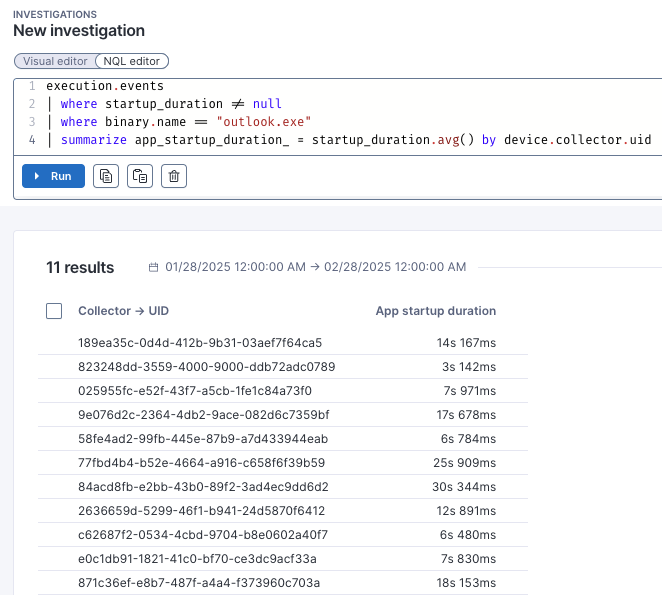
アプリケーション起動時間は、実行イベントの指標であり、`startup_duration`フィールドに保存されています。 次の例はNQLクエリでこれを示しています。
```
execution.events
| where startup_duration != null
| where binary.name == "outlook.exe"
| summarize app_startup_duration_ = startup_duration.avg() by device.collector.uid
```
クエリを実行すると、次の結果が得られます。
## 要件
### アプリケーション要件
Collectorが正確なアプリケーション起動時間を報告するためには、アプリケーションは以下の要件を満たす必要があります:
* **メインウィンドウのネイティブタイトルバー** - 起動時間を測定するには、アプリケーションはスプラッシュスクリーンと区別するために、メインウィンドウに標準のタイトルバーを表示する必要があります。 ウィンドウを表示するアプリケーション——コンソールアプリケーションや最小化して実行されるアプリケーション——は、測定から除外されます。
* **このアプリケーションはユニバーサルWindowsプラットフォーム(UWP)アプリではありません** - 測定方法はUWPアプリケーションでは機能しません。
* **アプリケーションは起動に3分未満かかります** - 起動時間は、起動に3分以上かかるアプリケーションに対しては報告されません。これは、アプリケーションが応答しないなどの他の問題を示す可能性があります。
* **アプリケーションはメインウィンドウを初期化して表示するために1つのプロセスを使用しています** - Collectorはメインウィンドウを表示するために1つのプロセスが責任を持ち、複数のプロセスで初期化するアプリケーションの起動時間の値が不正確であると報告する場合があります。
* **アプリケーションはx64のバイナリでなければなりません** - Collector は、32ビットアプリケーションの実行を継続して報告します。 ただし、アプリケーションの起動時間は、23.6以降のバージョンのCollectorで64ビットアプリケーションにのみ利用可能です。
### ホワイトリストにある実行可能
アプリケーションの起動時間は、すべてのアプリケーションで出荷時設定では利用できません。 特定の *ホワイトリスト* に関連する実行可能ファイルを持つアプリケーションでのみ利用可能です。 デフォルトでは、ホワイトリストには以下のアプリケーションが含まれています:
| アプリケーションの種類 | アプリケーション | 実行可能ファイル名 |
| -------------------- | --------------- | -------------------------------------------------- |
| Web ブラウザー | Google Chrome | chrome.exe |
| | Firefox | firefox.exe |
| | Microsoft Edge | msedge.exe |
| Microsoft Officeスイート | Word | winword.exe |
| | Excel | excel.exe |
| | PowerPoint | powerpnt.exe |
| | Outlook | |
| | OneNote | onenote.exe |
| Adobe suite | Adobe Acrobat | |
| 通信 | Microsoft Teams | |
| | Zoom | zoom.exe |
許可リストの設定は[次のセクション](#applicationstartupduration-configuration)を参照してください。
## 構成
レポートアプリケーションの起動時間を有効にして設定するには、2つの方法があります:
* インストール中に[MSIパラメーター](#applicationstartupduration-msiparameter)を使用する
* [レジストリ キー](#applicationstartupduration-registrykey) を直接変更する
アプリケーションを許可リストに追加するには、まずその要件を満たしていることを確認し、新しい許可リストを本番環境で有効にする前に測定の精度をテストします。 常に独自の許可リストにデフォルトの実行可能ファイルリストを含めてください。
許可リストの形式は、実行可能ファイル名のカンマ区切りリストからなる文字列です。 アスタリスクを使って、実行可能ファイル名内の0個以上の文字を置換するワイルドカードとして使用できます。例えば:
```sh
"winword.exe,excel.exe,onenote*"
```
### MSI パラメーター <0>\
インストール中に、`APP_STARTUP_DURATION` \[MSIパラメータ] (/broken/pages/2Fs3Q7uJbmCtb2ukmpmd#installingcollectoronwindows-deployingcollectorusingactivedirectorygrouppolicy) の値を `enable` に設定して、アプリケーション起動時間のレポートを有効にすることができます。 デフォルトでは無効になっています。
`APP_STARTUP_DURATION_ALLOWLIST` MSIパラメーターは、アプリケーションの起動時間が測定されるアプリケーションのリストを定義します。
### レジストリキー
アプリケーションの起動時間の報告をローカルで有効にし、デバイスの許可リストを変更するには、次のレジストリキーを編集してください:
`HKEY_LOCAL_MACHINE\SOFTWARE\Nexthink\Collector\AppStartupDuration`
`Disabled=0` キーを設定して、アプリケーションの起動時間データの報告を有効にします。
`Allowlist`キーを修正して、アプリケーションの起動時間が測定されるアプリケーションのリストを定義します。
## APP\_STARTUP\_DURATION\_ALLOWLISTパラメーターへの移行
Nexthinkはオリジナルの許可リストパラメーターの名前を変更しました。現在のパラメータ名は:
`APP_STARTUP_DURATION_ALLOWLIST`
Collectorを更新する際、インストーラーは許可リストパラメーターを自動的に新しい名前に更新し、その値を保持します。
{% hint style="warning" %}
* 旧パラメータ名と新パラメータ名を同時に使用するとエラーが発生します。
* カスタム設定スクリプトがある場合は、新しいパラメータ名を使用するように更新してください。
{% endhint %}
---
# Agent Instructions
This documentation is published with GitBook. GitBook is the documentation platform designed so that both humans and AI agents can read, navigate, and reason over technical content effectively. Learn more at gitbook.com.
## Querying This Documentation
If you need additional information that is not directly available in this page, you can query the documentation dynamically by asking a question.
Perform an HTTP GET request on the current page URL with the `ask` query parameter, and the optional `goal` query parameter:
```
GET https://docs.nexthink.com/platform/ja/references/database-information-and-organization/application-startup-duration.md?ask=&goal=
```
`ask` is the immediate question: it should be specific, self-contained, and written in natural language.
`goal` is optional and describes the broader end goal you are ultimately trying to accomplish on behalf of the user. GitBook uses it to tailor the answer towards what is most useful for that goal.
The response will contain a direct answer to the question and relevant excerpts and sources from the documentation.
Use this mechanism when the answer is not explicitly present in the current page, you need clarification or additional context, or you want to retrieve related documentation sections.