> For the complete documentation index, see [llms.txt](https://docs.nexthink.com/platform/llms.txt). Markdown versions of documentation pages are available by appending `.md` to page URLs; this page is available as [Markdown](https://docs.nexthink.com/platform/ja/library-packs/applications/library-applications-google-workspace.md).
# ライブラリアプリケーション-Google ワークスペース
## 概要
Google Workspaceは、組織の生産性およびコラボレーションのための定番スイートとして、ますます人気を高めています。しかし、他のデジタル生産性アプリケーションと同様に、それらのパフォーマンスが悪い場合、従業員の体験も悪化し、最終的には生産性にも影響します。
Google Workspaceライブラリパックには、Nexthinkの[アプリケーション](https://nexthink.gitbook.io/latest/user-guide/applications)モジュールを使用して監視するための事前設定されたアプリケーションがスイートで含まれています。
これらはNexthinkライブラリからインストールでき、Googleの生産性およびコラボレーションスイートの導入、速度、安定性を監視します。
アプリケーションモジュールの詳細を知る:
* [ライブラリアプリケーションFAQ](/platform/ja/library-packs/faq/library-applications-faq.md)
* [アプリケーション](https://nexthink.gitbook.io/latest/user-guide/applications)
## Google Workspaceアプリケーション
このライブラリパックは、以下にリストされているGoogle Workspacesの代表的なアプリケーションを網羅しています。
{% hint style="info" %}
要件:このライブラリパックにある一部のアプリケーションを動作させるためには、[アプリケーションエクスペリエンス](https://nexthink.gitbook.io/latest/overview/products)ライセンスが必要です。
{% endhint %}
以下のアプリケーションは、3つ以上の主要ページやトランザクションを使用し、動作には[アプリケーションエクスペリエンス](https://nexthink.gitbook.io/latest/overview/products)ライセンスが必要です:
* Google Workspace: Gmail
* Google Workspace: Jamboard
* Google Workspace: Meet
* Google Workspace: Chat
* Google Workspace: Sites
以下のアプリケーションは、3つ以下の主要ページやトランザクションを使用し、動作に[アプリケーションエクスペリエンス](https://nexthink.gitbook.io/latest/overview/products)ライセンスは不要です:
* Google Workspace: Docs, Sheets, Slides, Forms
* Google Workspace: Admin
* Google Workspace: Drive
* Google Workspace: Contacts
* Google Workspace: Groups
* Google Workspace: Calendar
## 主要ページ
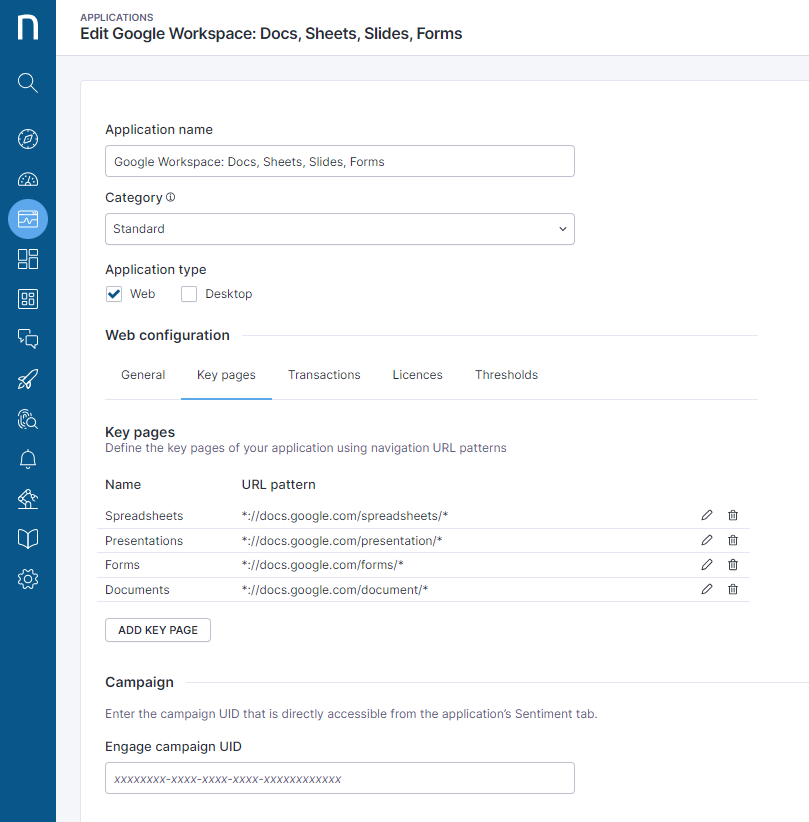
各アプリケーションの主要ページは、Google Workspaceアプリケーションを使用する際にアクセスされる標準ページをカバーするように事前に定義されています。以下のスクリーンショットは、これらの主要ページがどのように事前に定義されているかの例を示しています。
以下のスクリーンショットは主要ページの詳細をいくつか示しています。
## トランザクション
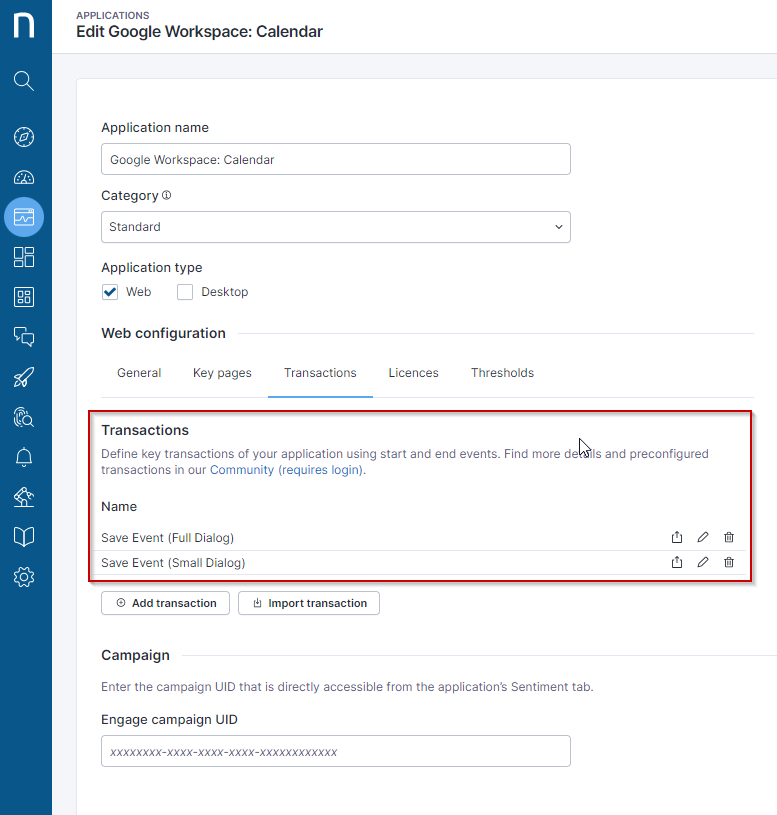
各アプリケーションの主要トランザクションは、標準のアプリケーション使用をカバーするように事前に定義されています。以下のスクリーンショットは、これらがどのように定義され、必要に応じて類似のトランザクションを作成するためのテンプレートとして活用できるかを示しています。
以下はトランザクションがどのように定義されたかの例です。
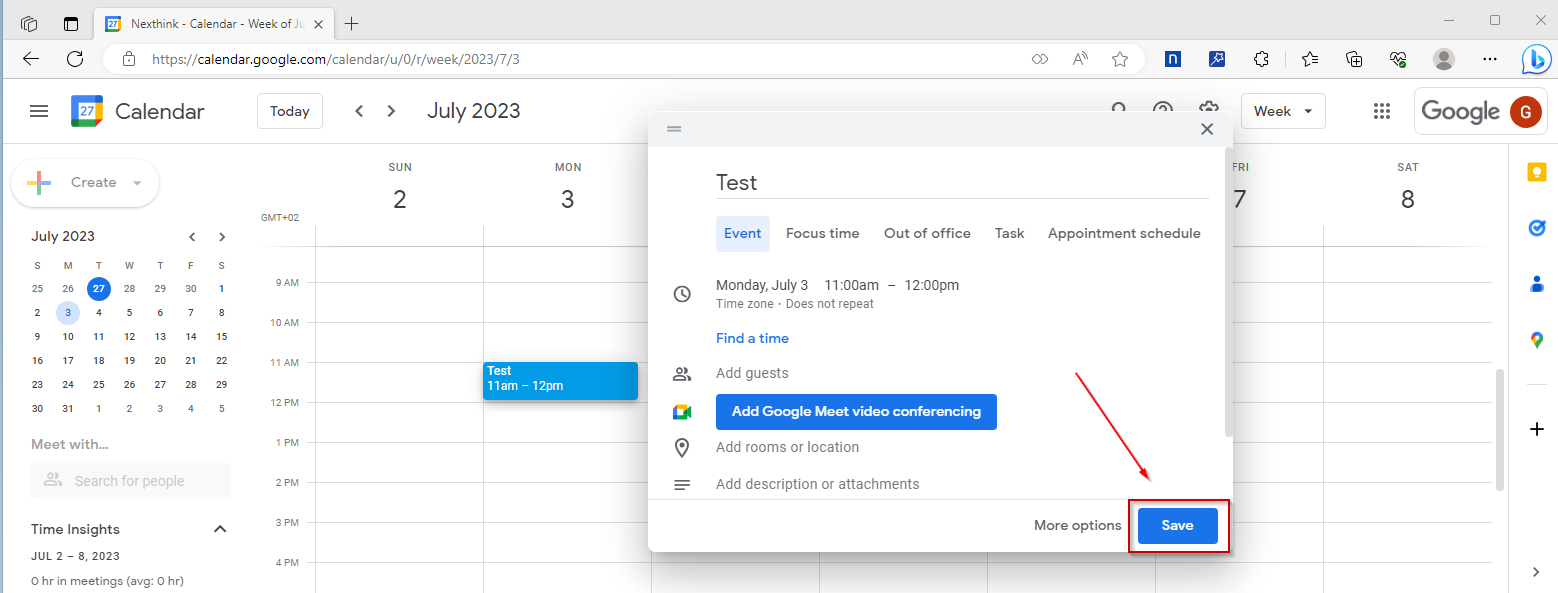
## “イベント保存(小さいダイアログ)”トランザクション
トランザクションの開始は“保存”ボタンクリックでトリガーされ、トランザクションの終了には自動オプションがあります。
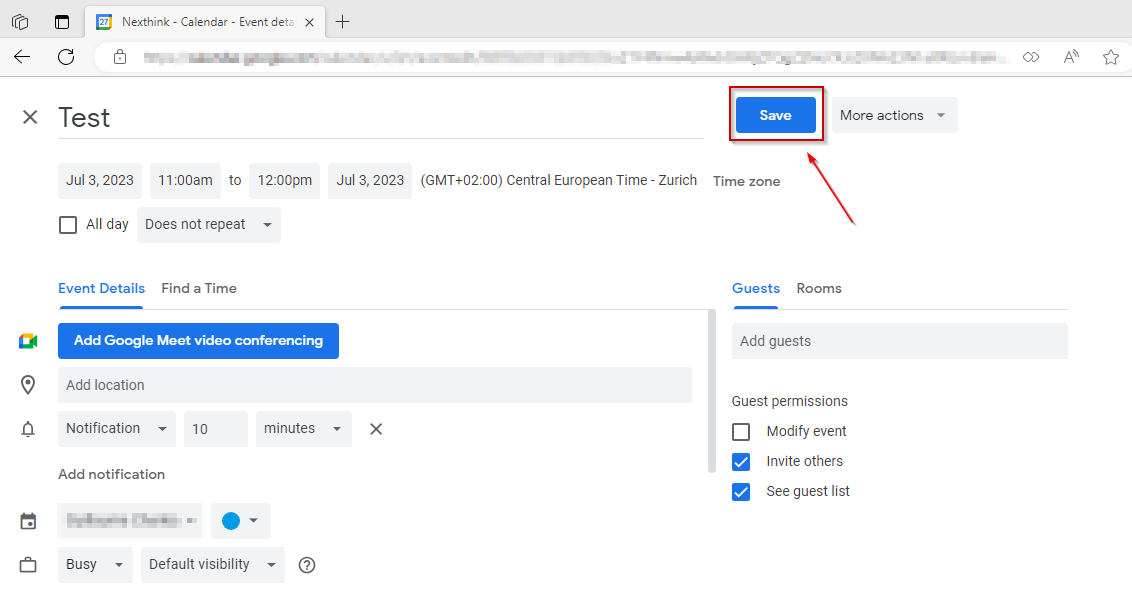
## “イベント保存(完全ダイアログ)”トランザクション
トランザクションの開始は“保存”ボタンクリックでトリガーされ、トランザクションの終了には自動オプションがあります。
---
# Agent Instructions
This documentation is published with GitBook. GitBook is the documentation platform designed so that both humans and AI agents can read, navigate, and reason over technical content effectively. Learn more at gitbook.com.
## Querying This Documentation
If you need additional information that is not directly available in this page, you can query the documentation by asking a question.
Perform an HTTP GET request on the following URL with the `ask` and `goal` query parameters:
```
GET https://docs.nexthink.com/platform/ja/library-packs/applications/library-applications-google-workspace.md?ask=&goal=
```
`ask` is the immediate question: it should be specific, self-contained, and written in natural language.
`goal` is what the user is ultimately trying to achieve, the reason they need the answer. Sharing it helps GitBook give you a better, more relevant answer. A goal is most helpful when it describes the outcome the user wants rather than restating the question. For example, with `ask=how do I create an API token`, a goal like `automate deployments from our CI pipeline` lets GitBook tailor the answer to that use case.
The response will contain a direct answer to the question and relevant excerpts and sources from the documentation.
Use this mechanism when the answer is not explicitly present in the current page, you need clarification or additional context, or you want to retrieve related documentation sections.