> For the complete documentation index, see [llms.txt](https://docs.nexthink.com/llms.txt). Markdown versions of documentation pages are available by appending `.md` to page URLs; this page is available as [Markdown](https://docs.nexthink.com/platform/ja/library-packs/security-and-compliance/cisco-anyconnect-timeout-and-status-management.md).
# Cisco Secure Client タイムアウトとステータス管理
## 概要
このLibrary packは、Cisco Secure Client VPNサービスのステータスとデバイスが接続しているserverのステータスを取得するリモートアクションを提供します。また、サービスが稼働している時間やVPNがタイムアウトするまでの残り時間を確認することもできます。
リモートアクションパラメータを使って、定義済みの最大タイムアウト時間を時間単位で設定できます。
さらに、残り時間の閾値を設定することができ、タイムアウト前に従業員に通知を送信したり、接続を再接続する必要がある場合に備えてリモートアクションキャンペーンを送信できます。
## 変更履歴
V1.0.0.0 - 初回リリース
## 設定
{% hint style="info" %}
このLibrary packには、特定のニーズに合わせてカスタマイズできるリモートアクションが含まれています。リモートアクションを正しく設定するためには、インストール後に各パラメータの説明を確認することをお勧めします。
{% endhint %}
## Pack構造
### リモートアクション
「Secure Clientタイムアウトチェック」リモートアクションは、VPNのタイムアウトまでの残り時間を監視することを可能にします。残り時間が特定の閾値を下回った場合、ユーザーに通知され、デバイスのログアウトまたは再起動による接続の更新オプションが提示されます。これは、VPN接続を管理し、予期せず切断されないようにするのに非常に役立ちます。リモートアクションはこれを自動的に行うため、手動で接続をチェックおよび更新する心配はありません。
{% hint style="info" %}
リモートアクションの詳細については、[Remote Actions の開始方法](/platform/ja/user-guide/remote-actions/setting-up-and-managing-remote-actions.md) のドキュメントページをご覧ください。
{% endhint %}
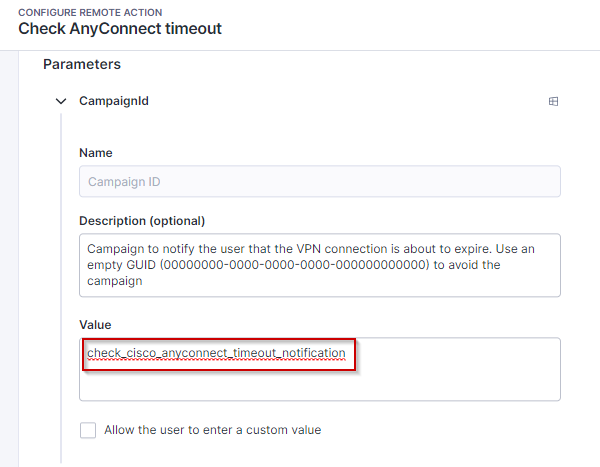
以下の画像は、「Secure Clientタイムアウトチェック」リモートアクションのデフォルト設定を示しており、キャンペーンUIDとタイムアウト閾値パラメータが管理されています。キャンペーンUIDは、VPNがタイムアウトするまでの残り時間が指定された閾値を下回ったときに起動されるキャンペーンを識別するために使用されます。タイムアウト閾値は、タイムアウトが迫ったときにユーザーに通知すべきタイミングを判断するために使用されます。
キャンペーンはリモートアクション用に構成されています
ユーザーに通知するタイミングとして 8 時間がしきい値に設定されています
### **Engage キャンペーン**
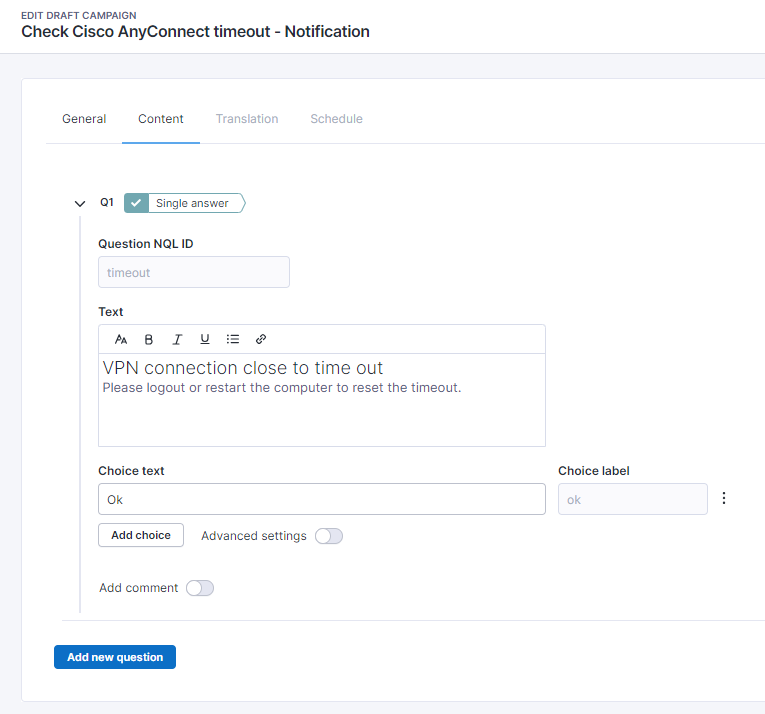
「Check Cisco Secure Client timeout - Notification」リモートアクションキャンペーンは、リモートアクション「Check Secure Client timeout」と連携して動作するように設計されています。これは、ユーザーに VPN 接続がまもなく期限切れとなり、デバイスのログアウトまたは再起動によって更新する必要があることを知らせます。
このキャンペーンは、組織の特定のニーズに合わせて調整できます。キャンペーンをカスタマイズすることで、ターゲットユーザーにより響くようにコンテンツやメッセージを調整できます。これにより、エンゲージメントを高め、望ましい成果を促進することができます。
{% hint style="info" %}
キャンペーンのカスタマイズ方法についての詳細は、[Getting started with Campaigns ](/platform/ja/user-guide/campaigns/working-with-campaigns.md)ドキュメントページをご覧ください。
{% endhint %}
以下のスクリーンショットは、パックに含まれるデフォルトのキャンペーンを示しています。
---
# Agent Instructions
This documentation is published with GitBook. GitBook is the documentation platform designed so that both humans and AI agents can read, navigate, and reason over technical content effectively. Learn more at gitbook.com.
## Querying This Documentation
If you need additional information that is not directly available in this page, you can query the documentation by asking a question.
Perform an HTTP GET request on the following URL with the `ask` and `goal` query parameters:
```
GET https://docs.nexthink.com/platform/ja/library-packs/security-and-compliance/cisco-anyconnect-timeout-and-status-management.md?ask=&goal=
```
`ask` is the immediate question: it should be specific, self-contained, and written in natural language.
`goal` is what the user is ultimately trying to achieve, the reason they need the answer. Sharing it helps GitBook give you a better, more relevant answer. A goal is most helpful when it describes the outcome the user wants rather than restating the question. For example, with `ask=how do I create an API token`, a goal like `automate deployments from our CI pipeline` lets GitBook tailor the answer to that use case.
The response will contain a direct answer to the question and relevant excerpts and sources from the documentation.
Use this mechanism when the answer is not explicitly present in the current page, you need clarification or additional context, or you want to retrieve related documentation sections.