> For the complete documentation index, see [llms.txt](https://docs.nexthink.com/platform/llms.txt). Markdown versions of documentation pages are available by appending `.md` to page URLs; this page is available as [Markdown](https://docs.nexthink.com/platform/ja/whats-new/whats-new-2024/whats-new-2024.6.md).
# 2024年6月の新着情報
**The version 2024.6 release date is July 8, 2024**. リリースノートは[拡張ドキュメント](https://edocs.nexthink.com/ja/nexthink-infinity/infinity-release-notes)ウェブサイトでご覧ください。
## Nexthink Adopt
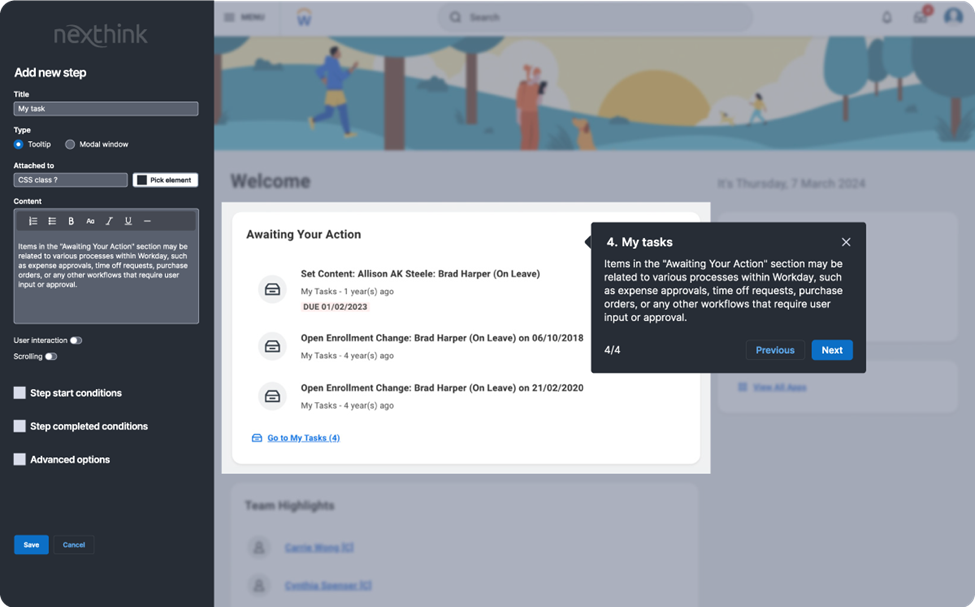
As of June 25, 2024, [Nexthink Adopt](https://nexthink.com/platform/adopt), a digital adoption solution, is now Generally Available as a product add-on. Nexthink Adoptは、エンタープライズアプリケーションの可能性を最大限に引き出し、アプリケーションの課題を解決します。これは、アプリ内ガイダンスと瞬間的なトレーニングを提供するブラウザベースのアプリケーション上にオーバーレイとして機能します。 Adoptは、従業員エンゲージメントキャンペーン、プロアクティブなアプリケーション監視と修復と組み合わせることで、エンドツーエンドのアプリケーション成功を達成します。
詳細については、[Adoptドキュメンテーション](https://docs-adopt.nexthink.com/)を参照してください。 [Adopt](https://nexthink.com/platform/adopt)は追加ライセンスが必要です。詳細はNexthink担当者にお問い合わせください。
## **デバイスビューのタイムラインでのアプリケーションのフリーズ**
アプリケーションの問題をより簡単にトラブルシュートするために、バイナリがフリーズしたイベントをデバイスビューのタイムライン上に表示できるようになりました。詳細については、[タイムライン](/platform/ja/user-guide/device-view/timeline.md)ドキュメンテーションを参照してください。
## **デバイスビューからワークフローをトリガー**
複数の手動アクションを行う時間と労力を節約するために、デバイスビューのアクションパネルから直接ワークフローをトリガーできます。詳細については、[Device View](/platform/ja/user-guide/device-view.md)ドキュメントを参照してください。
💡このトピックに対するあなたの関心に感謝します。[アイデアポータル](https://ideas.nexthink.com/ideas/CP-I-1300)でご覧になれます!
## ネットワークビューの時系列
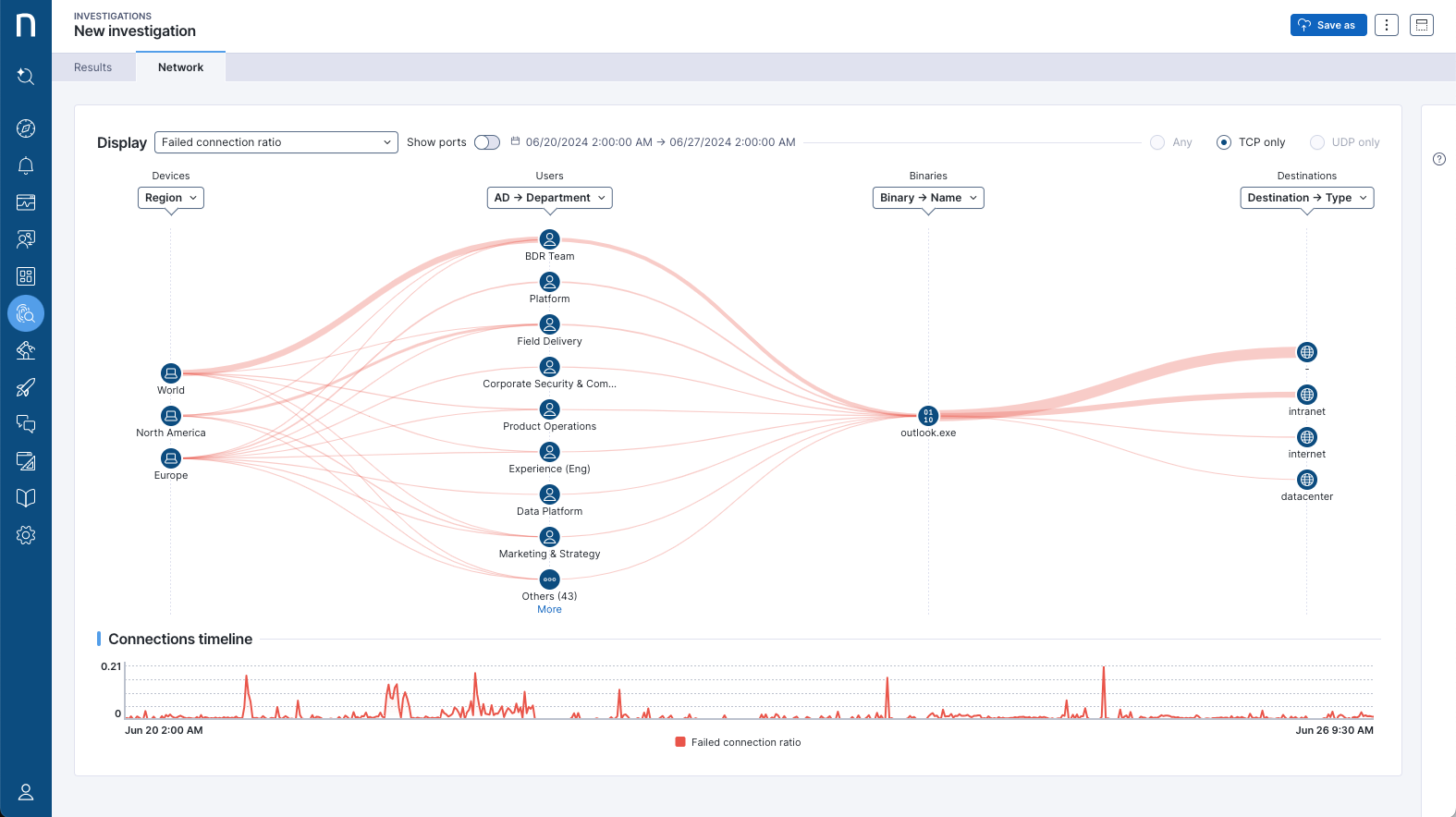
ネットワーク接続の問題がいつ始まったかをより迅速に理解し、接続のトラブルのピークを観察することで、影響を受けている人や考えられる原因を特定します。ネットワークビューには、選択したメトリックが時間と共にどのように変化するかを示す時系列チャートが表示されます。詳細については[ネットワークビュー](/platform/ja/user-guide/network-view.md)のドキュメントをご参照ください。
## **ダッシュボードの新しいタイムフレームオプション**
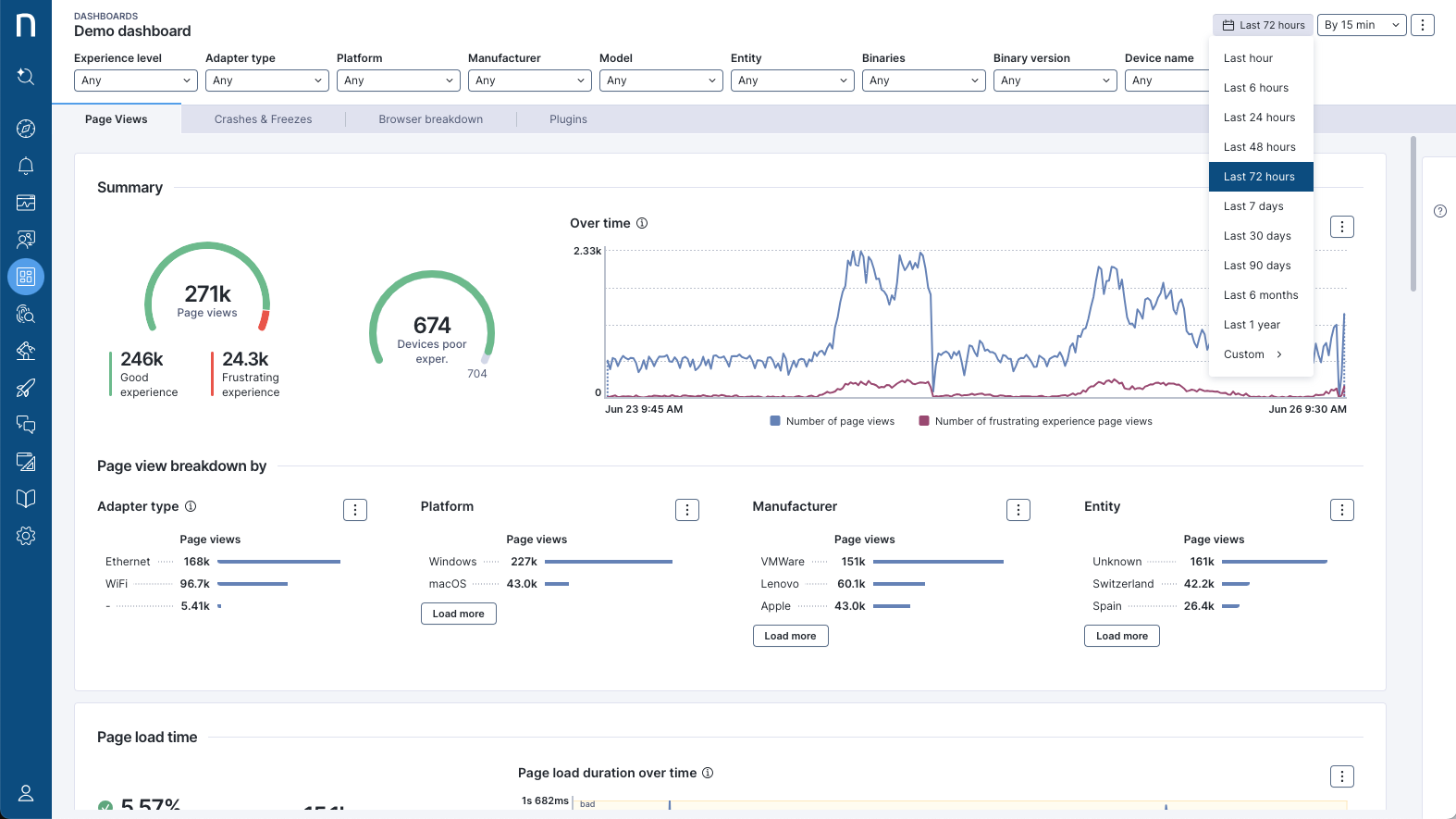
Resolve issues more quickly by honing in on relevant data with two new timeframes in the timeframe picker: last 48 hours, and last 72 hours. Both of these offer 15-minute and 1-hour granularity options. ダッシュボード編集者は、ダッシュボードのデフォルトの時間枠と粒度としてこれらの新しいオプションを選択できるようになりました。
詳細については、[タイムフレームピッカー](/platform/ja/user-guide/live-dashboards/widget-types/timeframe-picker.md)ドキュメンテーションを参照してください。
## **調査用の折れ線グラフ可視化**
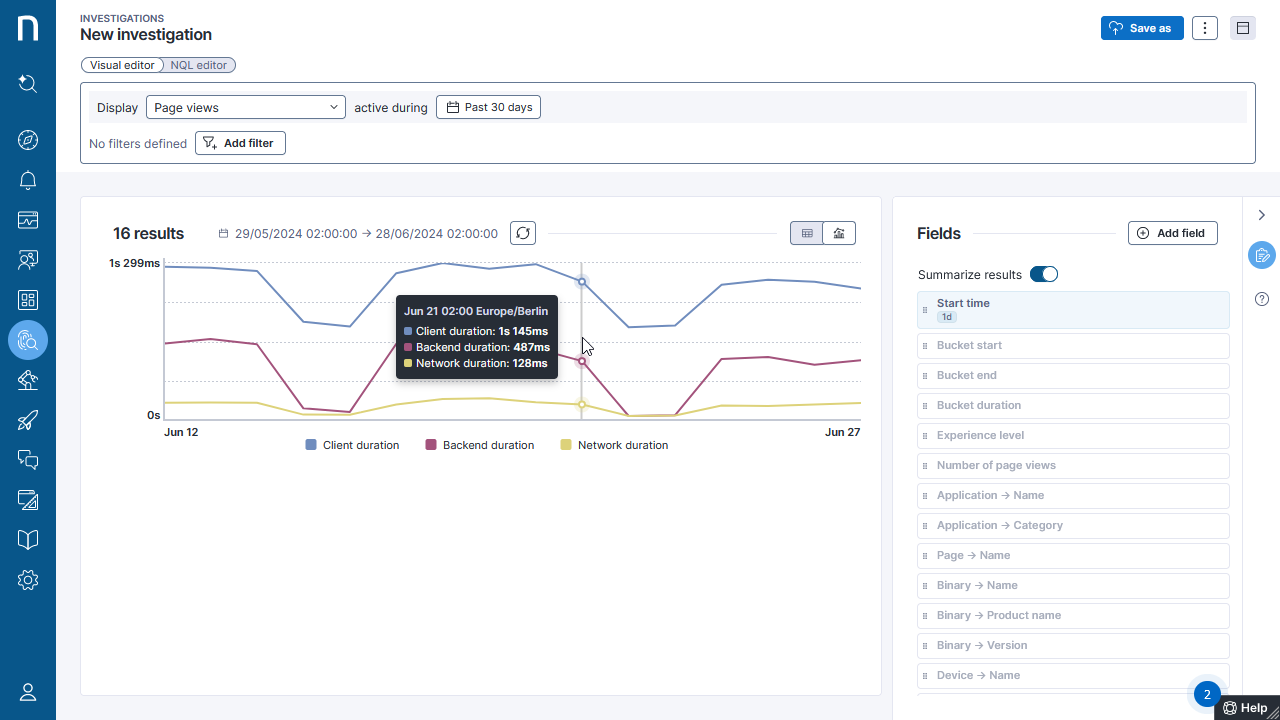
調査結果を視覚化し、互換性のあるクエリに対して利用可能な新しい折れ線グラフモードでトレンドをより迅速に確認します。詳細については、[ビジュアルエディター](/platform/ja/user-guide/investigations/creating-investigations/visual-editor.md)ドキュメンテーションを参照してください。
## **個別リモートアクションとキャンペーンのビジュアルエディターサポート**
個別のリモートアクションとキャンペーンを選択してクエリすることで、ビジュアルエディターでの調査がより簡単になります。それぞれのフィールドは、リストおよびフィルタリングのためのクエリに使用することができます。
詳細については、[ビジュアルエディター](/platform/ja/user-guide/investigations/creating-investigations/visual-editor.md)ドキュメンテーションを参照してください。
## **NQLクエリの出力フォーマッティング**
クエリの出力フォーマットにより柔軟性を持たせ、データの解釈を容易にします。新しいフォーマッティング関数\*\*as()\*\*を使用して計算されたメトリックにフォーマッティング情報を付与し、これがNexthink全体で一貫して表示されます。
Refer to the [NQL as()](/platform/ja/understanding-key-data-platform-concepts/nexthink-query-language-nql/nql-functions/nql-as.md) documentation for more information.
## チェックリスト内のカスタムフィールドのフォーマッティングされた値
チェックリスト内のNQLベースのカスタムフィールドのフォーマッティングで、メトリックをより理解しやすくします。詳細については、[チェックリスト管理](/platform/ja/user-guide/administration/content-management/checklists-management.md)を参照してください。
## **Remote action 10-minute frequency**
新しいより高頻度のオプションでデータを迅速にキャプチャし、問題を迅速に修正します。 These remote actions will be executed every 10 minutes to 45 minutes using a local scheduler. Centrally scheduled remote actions continue to support frequencies of 1 hour and above. 詳細については、[リモートアクションのスケジューリング](/platform/ja/user-guide/remote-actions/setting-up-and-managing-remote-actions/creating-remote-actions/scheduling-remote-actions.md)ドキュメンテーションを参照してください。
💡この機能は[顧客のアイデア](https://ideas.nexthink.com/ideas/CP-I-991)から生まれました。貴重なご意見をありがとうございます!
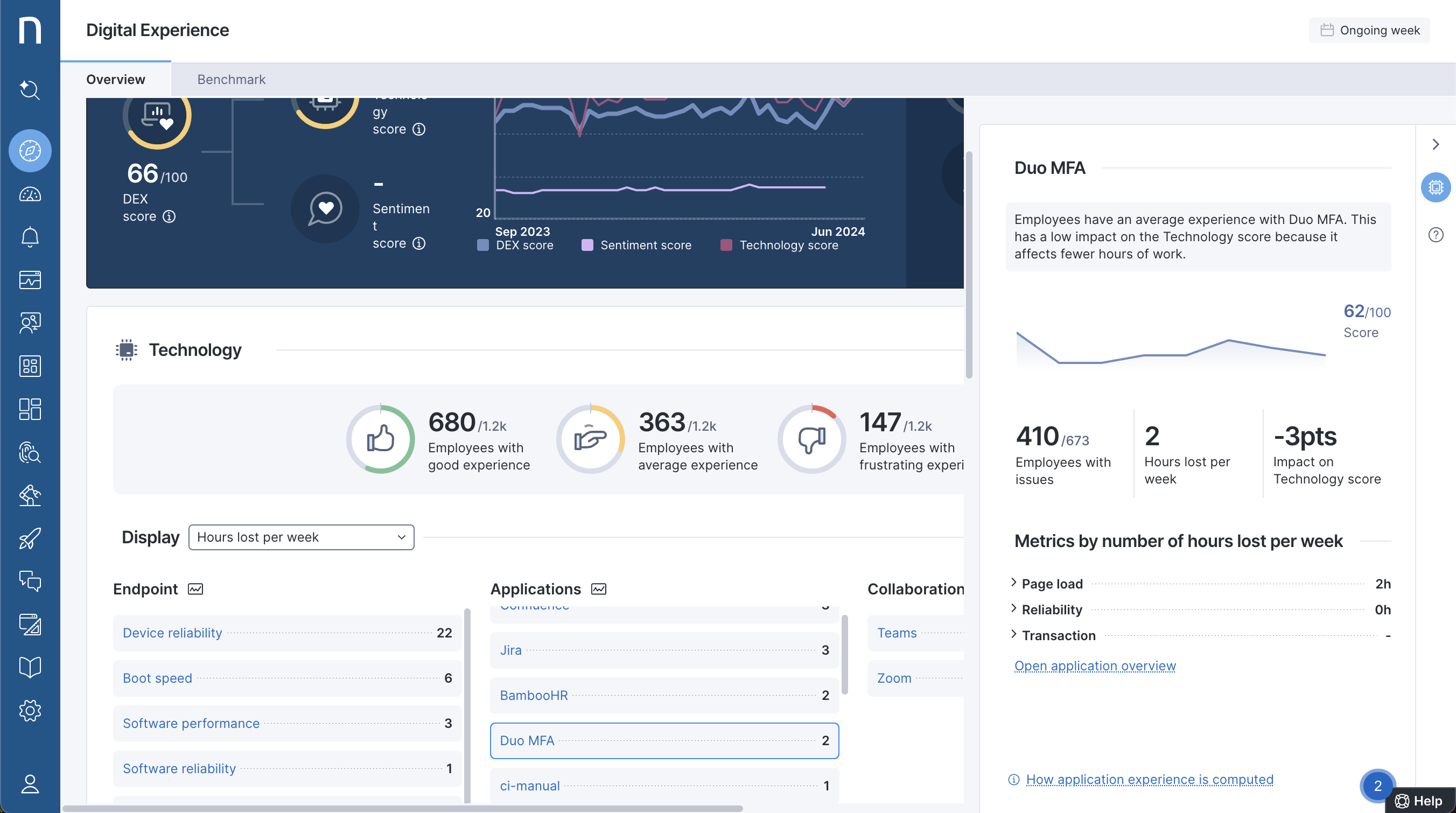
## **Experience Centralの強化**
製品内の自動説明を通して、DEXの状況についてより深い洞察を得ましょう。
あなたにとって最も重要な指標に基づいて、プロアクティブなDEXイニシアティブに優先順位を付けましょう。現在、Experience Centralダッシュボードでは、複合ノード(DEXスコアへの影響、失われた時間、問題のある従業員数)とリーフノードの間で同じ優先順位付け指標を確認できます。
詳細については、[Digital Experience](/platform/ja/user-guide/digital-experience.md)ドキュメントを参照してください。 [Experience Central](https://nexthink.com/platform/ja/experience-central)は追加ライセンスの対象です。詳細はNexthinkの担当者にお問い合わせください。
## **コラボレーション体験: 更新されたダッシュボード**
通話問題のトラブルシュートがより容易にできるよう、コラボレーションツールダッシュボードの改善が施されています。新たな品質指標を使い、通話の問題に影響されるユーザーとデバイスを特定するのがより簡単になりました。
このダッシュボードは、すべての地域での2024.6ロールアウトの完了後に利用可能になります。
詳細については、[コラボレーションツールの使用](/platform/ja/user-guide/collaboration-experience/getting-started-with-collaboration-experience/using-collaboration-tools.md)ドキュメントを参照してください。[コラボレーション体験](https://nexthink.com/platform/ja/collaboration-experience)は追加ライセンスの対象です。詳細はNexthinkの担当者にお問い合わせください。
## **コラボレーション体験: Teamsの通話タイプを識別**
コラボレーションセッションに新たに追加された**通話タイプ**フィールドを使用して、重要度の高いTeams通話の品質を特定し、調査してください。この機能は、ダッシュボード、コラボレーションツールダッシュボード、調査、ライブダッシュボード、およびアラートで通話ビューを表示します。
詳細については、[Device View を使用した通話品質の問題の確認](/platform/ja/user-guide/collaboration-experience/getting-started-with-collaboration-experience/using-device-view-for-call-quality-issues.md)ドキュメントを参照してください。[コラボレーション体験](https://nexthink.com/platform/ja/collaboration-experience)は追加ライセンスの対象です。詳細はNexthinkの担当者にお問い合わせください。
💡 [アイデアポータルのこのトピック](https://ideas.nexthink.com/ideas/CP-I-1321)に関心を示してくださりありがとうございます!
## **Webhooks: ストリーム通知の能力向上**
Webhookを使用して時間を指定したイベントをストリーミングし、Webhookペイロードにデバイス名とユーザー名との関連付けを含ませることで、自動化能力を拡張します。この機能により、ITSMツールでチケットを作成する際にデバイス名を含めることができ、Webhookペイロードにアラートからの新しいフィールド(トリガー参照値など)が導入されます。さらに、新しいバージョンのWebhooksにより、アラートのコンテキスト内でトリガーされたアプリケーションに基づいてMS Teams通知を送信できます。
詳細については、[Webhooks](/platform/ja/configuring_nexthink/bringing-data-into-your-nexthink-instance/integrating-nexthink-with-third-party-tools/outbound-connectors/webhooks.md)のドキュメントを参照してください。
💡 [アイデアポータルのこのトピック](https://ideas.nexthink.com/ideas/CP-I-1734)に関心を示してくださりありがとうございます!
## **制限付きビューを持つユーザーのためのより大きなアクセス**
より多くのNexthinkユーザーがInfinityの機能を利用できるようにするとともに、彼らが許可されているデータだけを見ることができるようにします。今後、制限付きビューを持つユーザーも、アプリケーション、アラート、診断、コラボレーションツールを表示でき、Infinityの強力なトラブルシューティング能力を活用できます。詳細については、[表示ドメイン](/platform/ja/user-guide/administration/account-management/roles/view-domain.md)のドキュメンテーションを参照してください。
💡この機能は[顧客のアイデア](https://ideas.nexthink.com/ideas/CP-I-580)から生まれました。貴重なご意見をありがとうございます!
## **組織階層の再定義**
組織の進化に応じて、組織の階層を調整し、既存の階層を完全に再定義したり削除したりすることが可能です。詳細については、[Product configuration](/platform/ja/user-guide/administration/system-configuration/data-management/environment/product-configuration.md)ドキュメントを参照してください。
💡 [アイデアポータルのこのトピック](https://ideas.nexthink.com/ideas/CP-I-1808)に関心を示してくださりありがとうございます!
## **新しいウェブアプリケーションダッシュボード**
新しいNQLベースのウェブアプリケーションダッシュボードを使用して、ウェブアプリケーションの問題をより迅速に解決します。新しいダッシュボードには、注目が必要な主要な問題を強調表示する新しい概要ダッシュボードが含まれています。新しいダッシュボードは、すべてのWebアプリケーションで表示される「新しいエクスペリエンスに切り替え」ボタンをクリックすることで切り替えることができます。
詳細については、[ウェブアプリケーションのモニタリング - 新しいエクスペリエンス](/platform/ja/user-guide/applications/monitoring-applications/monitoring-web-applications.md)のドキュメントを参照してください。
🔎 この機能は技術プレビューです。最終リリース前に変更される可能性があります。
## **実行可能ファイルの自動カテゴリ分け**
GenAIによる新たな自動カテゴリ分けにより、従業員がどの種類のアプリケーションを使用しているかを理解し、トラブルシューティング時により深いコンテキストを得ることができます。
🔎 この機能は技術プレビューです。最終リリース前に変更される可能性があります。
## **16進形式でのバイナリハッシュ**
Infinityのバイナリハッシュを外部システムに表示されているハッシュと比較します:ハッシュは現在、base64の代わりに16進数形式で表現されています(Experience/Finderでの以前の形式)。
## **アクセシビリティ: スクリーンリーダーサポートの改善**
Nexthinkアプリケーション全体でのスクリーンリーダーサポート向上のため、Ariaラベルの変更により組織全体での一貫性を確保します。
## **キャンペーンのための質問分岐の改善**
質問を減らすことでキャンペーンの回答率を高め、特に調査/XLAキャンペーンに効果的です。
複数回答の質問(選択した値に関係なく次の質問を選択)とNPS質問(従業員がプロモーター、中立、または批判者であるかに応じて次の質問を選択)のための新しい分岐オプションが利用可能です。
詳細については、[質問の流れを制御する](broken://pages/1cYy5LXa2KfwaRnPwTM0)ドキュメントを参照してください。
💡 [アイデアポータルのこのトピック](https://ideas.nexthink.com/ideas/CP-I-1606)に関心を示してくださりありがとうございます!
## **ライブラリ: 新しいコンテンツが利用可能**
製品内のNexthink Libraryを訪れて、次の新しいコンテンツをご覧ください:
* **Chrome更新の準拠ワークフロー:** Chromeが更新されたが再起動されていない場合に、それを特定して通常の解決策を自動化して、望ましい状態に準拠するようにしましょう。
* **Intune用のプリビルトワークフローコネクタ:** Intuneとの統合を簡素化し、Intuneステータス情報をワークフローで取得するためのプリビルトコネクタThinkletを取得します。
* **オンプレミスAzure ADのライセンス回収ワークフロー:** 使用されていないライセンスの検出と削除を自動化し、新しいワークフローによって不要なコストを削減します。
* **Jiraアプリケーションのエクスペリエンスを監視:** Jiraの問題をより簡単に検出し、解決するためのプリビルトアプリケーションを使用してJiraユーザーエクスペリエンスと安定性を監視します。
* **Intuneランドスケープの管理を強化:** ダッシュボードの更新により、移行とリモートアクション結果の出力を監視するためのトレンドデータを含め、Intuneの健康可視性を向上させます。
* **HP保証情報の取得:** 現在、HPデバイスをサポートするリモートアクションを使用してHP保証情報を確認します。
* **起動とログイン診断の強化:** Experience Centralからもアクセス可能な起動とログインダッシュボードの推奨アクションにより、トラブルシューティングを加速します。
* **モニターの精度向上:** バイナリおよびグローバルインサイトモニターの精度とアラートの優先度を向上させます。
* **フロー構築用キットライブラリパック:** 役に立つ構成要素を搭載した新しいライブラリパックで、フローワークフローをより簡単に構築します。
詳細については、[Nexthink Library](/platform/ja/user-guide/nexthink-library.md) ドキュメントを参照してください。
このコンテンツは、すべての地域で2024.6ロールアウトの完了後に利用可能になります。
上記のワークフローおよびアプリケーションコンテンツは追加ライセンスの対象です。詳細はNexthinkの担当者にお問い合わせください。
## **改善されたドキュメンテーションプラットフォーム**
新しいNexthinkユーザーをオンボードし、新しいNexthink製品と機能を最大限に活用する方法を、より魅力的で最新のドキュメンテーションエクスペリエンスで学んでください。
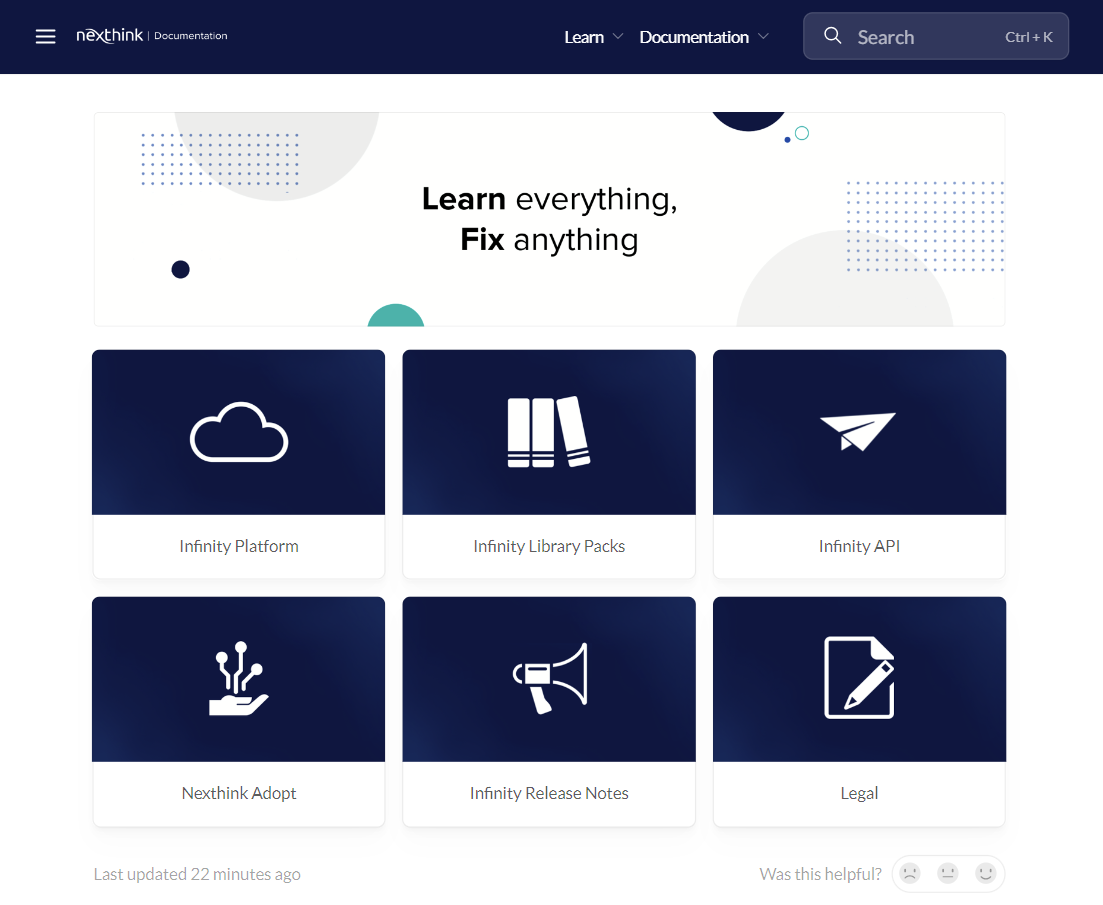
Nexthinkドキュメンテーション- [docs.nexthink.com](http://docs.nexthink.com/) および [edocs.nexthink.com](http://edocs.nexthink.com/) は、いくつかの改善点を備えた新しいプラットフォームに移行されました: 統一されたドキュメンテーションポータルヘッダは、Learnポータルとの調和のとれたナビゲーションを提供し、各ページの最終更新日を表示することができ、ページが役に立つと感じた場合は評価を残すことができます。
---
# Agent Instructions
This documentation is published with GitBook. GitBook is the documentation platform designed so that both humans and AI agents can read, navigate, and reason over technical content effectively. Learn more at gitbook.com.
## Querying This Documentation
If you need additional information that is not directly available in this page, you can query the documentation dynamically by asking a question.
Perform an HTTP GET request on the current page URL with the `ask` query parameter, and the optional `goal` query parameter:
```
GET https://docs.nexthink.com/platform/ja/whats-new/whats-new-2024/whats-new-2024.6.md?ask=&goal=
```
`ask` is the immediate question: it should be specific, self-contained, and written in natural language.
`goal` is optional and describes the broader end goal you are ultimately trying to accomplish on behalf of the user. GitBook uses it to tailor the answer towards what is most useful for that goal.
The response will contain a direct answer to the question and relevant excerpts and sources from the documentation.
Use this mechanism when the answer is not explicitly present in the current page, you need clarification or additional context, or you want to retrieve related documentation sections.