> For the complete documentation index, see [llms.txt](https://docs.nexthink.com/llms.txt). Markdown versions of documentation pages are available by appending `.md` to page URLs; this page is available as [Markdown](https://docs.nexthink.com/platform/ja/library-packs/applications/workday-experience/usage-guide_-workday-experience.md).
# 利用ガイド:実務経験
## はじめに
*Workdayエクスペリエンス* ライブラリパックは、Workday HCMを通じて社員のエクスペリエンスを監視および管理することを可能にします。このページでは、コンテンツの構造とその利用方法について説明します。
これはあくまでガイドであり、可能なインサイトやアクションの一部を示したに過ぎないことをご承知おきください。多くの利用事例や特定のトラブルシューティングシナリオが、あなたの環境において明らかになることがあります。
設定ガイドに記載された手順に従って、ライブラリパックが正しく設定されていることを確認してください。
[設定ガイド: Workdayエクスペリエンス](/platform/ja/library-packs/applications/workday-experience/configuration-guide_-workday-experience.md)
### Webアプリケーションエクスペリエンスの可視性
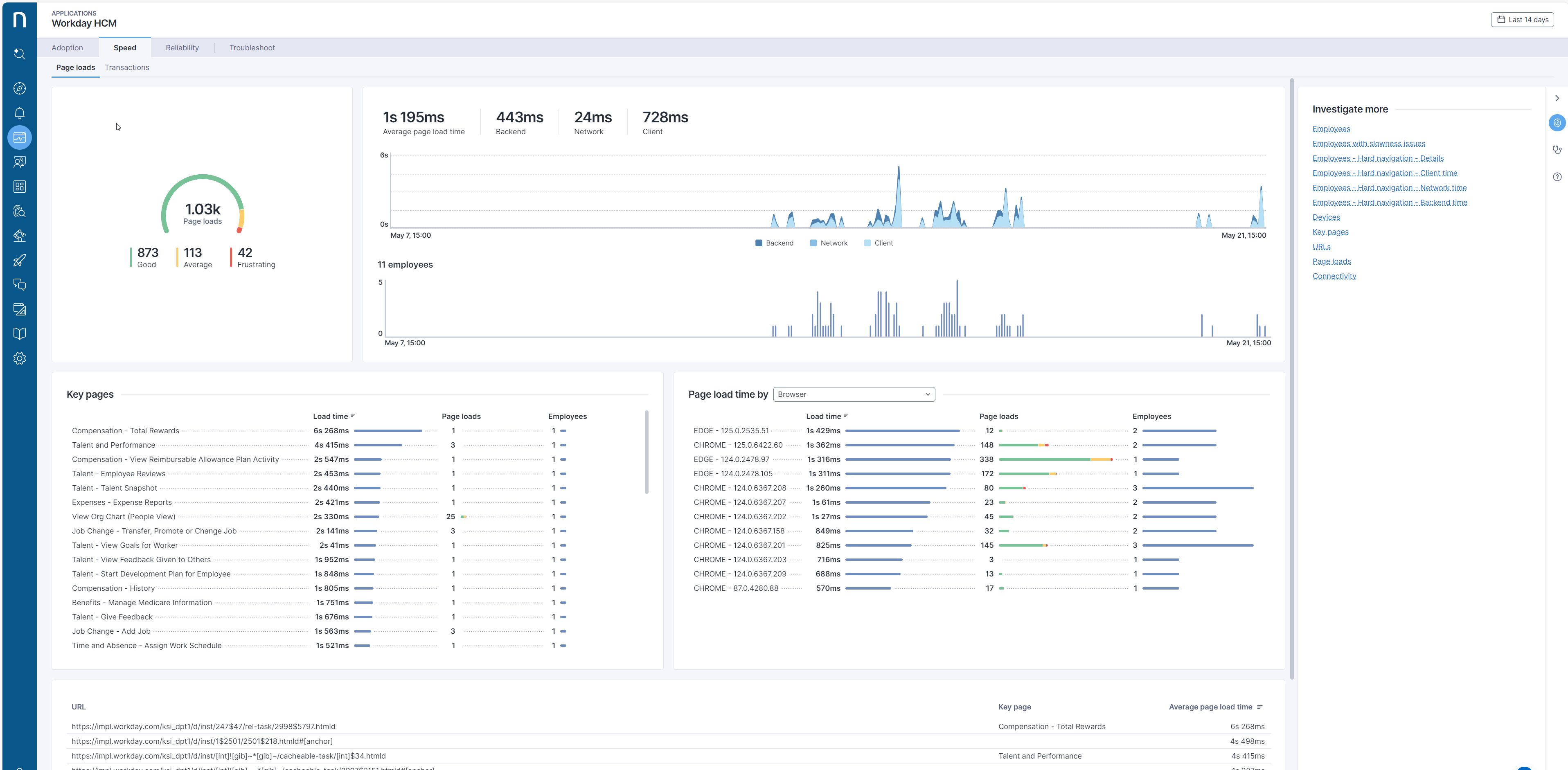
"Workday HCM"アプリケーションは、このライブラリパックの主要コンテンツとして機能します。これにより、[Nexthink Applications](https://nexthink.gitbook.io/opd/user-guide/applications)を通じて、社員のWorkdayエクスペリエンスに関する貴重なインサイトに直接アクセスできます。
Workday HCMアプリケーションを使用したアプリケーションダッシュボードインサイトの例
Webアプリケーションの導入状況、速度、信頼性を監視し、検出された問題をトラブルシューティングするためのアプリケーションダッシュボードの操作方法については、[Webアプリケーションモニタリングドキュメントページ](https://nexthink.gitbook.io/opd/user-guide/applications/monitoring-applications/monitoring-web-applications)をご覧ください。
***
関連トピック
* [Applications](https://nexthink.gitbook.io/opd/user-guide/applications)
---
# Agent Instructions
This documentation is published with GitBook. GitBook is the documentation platform designed so that both humans and AI agents can read, navigate, and reason over technical content effectively. Learn more at gitbook.com.
## Querying This Documentation
If you need additional information that is not directly available in this page, you can query the documentation by asking a question.
Perform an HTTP GET request on the following URL with the `ask` and `goal` query parameters:
```
GET https://docs.nexthink.com/platform/ja/library-packs/applications/workday-experience/usage-guide_-workday-experience.md?ask=&goal=
```
`ask` is the immediate question: it should be specific, self-contained, and written in natural language.
`goal` is what the user is ultimately trying to achieve, the reason they need the answer. Sharing it helps GitBook give you a better, more relevant answer. A goal is most helpful when it describes the outcome the user wants rather than restating the question. For example, with `ask=how do I create an API token`, a goal like `automate deployments from our CI pipeline` lets GitBook tailor the answer to that use case.
The response will contain a direct answer to the question and relevant excerpts and sources from the documentation.
Use this mechanism when the answer is not explicitly present in the current page, you need clarification or additional context, or you want to retrieve related documentation sections.