> For the complete documentation index, see [llms.txt](https://docs.nexthink.com/platform/llms.txt). Markdown versions of documentation pages are available by appending `.md` to page URLs; this page is available as [Markdown](https://docs.nexthink.com/platform/ja/user-guide/collaboration-experience.md).
# コラボレーションツール
コラボレーションツールは、組織内のすべての Microsoft Teams および Zoom 通話の音声と映像の品質を即座に把握できるようにします。
{% hint style="info" %}
お使いのライセンスモデルによっては、この機能には追加のライセンスが必要な場合があります。詳細については、Nexthink代表者にお問い合わせください。
{% endhint %}
## コラボレーションツールの概要
コラボレーションツールにより、サービスオーナーはアラート、ダッシュボード、コラボレーションメトリクスを使用して、組織全体の通話品質の問題をプロアクティブに検知し、調査できます。サポートチームは、個々のデバイスやコラボレーションセッションを深掘りして根本原因を特定し、従業員 Experience に影響を与える問題を効率的にトラブルシュートできます。
***
## 主な利点とユースケース
### 問題を早期に検知し、解決を加速
コラボレーションツールにより、IT チームは Microsoft Teams と Zoom のセッションデータを、デバイスパフォーマンス、接続性、ユーザー Experience メトリクス、構成変更、改善アクションと相関させることで、通話品質の問題をプロアクティブに特定し、解決までの時間を短縮できます。コラボレーション Experience に影響する要因をエンドツーエンドで可視化することで、チームは根本原因を迅速に特定し、是正措置を講じることができます。
### 組織全体のコラボレーションインサイトに基づく意思決定
個別のトラブルシューティングを超えて、コラボレーションツールはサービスオーナーが場所、部門、デバイス、コラボレーションプラットフォーム全体のパターンを把握するのに役立ちます。組織全体のインサイトを活用して、インフラ投資の優先順位付け、ハードウェアの標準化、デジタル従業員 Experience に影響する再発問題へのプロアクティブな対応を行います。
### 信頼性の高い Microsoft Teams Rooms Experience を維持
会議室の問題は、社員がオフィスに戻りつつある状況では、コラボレーションを妨げ、重要な議論を遅らせる可能性があります。 Collaboration Tools は、IT チームが Microsoft Teams Rooms を監視し、室内デバイス、周辺機器、接続性、アプリケーションに関連する問題を特定し、会議の品質と生産性に影響する問題を迅速にトラブルシュートできるよう支援します。
***
## Collaboration Tools を使い始める
**Collaboration Tools** のダッシュボードと補完的な機能を使用して、組織、デバイス、通話レベルで問題を検出および調査できます。
### Teams と Zoom にわたる通話品質問題を調査する
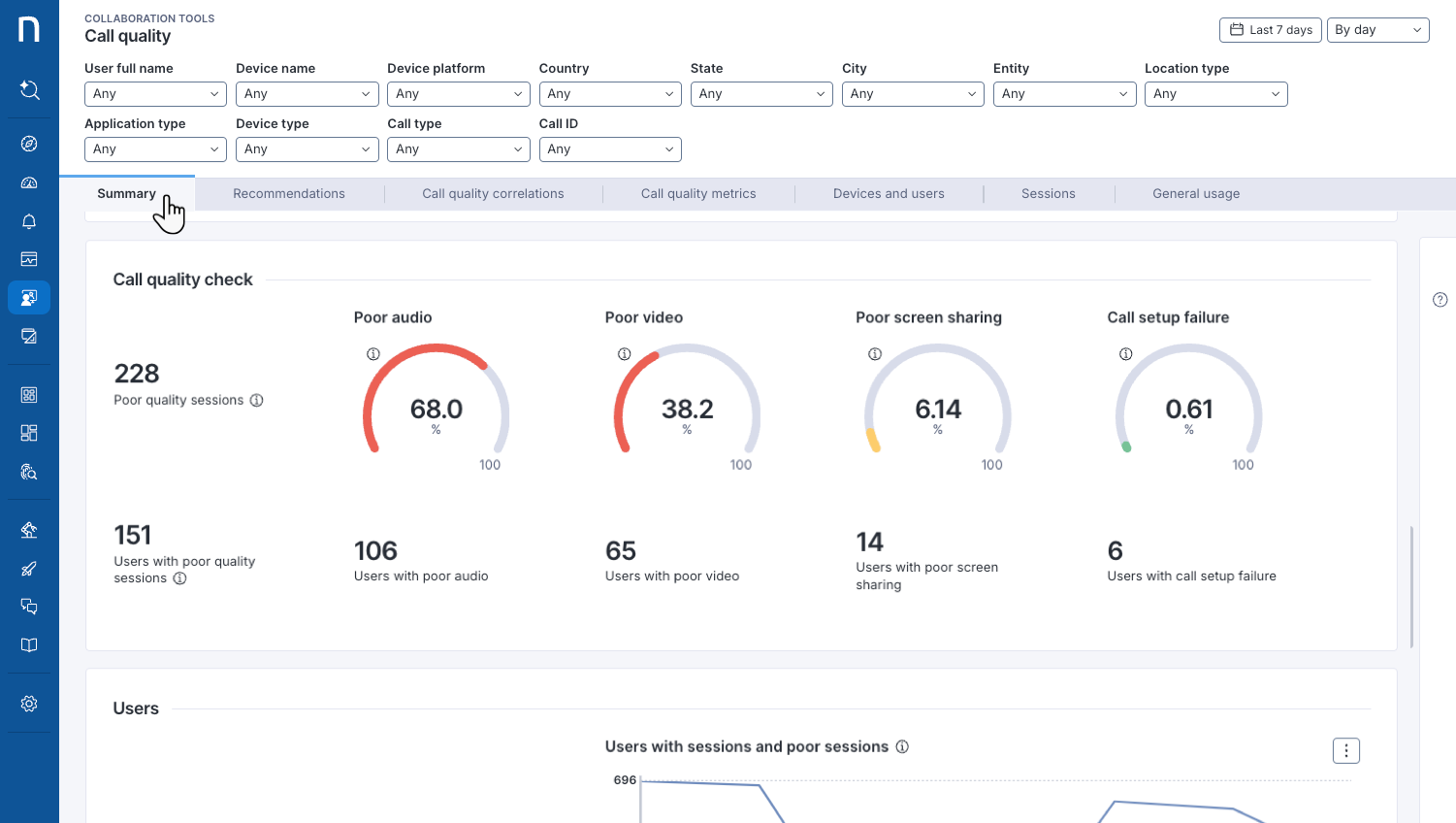
Microsoft Teams と Zoom の音声およびビデオ通話に関する問題を監視、調査、解決します。パフォーマンスの傾向を分析し、技術的な根本原因を特定し、影響を受けるユーザーやデバイスを把握して、トラブルシューティングを迅速化し、コラボレーション体験を向上させます。
詳細については、[通話品質の監視](/platform/ja/user-guide/collaboration-experience/getting-started-with-collaboration-experience/using-collaboration-tools.md) を参照してください。
### Microsoft Teams Rooms の通話に影響する問題を特定する
アプリケーション、デバイス、接続性、および関連コンポーネントに関連する問題を含む、Microsoft Teams Rooms の通話に影響する問題を特定、調査、解決します。集中管理されたダッシュボードを使用して関連データを相関させ、根本原因を迅速に特定し、最小限の構成作業で Teams Rooms の環境を効率的にトラブルシュートできます。
詳細については、[MS Teams Rooms の問題のトラブルシューティング](/platform/ja/user-guide/collaboration-experience/getting-started-with-collaboration-experience/ms-teams-rooms.md)を参照してください。
### 個々のコラボレーション問題を調査する
個々の従業員のコラボレーション Experience に影響する要因を分析します。
* **Device View** を使用して、デバイスのアクティビティ、リソース消費、接続性、およびアプリケーション使用状況を通話品質指標と関連付けます。詳細については、[Device View でデバイスメトリクスと通話品質を相関させる](/platform/ja/user-guide/collaboration-experience/getting-started-with-collaboration-experience/using-device-view-for-call-quality-issues.md) を参照してください。
* **Call View** を使用して、個々のコラボレーションセッションを分析し、各参加者が経験した通話品質を評価します。詳細については、[Call View を使用した個々のセッション品質の分析](/platform/ja/user-guide/collaboration-experience/getting-started-with-collaboration-experience/using-the-call-view-dashboard.md) を参照してください。
### Connectors と Nexthink Library コンテンツを使用して Collaboration Tools を構成する
MS Teams および Zoom Connectors を構成し、データ収集、監視、ストレージをサポートするダッシュボード、Remote actions、モニターなどの関連する Library コンテンツをインストールすることで、Collaboration Tools を最大限に活用できます。
詳細については、[コラボレーションツールの構成](/platform/ja/user-guide/collaboration-experience/configuring-collaboration-experience.md) を参照してください。
### Collaboration Tools FAQ を読む
Collaboration Tools に関する一般的な質問の回答は、[コラボレーション体験FAQ](/platform/ja/user-guide/collaboration-experience/collaboration-experience-faq.md) ページで確認できます。
---
# Agent Instructions
This documentation is published with GitBook. GitBook is the documentation platform designed so that both humans and AI agents can read, navigate, and reason over technical content effectively. Learn more at gitbook.com.
## Querying This Documentation
If you need additional information that is not directly available in this page, you can query the documentation dynamically by asking a question.
Perform an HTTP GET request on the current page URL with the `ask` query parameter, and the optional `goal` query parameter:
```
GET https://docs.nexthink.com/platform/ja/user-guide/collaboration-experience.md?ask=&goal=
```
`ask` is the immediate question: it should be specific, self-contained, and written in natural language.
`goal` is optional and describes the broader end goal you are ultimately trying to accomplish on behalf of the user. GitBook uses it to tailor the answer towards what is most useful for that goal.
The response will contain a direct answer to the question and relevant excerpts and sources from the documentation.
Use this mechanism when the answer is not explicitly present in the current page, you need clarification or additional context, or you want to retrieve related documentation sections.
.png?alt=media)