> For the complete documentation index, see [llms.txt](https://docs.nexthink.com/platform/llms.txt). Markdown versions of documentation pages are available by appending `.md` to page URLs; this page is available as [Markdown](https://docs.nexthink.com/platform/ja/user-guide/campaigns/campaigns-in-finder-classic/measuring-the-satisfaction-of-employees-with-finder-classic.md).
# Finder(クラシック)による従業員の満足度の測定
{% hint style="info" %}
Nexthink Finder は、Windows 専用のデスクトップアプリケーションであり、現在では Nexthink web インターフェース内でその機能が利用可能です。 Nexthink は、ブラウザから直接使用することができ、ほとんどの機能は追加のデスクトップアプリケーションを必要としません。
{% endhint %}
Nexthink Engage は、従業員の IT 環境への満足度を定期的に推定するために、Campaigns(キャンペーン)の特定のタイプと従業員の回答を集約する特定の手法を組み合わせた強力な技術である継続満足度測定(CSM)を提供します。
継続満足度測定は、さまざまなトピックに関して従業員がどのように感じているか、そしてその感情が時間の経過とともにどのように変化するかを知ることができ、仕事の中断を最小限に抑えることができます。
## 継続満足度測定の適合性
長期的に従業員に影響を与える事柄について質問するには、継続満足度測定が適しています。例えば:
* 提供されたデジタル機器に対する全体的な印象。
* サポートの質に対する認識。
* 長期的な IT イニシアチブに対する意見。
CSM のために設計された Campaigns(キャンペーン)は、緊急の出来事や、すべての関係者に一斉に告知する必要のある定期的な問題には適していません。例えば:
* サービス停止についてすべてのユーザーに緊急に通知する。
* アプリケーションのクラッシュに対応すること。
## 動作原則
可能な限りの中断を最小限に抑えて従業員の満足度を評価するために、継続満足度測定は、公開後少数の対象従業員に毎日ランダムに通知を送る campaign を使用します。数日間の回答収集後(観察ウィンドウ)、キャンペーンに既に参加した従業員の意見は、グループ全体の意見を統計的に±特定の範囲(信頼区間)プラスあるいはマイナスの許容範囲で反映し、一定の信頼度(信頼指数)を持っています。
例えば、1から10の選択肢がある意見尺度質問を含むCSMキャンペーンが合計2,000人の従業員を対象に開始されたと仮定します。 150件の回答を収集した後、従業員の平均意見が7.5であると仮定します。 CSMの統計計算は、その後、2000人の従業員全体の意見が
* **7.5 ± 0.5(信頼区間)で93%の確率(信頼指数)があると示しています**
300件の回答で、CSMは信頼指数を99%に引き上げ、同じ信頼区間を維持します。
### 信頼指数と従業員の質問のバランス
したがって、高い信頼指数を達成することと、より多くの従業員に質問することの間には妥協があります。従業員の負担を制限するために、CSM Campaignsは同じ従業員に時間間隔(静粛期間)の内に複数回質問することを避けます。静粛期間を尊重するために、CSM campaignは、標的従業員の総数を静粛期間の日数で割った数を超えるメンバー数のグループに毎日通知を送信することはできません。
キャンペーンは、次の経験的な式を使用して、1日あたりの通知された従業員の実際の数を計算します。
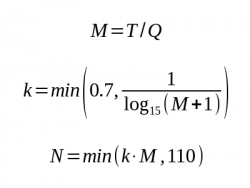 ここで、
* \_M\_は、静粛期間中に毎日標的にできる最大の従業員数です
* \_T\_は全体集団(調査の対象となる従業員数)です。
* \_Q\_は静粛期間(日数)です。
* \_k\_は経験的に決定された係数です。
* \_N\_は、最終的に1日あたりに標的とするユーザーの数(1日あたり最大110人まで制限)です。
ただし、通知を受けたすべての従業員がcampaignに回答するわけではありません。実際にcampaignに回答した1日あたりの従業員の数が、特定の回答数を得るために必要な観察ウィンドウを決定します。次の手順で説明されているように、Nexthinkメトリックの定義で、従業員の回答を集計するための観察ウィンドウを設定します。 CSMにおける観察ウィンドウは移動するウィンドウであることに注意してください。私たちは従業員の意見が時間とともにどのように変化するかに興味を持っています。
### パラメータ調整
CSM campaignの静粛期間と、それに関連するメトリックの観察ウィンドウを調整することで、従業員への影響と満足度報告の信頼度に関する望ましい結果を達成します。以下の表では、異なる観察ウィンドウに対する信頼指数を静粛期間ごとに取得します。表は、信頼区間±0.5、キャンペーンの選択肢のための1から10の間での均等分布、および50%の回答率([実際にはさらに高くなることがあります](https://www.nexthink.com/blog/response-rate-employee-surveys/))を仮定しています。完全な表のセットについては、このコミュニティの記事から参照される完全なCSM方法論文書を参照してください。
### 静粛期間は1ヶ月です
| 対象従業員 | 1日あたりの通知された従業員 | ウィンドウ7日 | ウィンドウ7日 | ウィンドウ14日 | ウィンドウ14日 |
| ----- | -------------- | --------- | -------- | --------- | -------- |
| | | **必要な回答** | **信頼指数** | **必要な回答** | **信頼指数** |
| 200 | 5 | 16 | 50% | 32 | 66% |
| 2000 | 43 | 149 | 93% | 299 | 99% |
| 20000 | 110 | 385 | 100% | 770 | 100% |
### 静粛期間は2ヶ月です
| 対象従業員 | 1日あたりの通知された従業員 | ウィンドウ7日 | ウィンドウ7日 | ウィンドウ14日 | ウィンドウ14日 |
| ----- | -------------- | --------- | -------- | --------- | -------- |
| | | **必要な回答** | **信頼指数** | **必要な回答** | **信頼指数** |
| 200 | 2 | 8 | 40% | 16 | 50% |
| 2000 | 23 | 81 | 81% | 163 | 94% |
| 20000 | 110 | 385 | 99% | 770 | 100% |
### 静粛期間は6ヶ月です
| 対象従業員 | 1日あたりの通知された従業員 | ウィンドウ7日 | ウィンドウ7日 | ウィンドウ14日 | ウィンドウ14日 |
| ----- | -------------- | --------- | -------- | --------- | -------- |
| | | **必要な回答** | **信頼指数** | **必要な回答** | **信頼指数** |
| 200 | 1 | 3 | 32% | 7 | 38% |
| 2000 | 8 | 27 | 58% | 54 | 73% |
| 20000 | 64 | 223 | 97% | 446 | 100% |
## CSMを設定する手順
特定の主題について従業員満足度の継続的な測定を設定するには、次のステップに従ってください。
* 関心のある主題についてのCSM用の特別なタイプのcampaignを作成します。
* 関連するメトリックを2つ作成してください。
1. 観察ウィンドウに沿ってcampaignの結果を集計するためのメトリック。
2. 観察ウィンドウ内の実際の回答数をカウントするメトリック。
* 結果を分析するために、関連するwidgetをPortalのdashboardに追加します。
### 継続的な満足度測定のためのキャンペーンの設計
継続的な満足度測定に適するためにキャンペーンは次の条件を満たす必要があります。
* 従業員のグループを調査する。
より良い結果を得るためには、ターゲットとなる従業員グループは、キャンペーンの全期間にわたって比較的安定しているべきです(例:部門に属する従業員、ラップトップを所有する従業員など)。
* 毎日異なるサブセットの従業員を対象にします。
この設定は、一度限りのキャンペーンおよび繰り返しのキャンペーンとの違いを示します。
* 適切な静粛期間を定義します。
従業員への負担を最小限に抑えつつ信頼度を最大化するために、静粛期間の表を確認します。
* 一つ以上の意見尺度質問を含めます。
[Campaignを作成する](/platform/ja/user-guide/campaigns/campaigns-in-finder-classic/creating-a-campaign-with-finder-classic.md)際に、上記のオプションを設定します。
### CSM campaignの結果分析
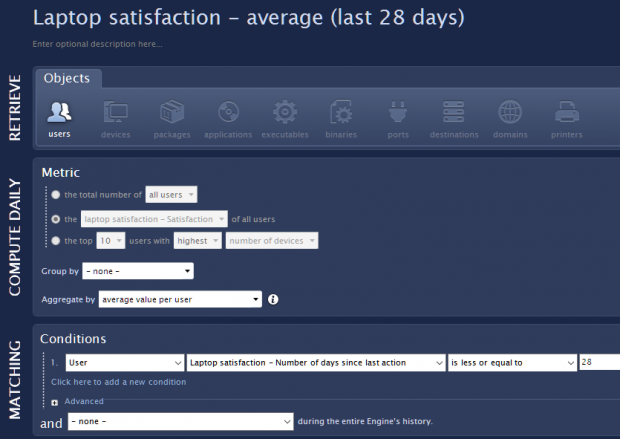
CSMキャンペーンから結果を収集するには、従業員の意見を集計する数量メトリックを作成します(その数値)。
1. [メトリックを作成](/platform/ja/user-guide/using-finder-classic/monitoring-it-custom-metrics-with-finder-classic/creating-a-metric-with-finder-classic.md)
ユーザーに。
2. 「日次計算」セクションで、キャンペーンの意見尺度質問を計算し、「ユーザーごとに平均値で集計」を選択します。
3. "MATCHING" セクションで、「ユーザー | <キャンペーン> - 最後のアクションからの日数 | <= | 区間日数(W)」と条件として観察ウィンドウを設定します。
ここで、
* \_M\_は、静粛期間中に毎日標的にできる最大の従業員数です
* \_T\_は全体集団(調査の対象となる従業員数)です。
* \_Q\_は静粛期間(日数)です。
* \_k\_は経験的に決定された係数です。
* \_N\_は、最終的に1日あたりに標的とするユーザーの数(1日あたり最大110人まで制限)です。
ただし、通知を受けたすべての従業員がcampaignに回答するわけではありません。実際にcampaignに回答した1日あたりの従業員の数が、特定の回答数を得るために必要な観察ウィンドウを決定します。次の手順で説明されているように、Nexthinkメトリックの定義で、従業員の回答を集計するための観察ウィンドウを設定します。 CSMにおける観察ウィンドウは移動するウィンドウであることに注意してください。私たちは従業員の意見が時間とともにどのように変化するかに興味を持っています。
### パラメータ調整
CSM campaignの静粛期間と、それに関連するメトリックの観察ウィンドウを調整することで、従業員への影響と満足度報告の信頼度に関する望ましい結果を達成します。以下の表では、異なる観察ウィンドウに対する信頼指数を静粛期間ごとに取得します。表は、信頼区間±0.5、キャンペーンの選択肢のための1から10の間での均等分布、および50%の回答率([実際にはさらに高くなることがあります](https://www.nexthink.com/blog/response-rate-employee-surveys/))を仮定しています。完全な表のセットについては、このコミュニティの記事から参照される完全なCSM方法論文書を参照してください。
### 静粛期間は1ヶ月です
| 対象従業員 | 1日あたりの通知された従業員 | ウィンドウ7日 | ウィンドウ7日 | ウィンドウ14日 | ウィンドウ14日 |
| ----- | -------------- | --------- | -------- | --------- | -------- |
| | | **必要な回答** | **信頼指数** | **必要な回答** | **信頼指数** |
| 200 | 5 | 16 | 50% | 32 | 66% |
| 2000 | 43 | 149 | 93% | 299 | 99% |
| 20000 | 110 | 385 | 100% | 770 | 100% |
### 静粛期間は2ヶ月です
| 対象従業員 | 1日あたりの通知された従業員 | ウィンドウ7日 | ウィンドウ7日 | ウィンドウ14日 | ウィンドウ14日 |
| ----- | -------------- | --------- | -------- | --------- | -------- |
| | | **必要な回答** | **信頼指数** | **必要な回答** | **信頼指数** |
| 200 | 2 | 8 | 40% | 16 | 50% |
| 2000 | 23 | 81 | 81% | 163 | 94% |
| 20000 | 110 | 385 | 99% | 770 | 100% |
### 静粛期間は6ヶ月です
| 対象従業員 | 1日あたりの通知された従業員 | ウィンドウ7日 | ウィンドウ7日 | ウィンドウ14日 | ウィンドウ14日 |
| ----- | -------------- | --------- | -------- | --------- | -------- |
| | | **必要な回答** | **信頼指数** | **必要な回答** | **信頼指数** |
| 200 | 1 | 3 | 32% | 7 | 38% |
| 2000 | 8 | 27 | 58% | 54 | 73% |
| 20000 | 64 | 223 | 97% | 446 | 100% |
## CSMを設定する手順
特定の主題について従業員満足度の継続的な測定を設定するには、次のステップに従ってください。
* 関心のある主題についてのCSM用の特別なタイプのcampaignを作成します。
* 関連するメトリックを2つ作成してください。
1. 観察ウィンドウに沿ってcampaignの結果を集計するためのメトリック。
2. 観察ウィンドウ内の実際の回答数をカウントするメトリック。
* 結果を分析するために、関連するwidgetをPortalのdashboardに追加します。
### 継続的な満足度測定のためのキャンペーンの設計
継続的な満足度測定に適するためにキャンペーンは次の条件を満たす必要があります。
* 従業員のグループを調査する。
より良い結果を得るためには、ターゲットとなる従業員グループは、キャンペーンの全期間にわたって比較的安定しているべきです(例:部門に属する従業員、ラップトップを所有する従業員など)。
* 毎日異なるサブセットの従業員を対象にします。
この設定は、一度限りのキャンペーンおよび繰り返しのキャンペーンとの違いを示します。
* 適切な静粛期間を定義します。
従業員への負担を最小限に抑えつつ信頼度を最大化するために、静粛期間の表を確認します。
* 一つ以上の意見尺度質問を含めます。
[Campaignを作成する](/platform/ja/user-guide/campaigns/campaigns-in-finder-classic/creating-a-campaign-with-finder-classic.md)際に、上記のオプションを設定します。
### CSM campaignの結果分析
CSMキャンペーンから結果を収集するには、従業員の意見を集計する数量メトリックを作成します(その数値)。
1. [メトリックを作成](/platform/ja/user-guide/using-finder-classic/monitoring-it-custom-metrics-with-finder-classic/creating-a-metric-with-finder-classic.md)
ユーザーに。
2. 「日次計算」セクションで、キャンペーンの意見尺度質問を計算し、「ユーザーごとに平均値で集計」を選択します。
3. "MATCHING" セクションで、「ユーザー | <キャンペーン> - 最後のアクションからの日数 | <= | 区間日数(W)」と条件として観察ウィンドウを設定します。
 実際にキャンペーンに回答した従業員の数を知るために、カウントメトリックを作成します。
1. [メトリックを作成](/platform/ja/user-guide/using-finder-classic/monitoring-it-custom-metrics-with-finder-classic/creating-a-metric-with-finder-classic.md)
ユーザーに。
2. 「日次計算」セクションで、「全ユーザーの総数」を選択します。
3. "MATCHING" セクションでは、観察ウィンドウ内でキャンペーンに完全に回答した従業員(ユーザー)を次の2つの条件で選択します。
**ユーザー | \ - ステータス | は | 完全回答**
**ユーザー | \ - 最後のアクションからの日数 | <= | \日数**
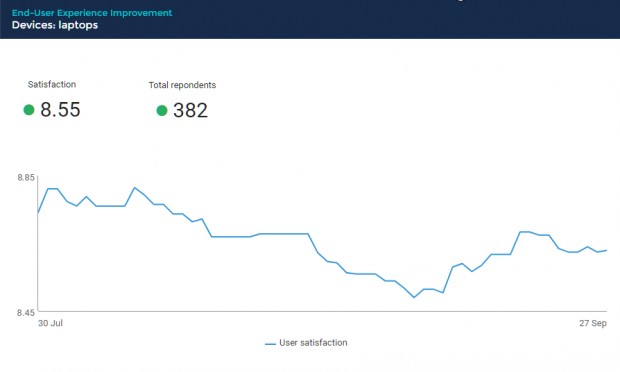
ポータルにあるダッシュボードに最初のメトリックの折れ線グラフウィジェットと2番目のメトリックのKPIウィジェットを追加します。
実際にキャンペーンに回答した従業員の数を知るために、カウントメトリックを作成します。
1. [メトリックを作成](/platform/ja/user-guide/using-finder-classic/monitoring-it-custom-metrics-with-finder-classic/creating-a-metric-with-finder-classic.md)
ユーザーに。
2. 「日次計算」セクションで、「全ユーザーの総数」を選択します。
3. "MATCHING" セクションでは、観察ウィンドウ内でキャンペーンに完全に回答した従業員(ユーザー)を次の2つの条件で選択します。
**ユーザー | \ - ステータス | は | 完全回答**
**ユーザー | \ - 最後のアクションからの日数 | <= | \日数**
ポータルにあるダッシュボードに最初のメトリックの折れ線グラフウィジェットと2番目のメトリックのKPIウィジェットを追加します。
 ---
# Agent Instructions
This documentation is published with GitBook. GitBook is the documentation platform designed so that both humans and AI agents can read, navigate, and reason over technical content effectively. Learn more at gitbook.com.
## Querying This Documentation
If you need additional information that is not directly available in this page, you can query the documentation dynamically by asking a question.
Perform an HTTP GET request on the current page URL with the `ask` query parameter, and the optional `goal` query parameter:
```
GET https://docs.nexthink.com/platform/ja/user-guide/campaigns/campaigns-in-finder-classic/measuring-the-satisfaction-of-employees-with-finder-classic.md?ask=&goal=
```
`ask` is the immediate question: it should be specific, self-contained, and written in natural language.
`goal` is optional and describes the broader end goal you are ultimately trying to accomplish on behalf of the user. GitBook uses it to tailor the answer towards what is most useful for that goal.
The response will contain a direct answer to the question and relevant excerpts and sources from the documentation.
Use this mechanism when the answer is not explicitly present in the current page, you need clarification or additional context, or you want to retrieve related documentation sections.
---
# Agent Instructions
This documentation is published with GitBook. GitBook is the documentation platform designed so that both humans and AI agents can read, navigate, and reason over technical content effectively. Learn more at gitbook.com.
## Querying This Documentation
If you need additional information that is not directly available in this page, you can query the documentation dynamically by asking a question.
Perform an HTTP GET request on the current page URL with the `ask` query parameter, and the optional `goal` query parameter:
```
GET https://docs.nexthink.com/platform/ja/user-guide/campaigns/campaigns-in-finder-classic/measuring-the-satisfaction-of-employees-with-finder-classic.md?ask=&goal=
```
`ask` is the immediate question: it should be specific, self-contained, and written in natural language.
`goal` is optional and describes the broader end goal you are ultimately trying to accomplish on behalf of the user. GitBook uses it to tailor the answer towards what is most useful for that goal.
The response will contain a direct answer to the question and relevant excerpts and sources from the documentation.
Use this mechanism when the answer is not explicitly present in the current page, you need clarification or additional context, or you want to retrieve related documentation sections.