> For the complete documentation index, see [llms.txt](https://docs.nexthink.com/platform/llms.txt). Markdown versions of documentation pages are available by appending `.md` to page URLs; this page is available as [Markdown](https://docs.nexthink.com/platform/ja/library-packs/nexthink-management/infinity-transition-support/usage-guide_-infinity-transition-support.md).
# 使用ガイド: Infinity 移行サポート
## 概要
Nexthink Infinityへの移行を開始している(または開始を考えている)場合、将来的に廃止されるPlatform機能の現在の使用状況を理解する必要があります。
Nexthink Infinity TransitionのLibrary packは、主要なPlatform機能の現在の使用状況をモニタリングし、新機能の採用の進捗を理解することで、NexthinkユーザーがNexthink Infinityへ移行するのをサポートします。
構成ガイドで強調されている手順に従って、Library packが正しく設定されていることを確認してください。
[設定ガイド:Infinity移行サポート](/platform/ja/library-packs/nexthink-management/infinity-transition-support/configuration-guide_-infinity-transition-support.md)
## Platform使用状況
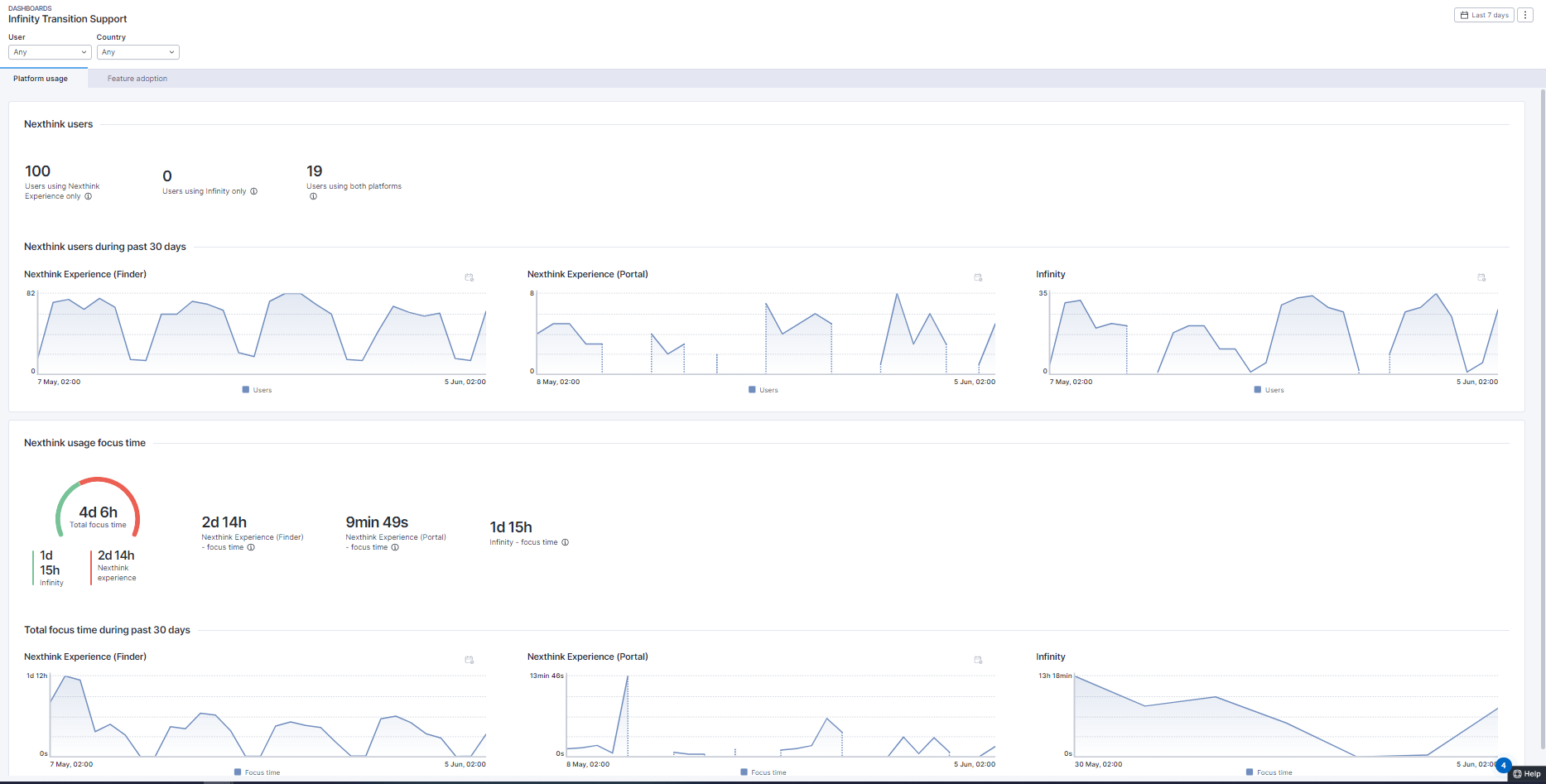
「Platform使用状況」タブでは、Nexthinkユーザーの数と、Nexthink ExperienceとInfinityの両Platformでのフォーカスタイムに関する詳細を提供します。 Infinityのみを使用するユーザーを示すKPIがあり、例えばEngageを通じて当該ユーザーに相談した後、Nexthink Experienceへのアクセスを削除することが提案されます。「フォーカスタイム」ゲージは、ユーザーが両方のPlatformでどれだけの時間をアクティブに過ごしているかを正確に表示します。
## 機能の採用
「機能の採用」ビューは、個々の機能の採用状況に関する詳細情報を提供します。旧Platformからの詳細に焦点を当て、移行管理者が移行を容易にするために必要な情報を提供します。このダッシュボードタブで報告される機能は次のとおりです:
* ダッシュボードフォーカスタイム
* DEXフォーカスタイム
* リモートアクションの数
* キャンペーンの数
ランディングページが旧ページではなくInfinityページとして正しく設定され、維持されていることを確認することが重要です。ランディングページの設定方法については、[プロファイルをご覧ください。](https://nexthink.gitbook.io/opd/user-guide/administration/account-management/roles)
## Infinity接続
このページでは、"**Infinityへの接続状態を取得する**"というリモートアクションの状態について説明します。
このリモートアクションは、デバイスが新しいPlatformにアクセスできることを確認するもので、移行プロセスの重要なステップです。
移行の範囲に含まれるすべてのデバイスに対して、リモートアクションを実行する必要があります。
ゲージチャートは表示します
* リモートアクションが実行されたデバイス
* リモートアクションが正常に完了したデバイス
* Infinityプラットフォーム用に正しい接続設定を持つデバイス。
## 「Nexthink Infinity Transition」アプリケーション
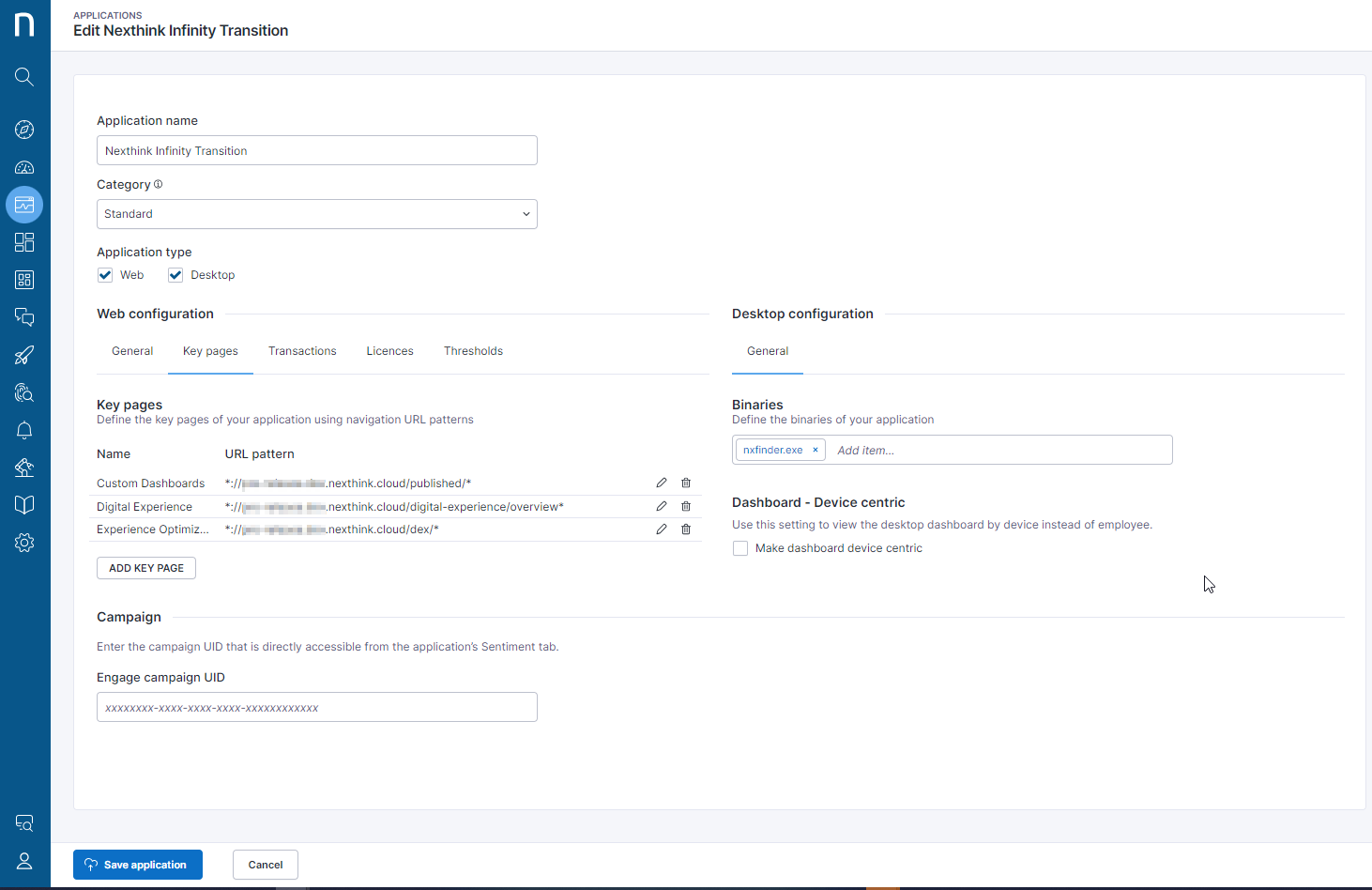
「Nexthink Infinity Transition」アプリケーションは、このLibrary packの重要なコンポーネントです。以下の画像は、このアプリケーションの構成詳細を示しています。インストール後、「一般」タブの「URLパターン」セクションでテナントID/名前を更新することで、追加のメンテナンスが必要です。
---
# Agent Instructions
This documentation is published with GitBook. GitBook is the documentation platform designed so that both humans and AI agents can read, navigate, and reason over technical content effectively. Learn more at gitbook.com.
## Querying This Documentation
If you need additional information that is not directly available in this page, you can query the documentation by asking a question.
Perform an HTTP GET request on the following URL with the `ask` and `goal` query parameters:
```
GET https://docs.nexthink.com/platform/ja/library-packs/nexthink-management/infinity-transition-support/usage-guide_-infinity-transition-support.md?ask=&goal=
```
`ask` is the immediate question: it should be specific, self-contained, and written in natural language.
`goal` is what the user is ultimately trying to achieve, the reason they need the answer. Sharing it helps GitBook give you a better, more relevant answer. A goal is most helpful when it describes the outcome the user wants rather than restating the question. For example, with `ask=how do I create an API token`, a goal like `automate deployments from our CI pipeline` lets GitBook tailor the answer to that use case.
The response will contain a direct answer to the question and relevant excerpts and sources from the documentation.
Use this mechanism when the answer is not explicitly present in the current page, you need clarification or additional context, or you want to retrieve related documentation sections.