> For the complete documentation index, see [llms.txt](https://docs.nexthink.com/llms.txt). Markdown versions of documentation pages are available by appending `.md` to page URLs; this page is available as [Markdown](https://docs.nexthink.com/references/accessibility.md).
# Accessibility
### Overview
Accessibility is a key part of delivering a product that works for everyone. At Nexthink, we are committed to ensuring that all individuals can fully engage with and benefit from our solutions.
To achieve this, we are aligning our product with internationally recognized accessibility standards, including the [Web Content Accessibility Guidelines (WCAG)](https://www.w3.org/TR/WCAG21/).
### Accessibility requirements
The [WCAG standard](https://www.w3.org/TR/WCAG21/) defines many criteria that must be met in order for a product to be considered accessible. For Nexthink, this means:
* Colors must provide sufficient contrast and remain functional for users with color vision deficiencies.
* The product should be fully operable using only a keyboard.
* The product should be fully usable with a screen reader.
### Accessible products at Nexthink
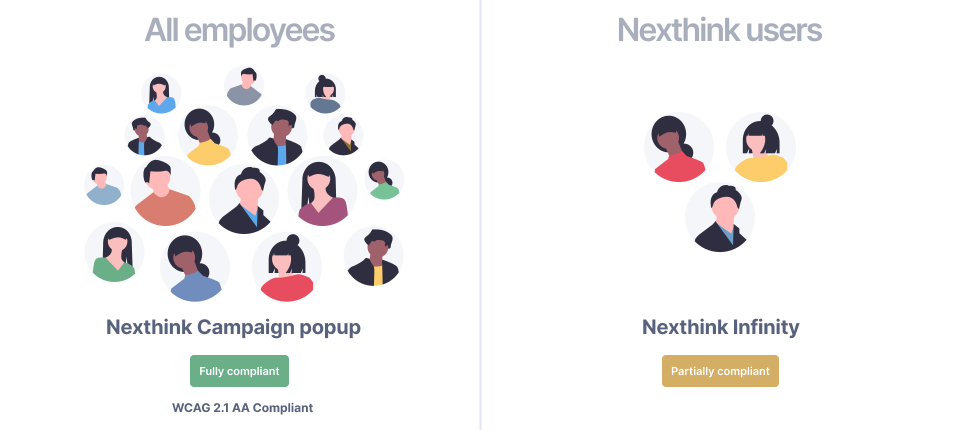
Nexthink has two different user interfaces (UI):
* Fully-compliant WCAG 2.1 UI: The Nexthink Campaign popup application, which all company employees use to read and answer campaigns.
* Partially-compliant WCAG 2.2 UI: The Nexthink Infinity user interface, which is used mainly by employees inside the IT department.
{% hint style="info" %}
Nexthink is currently auditing and updating to address issues in its compliance with WCAG 2.2 accessibility standards. Once testing and resolution is complete, this Accessibility page will be updated to fully reflect our compliance to WCAG 2.2 requirements.
{% endhint %}
#### Nexthink Campaign popup application
Nexthink Campaign popup application is fully compliant with WCAG 2.1 AA guidelines.
View [Nexthink Campaign popup application Accessibility Conformance Report](/references/accessibility/nexthink-engage-popup-application-vpat-statement.md).
**Accessibility**
| Product | | Status |
| ----------------------------------- | --------------------- | ------------------------------------------------------------------------------------------------------------------------------------------------------------------------------------------------------------------------------------------------------ |
| Nexthink Campaign popup application | WCAG 2.1 AA | |
| Nexthink Campaign popup application | Color accessibility | |
| Nexthink Campaign popup application | Keyboard operation | |
| Nexthink Campaign popup application | Screen reader support | |
**Supported screen readers**
NVDA, JAWS, Microsoft Narrator, and macOS VoiceOver.
### Nexthink Infinity user interface
Nexthink Infinity user interface is currently partially compliant with WCAG 2.2 AA guidelines.
View [Nexthink Infinity Accessibility Conformance Report](/references/accessibility/nexthink-infinity-vpat-statement.md).
#### Accessibility
| Product | Goal | Status |
| ----------------- | --------------------- | ------------------------------------------------------------------------------------------------------------------------------------------------------------------------------------------------------------------------------------------------------ |
| Nexthink Infinity | Color accessibility | |
| Nexthink Infinity | Keyboard operation | |
| Nexthink Infinity | Screen reader support | Partial support |
#### Notes
* Color accessibility only includes text contrast and support for color blindness.
* Nexthink Finder is being replaced by Nexthink Infinity and does not support accessibility features.
#### Accessibility user testing
We test a wide range of assistive technologies including VoiceOver, JAWS and NVDA screen readers, Dragon voice activation software and ZoomText magnification. The process is both automated and based on manual user testing, and the team includes people with a range of impairments and disabilities. These include:
* Blindness
* Low vision
* Colour blindness
* Dyslexia
* Learning disabilities
* Mobility impairments
* Deafness
* Asperger's Syndrome
* Anxiety/panic disorder
---
# Agent Instructions
This documentation is published with GitBook. GitBook is the documentation platform designed so that both humans and AI agents can read, navigate, and reason over technical content effectively. Learn more at gitbook.com.
## Querying This Documentation
If you need additional information that is not directly available in this page, you can query the documentation by asking a question.
Perform an HTTP GET request on the following URL with the `ask` and `goal` query parameters:
```
GET https://docs.nexthink.com/references/accessibility.md?ask=&goal=
```
`ask` is the immediate question: it should be specific, self-contained, and written in natural language.
`goal` is what the user is ultimately trying to achieve, the reason they need the answer. Sharing it helps GitBook give you a better, more relevant answer. A goal is most helpful when it describes the outcome the user wants rather than restating the question. For example, with `ask=how do I create an API token`, a goal like `automate deployments from our CI pipeline` lets GitBook tailor the answer to that use case.
The response will contain a direct answer to the question and relevant excerpts and sources from the documentation.
Use this mechanism when the answer is not explicitly present in the current page, you need clarification or additional context, or you want to retrieve related documentation sections.
 |
| Nexthink Campaign popup application | Color accessibility |
|
| Nexthink Campaign popup application | Color accessibility |