> For the complete documentation index, see [llms.txt](https://docs.nexthink.com/platform/llms.txt). Markdown versions of documentation pages are available by appending `.md` to page URLs; this page is available as [Markdown](https://docs.nexthink.com/platform/user-guide/collaboration-experience.md).
# Collaboration Tools
Collaboration Tools allows you to gain an immediate understanding of the audio and video quality of every Microsoft Teams and Zoom call in your organization.
{% hint style="info" %}
Depending on your current licensing model, this capability may require an additional license. Contact your Nexthink representative for more information.
{% endhint %}
## Collaboration Tools at a glance
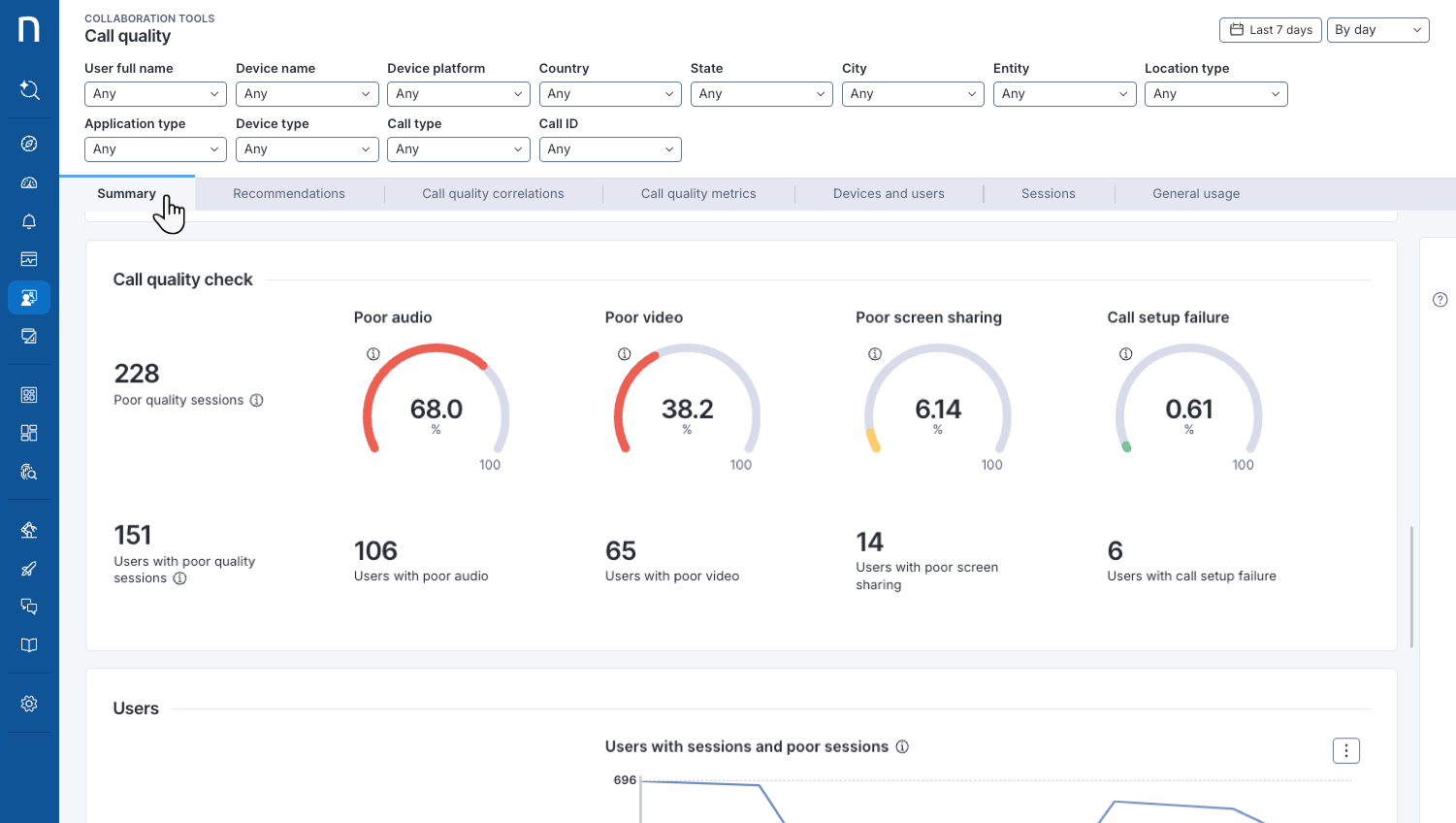
Collaboration Tools enables service owners to proactively detect and investigate call quality issues across the organization using alerts, dashboards, and collaboration metrics. Support teams can then drill down into individual devices and collaboration sessions to identify root causes and efficiently troubleshoot issues affecting the employee experience.
***
## Key benefits and use cases
### Detect issues earlier and accelerate resolution
Collaboration Tools enables IT teams to proactively identify call quality issues and reduce time to resolution by correlating session data from Microsoft Teams and Zoom with device performance, connectivity, user experience metrics, configuration changes, and remediation actions. With end-to-end visibility into the factors affecting collaboration experiences, teams can quickly identify root causes and take corrective action.
### Make informed decisions with organization-wide collaboration insights
Beyond individual troubleshooting, Collaboration Tools helps service owners identify patterns across locations, departments, devices, and collaboration platforms. Use organization-wide insights to prioritize infrastructure investments, standardize hardware, and proactively address recurring issues that affect the digital employee experience.
### Maintain reliable Microsoft Teams Rooms experiences
Meeting room issues can disrupt collaboration and delay critical discussions, especially as employees return to the office. Collaboration Tools helps IT teams monitor Microsoft Teams Rooms, identify issues related to room devices, peripherals, connectivity, and applications, and quickly troubleshoot problems that impact meeting quality and productivity.
***
## Get started with Collaboration Tools
Use **Collaboration Tools** dashboards and complementary features to help you detect and investigate issues at the organization, device and call levels.
### Investigate call quality issues across Teams and Zoom
Monitor, investigate, and resolve voice and video call issues across Microsoft Teams and Zoom. Analyze performance trends, identify technical root causes, and determine the users and devices affected to accelerate troubleshooting and improve collaboration experiences.
Refer to [Monitoring Call Quality](/platform/user-guide/collaboration-experience/getting-started-with-collaboration-experience/using-collaboration-tools.md) for more information.
### Identify issues affecting Microsoft Teams Rooms calls
Identify, investigate, and resolve issues affecting Microsoft Teams Rooms calls, including problems related to applications, devices, connectivity, and associated components. Use a centralized dashboard to correlate relevant data, quickly pinpoint root causes, and efficiently troubleshoot Teams Rooms environments with minimal configuration effort.
Refer to [Troubleshooting MS Teams Rooms issues](/platform/user-guide/collaboration-experience/getting-started-with-collaboration-experience/ms-teams-rooms.md) for more information.
### Investigate individual collaboration issues
Analyze the factors affecting an individual employee's collaboration experience.
* Use **Device View** to correlate device activity, resource consumption, connectivity, and application usage with call quality indicators. For more information, refer to [Correlating device metrics with call quality in Device View](/platform/user-guide/collaboration-experience/getting-started-with-collaboration-experience/using-device-view-for-call-quality-issues.md).
* Use **Call View** to analyze individual collaboration sessions and assess the call quality experienced by each participant. For more information, refer to [Analyzing individual session quality with Call View](/platform/user-guide/collaboration-experience/getting-started-with-collaboration-experience/using-the-call-view-dashboard.md).
### Configure Collaboration tools through Connectors and Nexthink Library content
Make the most out of Collaboration Tools, by configuring MS Teams and Zoom Connectors and installing relevant Library content, supporting data collection, monitoring and storage such as dashboards, remote actions and monitors.
Refer to [Configuring Collaboration Tools](/platform/user-guide/collaboration-experience/configuring-collaboration-experience.md) for more details.
### Read Collaboration Tools FAQ
Find answers to common questions about Collaboration Tools on the [Collaboration Experience FAQ](/platform/user-guide/collaboration-experience/collaboration-experience-faq.md) page.
---
# Agent Instructions
This documentation is published with GitBook. GitBook is the documentation platform designed so that both humans and AI agents can read, navigate, and reason over technical content effectively. Learn more at gitbook.com.
## Querying This Documentation
If you need additional information that is not directly available in this page, you can query the documentation by asking a question.
Perform an HTTP GET request on the following URL with the `ask` and `goal` query parameters:
```
GET https://docs.nexthink.com/platform/user-guide/collaboration-experience.md?ask=&goal=
```
`ask` is the immediate question: it should be specific, self-contained, and written in natural language.
`goal` is what the user is ultimately trying to achieve, the reason they need the answer. Sharing it helps GitBook give you a better, more relevant answer. A goal is most helpful when it describes the outcome the user wants rather than restating the question. For example, with `ask=how do I create an API token`, a goal like `automate deployments from our CI pipeline` lets GitBook tailor the answer to that use case.
The response will contain a direct answer to the question and relevant excerpts and sources from the documentation.
Use this mechanism when the answer is not explicitly present in the current page, you need clarification or additional context, or you want to retrieve related documentation sections.