> For the complete documentation index, see [llms.txt](https://docs.nexthink.com/platform/llms.txt). Markdown versions of documentation pages are available by appending `.md` to page URLs; this page is available as [Markdown](https://docs.nexthink.com/platform/user-guide/applications/monitoring-applications/monitoring-web-applications/performance/page-loads/understanding-the-page-loads-metric.md).
# Understanding the Page loads metric
The average page load time is measured using the *onload* event defined by the Navigation Timing Level 2 specification on the [http://w3.org](http://w3.org/) website. For more detailed information, refer to the [Navigation timing API](#navigation-timing-api) section below.
## What is considered a navigation event?
A navigation event is a change triggered on a web page when the URL changes and the browser populates its history with a new entry. The browser history is a list of visited addresses allowing users to return to a previously visited page.
The dashboard reports values for two types of navigations out-of-the-box:
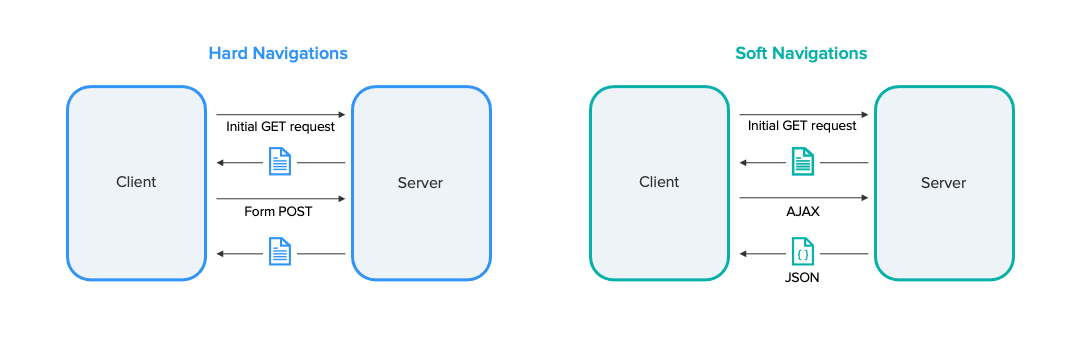
* **Hard navigations** take place when the browser sends a request to load a whole new page.
* **Soft navigations** allow for measuring the speed of asynchronous page loads where the browser does not load a new page. They are very common in single-page applications (SPA). Soft navigations have to be enabled for each application. Refer to the [Configuring web applications](/platform/user-guide/applications/setting-up-and-managing-applications/configuring-applications/configuring-web-applications.md) documentation for more information.
## The difference between hard and soft navigations
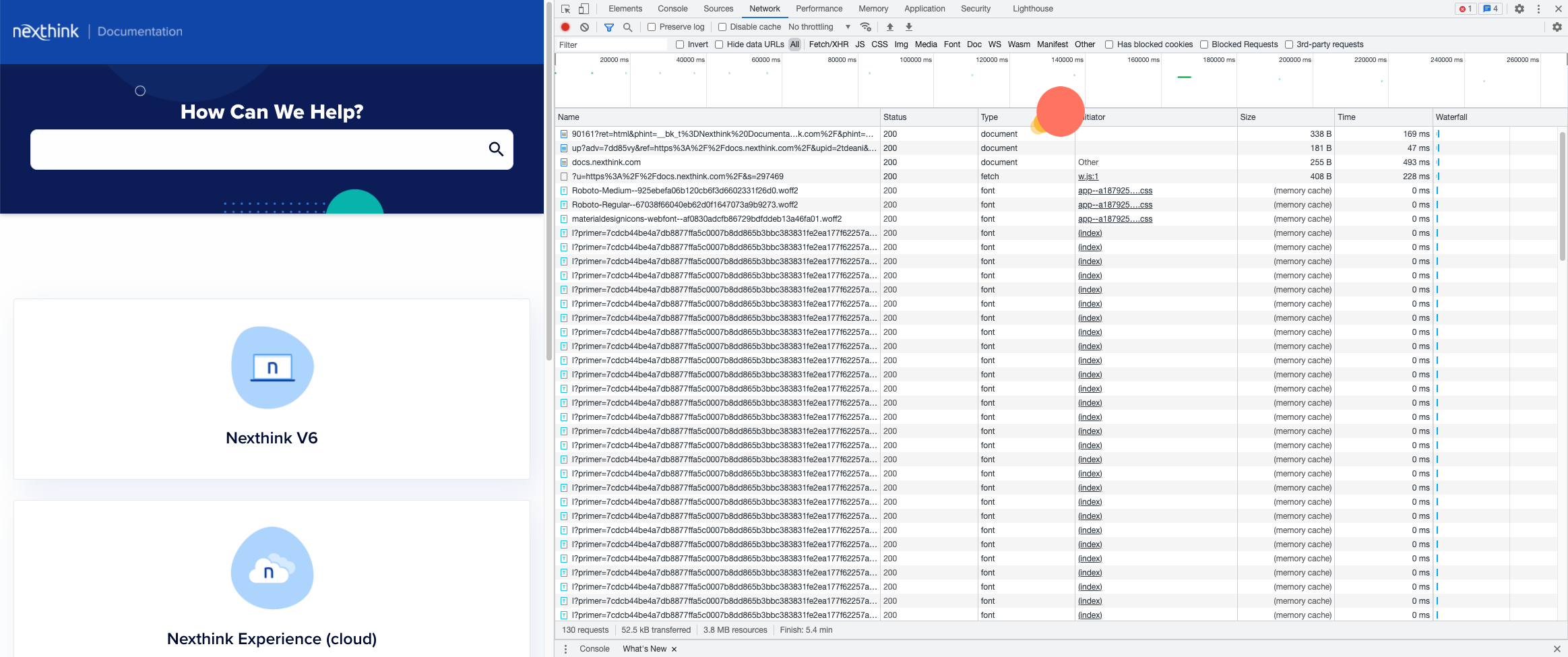
A hard navigation event is triggered at the technical level when a document is loaded. This behavior can be identified in the browser developer tools using the **Network** tab. One of the web requests should be of the **document** type. Soft navigations are all other navigations when the browser does not load document request types.
## How does Nexthink translate navigation into page load metrics?
Nexthink identifies two types of navigation events—**Hard navigations** and **Soft navigations**—and computes page load metrics based on how each type occurs.
### Hard navigations
A hard navigation occurs when the browser loads a new document, typically when the URL changes. Nexthink measures the page load time for these navigations to help you understand how long a page takes to become ready for end users.
You can now choose how Nexthink computes page load time for **Hard navigations** when configuring a web application for Nexthink monitoring. The selected method defines the moment at which Nexthink considers the navigation as complete.
Nexthink currently supports two computation methods:
* **Browser timing API**—system default.
* **Page completion time**—currently, under **Technical preview**.
Changing the hard-navigation computation method affects all metrics derived from page load time—including DEX score, alerts, live dashboards, and historical reporting.
{% hint style="warning" %}
You can only activate one computation method at a time for hard-navigation page loads, meaning:
* Nexthink does not collect data using the deselected method after switching.
* Nexthink does not display both methods side by side for the same period.
* Nexthink does not recalculates retroactively previously collected data using a different method.
If needed, you can view the **Page completion time** without switching methods by [using the Nexthink Extension.](#alternative-using-nexthink-extension-to-view-the-page-completion-time)
{% endhint %}
#### Browser timing API
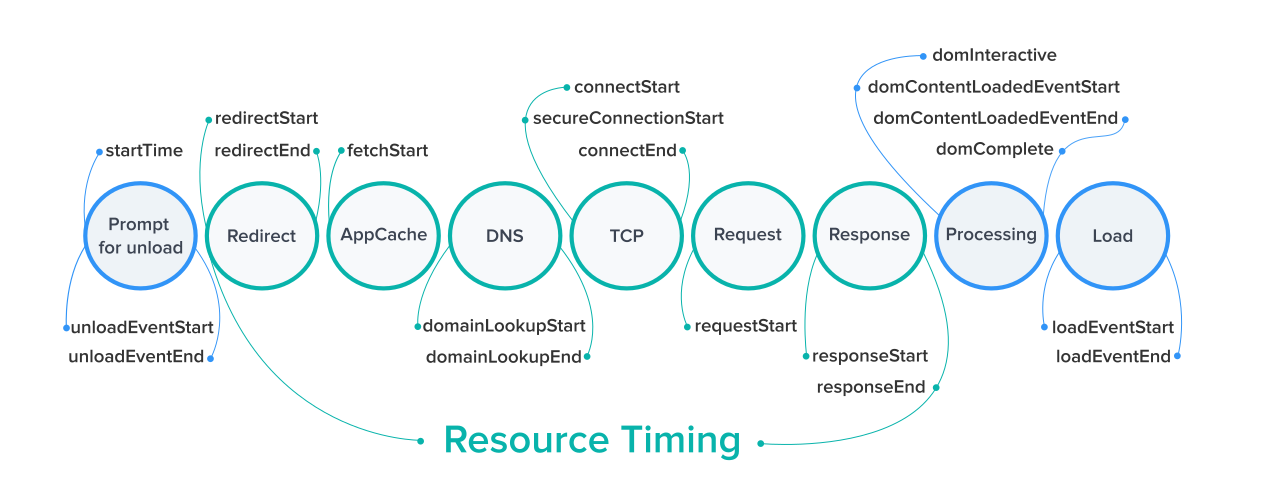
The following diagram visualizes how the **Browser Timing API** measures page load time by outlining the events and attributes that occur from page unload to full load.
{% hint style="info" %}
The sum of the timing elements shown below is not always equal to the total page load time because other factors, such as concurrent OS tasks, may affect the loading time of the page.
{% endhint %}
**Backend time** is the time between when the client starts sending a request `requestStart` and when the clients start receiving a response `responseStart`.
**Network time** is the sum of the time between:
* `redirectStart` and `redirectEnd`.
* `domainLookupStart` and `connectEnd`
* `responseStart` and `responseEnd`
**Client time** is the time between `unloadEventEnd` and `loadEventEnd` minus the backend and network times.
Resources timing events
**Unload event**\
An unload event is triggered when the user navigates away from the page or when the page is reloaded.
**Redirect**\
The time it takes to follow HTTP redirects
**DNS**\
The time it takes to resolve domain names
**TCP**\
The time it takes to establish a socket connection between the browser and the webserver
**SSL**\
The time it takes to establish a secure socket connection between the browser and the webserver
**Request**\
The time it takes to wait for the first byte of the document response
**Response**\
The time it takes to download the document response
**Processing**\
The time it takes by the browser to process and build the DOM
**Load**\
The time it takes to load the DOM, including DOM processing
**Number of bytes transferred**\
HTTP response sizes
DOM events and attributes
There are various onload events that are triggered before a page can be fully loaded. The browser fires an onload event which can trigger additional functions or logic on the page. Such events are also used in the process of calculating page load times:
`domLoading` attribute provides the start time of the entire process.
`domInteractive` event is triggered when the browser has completed parsing the HTML and constructed the DOM.
`domContentLoadedEventStart` and `domContentLoadedEventEnd` events mark the start and end times of a render tree creation. The process begins when the CSS object model is ready.
`domComplete` event is triggered when the processing is completed and all the resources are ready.
#### Page completion time
{% hint style="warning" %}
This Technical Preview is made available to customers free of charge for their evaluation and feedback; in general availability the functionalities of the preview may be subject to additional cost and/or licensing.\
As such, the Technical Preview, the documentation, and any updates are provided for limited evaluation only and on an ‘as-is’ and ‘as-available’ basis without warranty of any kind.
{% endhint %}
The **Page completion time** method extends the measurement beyond the browser load event. It captures additional activity that affects when the page is visually complete or usable from the user perspective. Examples include:
* Asynchronous data fetches
* DOM updates
* Client-side rendering and processing
Because the **Page completion time** method accounts for more activity than the **Browser timing API**, the reported page load time may be longer than with the default method.
Therefore, **Page completion time** is helpful for organizations whose manual measurements or user perceptions suggest that hard navigation load times are longer than the values reported by Nexthink, using the default computation method.
Switching to the **Page completion time** method in the web application configuration does not improve high page load times.
{% hint style="warning" %}
Changing the hard-navigation computation method affects all metrics derived from page load time—including DEX score, alerts, live dashboards, and historical reporting.
You can only activate one computation method at a time for hard-navigation page loads, meaning:
* Nexthink does not collect data using the deselected method after switching.
* Nexthink does not display both methods side by side for the same period.
* Nexthink does not recalculates retroactively previously collected data using a different method.
{% endhint %}
Alternative: Using Nexthink Extension to view the Page completion time.
From Nexthink Extension, you can view **Page completion time** without switching the **Hard navigation** method in the web application configuration.
1. Open Nexthink Extension from your browser, within the page of interest.
2. Click the **Powered by Nexthink** badge five times to open the **Nexthink extension** pop-up.
3. See the **Page load time** value, which is equivalent to the **Page completion time**, under **Soft Navigation**.
***
### Soft navigations
A soft navigation consists of the following sequence of distinct events (some are optional):
1. User's interaction and/or hard navigation triggers the soft navigation.
2. Changes in the rendering of the page.
3. A request for new resources from the backend.
4. Waiting time for the backend to respond.
5. Receiving of resources from the backend.
6. Processing on the client-side based on the new resources.
The information above is applied in the timeline to Backend, Network, and Client as follows:
* **Client** time is defined as the sum of **1.** & **2.** & **6.**
* **Network** time is the sum of **3.** & **5.**
* **Backend** time is **4.**
#### **Soft navigation completion**
A soft navigation is considered complete when:
* There is no relevant network activity, such as background requests to backend services.
* There are no relevant client-side rendering or DOM changes during a short stabilization period.
User interactions may trigger additional network requests or client-side rendering changes, delaying completion until the application reaches a stable state.
{% hint style="info" %}
You can view the **Page completion time** metric for soft navigations by [using the Nexthink Extension.](#alternative-using-nexthink-extension-to-view-the-page-completion-time)
{% endhint %}
---
# Agent Instructions
This documentation is published with GitBook. GitBook is the documentation platform designed so that both humans and AI agents can read, navigate, and reason over technical content effectively. Learn more at gitbook.com.
## Querying This Documentation
If you need additional information that is not directly available in this page, you can query the documentation by asking a question.
Perform an HTTP GET request on the following URL with the `ask` and `goal` query parameters:
```
GET https://docs.nexthink.com/platform/user-guide/applications/monitoring-applications/monitoring-web-applications/performance/page-loads/understanding-the-page-loads-metric.md?ask=&goal=
```
`ask` is the immediate question: it should be specific, self-contained, and written in natural language.
`goal` is what the user is ultimately trying to achieve, the reason they need the answer. Sharing it helps GitBook give you a better, more relevant answer. A goal is most helpful when it describes the outcome the user wants rather than restating the question. For example, with `ask=how do I create an API token`, a goal like `automate deployments from our CI pipeline` lets GitBook tailor the answer to that use case.
The response will contain a direct answer to the question and relevant excerpts and sources from the documentation.
Use this mechanism when the answer is not explicitly present in the current page, you need clarification or additional context, or you want to retrieve related documentation sections.