> For the complete documentation index, see [llms.txt](https://docs.nexthink.com/llms.txt). Markdown versions of documentation pages are available by appending `.md` to page URLs; this page is available as [Markdown](https://docs.nexthink.com/user-guide/remote-actions.md).
# Remote Actions
The Remote Actions module lets you run scripts on employee devices to diagnose and remediate issues without requiring physical access. Remote actions are useful for IT support teams looking to resolve employee issues faster, for operations teams aiming to automate repetitive remediation tasks, and for employees who can solve common problems on their own through self-help interfaces.
## Remote Actions at a glance
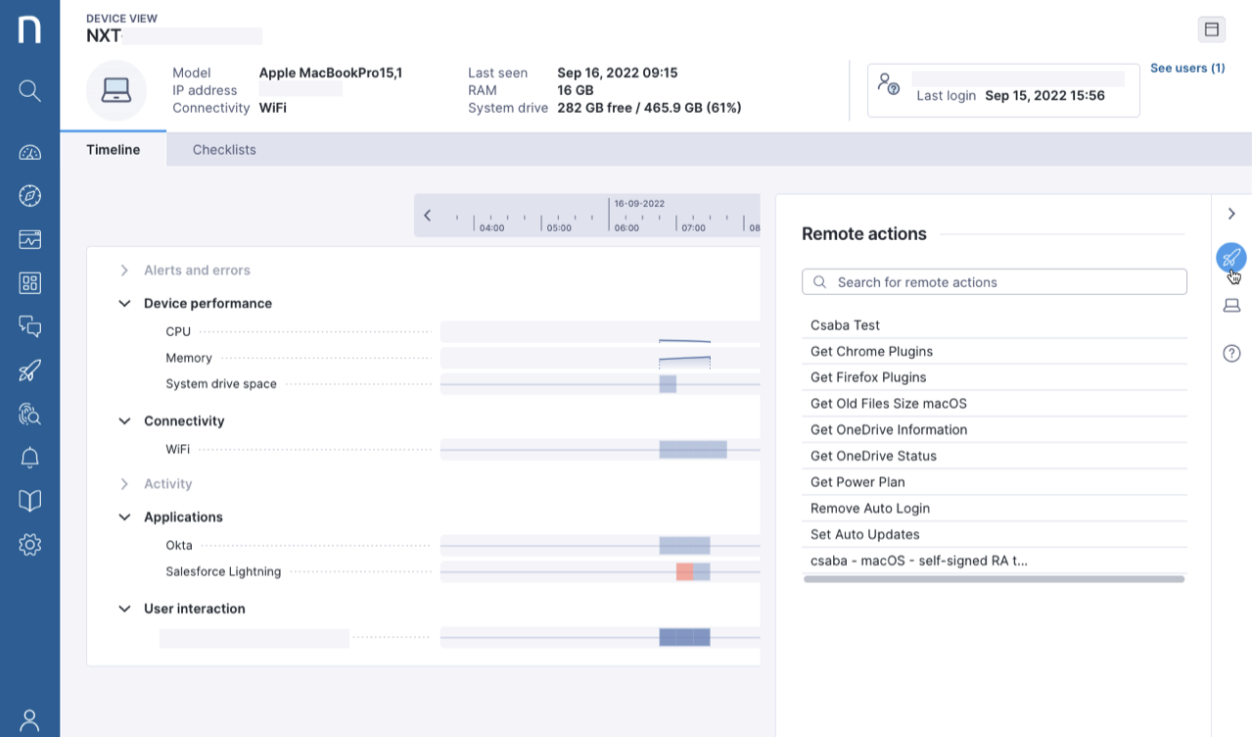
Remote actions offer several ways to prevent and remediate issues encountered by employees and to gather additional information from devices. A remote action is an executable script that can accept parameters and optionally return outputs to Nexthink's data layer, where they feed dashboards, support troubleshooting investigations, and enrich device and user data across the platform.
***
## Key benefits and use cases
Remote Actions support four main scenarios, each addressing a different way IT teams can act on device issues.
### Fix issues faster with direct support
When a support agent receives an incident or detects a problem, they can trigger a script directly on the affected device from the Nexthink web interface, without scheduling a session or taking control of it. This reduces resolution time and minimizes disruption to the employee.
### Empower employees to resolve issues on their own
By combining Remote Actions with Campaigns, you can automatically detect a known issue, run a script to address it, and notify the employee — all without involving the support team. Employees get guided through the resolution at their own pace, reducing the need for external intervention and freeing up support capacity for more complex issues.
### Remediate issues automatically, before anyone notices
The most powerful use of Remote Actions is eliminating issues before employees even notice them. By combining scripts with automated triggers and scheduling, you can detect known problems across your device fleet and remediate them silently in the background — no ticket, no delay, no disruption. This reduces the volume of support requests and keeps your IT environment healthier over time.
### Enrich your Nexthink data with device-level insights
Nexthink Collector provides a rich set of device data, but some information resides only on the device itself. Schedule remote actions to retrieve that additional context on demand or periodically on targeted devices, feeding it back into the Nexthink data layer where it becomes available for investigations, alerts, and dashboards. This makes your monitoring more complete and your decisions better informed.
{% hint style="info" %}
Remote Actions can also be triggered programmatically via API, extending their availability to third-party tools such as self-service portals and ticketing systems, so agents can act without leaving their existing workflows. Refer to the [Remote Actions API](https://docs.nexthink.com/api/remote-actions) documentation for more information.
{% endhint %}
***
## Get started with Remote Actions
### Diagnose and remediate employee issues with Remota Actions
Use Remote Actions to collect diagnostic information, remediate issues, and automate IT tasks on targeted devices and VDI sessions. Remote Actions can be executed on-demand or through automated processes, and can also be made available in Spark to support employee self-service and guided remediation.
Refer to [Working with Remote Actions](/user-guide/remote-actions/using-remote-actions.md) for more information.
### Track remote action executions
Track remote action execution results and statistics to understand execution status, identify failures, and review outputs returned from targeted devices or VDI sessions.
Refer to [Monitoring remote actions execution statistics](/user-guide/remote-actions/using-remote-actions/monitoring-remote-actions-execution-statistics.md) for more information.
### Use out-of-the-box remote actions
Use Library remote actions to quickly diagnose and remediate common endpoint and VDI issues based on Nexthink best practices and common IT use cases.
Refer to [Nexthink Library](/user-guide/nexthink-library.md) documentation for more information.
### Create your first remote action
Build custom remote actions tailored to your environment and operational needs. Define the target, configure the action logic, and test the execution before making the remote action available to other Nexthink features and users.
Refer to [Setting up and managing Remote Actions](/user-guide/remote-actions/setting-up-and-managing-remote-actions.md) for more information.
---
# Agent Instructions
This documentation is published with GitBook. GitBook is the documentation platform designed so that both humans and AI agents can read, navigate, and reason over technical content effectively. Learn more at gitbook.com.
## Querying This Documentation
If you need additional information that is not directly available in this page, you can query the documentation by asking a question.
Perform an HTTP GET request on the following URL with the `ask` and `goal` query parameters:
```
GET https://docs.nexthink.com/user-guide/remote-actions.md?ask=&goal=
```
`ask` is the immediate question: it should be specific, self-contained, and written in natural language.
`goal` is what the user is ultimately trying to achieve, the reason they need the answer. Sharing it helps GitBook give you a better, more relevant answer. A goal is most helpful when it describes the outcome the user wants rather than restating the question. For example, with `ask=how do I create an API token`, a goal like `automate deployments from our CI pipeline` lets GitBook tailor the answer to that use case.
The response will contain a direct answer to the question and relevant excerpts and sources from the documentation.
Use this mechanism when the answer is not explicitly present in the current page, you need clarification or additional context, or you want to retrieve related documentation sections.