> For the complete documentation index, see [llms.txt](https://docs.nexthink.com/platform/llms.txt). Markdown versions of documentation pages are available by appending `.md` to page URLs; this page is available as [Markdown](https://docs.nexthink.com/platform/library-packs/it-operations/investigations-starter-pack/configuration-guide-investigations-starter-pack.md).
# Configuration guide: Investigations starter pack
{% hint style="warning" %}
The configuration options on this page are only accessible to [administrators](https://docs.nexthink.com/platform/user-guide/administration/account-management/roles#roles-administration).
Refer to the [Usage guide: Investigations starter pack](/platform/library-packs/it-operations/investigations-starter-pack/usage-guide-investigations-starter-pack.md) to use library content as a standard user.
{% endhint %}
This library pack contains content included in Nexthink Infinity [Investigations](/platform/user-guide/investigations.md), without any prerequisites for [expansion products](https://docs.nexthink.com/platform/overview/products).
## **Included content and dependencies**
This library pack contains the following content and dependencies:
| Content type | Name | Description | Dependencies |
| ------------------------- | ----------------------------------------------------------- | ------------------------------------------------------------------------------------------------------------------------------------------------------------- | --------------- |
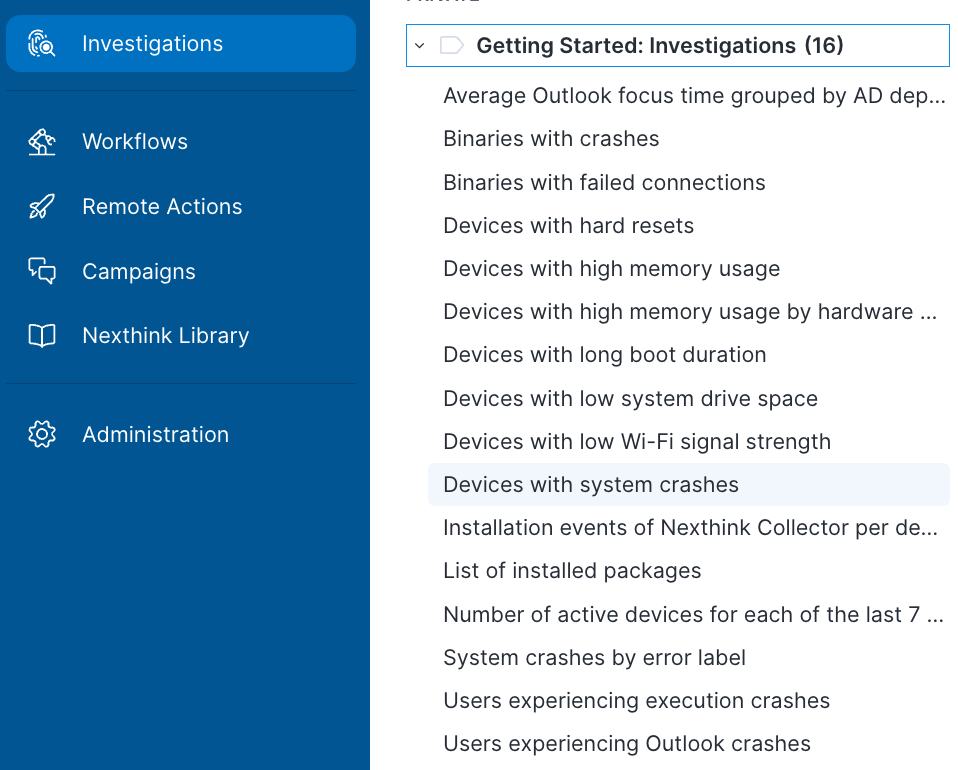
| Investigations | **Devices with system crashes** | This investigation enables you to identify devices that have experienced at least 1 system crash in the past 7 days. | none
|
| Investigations | **System crashes by error label** | This investigation enables you to identify the number of different system crashes grouped by the error label the system crash has returned, in the past 7d. | none |
| Investigations | **Devices with hard resets** | This investigation enables you to identify devices that have experienced at least 1 hard reset in the past 7 days. | none |
|
Investigations
| **Devices with long boot duration** | This investigation enables you to identify devices that have recorded boot duration of 150s or more in the past 7 days. | none |
| Investigations | **Devices with high memory usage** | This investigation enables you to identify devices that have recorded a memory usage of 90% or more in the past 24h. | none |
| Investigations | **Devices with high memory usage by hardware manufacturer** | This investigation enables you to identify devices that have recorded a memory usage of 90% or more, grouped by device manufacturer, in the past 24h. | none |
| Investigations | **Devices with low system drive space** | This investigation enables you to identify devices that have shown to have 23GB or less of system drive free space in the past 24h. | none |
| Investigations | **Devices with low Wi-Fi signal strength** | This investigation enables you to identify devices that experienced a Wi-Fi signal strength of 80dBm or less in the past 24h. | none |
| Investigations | **Number of active devices for each of the last 7 days** | This investigation enables you to identify the number of devices that were active for each day in the past 7 days. | none |
| Investigations | **List of installed packages** | This investigation enables you to identify the packages installed across your landscape, grouped by the number of devices with the specific package installed | none |
| Investigations | **Installation events of Nexthink Collector per device** | This investigation enables you to identify the installation events of Nexthink Collector per device | none |
| Investigations | **Binaries with crashes** | This investigation enables you to identify the Binaries that have experienced at least 1 crash in the past 7 days. | none |
| Investigations | **Users experiencing execution crashes** | This investigation enables you to identify users that have faced at least 1 binary crash in the past 7 days. | none |
| Investigations | **Users experiencing Outlook crashes** | This investigation enables you to identify users that have faced at least 1 Outlook crash in the past 7 days. | none |
## **Configuring** Investigations starter pack
{% hint style="info" %}
Adapt these suggested configuration steps to edit and customize content according to your organizational needs.
{% endhint %}
Follow these steps to install and configure content:
1. Before configuration - Install the library pack from [Nexthink Library](https://docs.nexthink.com/platform/user-guide/nexthink-library).
2. From the main menu, select **Investigations.**
3. From the open main **Investigations** right-side panel, verify the list of investigations installed from the **Investigations starter pack**.
4. Open and execute pack-related investigations to check they query data properly in your environment.
5. After confirming the investigations are correctly installed, from the main menu, navigate to the **Investigations** > **Manage investigations** page.
6. Search for pack-related investigation for editing. For each installed investigation:
* Customize the investigation if you need to adjust some value.
* Click the **Save as** a button to rename the investigation if you want to retain your customizations in a separate investigation, but still reuse the original pre-defined library investigation in the future.
{% hint style="info" %}
Refer to the [Investigations ](/platform/user-guide/investigations.md)documentation to learn more about managing, editing, running, and sharing investigations.
{% endhint %}
***
RELATED TOPICS
* [Overview: Investigations started pack](/platform/library-packs/it-operations/investigations-starter-pack.md)
* [Usage guide: ](/platform/library-packs/it-operations/investigations-starter-pack/usage-guide-investigations-starter-pack.md)[Investigations](/platform/library-packs/it-operations/investigations-starter-pack.md)[ started pack](/platform/library-packs/it-operations/investigations-starter-pack/usage-guide-investigations-starter-pack.md)
---
# Agent Instructions
This documentation is published with GitBook. GitBook is the documentation platform designed so that both humans and AI agents can read, navigate, and reason over technical content effectively. Learn more at gitbook.com.
## Querying This Documentation
If you need additional information that is not directly available in this page, you can query the documentation dynamically by asking a question.
Perform an HTTP GET request on the current page URL with the `ask` query parameter, and the optional `goal` query parameter:
```
GET https://docs.nexthink.com/platform/library-packs/it-operations/investigations-starter-pack/configuration-guide-investigations-starter-pack.md?ask=&goal=
```
`ask` is the immediate question: it should be specific, self-contained, and written in natural language.
`goal` is optional and describes the broader end goal you are ultimately trying to accomplish on behalf of the user. GitBook uses it to tailor the answer towards what is most useful for that goal.
The response will contain a direct answer to the question and relevant excerpts and sources from the documentation.
Use this mechanism when the answer is not explicitly present in the current page, you need clarification or additional context, or you want to retrieve related documentation sections.