> For the complete documentation index, see [llms.txt](https://docs.nexthink.com/platform/llms.txt). Markdown versions of documentation pages are available by appending `.md` to page URLs; this page is available as [Markdown](https://docs.nexthink.com/platform/library-packs/security-and-compliance/workflow-jamf-client-continuity/usage-guide-microsoft-teams-assisted-troubleshooting.md).
# Usage guide: Jamf client continuity
{% hint style="warning" %}
This page outlines various ways to use the pack, including use case examples.
Administrators can refer to the [Configuration guide](/platform/library-packs/security-and-compliance/workflow-jamf-client-continuity/configuration-guide-microsoft-teams-assisted-troubleshooting.md) to set up and customize the installed content.
{% endhint %}
The **Jamf client continuity** library pack enables EUC teams to:
* Reduce the risk of endpoint compliance and security issues
* Reduce the number of tickets (and associated costs) related to device non-compliance, performance degradation, and other issues
* Save productivity time and reduce IT support costs with automated compliance checks and remediation.
## Library pack uses
{% hint style="info" %}
Jump to [Use cases](#use-cases) on this page to see relevant scenario applications.
{% endhint %}
Use the library pack content for the following purposes.
### **Visibility**
This library pack focuses on the Jamf client continuity [workflow](/platform/user-guide/workflows.md). It silently checks multiple points of Jamf client health, such as the presence of a client, whether it is running or not, and whether it is connected to Jamf. The workflow can automatically fix the majority of issues detected, and will create an ITSM ticket with a summary of the Jamf client's status where this is not possible.
### **Workflow triggering**
This workflow is designed to run on a schedule across all Jamf-managed macOS devices.
**Schedule trigger recommendation**
We recommend that you create a workflow schedule that runs once a day.
The example below shows what a query looks like when selecting macOS devices.
**NQL:**
{% code lineNumbers="true" %}
```
devices
| where operating_system.platform == macos
| list name, operating_system.name, operating_system.build, last_seen
```
{% endcode %}
## Predefined workflow structure and steps
The **Jamf client continuity** workflow is structured in these main steps:
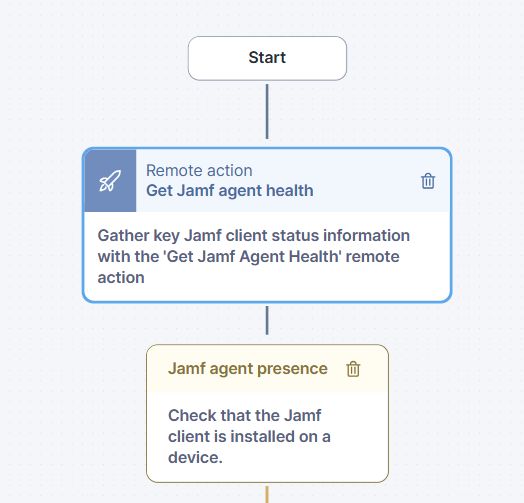
1. The workflow [gets key status data from Jamf client on a device](#workflow-gets-key-status-data-from-jamf-client-on-a-device) using a remote action.
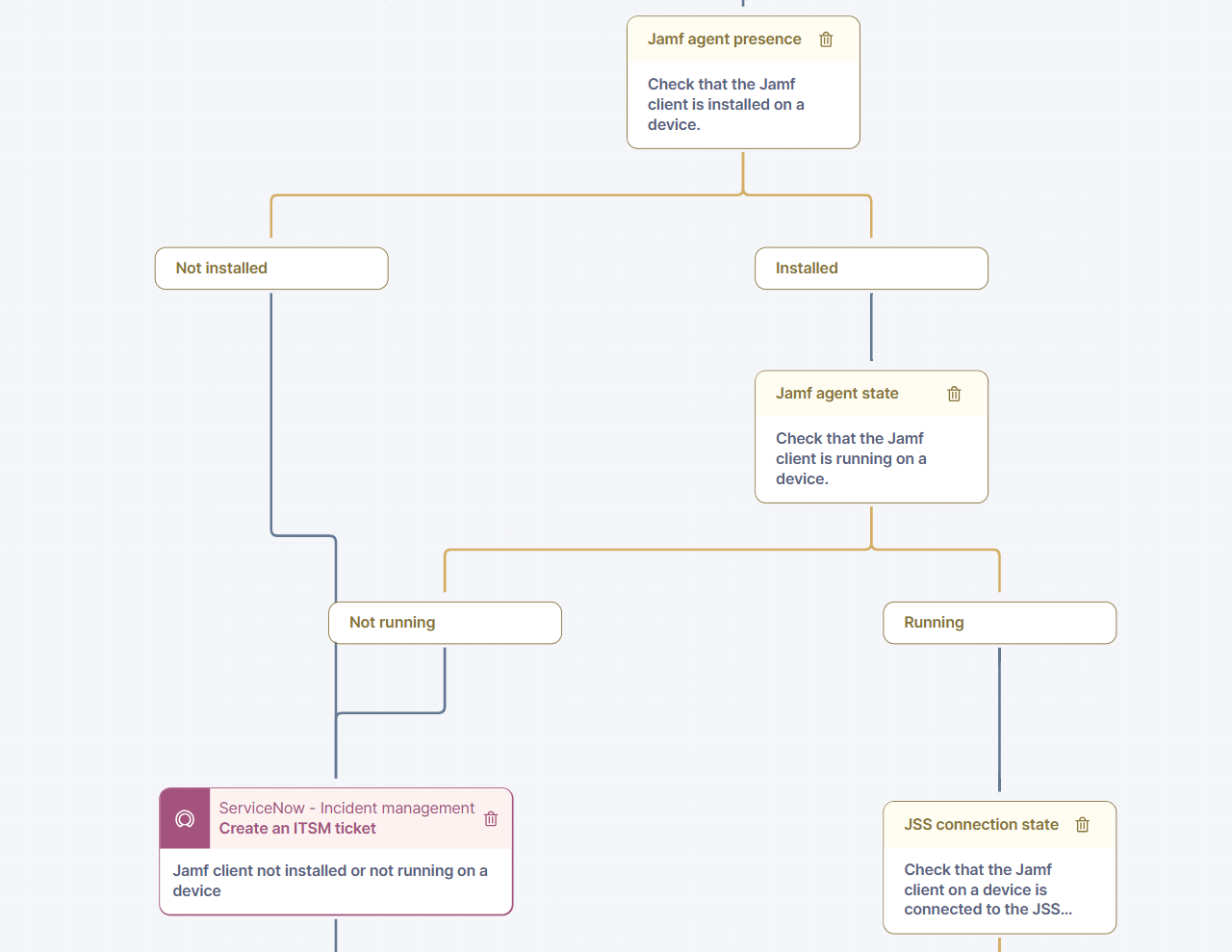
2. The workflow [checks that the Jamf client is running](#workflow-checks-that-the-jamf-client-is-running-on-the-device) on the device.
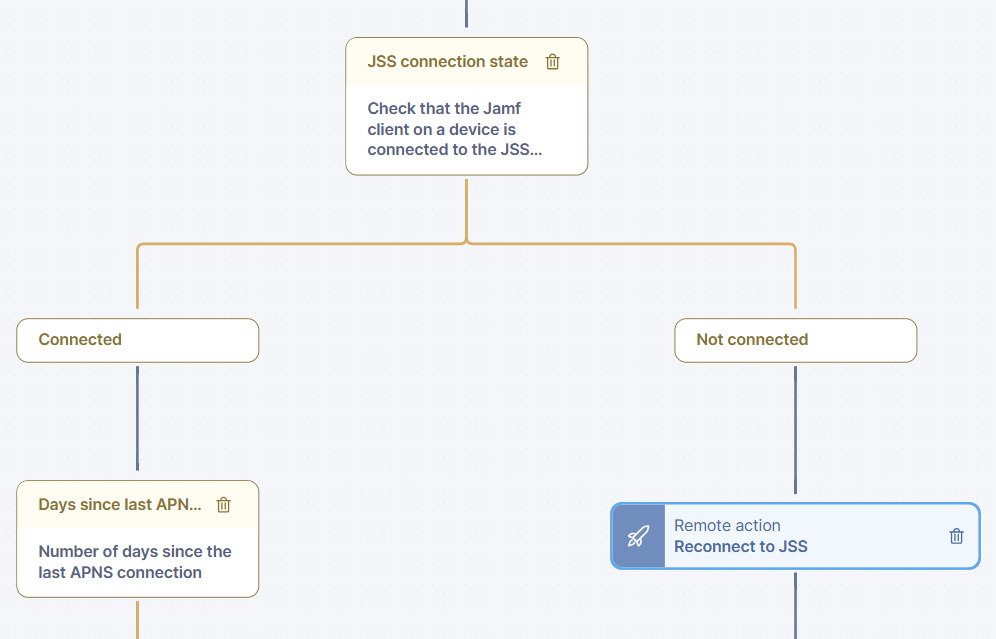
3. The workflow [checks the JSS connection status](#check-the-jss-connection-status-of-the-device) of the device.
4. The workflow [checks the APNS connection](#check-the-apns-connection) status.
### Workflow gets key status data from Jamf client on a device
Using a 'Get Jamf Agent Health' remote action, the workflow retrieves a summary of Jamf client status information: client presence on a device and, if it's running, its connection status to a Jamf server (JSS) and Apple Push Notification Service (APNS).
Once this data has been obtained, the workflow proceeds to process it step by step.
### Workflow checks that the Jamf client is running on the device.
First, the workflow checks if the Jamf client is present on a device. If it is, the workflow then checks that the Jamf client is running. If it is, the workflow proceeds to the next steps. Otherwise, the device is reported as missing the Jamf client via an ITSM ticket.
### Check the JSS connection status of the device
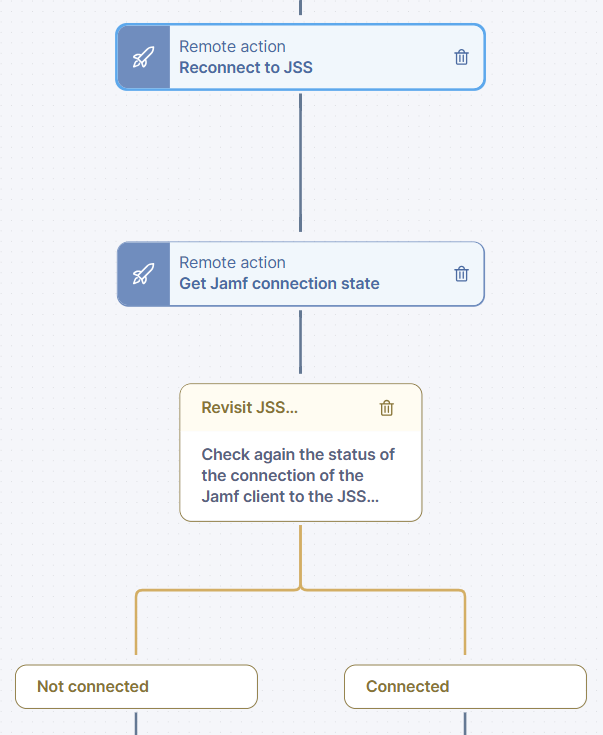
The workflow now checks if the client is connected to the Jamf server (JSS), and if an APNS connection was made within the last five days. If there is no connection to the JSS server, the workflow will try to re-establish it using the remote action 'Invoke Jamf reconnect'.
It will then check the connection status again by triggering another execution of the 'Get Jamf agent health' remote action. If the connection is still not established, this device will be reported as having Jamf client connectivity issues via an ITSM ticket.
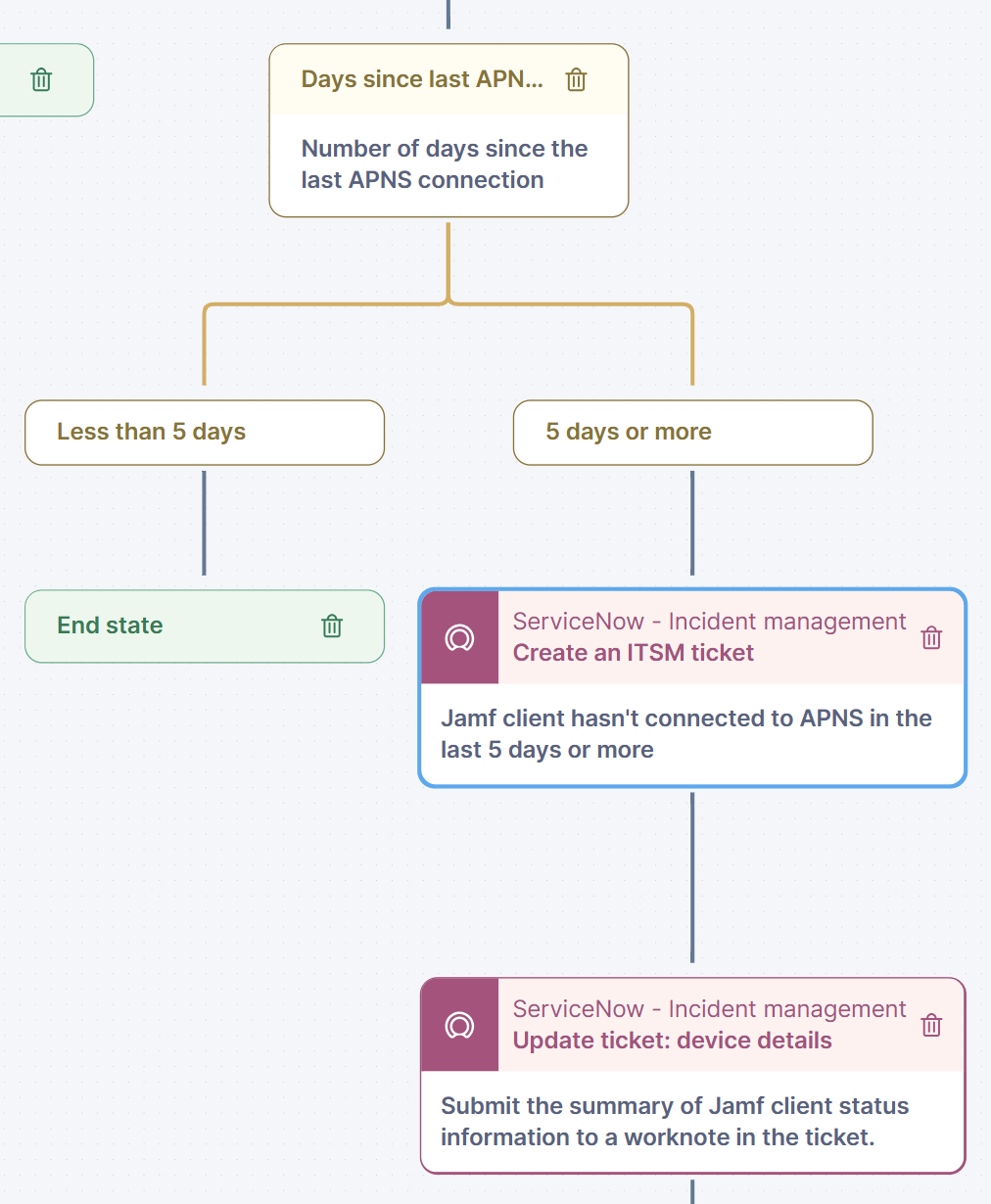
### Check the APNS connection
If other issues are detected, the workflow will report a device as affected by Jamf client issues via an ITSM ticket. This ticket contains a short summary of the detected issue, as well as the output of the 'Get Jamf Agent Health' remote action, which may be useful for further troubleshooting of an issue.
***
RELATED TOPICS
* [Workflow: Jamf client continuity](/platform/library-packs/security-and-compliance/workflow-jamf-client-continuity.md)
* [Configuration guide: Jamf client continuity](/platform/library-packs/security-and-compliance/workflow-jamf-client-continuity/configuration-guide-microsoft-teams-assisted-troubleshooting.md)
* [Managing workflows](/platform/user-guide/workflows/managing-workflows.md)
* [Managing remote actions](/platform/user-guide/remote-actions/setting-up-and-managing-remote-actions/managing-remote-actions.md)
---
# Agent Instructions
This documentation is published with GitBook. GitBook is the documentation platform designed so that both humans and AI agents can read, navigate, and reason over technical content effectively. Learn more at gitbook.com.
## Querying This Documentation
If you need additional information that is not directly available in this page, you can query the documentation dynamically by asking a question.
Perform an HTTP GET request on the current page URL with the `ask` query parameter, and the optional `goal` query parameter:
```
GET https://docs.nexthink.com/platform/library-packs/security-and-compliance/workflow-jamf-client-continuity/usage-guide-microsoft-teams-assisted-troubleshooting.md?ask=&goal=
```
`ask` is the immediate question: it should be specific, self-contained, and written in natural language.
`goal` is optional and describes the broader end goal you are ultimately trying to accomplish on behalf of the user. GitBook uses it to tailor the answer towards what is most useful for that goal.
The response will contain a direct answer to the question and relevant excerpts and sources from the documentation.
Use this mechanism when the answer is not explicitly present in the current page, you need clarification or additional context, or you want to retrieve related documentation sections.