# ServiceNow - Incident management connector thinklet

Configure ServiceNow - Incident management connector thinklets to take specific actions within your workflow.

## Action: Add affected configuration item to incident <a href="#servicenow-incidentmanagement-action-createincident" id="servicenow-incidentmanagement-action-createincident"></a>

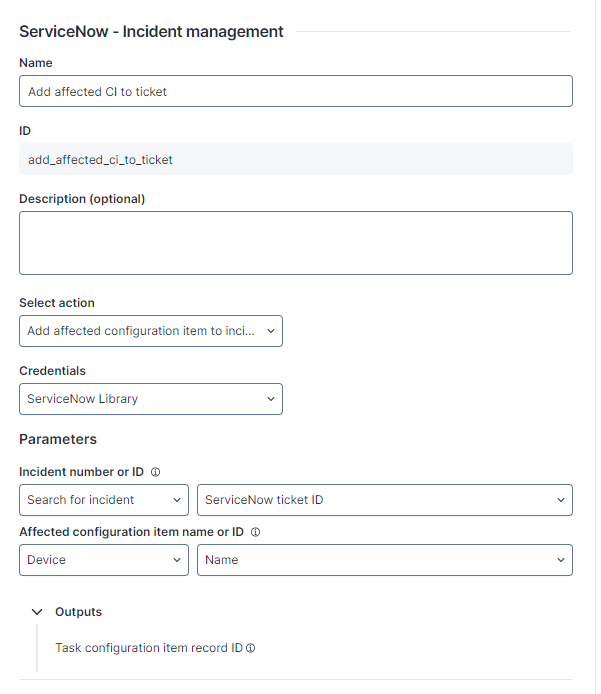
**Add affected configuration item to incident** adds a task entry to the Affected CIs tab of the incident ticket.

The ServiceNow - Incident management connector thinklet relies on the [Table incident POST](https://docs.servicenow.com/bundle/washingtondc-api-reference/page/integrate/inbound-rest/concept/c_TableAPI.html#title_table-POST) API endpoint.

<figure><img src="/files/00rupFagCcG46tlyKxxA" alt="" width="301"><figcaption></figcaption></figure>

* **Parameters**: Configure the data used as parameters for this action. Hover over the tooltip icon for more information on how the parameter is mapped and what data is required.
  * **Incident number or ID**
  * **Affected configuration item name or ID**
* **Outputs**: View the outputs of the connector thinklet.
  * **Task configuration item record ID** (`TaskCIRecordID`)

The table below shows the API Service connector details needed when recreating the connector:

<table><thead><tr><th>Field</th><th>Value</th><th data-hidden></th></tr></thead><tbody><tr><td>Resource Path</td><td>api/now/table/task_ci</td><td></td></tr><tr><td>Method</td><td>POST</td><td></td></tr><tr><td>Payload</td><td><code>{"ci_item": "{{AffectedConfigurationItemRefernce}}","task": "{{IncidentReference}}"}</code></td><td></td></tr><tr><td>Outputs</td><td>Task record id: <code>$.result.sys_id</code></td><td></td></tr></tbody></table>

## Action: Add incident work note <a href="#servicenow-incidentmanagement-action-addincidentworknote" id="servicenow-incidentmanagement-action-addincidentworknote"></a>

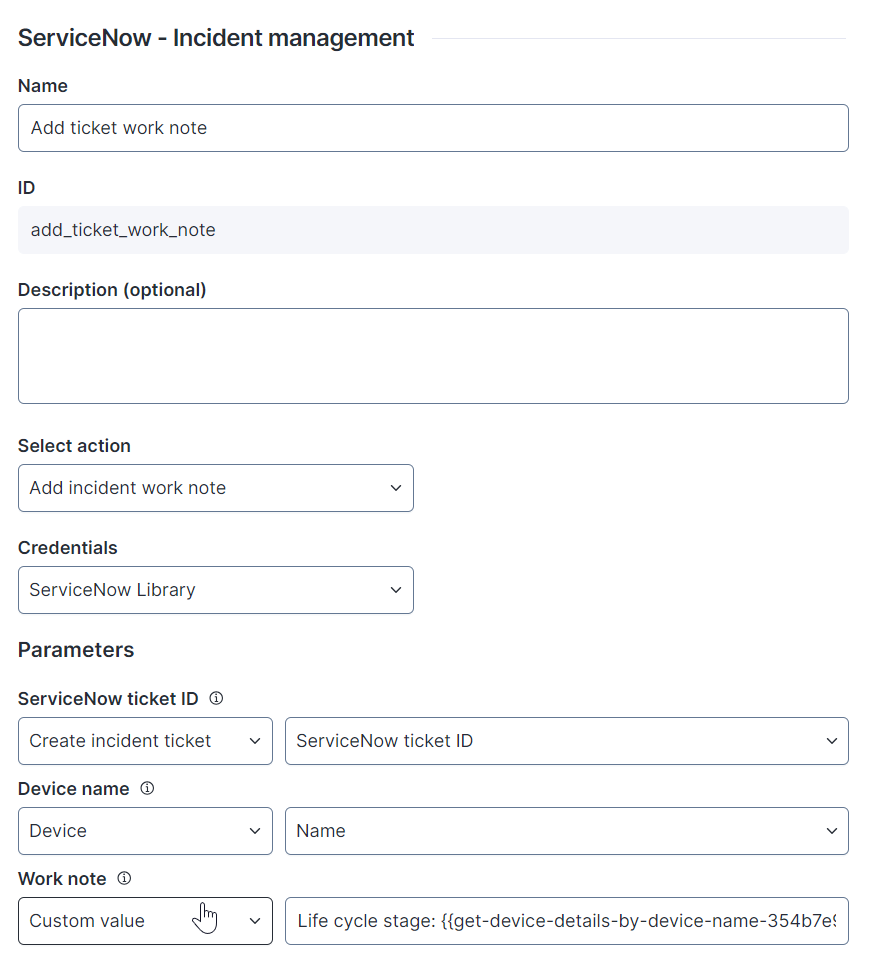
**Add incident work note** adds a work note for the incident ticket.

The ServiceNow - Incident management connector thinklet relies on the [Table incident PATCH](https://docs.servicenow.com/bundle/washingtondc-api-reference/page/integrate/inbound-rest/concept/c_TableAPI.md#title_table-patch) API endpoint.

<figure><img src="/files/Wj0j0Q17xKalfnTizz3t" alt="image-20240604-120125.png" width="375"><figcaption></figcaption></figure>

* **Name**: Enter a unique name for the connector thinklet.
* **ID**: The system generates the ID automatically based on the name.
* **Description (optional)**: Describe the purpose of the connector thinklet and what it does. This information is useful for other workflow users who may not be familiar with it.
* **Select action**: Select the action to be performed.
* **Credentials**: Select the connection credentials for the integration. Configure them first on the Connector credentials page of the Administration module. Refer to the [Connector credentials](/platform/configuring_nexthink/bringing-data-into-your-nexthink-instance/integrating-nexthink-with-third-party-tools/outbound-connectors/connector-credentials.md) documentation for more information.
* **Parameters**: Configure the data used as parameters for this action. Hover over the tooltip icon for more information on how the parameter is mapped and what data is required.
  * **ServiceNow ticket ID**: Identification to track ServiceNow ticket
  * **Device name:** The name of the device
  * **Work note**: Work notes text populated for the incident
* **Outputs**: View the outputs of the connector thinklet.

The table below shows the API Service connector details needed when recreating the connector:

<table><thead><tr><th width="202">Field</th><th>Value</th><th data-hidden></th></tr></thead><tbody><tr><td>Resource Path</td><td><code>/api/now/table/incident/{{ServiceNowTicketID}}</code></td><td></td></tr><tr><td>Method</td><td>PATCH</td><td></td></tr><tr><td>Payload</td><td><code>{"work_notes":"Device Name: {{DeviceName}}, {{WorkNote}}"}</code></td><td></td></tr><tr><td>Outputs</td><td>-</td><td></td></tr></tbody></table>

## Action: Change incident assignment group <a href="#servicenow-incidentmanagement-action-createincident" id="servicenow-incidentmanagement-action-createincident"></a>

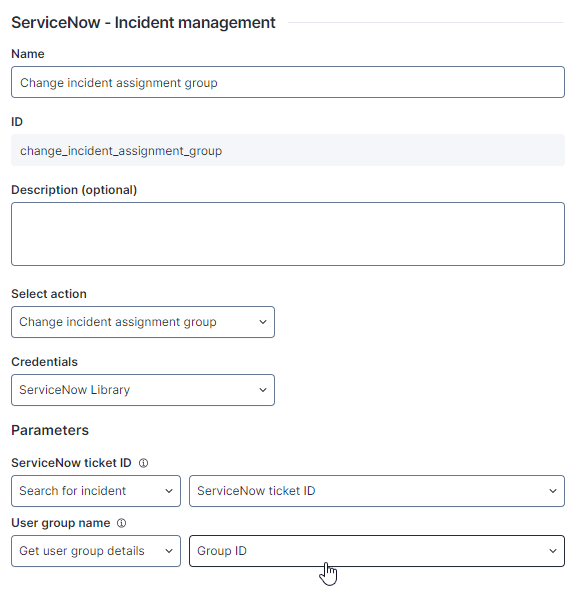
**Change incident assignment group** updates the Assignment group field of an incident ticket to the value provided by the input parameter.

The ServiceNow - Incident management connector thinklet relies on the [Table incident POST](https://docs.servicenow.com/bundle/washingtondc-api-reference/page/integrate/inbound-rest/concept/c_TableAPI.html#title_table-POST) API endpoint.

<figure><img src="/files/HhzOnSvf6MNuvp3jgDwt" alt="" width="291"><figcaption></figcaption></figure>

* **Parameters**: Configure the data used as parameters for this action. Hover over the tooltip icon for more information on how the parameter is mapped and what data is required.
  * **ServiceNow ticket ID**
  * **User group name**

The table below shows the API Service connector details needed when recreating the connector:

<table><thead><tr><th width="237">Field</th><th>Value</th><th data-hidden></th></tr></thead><tbody><tr><td>Resource Path</td><td><code>api/now/table/incident/{{ServiceNowTicketID}}</code></td><td></td></tr><tr><td>Method</td><td>PATCH</td><td></td></tr><tr><td>Payload</td><td><code>{"assignment_group":"{{UserGroupName}}"}</code></td><td></td></tr><tr><td>Outputs</td><td></td><td></td></tr></tbody></table>

## Action: Create incident <a href="#servicenow-incidentmanagement-action-createincident" id="servicenow-incidentmanagement-action-createincident"></a>

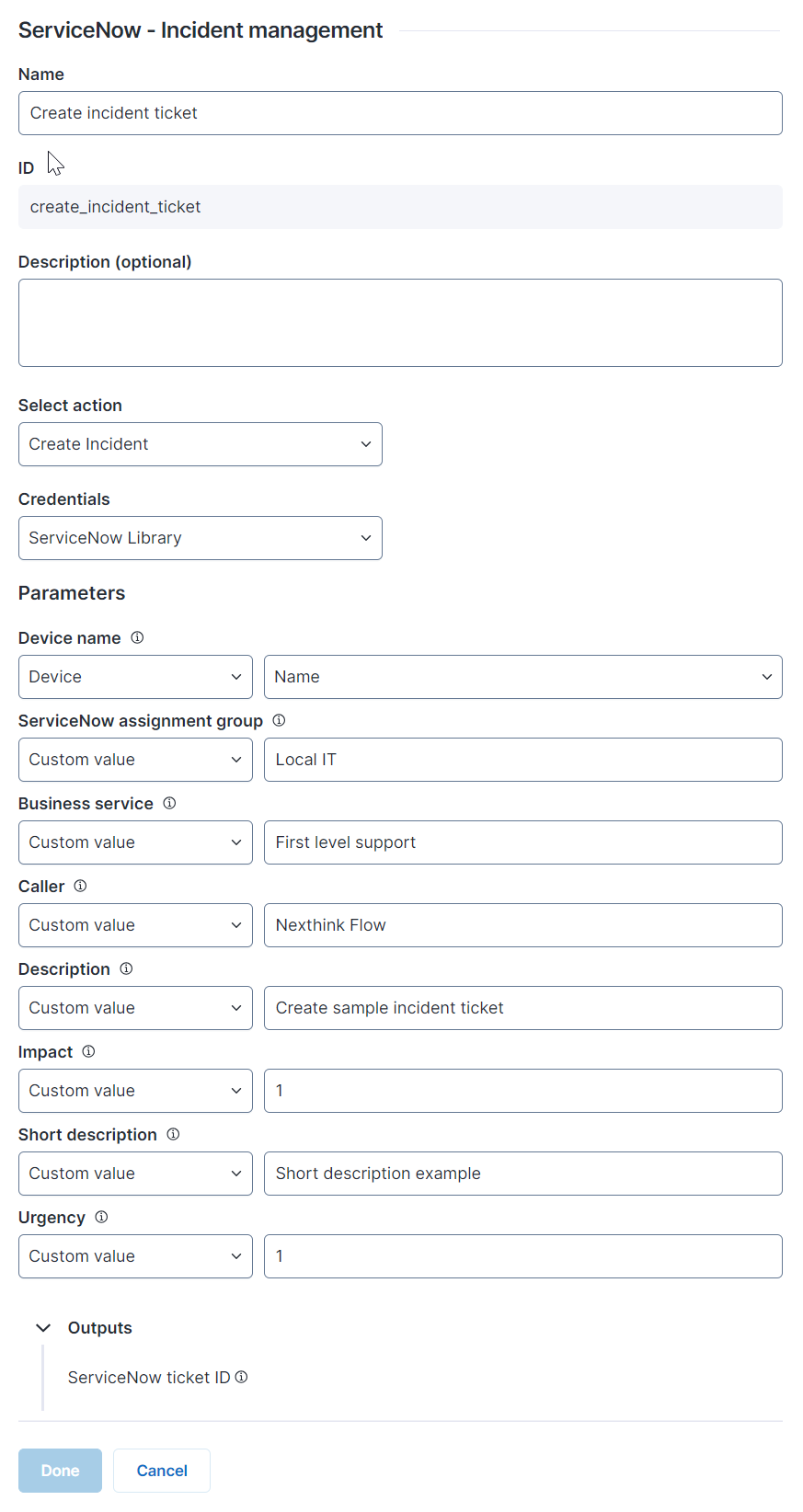
**Create Incident** creates a new ServiceNow incident ticket.

The ServiceNow - Incident management connector thinklet relies on the [Table incident POST](https://docs.servicenow.com/bundle/washingtondc-api-reference/page/integrate/inbound-rest/concept/c_TableAPI.html#title_table-POST) API endpoint.

<figure><img src="/files/71ZNiyBYHNe9oncKKe9i" alt="image-20240604-114738.png" width="375"><figcaption></figcaption></figure>

* **Parameters**: Configure the data used as parameters for this action. Hover over the tooltip icon for more information on how the parameter is mapped and what data is required.
  * **Device name**~~:~~ Name of the device
  * **ServiceNow assignment group**: Assignment group populated for the incident
  * **Business service**: Business service populated for the incident
  * **Caller**: Caller populated for the incident
  * **Description**: Description populated for the incident
  * **Impact**: Impact populated for the incident, 1- High, 2- Medium, 3- Low
  * **Short description**: Short description populated for the incident
  * **Urgency**: Urgency populated for the incident, 1- High, 2- Medium, 3- Low
* **Outputs**: View the outputs of the connector thinklet.
  * **ServiceNow ticket ID** (`ServiceNowTicketID`): ServiceNow ticket ID

The table below shows the API Service connector details needed when recreating the connector:

<table><thead><tr><th width="237">Field</th><th>Value</th><th data-hidden></th></tr></thead><tbody><tr><td>Resource Path</td><td><code>/api/now/table/incident</code></td><td></td></tr><tr><td>Method</td><td>POST</td><td></td></tr><tr><td>Payload</td><td><code>{"assignment_group": "{{ServiceNowAssignmentGroup}}", "business_service": "{{BusinessService}}","caller_id": "{{Caller}}","description": "{{Description}}","impact": "{{Impact}}","short_description": "{{ShortDescription}}","urgency": "{{Urgency}}", "cmdb_ci": "{{DeviceName}}"}</code></td><td></td></tr><tr><td>Outputs</td><td>ServiceNowTicketID: <code>$.result.sys_id</code></td><td></td></tr></tbody></table>

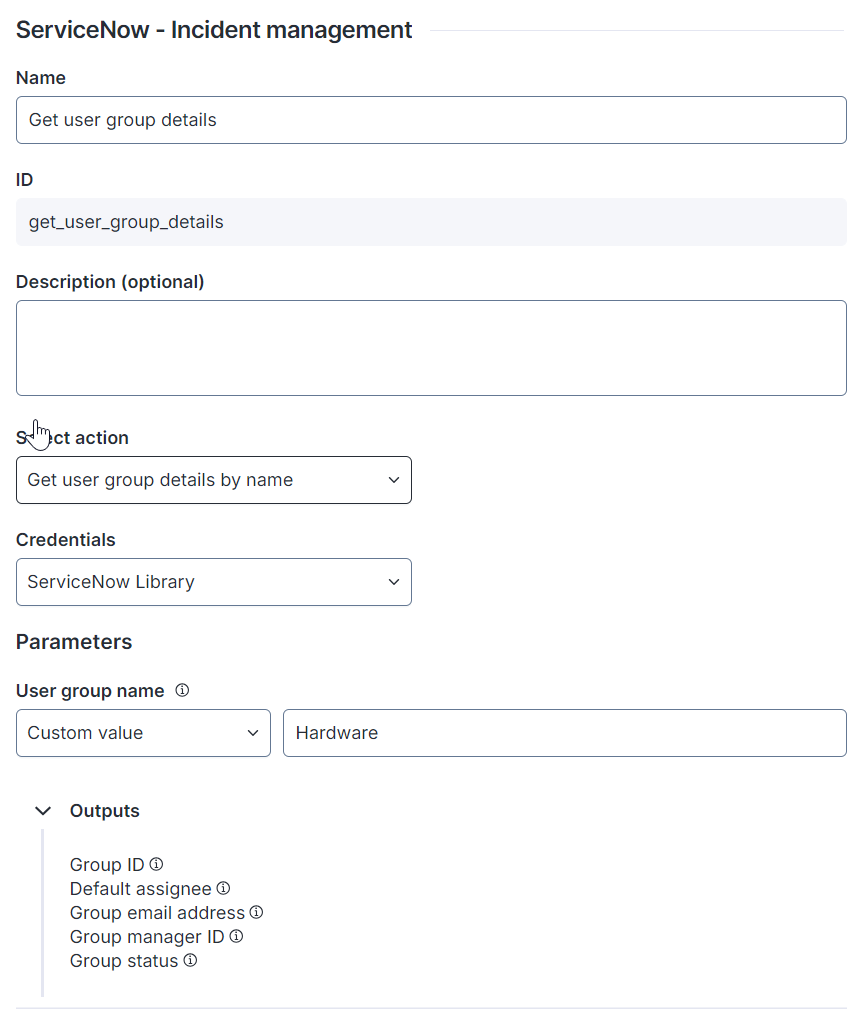
## Action: Get user group details by name <a href="#servicenow-incidentmanagement-action-createincident" id="servicenow-incidentmanagement-action-createincident"></a>

**Get user group details by name** retrieves group details using group names as search criteria.

The ServiceNow - Incident management connector thinklet relies on the [Table incident POST](https://docs.servicenow.com/bundle/washingtondc-api-reference/page/integrate/inbound-rest/concept/c_TableAPI.html#title_table-POST) API endpoint.

<figure><img src="/files/jV5dCq6SbiODDF1KVgDs" alt="" width="375"><figcaption></figcaption></figure>

* **Parameters**: Configure the data used as parameters for this action. Hover over the tooltip icon for more information on how the parameter is mapped and what data is required.
  * **User group name**~~:~~ Name of the group
* **Outputs**: View the outputs of the connector thinklet.
  * **Group ID** (`GroupID`)
  * **Default assignee** (`DefaultAssignee`)
  * **Group email address** (`GroupEmailAddress`)
  * **Group manager ID** (`GroupManagerID`)
  * **Group status** (`GroupStatus`): Is the group active - *true* or *false*

The table below shows the API Service connector details needed when recreating the connector:

<table><thead><tr><th width="237">Field</th><th>Value</th><th data-hidden></th></tr></thead><tbody><tr><td>Resource Path</td><td><code>api/now/table/sys_user_group?sysparm_query=name={{UserGroupName}}</code></td><td></td></tr><tr><td>Method</td><td>GET</td><td></td></tr><tr><td>Payload</td><td></td><td></td></tr><tr><td>Outputs</td><td><p><code>GroupStatus $.result[0].active</code></p><p><code>DefaultAssignee $.result[0].default_assignee</code></p><p><code>GroupEmailAddress $.result[0].email</code></p><p><code>GroupManagerID $.result[0].manager.value</code></p></td><td></td></tr></tbody></table>

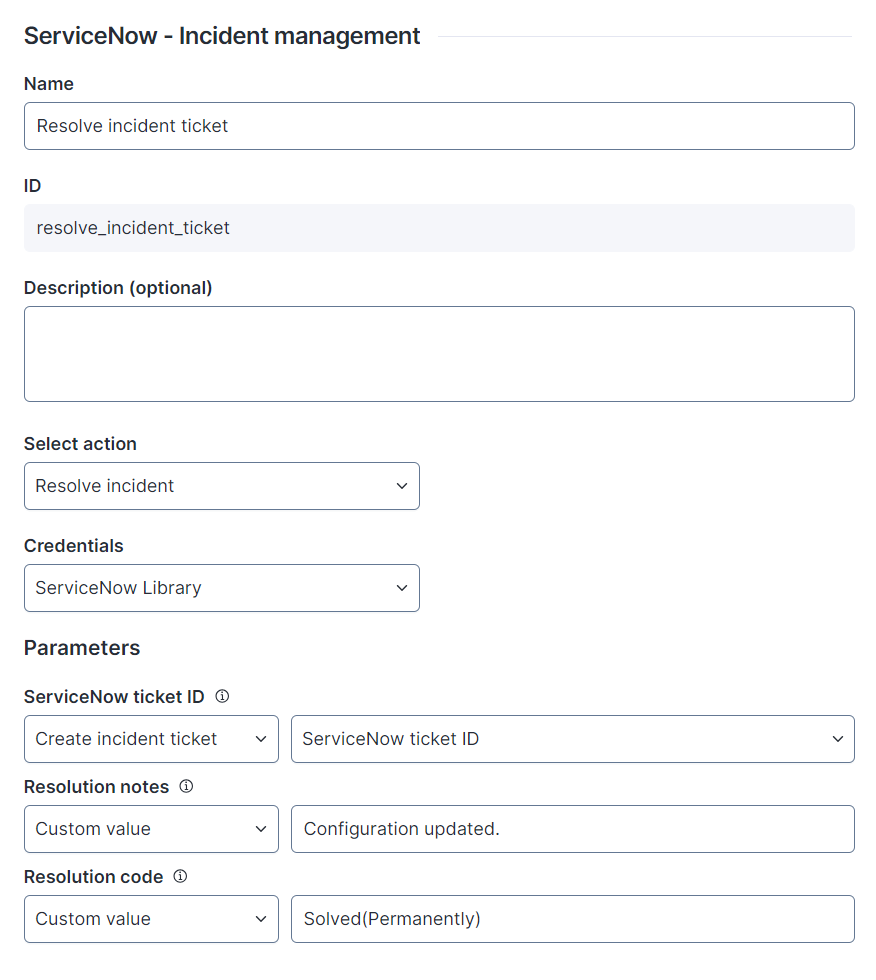
## Action: Resolve incident <a href="#servicenow-incidentmanagement-action-resolveincident" id="servicenow-incidentmanagement-action-resolveincident"></a>

**Resolve incident** changes the incident ticket state to **Resolved** and updates the resolution code and resolution notes.

The ServiceNow - Incident management connector thinklet relies on the [Table incident PATCH](https://docs.servicenow.com/bundle/washingtondc-api-reference/page/integrate/inbound-rest/concept/c_TableAPI.md#title_table-patch) API endpoint.

<figure><img src="/files/x9IA8rSm2BCJVjPEoSpz" alt="image-20240604-121433.png" width="375"><figcaption></figcaption></figure>

* **Parameters**: Configure the data used as parameters for this action. Hover over the tooltip icon for more information on how the parameter is mapped and what data is required.
  * **ServiceNow ticket ID**
  * **Resolution notes**: Description of the resolution
  * **Resolution code**: Resolution code populated for the ticket, e.g., Solved (Permanently)

The table below shows the API Service connector details needed when recreating the connector:

<table><thead><tr><th width="237">Field</th><th>Value</th><th data-hidden></th></tr></thead><tbody><tr><td>Resource Path</td><td><code>/api/now/table/incident/{{ServiceNowTicketID}}</code></td><td></td></tr><tr><td>Method</td><td>PATCH</td><td></td></tr><tr><td>Payload</td><td><code>{"state":"6","close_code":"{{CloseCode}}","close_notes":"{{CloseNotes}}"}</code></td><td></td></tr><tr><td>Outputs</td><td></td><td></td></tr></tbody></table>

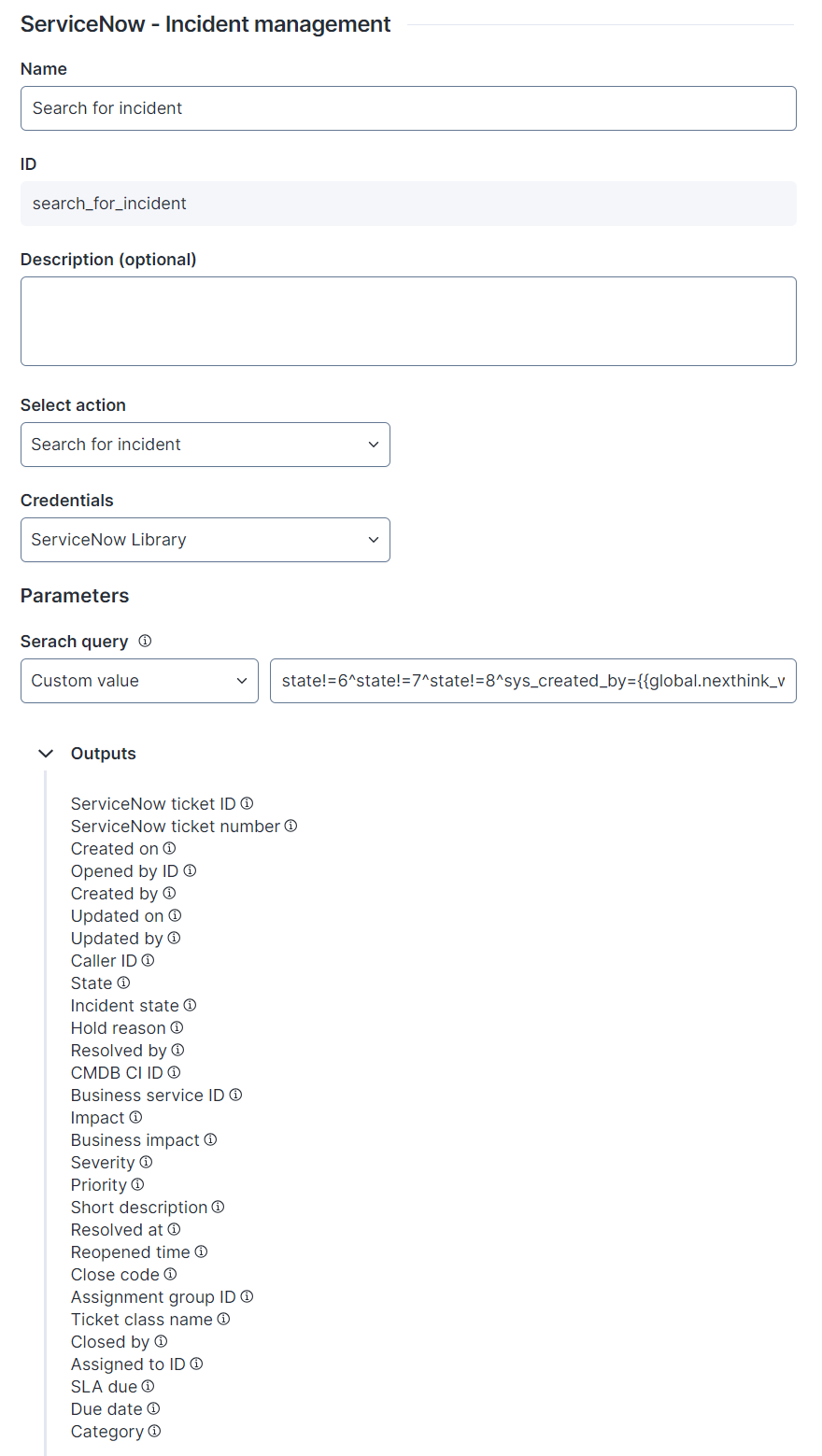
## Action: Search for incident <a href="#servicenow-incidentmanagement-action-createincident" id="servicenow-incidentmanagement-action-createincident"></a>

**Search for incident** searches for existing incident tickets using the search string as the search criterion.

The ServiceNow - Incident management connector thinklet relies on the [Table incident POST](https://docs.servicenow.com/bundle/washingtondc-api-reference/page/integrate/inbound-rest/concept/c_TableAPI.html#title_table-POST) API endpoint.

<figure><img src="/files/Z6TM7MRwoZuBglDrKGFp" alt="" width="375"><figcaption></figcaption></figure>

* **Parameters**: Configure the data used as parameters for this action. Hover over the tooltip icon for more information on how the parameter is mapped and what data is required.
  * **Search query**~~**:**~~ An encoded query string used to filter the results
* **Outputs**: View the outputs of the connector thinklet.
  * **ServiceNow ticket ID** (`ServiceNowTicketID`)
  * **ServiceNow ticket number** (`ServiceNowTicketNumber`)
  * **Created on** (`SysCreatedOn`)
  * **Opened by ID** (`OpenedByID`)
  * **Created by** (`CreatedBy`)
  * **Updated on** (`UpdatedOn`)
  * **Updated by** (`UpdatedBy`)
  * **Caller ID** (`CallerID`)
  * **State** (`State`)
  * **Incident state** (`IncidentState`)
  * **Hold reason** (`HoldReason`)
  * **Resolved by** (`ResolvedBy`)
  * **CMDB CI ID** (`CmdbCi`): Configuration Management Database (CMDB) Configuration Item (CI) ID
  * **Business service ID** (`Business service ID`)
  * **Impact** (`Impact`)
  * **Business impact** (`BusinessImpact`)
  * **Severity** (`Severity`)
  * **Priority** (`Priority`)
  * **Short description** (`ShortDescription`)
  * **Resolved at** (`ResolvedAt`)
  * **Reopened time** (`ReopenedTime`)
  * **Close code** (`CloseCode`)
  * **AssignmentGroupID** (`AssignmentGroupID`)
  * **Ticket class name** (`TicketClassName`)
  * **Closed b**y (`ClosedBy`)
  * **Assigned to ID** (`AssignedToID`)
  * **SLA due** (`SlaDue`)
  * **Due date** (`DueDate`)
  * **Category** (`Category`)

The following example search string retrieves incident tickets created by the workflow user. It excludes incidents with a status of closed, resolved, or canceled, includes only those with `workflow_name` in the short description, and applies a limit to the number of records retrieved.

<details>

<summary>Example search string for an input parameter</summary>

```
state!=6^state!=7^state!=8^sys_created_by={{global.nexthink_workflow_user}}^short_descriptionLIKEworkflow_name&sysparm_limit=1
```

</details>

The table below shows the API Service connector details needed when recreating the connector:

<table><thead><tr><th width="237">Field</th><th>Value</th><th data-hidden></th></tr></thead><tbody><tr><td>Resource Path</td><td><code>api/now/table/incident?sysparm_query={{SearchQuery}}</code></td><td></td></tr><tr><td>Method</td><td>GET</td><td></td></tr><tr><td>Payload</td><td></td><td></td></tr><tr><td>Outputs</td><td><p><code>AssignedToID $.result[0].assigned_to.value</code></p><p><code>AssignmentGroupID $.result[0].assignment_group.value BusinessImpact $.result[0].business_impact</code></p><p><code>Business service ID $.result[0].business_service.value</code></p><p><code>CallerID $.result[0].caller_id.value</code></p><p><code>Category $.result[0].category</code></p><p><code>CloseCode $.result[0].close_code</code></p><p><code>ClosedBy $.result[0].closed_by</code></p><p><code>CmdbCi $.result[0].cmdb_ci.value</code></p><p><code>DueDate $.result[0].due_date</code></p><p><code>HoldReason $.result[0].hold_reason</code></p><p><code>Impact $.result[0].impact Incident</code></p><p><code>State $.result[0].incident_state</code></p><p><code>ServiceNowTicketNumber $.result[0].number</code></p><p><code>OpenedByID $.result[0].opened_by.value Priority $.result[0].priority</code></p><p><code>ReopenedTime $.result[0].reopened_time</code></p><p><code>ResolvedAt $.result[0].resolved_at</code></p><p><code>ResolvedBy $.result[0].resolved_by</code></p><p><code>Severity $.result[0].severity</code></p><p><code>ShortDescription $.result[0].short_description</code></p><p><code>SlaDue $.result[0].sla_due</code></p><p><code>State $.result[0].state</code></p><p><code>TicketClassName $.result[0].sys_class_name</code></p></td><td></td></tr></tbody></table>

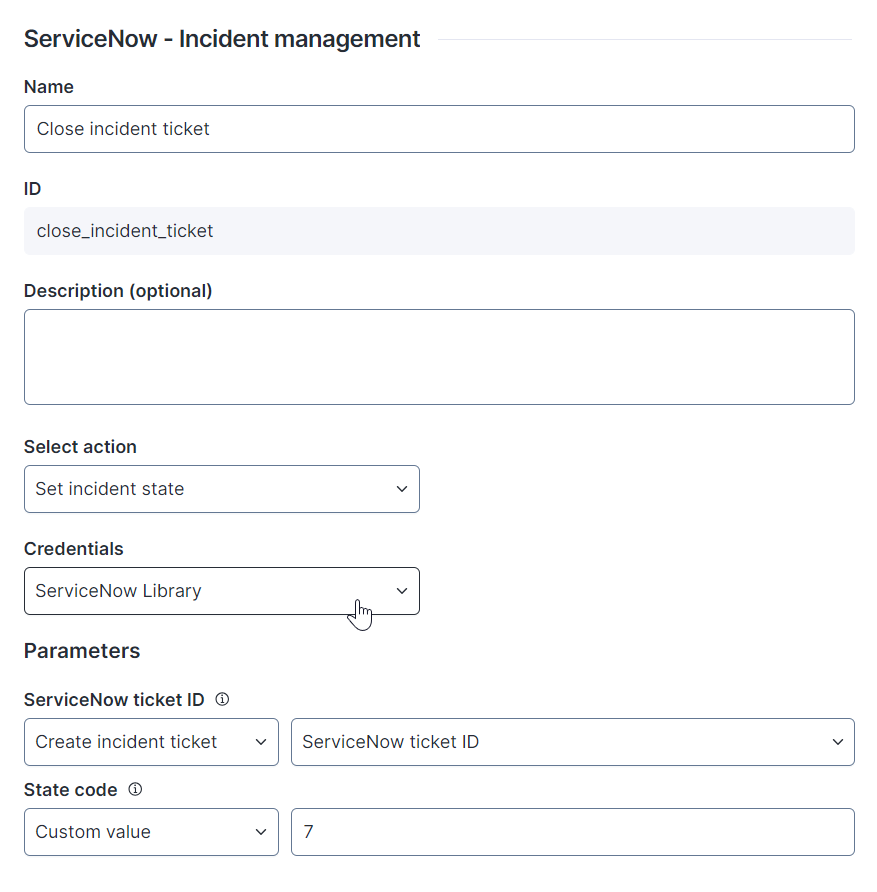
## Action: Set incident state <a href="#servicenow-incidentmanagement-action-setincidentstate" id="servicenow-incidentmanagement-action-setincidentstate"></a>

**Set incident state** changes the incident ticket **State code** to one of the following: 1- New, 2- In Progress, 7- Closed and 8- Canceled

The ServiceNow - Incident management connector thinklet relies on the [Table incident PATCH](https://docs.servicenow.com/bundle/washingtondc-api-reference/page/integrate/inbound-rest/concept/c_TableAPI.md#title_table-patch) API endpoint.

<figure><img src="/files/KFnMFLNxcUS37nYcIBme" alt="image-20240604-122044.png" width="375"><figcaption></figcaption></figure>

* **Parameters**: Configure the data used as parameters for this action. Hover over the tooltip icon for more information on how the parameter is mapped and what data is required.
  * **ServiceNow ticket ID**
  * **State code**: 1- New, 2- In Progress, 7- Closed, 8- Canceled

The table below shows the API Service connector details needed when recreating the connector:

<table><thead><tr><th width="237">Field</th><th>Value</th><th data-hidden></th></tr></thead><tbody><tr><td>Resource Path</td><td><code>api/now/table/incident/{{ServiceNowTicketID}}</code></td><td></td></tr><tr><td>Method</td><td>PATCH</td><td></td></tr><tr><td>Payload</td><td><code>{"incident_state":"{{StateCode}}"}</code></td><td></td></tr><tr><td>Outputs</td><td></td><td></td></tr></tbody></table>

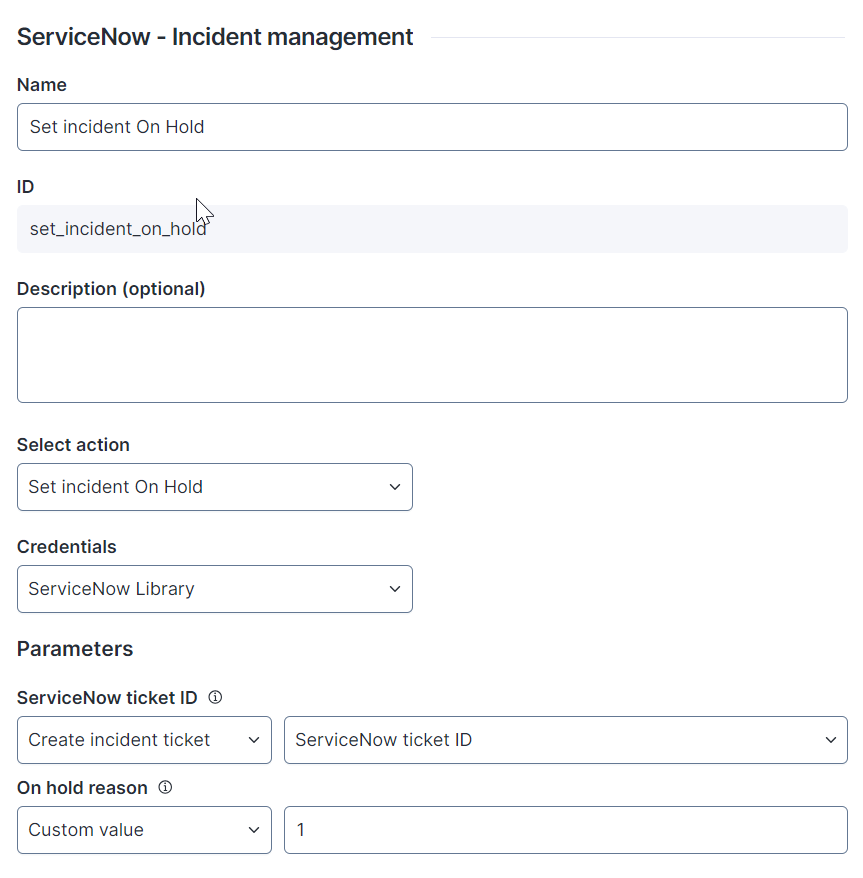
## Action: Set incident On Hold <a href="#servicenow-incidentmanagement-action-setincidentonhold" id="servicenow-incidentmanagement-action-setincidentonhold"></a>

**Set incident On Hold** sets the incident ticket to **On Hold** and updates the **On hold reason**.

The ServiceNow - Incident management connector thinklet relies on the [Table incident PATCH](https://docs.servicenow.com/bundle/washingtondc-api-reference/page/integrate/inbound-rest/concept/c_TableAPI.md#title_table-patch) API endpoint.

<figure><img src="/files/nqxPe9LFdzR4J3cOLAkZ" alt="image-20240604-122509.png" width="375"><figcaption></figcaption></figure>

* **Parameters**: Configure the data used as parameters for this action. Hover over the tooltip icon for more information on how the parameter is mapped and what data is required.
  * **ServiceNow ticket ID**
  * **On hold reason**: 1- Awaiting Caller, 2- Awaiting Evidence, 3- Awaiting Problem, 4- Awaiting Vendor, 5- Awaiting Change

The table below shows the API Service connector details needed when recreating the connector:

<table><thead><tr><th width="237">Field</th><th>Value</th><th data-hidden></th></tr></thead><tbody><tr><td>Resource Path</td><td><code>api/now/table/incident/{{ServiceNowTicketID}}</code></td><td></td></tr><tr><td>Method</td><td>PATCH</td><td></td></tr><tr><td>Payload</td><td></td><td></td></tr><tr><td>Outputs</td><td></td><td></td></tr></tbody></table>


---

# Agent Instructions: Querying This Documentation

If you need additional information that is not directly available in this page, you can query the documentation dynamically by asking a question.

Perform an HTTP GET request on the current page URL with the `ask` query parameter:

```
GET https://docs.nexthink.com/platform/user-guide/workflows/creating-workflows/configuring-connector-thinklet/servicenow-incident-management.md?ask=<question>
```

The question should be specific, self-contained, and written in natural language.
The response will contain a direct answer to the question and relevant excerpts and sources from the documentation.

Use this mechanism when the answer is not explicitly present in the current page, you need clarification or additional context, or you want to retrieve related documentation sections.