> For the complete documentation index, see [llms.txt](https://docs.nexthink.com/platform/llms.txt). Markdown versions of documentation pages are available by appending `.md` to page URLs; this page is available as [Markdown](https://docs.nexthink.com/platform/whats-new/whats-new-2024/whats-new-2024.7.md).
# What's new 2024.7
**The version 2024.7 release date is August 19, 2024**. View the release notes on the [Extended Documentation](https://edocs.nexthink.com/nexthink-infinity/infinity-release-notes) website.
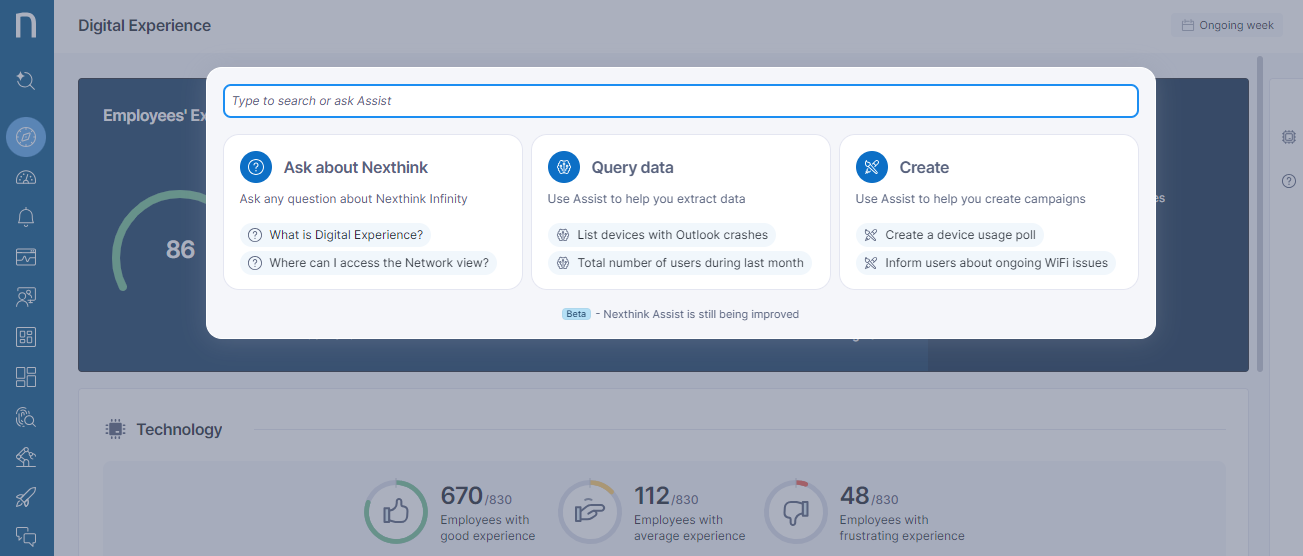
## **Nexthink Assist**
Get more out of Infinity with Nexthink Assist, our advanced natural language assistant that helps you speed up everyday tasks. Assist can help you:
* Create NQL investigations easily using natural language
* Create Campaigns fast with suggestions on the right phrasing for the right audience
* Get answers on how to use Infinity from our Documentation & Learn courses
Refer to the [Using Nexthink Assist](/platform/user-guide/search-and-workspace/using-workspace.md) documentation for more information.
Nexthink Assist will be rolled out progressively by region starting on September 3rd. You will receive further communication a few days before it is activated for your region so that you can anticipate its arrival.
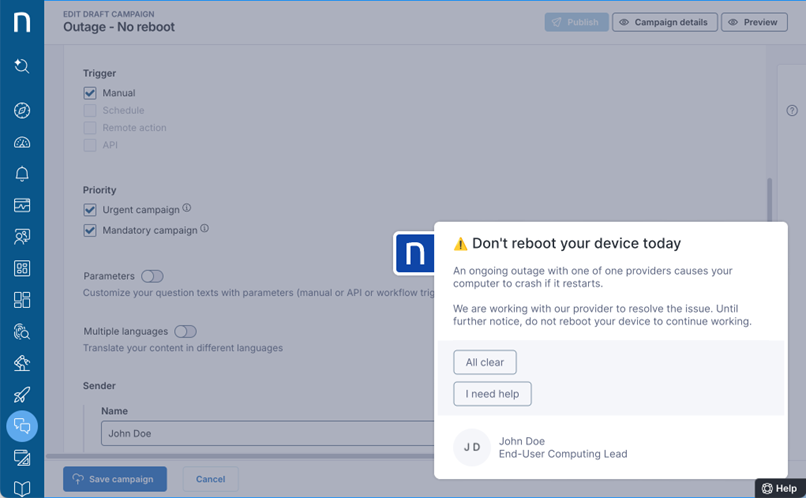
## **Mandatory campaigns**
Receive employee feedback or acknowledgement of important messages faster by creating campaigns with a mandatory response. A new option in campaigns lets you choose whether or not an employee can decline or postpone a campaign. This feature will be available to endpoints once they have been upgraded to Collector version 24.7.
Refer to the [Responding to Nexthink Campaigns ](/platform/user-guide/campaigns/working-with-campaigns/answering-a-campaign.md)documentation for more information.
💡 Thank you for expressing your interest in [this feature on our ideas portal](https://ideas.nexthink.com/ideas/CP-I-1082).
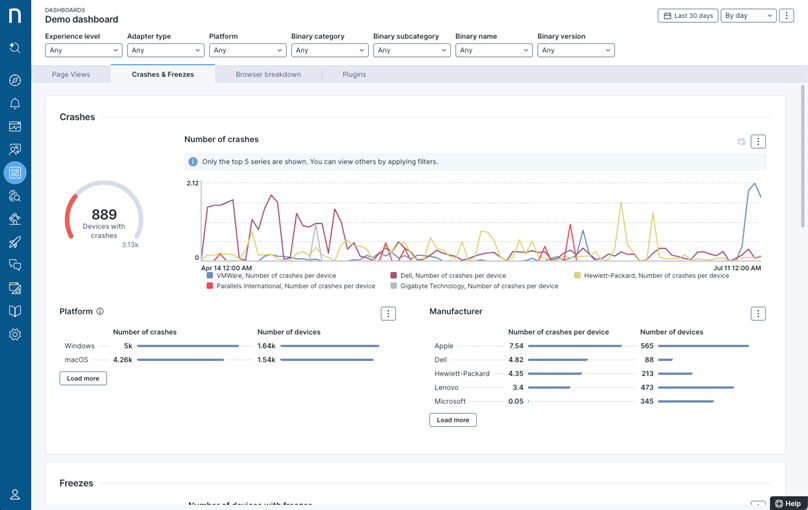
## **Dashboards: Breakdowns for line charts**
Create dashboards more easily when you need to show how a metric develops over time across different segments. New breakdowns for line charts now let you break down a metric by segment without needing to specify each segment individually, meaning you no longer need to adapt your NQL query if the segments change.
Refer to the [Line chart](/platform/user-guide/live-dashboards/widget-types/line-chart.md) documentation for more information.
## **Trends enhancements**
Gain greater visibility into possible problems with several enhancements to Custom Trends:
* Access trend computation logs using NQL
* Investigate the cause of errors and find solutions more quickly with trend computation logs
* Set up automatic alerts on trend computation logs
* Recover automatically from possible errors for improved data quality and less missing data
* Immediately plot trend data for new Custom Trends with the automatic calculation of 3 days of past data
Refer to the [Custom Trends Management](/platform/user-guide/administration/content-management/custom-trends-management.md) documentation for more information.
💡 Thank you for expressing your interest in [this feature on our ideas portal](https://ideas.nexthink.com/ideas/CP-I-1577).
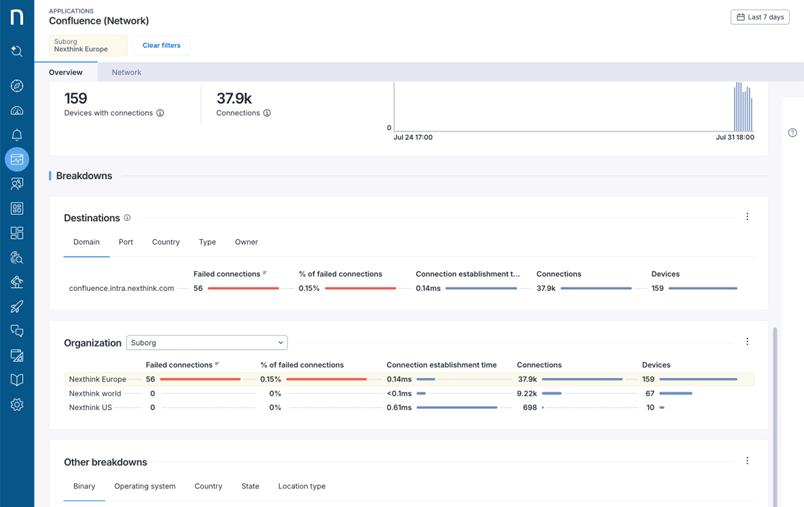
## **Applications: support for custom classifications**
Troubleshoot and analyze usage of applications more easily with custom classifications. The *Organization* breakdown in the *Network applications* and new *Web applications* dashboards lists all entities and custom classifications defined in the organization under product configuration. Note that desktop applications do not yet support custom classifications.
Refer to the [Monitoring network applications](/platform/user-guide/applications/monitoring-applications/monitoring-network-applications.md) and[ Monitoring web applications - new experience ](/platform/user-guide/applications/monitoring-applications/monitoring-web-applications.md)documentation for more information.
## **Applications: 90-day history**
See the impact of web application fixes and changes over time, and consult trends beyond 30 days. New web application dashboards now offer a 90-day timeframe, facilitating the analysis of changes that span over longer time periods. Additionally 4 new summary tables have been introduced in NQL:
* web.errors\_summary
* web.events\_summary
* web.page\_views\_summary
* web.transactions.summary
Note that device and user associations are not supported in the summary tables. As a result, device breakdowns, ISP breakdowns, and links to investigations are removed when the 90-day timeframe is selected.
Refer to the [Monitoring web applications](/platform/user-guide/applications/monitoring-applications/monitoring-web-applications.md) documentation for more information.
This functionality will be made available two weeks after the 2024.7 release.
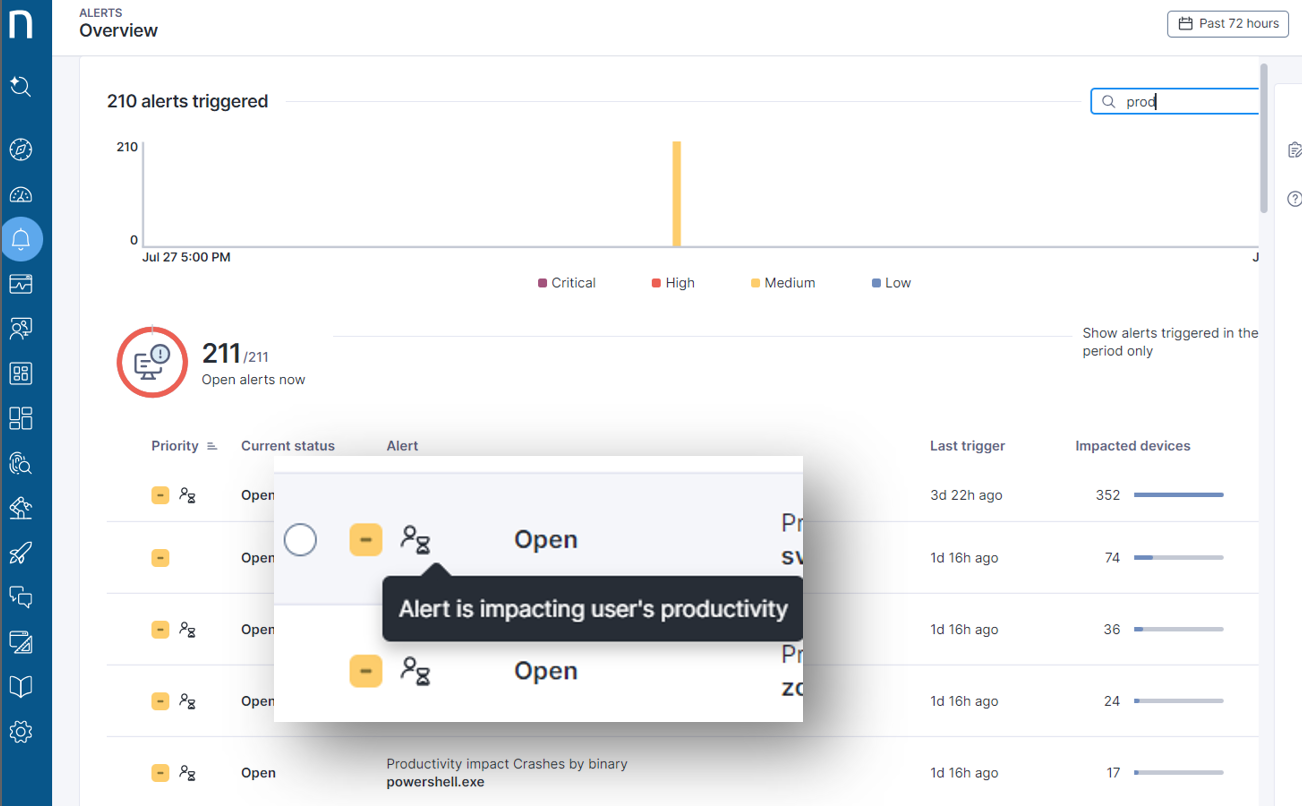
## **Alerts: Identify issues impacting productivity**
Reduce your MTTR by focusing your attention on the issues that matter the most. Now issues listed in Alerts overview give a clear indication of the impact on the productivity of your employees so you can tackle the most important ones first.
Refer to the [Alerts overview](/platform/user-guide/alerts-and-diagnostics/responding-to-alerts/alerts-overview.md) documentation for more information.
## **Tags for Alerts**
Manage your alerts more easily with tags, in the same way you use tags for other content like campaigns and remote actions.
Refer to the [Managing alerts](/platform/user-guide/alerts-and-diagnostics/managing-alerts.md) documentation for more information.
## **More fields allowed in checklists**
Make checklists more powerful with a greater number of allowed fields. Admins will have fewer checklists to create and manage, and support agents won't have to switch between multiple checklists, as checklists can now contain up to 20 custom fields and 35 fields in total.
Refer to the [Checklists management](/platform/user-guide/administration/content-management/checklists-management.md) and [Nexthink Infinity default thresholds and limits overview](/platform/references/nexthink-infinity-default-thresholds-overview.md) documentation for more information.
💡 Thank you for expressing your interest in [this feature on our ideas portal](https://ideas.nexthink.com/ideas/CP-I-1050).
These changes will appear in Amplify once the extension is updated to the latest version. The new version of Amplify will be available in the Chrome store two weeks after the 2024.7 release.
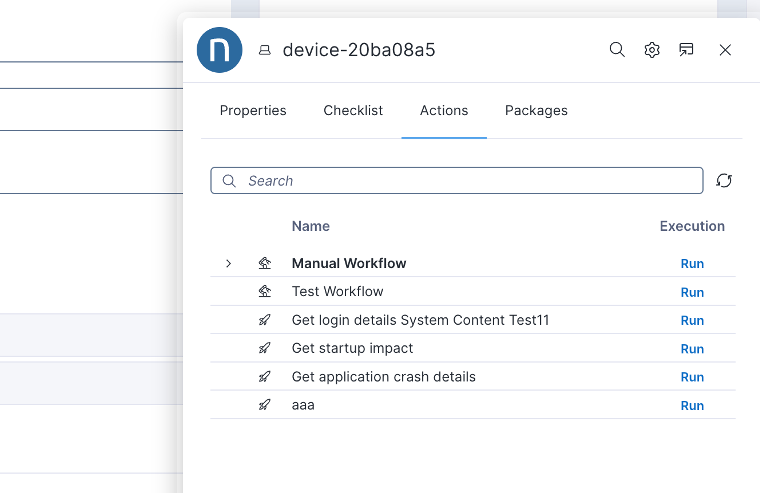
## **Amplify: Trigger workflows**
Execute multiple actions more easily by triggering workflows directly from Amplify. Instead of running multiple remote actions, support agents can trigger complex workflows from Amplify, view the status of previous executions, and copy the outcome of the action to the support ticket for further reference.
Refer to the [Amplify ](/platform/configuring_nexthink/bringing-data-into-your-nexthink-instance/deploying-nexthink-in-non-vdi-environment/configure-amplify.md)documentation for more information.
💡 Thank you for expressing your interest in [this feature on our ideas portal](https://ideas.nexthink.com/ideas/CP-I-1395).
[Amplify](https://nexthink.com/platform/amplify) and [Flow](https://nexthink.com/platform/flow) are subject to additional licenses, please contact your Nexthink representative for more information.
These changes will appear in Amplify once the extension is updated to the latest version. The new version of Amplify will be available in the Chrome store two weeks after the 2024.7 release.
## **Amplify: View workflow execution status**
See the status of the last 2 executions of workflows directly in Amplify's actions tab, without the additional effort and permissions required to consult this in-product. With the copy to clipboard option, you can copy the Workflow execution details to add to the ITSM ticket notes for further reference.
Refer to the [Amplify](/platform/configuring_nexthink/bringing-data-into-your-nexthink-instance/deploying-nexthink-in-non-vdi-environment/configure-amplify.md) documentation for more information.
[Amplify](https://nexthink.com/platform/amplify) is subject to an additional license, please contact your Nexthink representative for more information.
## **Flow: Wait for API**
Save time for support agents and your employees by integrating Flow with interactive 3rd-party systems like a chatbot. Now you can include a *Wait for API* behavior in your workflows to instruct your automation to wait for a response from an external source before proceeding.
Refer to the [Trigger wait for event](https://nexthink.stoplight.io/docs/api/workflows-api/operations/create-a-api-v-1-workflow-workflow-execution-trigger) documentation for more information.
[Flow](https://nexthink.com/platform/flow) is subject to an additional license, please contact your Nexthink representative for more information.
## **Flow: Workflow trigger for remote actions and campaigns**
Gain greater visibility and control over which remote actions and campaigns are used in workflows. Both remote actions and campaigns now have a workflow trigger option that must be explicitly selected to allow their use in workflow designs.
Refer to the [Triggering campaigns](/platform/user-guide/campaigns/working-with-campaigns/triggering-campaigns.md) and [Triggering remote actions](/platform/user-guide/remote-actions/setting-up-and-managing-remote-actions/managing-remote-actions.md#triggering) documentation for more information.
[Flow](https://nexthink.com/platform/flow) is subject to an additional license, please contact your Nexthink representative for more information.
## **Investigate remote action executions**
Consult the results of your remote action executions more easily with direct access to execution details from the remote action dashboard. You can now drill down to execution details (shown next to the number of executions) and drill down to the last executions per device (shown next to the number of devices). Inputs and outputs are displayed in columns to facilitate analysis and exporting the data to other systems.
Refer to the[ Using remote actions](/platform/user-guide/remote-actions/using-remote-actions.md) documentation for more information.
💡 Thank you for expressing your interest in [this feature on our ideas portal](https://ideas.nexthink.com/ideas/CP-I-1195).
## **Description of binaries in NQL**
Troubleshoot binaries more easily with meaningful descriptions. Binary descriptions are created using GenAI and exposed in NQL to give additional context to your investigations.
## **Granular data privacy permissions**
Adhere to your internal compliance rules when granting access to sensitive data, thanks to more granular data privacy settings. It is now possible to individually grant access to sensitive user data, device data, and/or destination/domain data for each role. This ensures that Nexthink users see only the data they are permitted to access.
Refer to the [Roles ](/platform/user-guide/administration/account-management/roles.md#roles-dataprivacy)documentation for more information.
💡 Thank you for expressing your interest in [this feature on our ideas portal](https://ideas.nexthink.com/ideas/CP-I-1625).
This functionality will be made available following the completion of the 2024.7 rollout in all regions.
## **Infinity self-service transition**
Prepare your transition to Infinity if you have not already made the leap. A new admin screen describes the Infinity transition steps, with descriptions and links to the documentation so that you can step through the transition at your own pace. Once you're ready Nexthink Support will help (via a support ticket) with the final step to complete your full transition to Infinity.
Refer to the [Infinity Transition page](https://edocs.nexthink.com/infinity-transition/infinity-transition-page) documentation for more information.
## **Support for Entra ID extension attributes**
Enrich user objects with custom extension attributes using the extended field selector in the updated Entra ID connector.
Refer to the [Connector for Microsoft Entra ID (Azure AD)](/platform/configuring_nexthink/bringing-data-into-your-nexthink-instance/integrating-nexthink-with-third-party-tools/inbound-connectors/connector-for-microsoft-entra-id-azure-ad.md) documentation for more information.
💡 Thank you for expressing your interest in [this feature on our ideas portal](https://ideas.nexthink.com/ideas/CP-I-592).
## **SFTP private key authentication**
Increase your security by using SSH authentication when exporting data to your SFTP Server.
Refer to the [Connector credentials](/platform/configuring_nexthink/bringing-data-into-your-nexthink-instance/integrating-nexthink-with-third-party-tools/outbound-connectors/connector-credentials.md) documentation for more information.
💡 Thank you for expressing your interest in [this feature on our ideas portal](https://ideas.nexthink.com/ideas/CP-I-1156).
## **Library: Enhanced sustainable IT reporting**
Gain better insight into sustainable IT reporting and footprint reduction opportunities with an updated Enhanced sustainable IT reporting dashboard. This dashboard now includes new estimates for consumption and emission, insights into manufacturing footprint (scope 3), idle time calculations, and consideration for working locations.
Refer to the [Sustainable IT](/platform/library-packs/sustainable-it.md) documentation for more information.
This new Library content will be made available following the completion of the 2024.7 rollout in all regions.
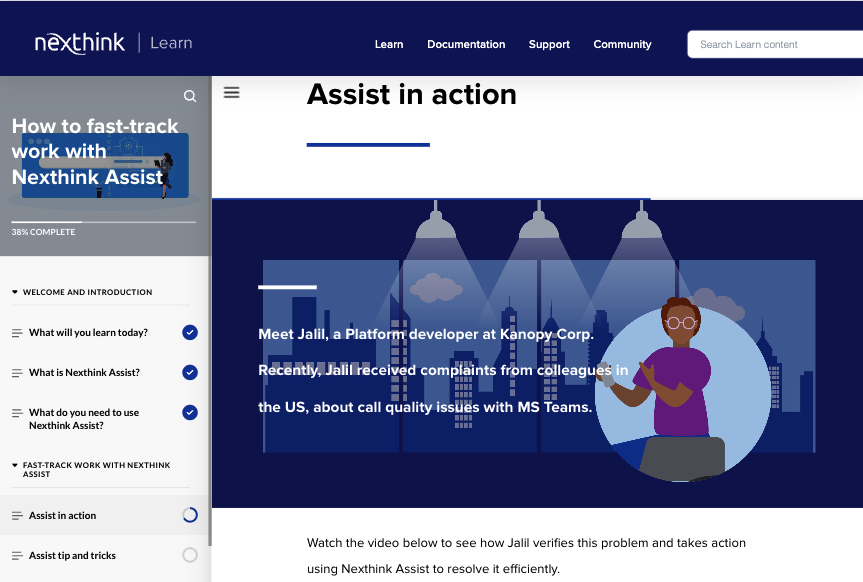
## **Learn: How to Fast-Track Work with Nexthink Assist**
Understand how to get the most out of Nexthink Assist with updated documentation and a new online course, [How to fast-track work with Nexthink Assist](https://learn.nexthink.com/courses/how-to-fast-track-work-with-nexthink-assist)*,* now available in the [Nexthink Infinity Fundamentals](https://learn.nexthink.com/learning-paths/nexthink-infinity-fundamentals) learning path.
---
# Agent Instructions
This documentation is published with GitBook. GitBook is the documentation platform designed so that both humans and AI agents can read, navigate, and reason over technical content effectively. Learn more at gitbook.com.
## Querying This Documentation
If you need additional information that is not directly available in this page, you can query the documentation dynamically by asking a question.
Perform an HTTP GET request on the current page URL with the `ask` query parameter, and the optional `goal` query parameter:
```
GET https://docs.nexthink.com/platform/whats-new/whats-new-2024/whats-new-2024.7.md?ask=&goal=
```
`ask` is the immediate question: it should be specific, self-contained, and written in natural language.
`goal` is optional and describes the broader end goal you are ultimately trying to accomplish on behalf of the user. GitBook uses it to tailor the answer towards what is most useful for that goal.
The response will contain a direct answer to the question and relevant excerpts and sources from the documentation.
Use this mechanism when the answer is not explicitly present in the current page, you need clarification or additional context, or you want to retrieve related documentation sections.