# Microsoft Outlook connector thinklet

Configure Microsoft Outlook connector thinklets to take specific actions within your workflow.

{% hint style="info" %}
Refer to the [Permissions ](https://learn.microsoft.com/en-us/graph/api/user-sendmail?view=graph-rest-1.0\&tabs=http#permissions)section in the Microsoft documentation to view the required authorizations.
{% endhint %}

## Action: Send an email to one recipient <a href="#microsoftoutlookconnectorthinklet-action-sendanemailtoonerecipient" id="microsoftoutlookconnectorthinklet-action-sendanemailtoonerecipient"></a>

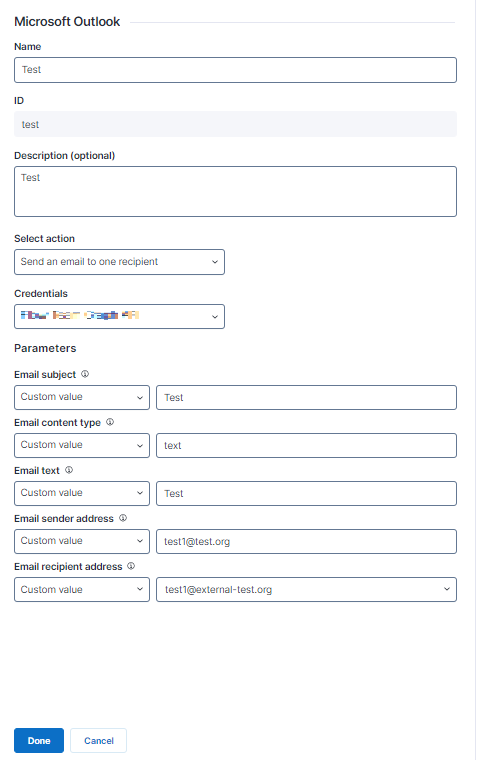
**Send an email to one recipient** sends an email to a single recipient from an email address that is part of your organization's Microsoft Graph tenant. The recipient's email address can belong to anyone inside or outside of your organization.

The Microsoft Outlook connector thinklet relies on the [user: sendMail](https://learn.microsoft.com/en-us/graph/api/user-sendmail?view=graph-rest-1.0\&tabs=http) API endpoint provided by Microsoft Graph.

<figure><img src="https://268444917-files.gitbook.io/~/files/v0/b/gitbook-x-prod.appspot.com/o/spaces%2FxJSUDk9NTtCHYPG5EWs3%2Fuploads%2Fgit-blob-7eb267901795b4c6a95ff6c39ab70968ff237ab8%2Fimage-20240521-085355.png?alt=media" alt="image-20240521-085355.png" width="479"><figcaption></figcaption></figure>

* **Parameters:** Configure the data used as parameters for this action. Hover over the tooltip icon for more information on how the parameter is mapped and what data is required.
  * **Email subject**: The subject of the email in plain text.
  * **Email content type**: The content type of the email. Set to **text** or **html** depending on the email text type.
  * **Email text**: The email text in HTML format or plain text, depending on the email content type setting.
  * **Email sender address**: The email address from which the email will be sent. It must be in your organization’s Microsoft Graph API scope.
  * **Email recipient address**: Any valid email address.
* **Outputs**
  * This thinklet connector has no outputs.

The table below shows the API Service connector details needed when recreating the connector:

<table><thead><tr><th width="272">Field</th><th>Value</th><th data-hidden></th></tr></thead><tbody><tr><td>Resource Path</td><td><code>/users/{{EmailSender}}/sendMail</code></td><td></td></tr><tr><td>Method</td><td>POST</td><td></td></tr><tr><td>Payload</td><td></td><td></td></tr><tr><td>Outputs</td><td><code>{ "message": { "subject": "{{EmailSubject}}", "body": { "contentType": "{{EmailContentType}}", "content": "{{EmailText}}" }, "toRecipients": [ { "emailAddress": { "address": "{{EmailRecipient}}" } } ] }, "saveToSentItems": "false"}</code></td><td></td></tr></tbody></table>

## Action: **Send an email to two recipients** <a href="#microsoftoutlookconnectorthinklet-action-sendanemailtotworecipients" id="microsoftoutlookconnectorthinklet-action-sendanemailtotworecipients"></a>

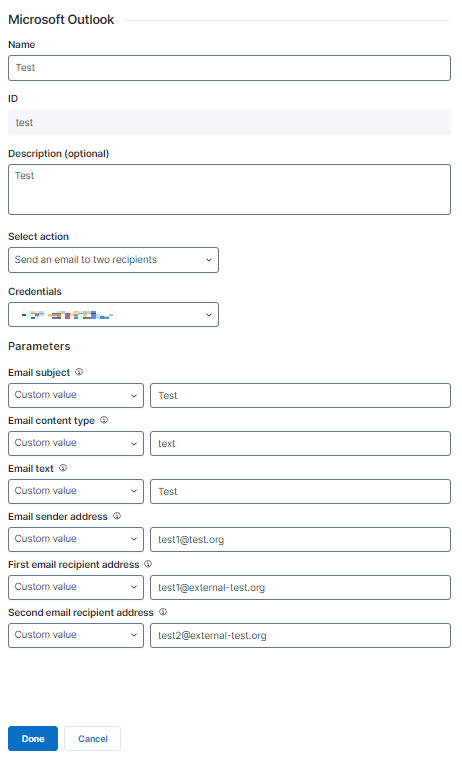
**Send an email to two recipients** sends an email to two recipients from an email address that is part of your organization's Microsoft Graph tenant. The recipient email addresses can belong to anyone inside or outside your organization.

The Microsoft Outlook connector thinklet relies on the [user: sendMail](https://learn.microsoft.com/en-us/graph/api/user-sendmail?view=graph-rest-1.0\&tabs=http) API endpoint provided by Microsoft Graph.

<figure><img src="https://268444917-files.gitbook.io/~/files/v0/b/gitbook-x-prod.appspot.com/o/spaces%2FxJSUDk9NTtCHYPG5EWs3%2Fuploads%2Fgit-blob-a0326cf840ceec4ab5fa7866611bebab295af77d%2Fimage-20240521-085428.png?alt=media" alt="image-20240521-085428.png" width="462"><figcaption></figcaption></figure>

* **Parameters:** Configure the data used as parameters for this action. Hover over the tooltip icon for more information on how the parameter is mapped and what data is required.
  * **Email subject**: The subject of the email in plain text.
  * **Email content type**: The content type of the email. Set to **text** or **html** depending on the email text type.
  * **Email text**: The email text in HTML format or plain text, depending on the email content type setting.
  * **Email sender address**: The email address from which the email will be sent. It must be in your organization’s Microsoft Graph API scope.
  * **First email recipient address**: Any valid email address.
    * **Second email recipient address**: Any valid email address.
* **Outputs**
  * This thinklet connector has no outputs.

The table below shows the API Service connector details needed when recreating the connector:

<table><thead><tr><th width="272">Field</th><th>Value</th><th data-hidden></th></tr></thead><tbody><tr><td>Resource Path</td><td><code>/users/{{EmailSender}}/sendMail</code></td><td></td></tr><tr><td>Method</td><td>POST</td><td></td></tr><tr><td>Payload</td><td></td><td></td></tr><tr><td>Outputs</td><td><code>{ "message": { "subject": "{{EmailSubject}}", "body": { "contentType": "{{EmailContentType}}", "content": "{{EmailText}}" }, "toRecipients": [ { "emailAddress": { "address": "{{EmailRecipient1}}" } }, { "emailAddress": { "address": "{{EmailRecipient2}}" } } ] }, "saveToSentItems": "false" }</code></td><td></td></tr></tbody></table>

Refer to the [Configuring connector thinklets](https://docs.nexthink.com/platform/user-guide/workflows/creating-workflows/configuring-connector-thinklet) documentation for more information about connector thinklets.