> For the complete documentation index, see [llms.txt](https://docs.nexthink.com/platform/llms.txt). Markdown versions of documentation pages are available by appending `.md` to page URLs; this page is available as [Markdown](https://docs.nexthink.com/platform/library-packs/security-and-compliance/workflow-jamf-client-continuity/configuration-guide-microsoft-teams-assisted-troubleshooting.md).
# Configuration guide: Jamf client continuity
{% hint style="warning" %}
The configuration options on this page are only accessible to [administrators](https://docs.nexthink.com/platform/user-guide/administration/account-management/roles#roles-administration).
Refer to the [Usage guide: Jamf client continuity](/platform/library-packs/security-and-compliance/workflow-jamf-client-continuity/usage-guide-microsoft-teams-assisted-troubleshooting.md) to use library content as a standard user.
{% endhint %}
## **Prerequisites**
This library pack contains content from the following required [expansion products](/platform/overview/products.md):
* [Flow - Workflows](/platform/user-guide/workflows.md)
{% hint style="info" %}
Some of these products offer default access to their respective content and can still be used without [expansion products](/platform/overview/products.md).
To learn more about default thresholds for expansion products, [visit the extended documentation](broken://spaces/OrWF1QMMEwqZgv33QBkR).
{% endhint %}
## **Included content and dependencies**
This library pack contains the following content and dependencies:
| Content type | Name | Description | Dependencies |
| -------------------------------------------------------- | -------------------------- | ----------------------------------------------- | ----------------------------- |
| [Workflows](/platform/user-guide/workflows.md) | **Jamf client continuity** | Orchestrate the troubleshooting of Jamf client. | none |
| [Remote actions](/platform/user-guide/remote-actions.md) | **Get Jamf agent health** | Collects key Jamf client status information. | Used directly in the workflow |
| | **Invoke Jamf reconnect** | Reconnects the Jamf agent to the JSS server. | Used directly in the workflow |
## **Configuring Jamf client continuity pack**
{% hint style="info" %}
Adapt these suggested configuration steps to edit and customize content according to your organizational needs.
{% endhint %}
Follow these steps to install and configure content:
* Before configuration - Install library pack content from [Nexthink Library](/platform/user-guide/nexthink-library.md)
* [Step 1 - Configure remote action(s)](#step-1-configure-remote-actions)
* [Step 2 - Configure ITSM API connector credentials](#configurationguide-batteryreplacementscheduling-step2-configureitsmapiconnectorcredentials)
### **Step 1 - Configure remote actions**
1. From the main menu, navigate to the **Remote Actions** > [Manage remote action ](/platform/user-guide/remote-actions/setting-up-and-managing-remote-actions/managing-remote-actions.md)page.
2. Review and edit your remote actions.
Nexthink recommends the following configurations for these remote actions:
| Name | Trigger schedule | Parameters to edit |
| ------------------------- | ----------------- | ------------------ |
| **Get Jamf agent health** | Trigger: Workflow | N/A |
| **Invoke Jamf reconnect** | Trigger: Workflow | N/A |
### Step 2 - Configure ITSM API connector credentials
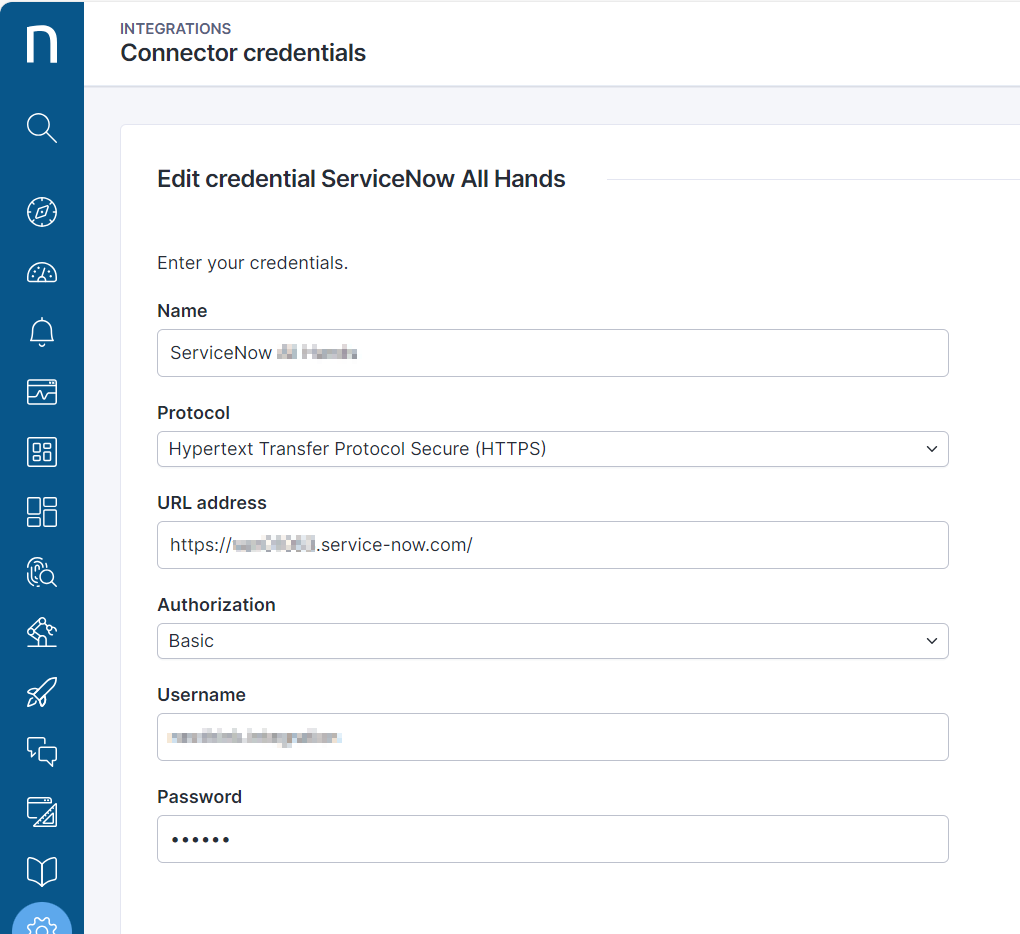
The configuration of [connector credentials](/platform/configuring_nexthink/bringing-data-into-your-nexthink-instance/integrating-nexthink-with-third-party-tools/outbound-connectors/connector-credentials.md) is essential for enabling API calls.
1. From the main menu, navigate to the **Administration** > [Connector credentials](/platform/configuring_nexthink/bringing-data-into-your-nexthink-instance/integrating-nexthink-with-third-party-tools/outbound-connectors/connector-credentials.md) page.
2. Choose the **HTTPS** option from the **Protocol** drop-down.
3. Paste the root `https://` of the ITSM into the **URL address** field.
4. Choose the **Basic** option from the **Authorization** drop-down.
5. Enter a **Username** and **Password** to connect to the third-party tool.
6. **Save** the credential.
After configuring the connector credential for the ITSM API:
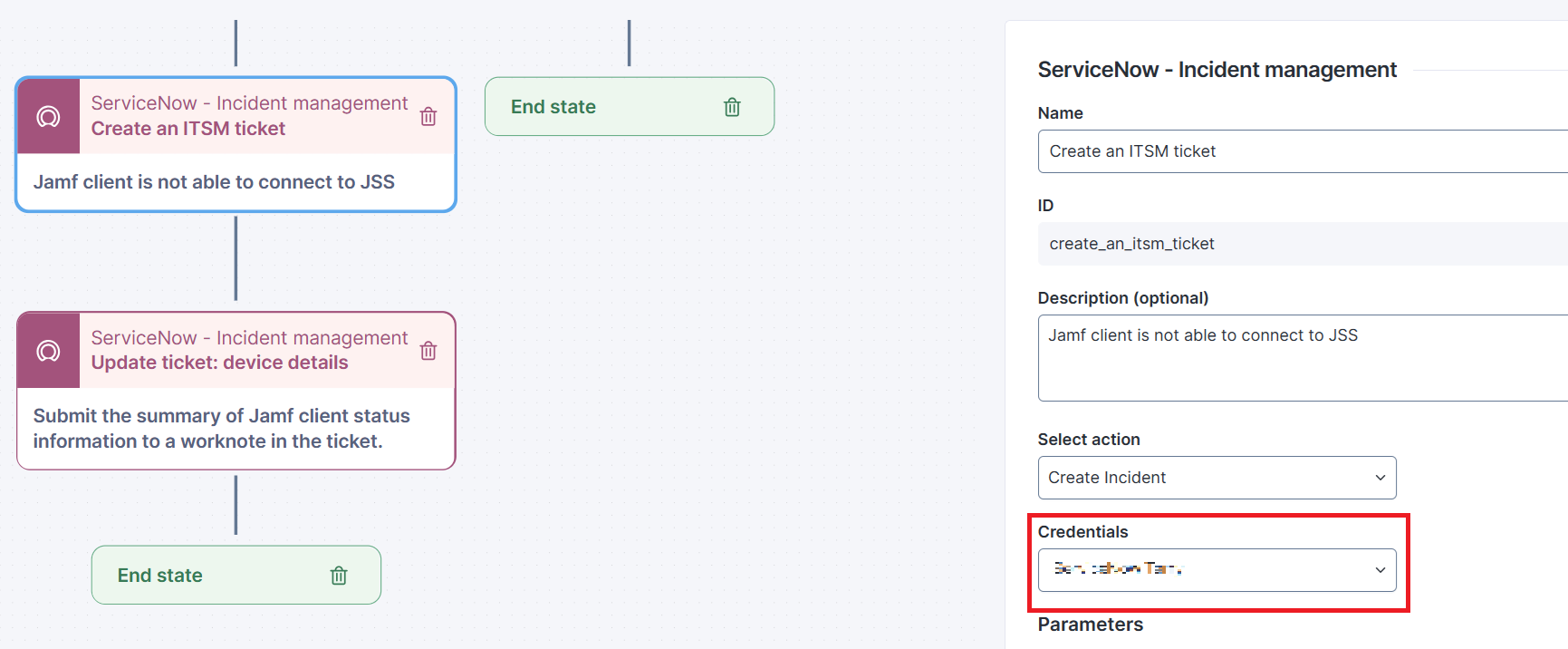
7. From the specific workflow, fill in each **Service/API** thinklet dropdown field for **Credentials**.
* When the workflow is installed or copied from the Library, this field will be blank as it is a local setup of each environment and is not included in the Library.
***
RELATED TOPICS
* [Workflow: Jamf client continuity](/platform/library-packs/security-and-compliance/workflow-jamf-client-continuity.md)
* [Usage guide: Jamf client continuity](/platform/library-packs/security-and-compliance/workflow-jamf-client-continuity/usage-guide-microsoft-teams-assisted-troubleshooting.md)
* [Managing workflows](/platform/user-guide/workflows/managing-workflows.md)
* [Manage remote actions](/platform/user-guide/remote-actions/setting-up-and-managing-remote-actions/managing-remote-actions.md)
---
# Agent Instructions
This documentation is published with GitBook. GitBook is the documentation platform designed so that both humans and AI agents can read, navigate, and reason over technical content effectively. Learn more at gitbook.com.
## Querying This Documentation
If you need additional information that is not directly available in this page, you can query the documentation dynamically by asking a question.
Perform an HTTP GET request on the current page URL with the `ask` query parameter, and the optional `goal` query parameter:
```
GET https://docs.nexthink.com/platform/library-packs/security-and-compliance/workflow-jamf-client-continuity/configuration-guide-microsoft-teams-assisted-troubleshooting.md?ask=&goal=
```
`ask` is the immediate question: it should be specific, self-contained, and written in natural language.
`goal` is optional and describes the broader end goal you are ultimately trying to accomplish on behalf of the user. GitBook uses it to tailor the answer towards what is most useful for that goal.
The response will contain a direct answer to the question and relevant excerpts and sources from the documentation.
Use this mechanism when the answer is not explicitly present in the current page, you need clarification or additional context, or you want to retrieve related documentation sections.