> For the complete documentation index, see [llms.txt](https://docs.nexthink.com/platform/llms.txt). Markdown versions of documentation pages are available by appending `.md` to page URLs; this page is available as [Markdown](https://docs.nexthink.com/platform/library-packs/collaboration-and-productivity-applications/workflow-onedrive-assisted-troubleshooting/configuration-guide-onedrive-assisted-troubleshooting.md).
# Configuration guide: OneDrive assisted troubleshooting
{% hint style="warning" %}
Refer to the [Usage guide: OneDrive assisted troubleshooting](/platform/library-packs/collaboration-and-productivity-applications/workflow-onedrive-assisted-troubleshooting/usage-guide-onedrive-assisted-troubleshooting.md) to use library content as a standard user.
{% endhint %}
## **Prerequisites**
This library pack contains content from the following required [expansion products](https://docs.nexthink.com/platform/overview/products):
* [Employee Engagement - Campaigns](https://docs.nexthink.com/platform/user-guide/campaigns)
* [Flow - Workflows](https://docs.nexthink.com/platform/user-guide/workflows)
{% hint style="info" %}
Some of these products offer default access to their respective content and can still be used without [expansion products](https://docs.nexthink.com/platform/overview/products).
To learn more about default thresholds for expansion products, [visit the extended documentation](https://edocs.nexthink.com/nexthink-infinity/infinity-specifications/nexthink-infinity-default-thresholds-overview).
{% endhint %}
## **Included content and dependencies**
This library pack contains the following content and dependencies:
| Content type | Name | Description | Dependencies |
| --------------------------------------------------------------------------------------------------- | ------------------------------------------------------------ | ---------------------------------------------------------------------------------------------------------------- | ---------------------------------------------------------------- |
| [Workflows](https://nexthink.gitbook.io/opd/user-guide/workflows/managing-workflows) | **OneDrive assisted troubleshooting** | Fully automated workflow to perform basic remediation steps on an OneDrive installation. |
Required to resolve common issues in your environment
|
| [Remote actions](https://nexthink.gitbook.io/opd/user-guide/remote-actions/managing-remote-actions) | **Get OneDrive status** | Gather information about the status of the Microsoft OneDrive client on the device. | Required for the workflow to function |
| [Remote actions](https://nexthink.gitbook.io/opd/user-guide/remote-actions/managing-remote-actions) | **Get OneDrive sync status** | Checks the syncronization of OneDrive | Required to resolve issues identified by the workflow |
| [Remote actions](https://nexthink.gitbook.io/opd/user-guide/remote-actions/managing-remote-actions) | **Repair OneDrive** | Performs a OneDrive repair or reinstallation on the device, mitigating possible sync issues.d in the parameters. | Required for the workflow to function |
| [Remote actions](https://nexthink.gitbook.io/opd/user-guide/remote-actions/managing-remote-actions) | **Reset OneDrive** | This Remote Action can assist in scenarios whereby OneDrive is failing to synchronize | Required for the workflow to function |
| [Remote actions](https://nexthink.gitbook.io/opd/user-guide/remote-actions/managing-remote-actions) | **Get Wi-Fi signal strengh** | Get information about Wi-Fi connection strengh on the device | Required for the workflow to function |
| [Remote actions](https://nexthink.gitbook.io/opd/user-guide/remote-actions/managing-remote-actions) | **Get network speed** | Gets information about the speed of the network | Required for the workflow to function |
| [Remote actions](https://nexthink.gitbook.io/opd/user-guide/remote-actions/managing-remote-actions) | **Get application crash details** | Gets information related to the applications crash. | Required for the workflow to function |
| [Campaigns](https://nexthink.gitbook.io/opd/user-guide/campaigns/managing-campaigns) | **Onedrive Troubleshooting** | Campaign to notify the user if they wish to start OneDrive troubleshooting assistance. | Required for the workflow to function |
| [Campaigns](https://nexthink.gitbook.io/opd/user-guide/campaigns/managing-campaigns) | **Onedrive Troubleshooting: Problems with Wi-Fi or network** | Campaign to notify the user there are issues with the Wi-Fi or nextwork connectivity | Required for the workflow to function |
| [Campaigns](https://nexthink.gitbook.io/opd/user-guide/campaigns/managing-campaigns) | **Onedrive Troubleshooting: Problems with the size** | Campaign to notify the user that there are issues with the Onedrive size configuration | Required for the workflow to function |
## **Configuring "OneDrive assisted troubleshooting workflow"**
{% hint style="info" %}
Adapt these suggested configuration steps to edit and customize content according to your organizational needs.
{% endhint %}
Follow these steps to install and configure content:
* Before configuration - Install library pack content from [Nexthink Library](https://docs.nexthink.com/platform/user-guide/nexthink-library)
* [Step 1 - Configure remote actions](#step-1-configure-remote-actions)
* [Step 2 - Edit campaigns](#step-2-edit-campaigns)
* [Step 3 - Configure ServiceNow API connector credentials](#step-3-configure-itsm-api-connector-credentials)
* [Step 4 - Configure the workflow](#step-4-configure-the-workflow)
### **Step 1 - Configure remote actions**
1. From the main menu, navigate to the **Remote Actions** > [Manage Remote Action ](https://docs.nexthink.com/platform/user-guide/remote-actions/managing-remote-actions)page.
2. Review and edit your remote actions.
### **Step 2 - Edit campaigns**
1. From the main menu, navigate to the **Campaigns** > [Manage Campaigns](https://docs.nexthink.com/platform/user-guide/campaigns/managing-campaigns) page.
2. Review and edit your campaigns. For each installed campaign:
* Customize the sender name and image.
* Review and adjust questions.
* Publish the campaign when you are ready to use it.
Nexthink recommends the following configurations for these campaigns:
| Name | Trigger | Priority |
| ------------------------------------------------------------ | --------------------------------------------------------- | ------------------------------------------------- |
| **Onedrive Troubleshooting** | The trigger for this campaign should be set to "workflow" | The priority for this campaign should be "Urgent" |
| **Onedrive Troubleshooting: Problems with Wi-Fi or network** | The trigger for this campaign should be set to "workflow" | The priority for this campaign should be "Urgent" |
| **Onedrive Troubleshooting: Problems with the size** | The trigger for this campaign should be set to "workflow" | The priority for this campaign should be "Urgent" |
### **Step 3 -** Configure ServiceNow API connector credentials
This workflow contains ServiceNow incident management connector thinklets that need configuring using the appropriate connector credentials.
For more information, see [ServiceNow - Incident management](https://docs.nexthink.com/platform/user-guide/workflows/creating-workflows/designer/configuring-connector-thinklet/servicenow-incident-management).
### Step 4 - Configure the workflow
Before customizing the 'Outlook-assisted troubleshooting' workflow, you should:
* Configure the ServiceNow incident management connector thinklets.
1. **ServiceNow**
Before triggering this workflow, an ITSM ticket should be raised, and the ticket reference should be stored.\
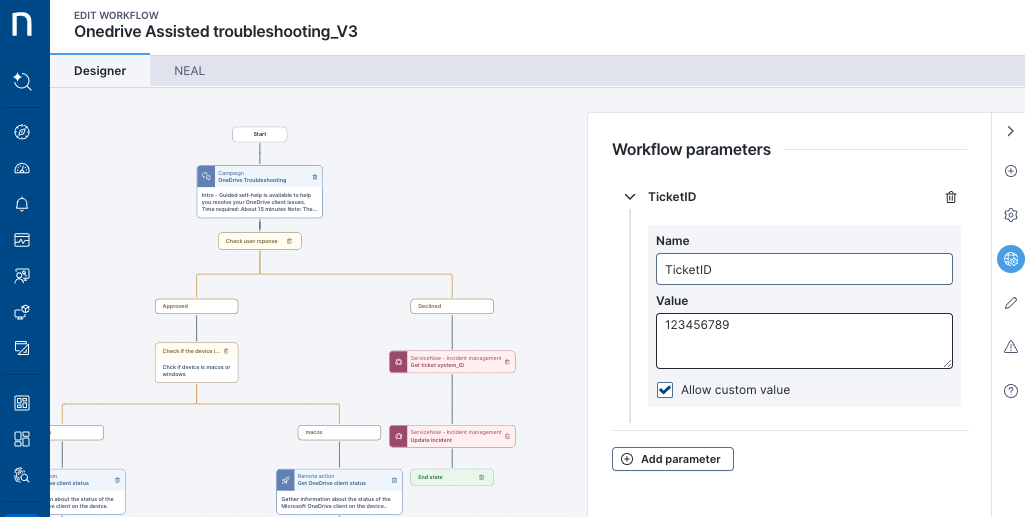
The workflow contains one parameter: '**TicketID**'. When the workflow is triggered, the ITSM ticket reference should be entered into this parameter.
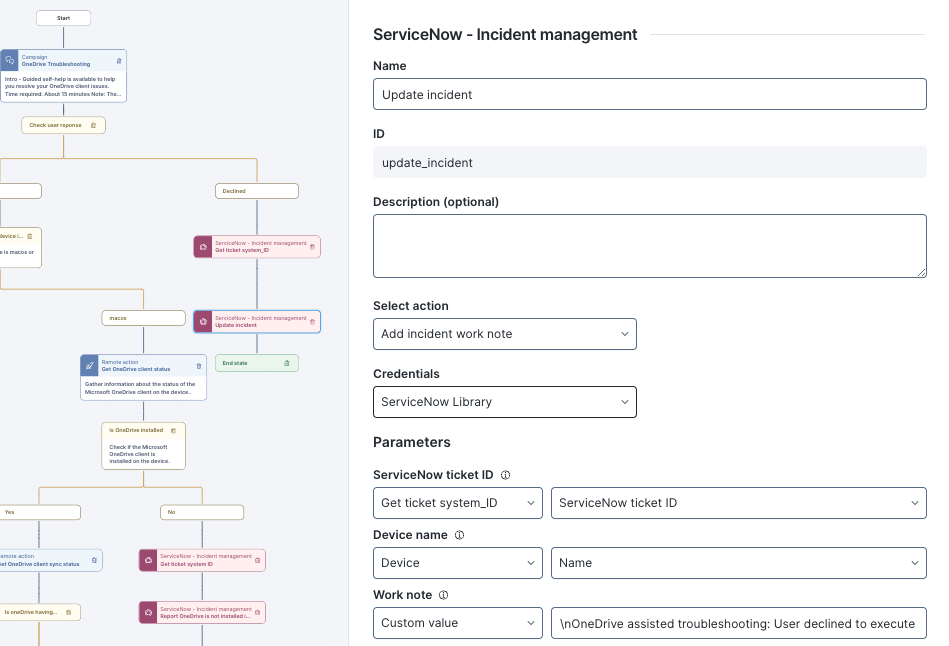
When action is taken, this ITSM ticket is updated with a status report at multiple workflow stages. These updates include the ticket ID, default device name, and a free text description. Any text descriptions should be reviewed and amended if required.
RELATED TOPICS
* [Overview page](/platform/library-packs/collaboration-and-productivity-applications/workflow-onedrive-assisted-troubleshooting.md)
* [Usage guide](/platform/library-packs/collaboration-and-productivity-applications/workflow-onedrive-assisted-troubleshooting/usage-guide-onedrive-assisted-troubleshooting.md)
---
# Agent Instructions
This documentation is published with GitBook. GitBook is the documentation platform designed so that both humans and AI agents can read, navigate, and reason over technical content effectively. Learn more at gitbook.com.
## Querying This Documentation
If you need additional information that is not directly available in this page, you can query the documentation dynamically by asking a question.
Perform an HTTP GET request on the current page URL with the `ask` query parameter, and the optional `goal` query parameter:
```
GET https://docs.nexthink.com/platform/library-packs/collaboration-and-productivity-applications/workflow-onedrive-assisted-troubleshooting/configuration-guide-onedrive-assisted-troubleshooting.md?ask=&goal=
```
`ask` is the immediate question: it should be specific, self-contained, and written in natural language.
`goal` is optional and describes the broader end goal you are ultimately trying to accomplish on behalf of the user. GitBook uses it to tailor the answer towards what is most useful for that goal.
The response will contain a direct answer to the question and relevant excerpts and sources from the documentation.
Use this mechanism when the answer is not explicitly present in the current page, you need clarification or additional context, or you want to retrieve related documentation sections.