# Microsoft Entra ID connector thinklet

Configure Microsoft Entra ID connector thinklets to take specific actions in your workflow.

{% hint style="info" %}
Configure API credentials to connect Microsoft Graph API with the Nexthink platform. For detailed instructions, refer to the [Entra ID integration](https://docs.nexthink.com/library/entra-id-integration-for-workflows) documentation for Workflows.

Refer to the [Permissions](https://learn.microsoft.com/en-gb/graph/api/user-list-memberof?view=graph-rest-1.0\&tabs=http#permissions) section in the Microsoft documentation to view the required authorizations.
{% endhint %}

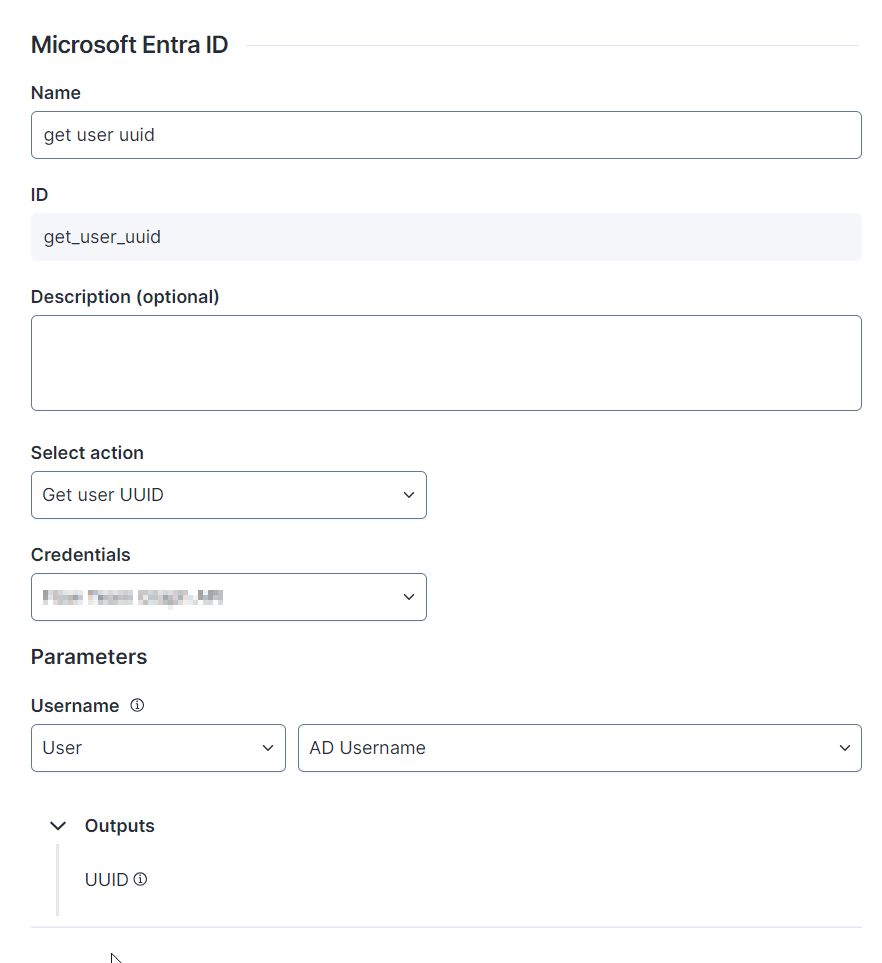
## Action: Get user UUID <a href="#microsoftentraidconnectorthinklet-action-getuseruuid" id="microsoftentraidconnectorthinklet-action-getuseruuid"></a>

**Get user UUID** retrieves a user Universally Unique Identifier (UUID).

The Microsoft Entra ID connector thinklet relies on the [Get a User](https://learn.microsoft.com/en-us/graph/api/user-get?view=graph-rest-1.0\&tabs=http) API endpoint provided by Microsoft Graph.

<figure><img src="https://268444917-files.gitbook.io/~/files/v0/b/gitbook-x-prod.appspot.com/o/spaces%2FxJSUDk9NTtCHYPG5EWs3%2Fuploads%2Fgit-blob-2295f65468cdaf56128c5c044fa88dd43cfc5aa0%2Fimage-20240531-134603.png?alt=media" alt="image-20240531-134603.png" width="457"><figcaption></figcaption></figure>

* **Parameters:** Configure the data used as parameters for this action. Hover over the tooltip icon for more information on how the parameter is mapped and what data is required.
  * **Username**: Active Directory username
* **Outputs:** View the outputs of the connector thinklet.
  * **UUID** (`uuid`): User ID

The table below shows the API Service connector details needed when recreating the connector:

<table><thead><tr><th width="272">Field</th><th>Value</th><th data-hidden></th></tr></thead><tbody><tr><td>Resource Path</td><td><code>/users/{{adUsername}}</code></td><td></td></tr><tr><td>Method</td><td>GET</td><td></td></tr><tr><td>Payload</td><td></td><td></td></tr><tr><td>Outputs</td><td><code>UUID $.id</code></td><td></td></tr></tbody></table>

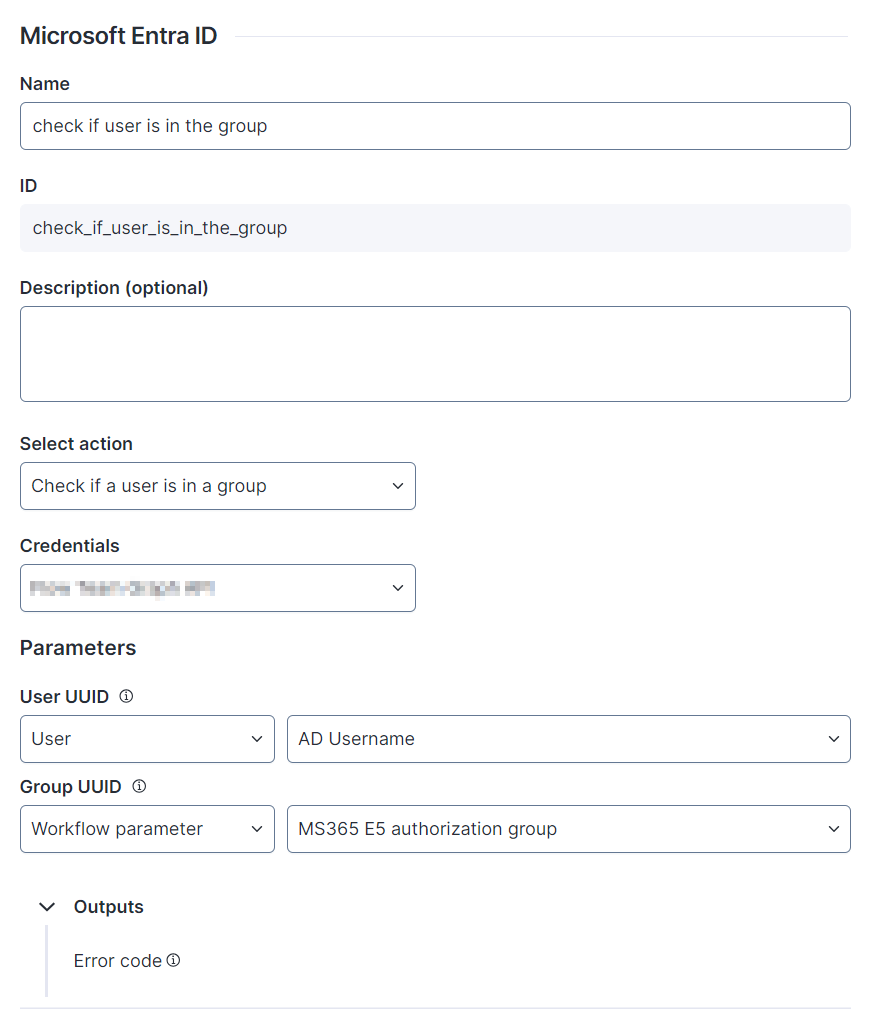
## Action: Check if a user is in a group <a href="#microsoftentraidconnectorthinklet-action-checkifauserisinagroup" id="microsoftentraidconnectorthinklet-action-checkifauserisinagroup"></a>

**Check if a user is in the group** verifies whether a user belongs to the Entra ID group. If the system finds the user within the group, the **Outputs** field remains empty. If the user is absent from the group or you submit an unsupported query, the **Outputs** field produces either the `Request_ResourceNotFound` or `Request_UnsupportedQuery` error accordingly.

The Microsoft Entra ID connector thinklet relies on the [List a user's direct memberships](https://learn.microsoft.com/en-gb/graph/api/user-list-memberof?view=graph-rest-1.0\&tabs=http) API endpoint provided by Microsoft Graph.

<figure><img src="https://268444917-files.gitbook.io/~/files/v0/b/gitbook-x-prod.appspot.com/o/spaces%2FxJSUDk9NTtCHYPG5EWs3%2Fuploads%2Fgit-blob-b3be334c03e223399cd30348e328d027cac2415e%2Fimage-20240531-140301.png?alt=media" alt="image-20240531-140301.png" width="425"><figcaption></figcaption></figure>

* **Parameters:** Configure the data used as parameters for this action. Hover over the tooltip icon for more information on how the parameter is mapped and what data is required.
  * **Group UUID**: Active Directory group ID
  * **User UUID**: Entra ID user UUID
* **Outputs:** View the outputs of the connector thinklet.
  * **Error code** (`groupPresenceErrorCode`): Error code

The table below shows the API Service connector details needed when recreating the connector:

<table><thead><tr><th width="272">Field</th><th>Value</th><th data-hidden></th></tr></thead><tbody><tr><td>Resource Path</td><td>/users/{{userUuid}}//memberOf?$filter=id+eq+'{{groupUuid}}'&#x26;$select=id</td><td></td></tr><tr><td>Method</td><td>GET</td><td></td></tr><tr><td>Payload</td><td></td><td></td></tr><tr><td>Outputs</td><td>groupPresenceErrorCode $.error.code</td><td></td></tr></tbody></table>

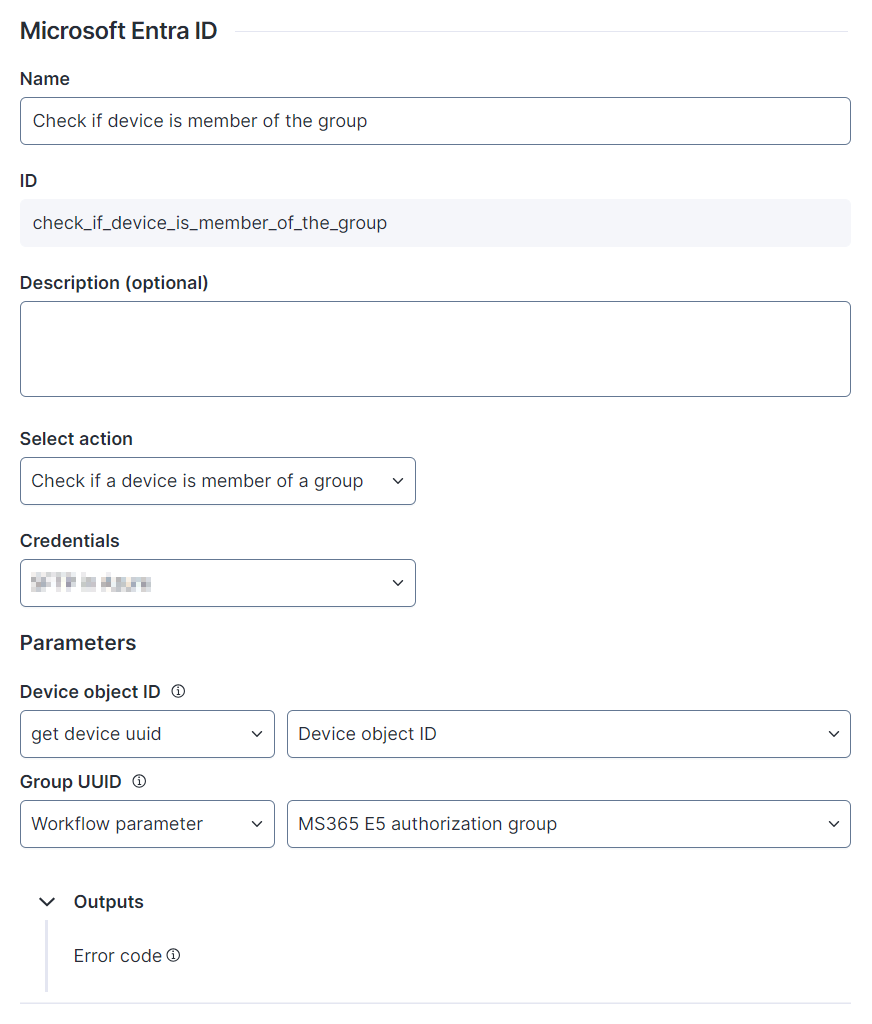
## Action: Check if a device is member of a group <a href="#microsoftentraidconnectorthinklet-action-checkifadeviceismemberofagroup" id="microsoftentraidconnectorthinklet-action-checkifadeviceismemberofagroup"></a>

**Check if a device is member of a group** verifes whether a device belongs to the Entra ID group. If the system finds the user within the group, the **Outputs** field remains empty. If the user is absent from the group or you submit an unsupported query, the **Outputs** field produces either the Request\_ResourceNotFound or Request\_UnsupportedQuery error accordingly.

The Microsoft Entra ID connector thinklet relies on the [List device memberships](https://learn.microsoft.com/en-gb/graph/api/device-list-memberof?view=graph-rest-1.0\&tabs=http) API endpoint provided by Microsoft Graph.

<figure><img src="https://268444917-files.gitbook.io/~/files/v0/b/gitbook-x-prod.appspot.com/o/spaces%2FxJSUDk9NTtCHYPG5EWs3%2Fuploads%2Fgit-blob-14db3c50328476f9ee2e046b11be82afa05fab93%2Fimage-20240531-142406.png?alt=media" alt="image-20240531-142406.png" width="415"><figcaption></figcaption></figure>

* **Parameters:** Configure the data used as parameters for this action. Hover over the tooltip icon for more information on how the parameter is mapped and what data is required.
  * **Device object ID**: Device Azure ID
  * **Group UUID**: Active Directory group ID
* **Outputs:** View the outputs of the connector thinklet.
  * **Error code** (`groupPresenceErrorCode`): Error code

The table below shows the API Service connector details needed when recreating the connector:

<table><thead><tr><th width="272">Field</th><th>Value</th><th data-hidden></th></tr></thead><tbody><tr><td>Resource Path</td><td>/devices/{{DeviceObjectID}}//member<code>Of?$filter=id+eq+'{{groupUuid}}'&#x26;$select=id</code></td><td></td></tr><tr><td>Method</td><td>GET</td><td></td></tr><tr><td>Payload</td><td></td><td></td></tr><tr><td>Outputs</td><td><code>groupPresenceErrorCode $.error.code</code></td><td></td></tr></tbody></table>

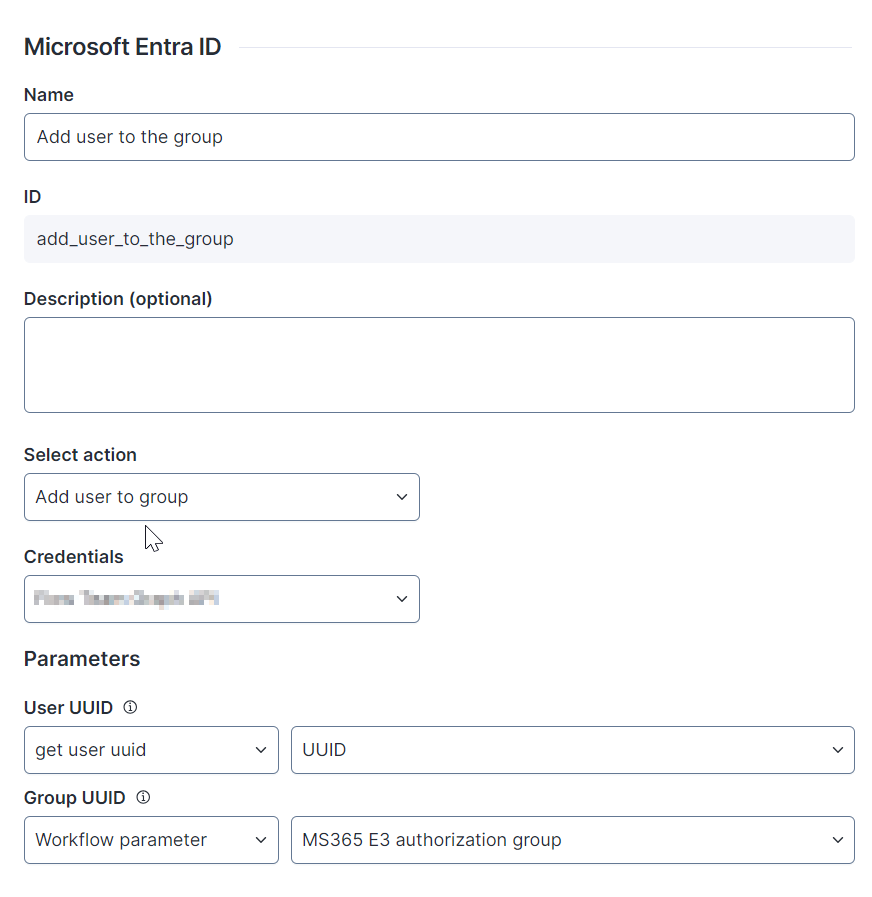
## Action: Add user to group <a href="#microsoftentraidconnectorthinklet-action-addusertogroup" id="microsoftentraidconnectorthinklet-action-addusertogroup"></a>

**Add user to group** adds a user to the Entra ID group.

The Microsoft Entra ID connector thinklet relies on the [Add members](https://learn.microsoft.com/en-gb/graph/api/group-post-members?view=graph-rest-1.0\&tabs=http) API endpoint provided by Microsoft Graph.

<figure><img src="https://268444917-files.gitbook.io/~/files/v0/b/gitbook-x-prod.appspot.com/o/spaces%2FxJSUDk9NTtCHYPG5EWs3%2Fuploads%2Fgit-blob-c39ee3e5ea3afee4ec90112e2ea8ad9f85e3e745%2Fimage-20240531-144444.png?alt=media" alt="image-20240531-144444.png" width="473"><figcaption></figcaption></figure>

* **Parameters:** Configure the data used as parameters for this action. Hover over the tooltip icon for more information on how the parameter is mapped and what data is required.
  * **User UUID**: User Azure ID
  * **Group UUID**: UUID of the Entra ID group to which you want to add the user
* **Outputs:** View the outputs of the connector thinklet.

The table below shows the API Service connector details needed when recreating the connector:

<table><thead><tr><th width="272">Field</th><th>Value</th><th data-hidden></th></tr></thead><tbody><tr><td>Resource Path</td><td><code>/groups/{{groupUuid}}/members/$ref</code></td><td></td></tr><tr><td>Method</td><td>POST</td><td></td></tr><tr><td>Payload</td><td></td><td></td></tr><tr><td>Outputs</td><td><code>{ "@odata.id": "https://graph.microsoft.com/v1.0/directoryObjects/{{userUuid}}"}</code></td><td></td></tr></tbody></table>

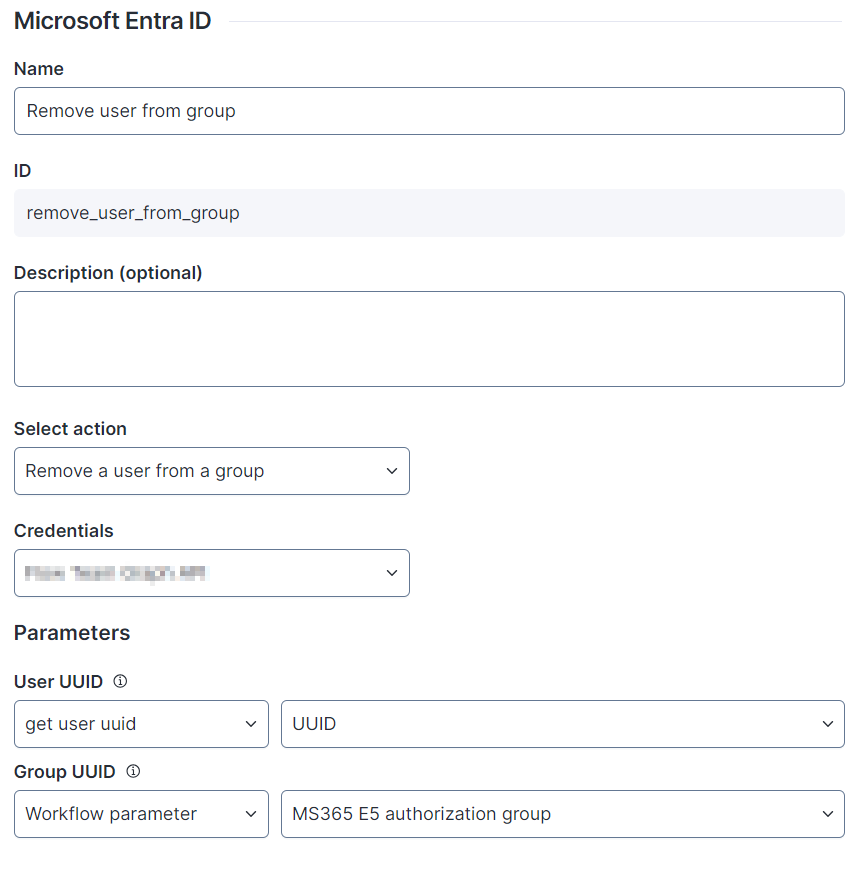
## Action: Remove a user from a group <a href="#microsoftentraidconnectorthinklet-action-removeauserfromagroup" id="microsoftentraidconnectorthinklet-action-removeauserfromagroup"></a>

**Remove a user from a group** removes the user from the Entra ID group.

The Microsoft Entra ID connector thinklet relies on the [Remove member](https://learn.microsoft.com/en-gb/graph/api/group-delete-members?view=graph-rest-1.0\&tabs=http) API endpoint provided by Microsoft Graph.

<figure><img src="https://268444917-files.gitbook.io/~/files/v0/b/gitbook-x-prod.appspot.com/o/spaces%2FxJSUDk9NTtCHYPG5EWs3%2Fuploads%2Fgit-blob-acc90fc0894520dac6f33be83f03e6526a1869c2%2Fimage-20240531-145251.png?alt=media" alt="image-20240531-145251.png" width="453"><figcaption></figcaption></figure>

* **Parameters:** Configure the data used as parameters for this action. Hover over the tooltip icon for more information on how the parameter is mapped and what data is required.
  * **User UUID**: User Azure ID
  * **Group UUID**: UUID of the Entra ID group from which you want the user removed
* **Outputs:** View the outputs of the connector thinklet.

The table below shows the API Service connector details needed when recreating the connector:

<table><thead><tr><th width="272">Field</th><th>Value</th><th data-hidden></th></tr></thead><tbody><tr><td>Resource Path</td><td><code>/groups/{{groupUuid}}/members/{{userUuid}}/$ref</code></td><td></td></tr><tr><td>Method</td><td>DELETE</td><td></td></tr><tr><td>Payload</td><td></td><td></td></tr><tr><td>Outputs</td><td></td><td></td></tr></tbody></table>

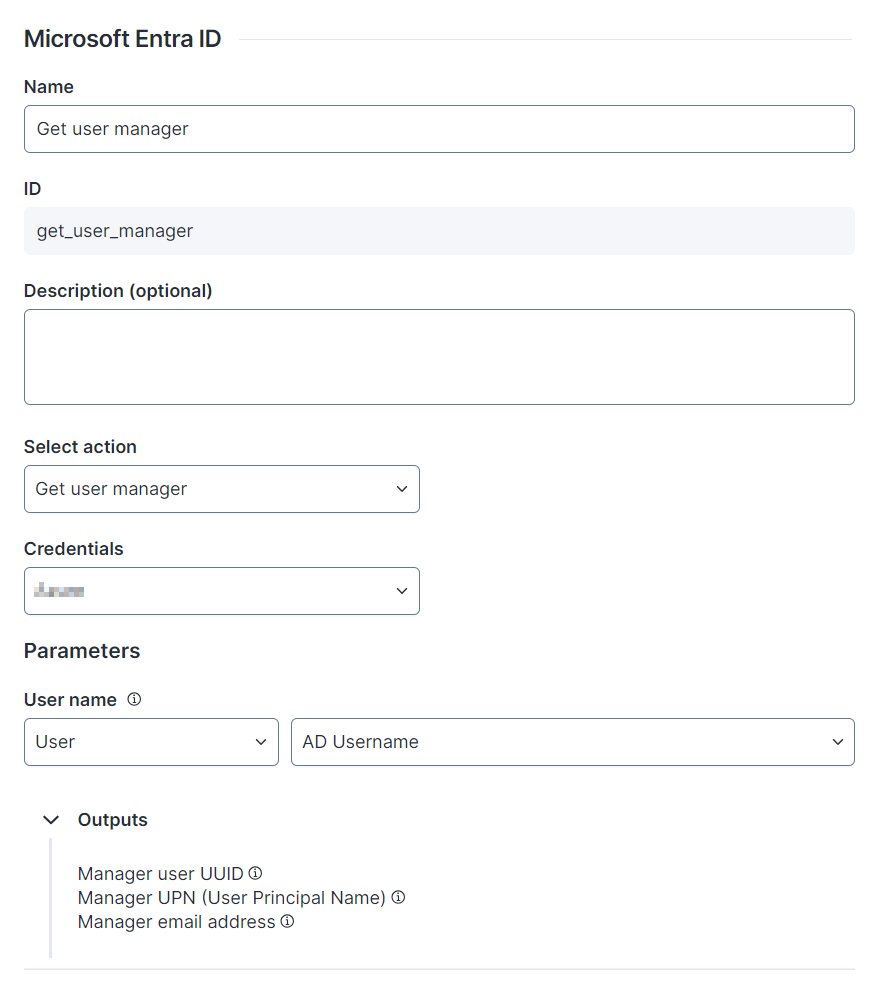
## Action: Get user manager <a href="#microsoftentraidconnectorthinklet-action-getusermanager" id="microsoftentraidconnectorthinklet-action-getusermanager"></a>

**Get user manager** retrieves the user manager information.

The Microsoft Entra ID connector thinklet relies on the [List manager](https://learn.microsoft.com/en-gb/graph/api/user-list-manager?view=graph-rest-1.0\&tabs=http) API endpoint provided by Microsoft Graph.

{% hint style="warning" %}
Please note that this action does not support application-type permissions and requires delegated permissions.\
For more information on the required permissions and their types, please refer to the API endpoint's documentation for this connector action.
{% endhint %}

<figure><img src="https://268444917-files.gitbook.io/~/files/v0/b/gitbook-x-prod.appspot.com/o/spaces%2FxJSUDk9NTtCHYPG5EWs3%2Fuploads%2Fgit-blob-b013ff97f0acf07e1367206259ce933decca3e98%2Fimage-20240531-145852.png?alt=media" alt="image-20240531-145852.png" width="435"><figcaption></figcaption></figure>

* **Parameters:** Configure the data used as parameters for this action. Hover over the tooltip icon for more information on how the parameter is mapped and what data is required.
  * **AD user name**: Active Directory username
* **Outputs:** View the outputs of the connector thinklet.
  * **Manager user UUID** (`ManagerUserUUID`): Manager user UUID
  * **Manager UPN** (**User Principal Name**) (`ManagerUPN`): Manager User Principal Name (UPN)
  * **Manager email address** (`ManagerEmailAddress`): Manager email address

The table below shows the API Service connector details needed when recreating the connector:

<table><thead><tr><th width="272">Field</th><th>Value</th><th data-hidden></th></tr></thead><tbody><tr><td>Resource Path</td><td><code>/users/{{adUsername}}/manager</code></td><td></td></tr><tr><td>Method</td><td>GET</td><td></td></tr><tr><td>Payload</td><td></td><td></td></tr><tr><td>Outputs</td><td><p><code>ManagerUserUUID $.id</code></p><p><code>ManagerEmailAddress $.mail</code></p><p><code>ManagerUPN $.userPrincipalName</code></p></td><td></td></tr></tbody></table>

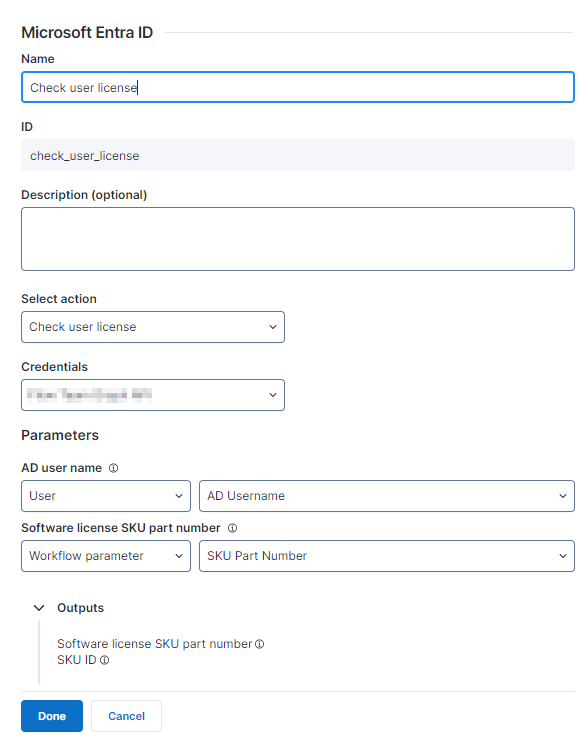
## Action: Check user license <a href="#microsoftentraidconnectorthinklet-action-checkuserlicense" id="microsoftentraidconnectorthinklet-action-checkuserlicense"></a>

**Check user license** verifies whether a specific user has a particular license assigned in Azure.

The Microsoft Entra ID connector thinklet relies on the [List licenseDetails](https://learn.microsoft.com/en-us/graph/api/user-list-licensedetails?view=graph-rest-1.0\&tabs=http) API endpoint provided by Microsoft Graph.

{% hint style="warning" %}
Please note that this action does not support application-type permissions and requires delegated permissions.\
For more information on the required permissions and their types, please refer to the API endpoint's documentation for this connector action.
{% endhint %}

<figure><img src="https://268444917-files.gitbook.io/~/files/v0/b/gitbook-x-prod.appspot.com/o/spaces%2FxJSUDk9NTtCHYPG5EWs3%2Fuploads%2Fgit-blob-c1847b8f82d208f01b74d6b933e4197e55d869c0%2Fimage-20240320-082519.png?alt=media" alt="image-20240320-082519.png" width="457"><figcaption></figcaption></figure>

* **Parameters:** Configure the data used as parameters for this action. Hover over the tooltip icon for more information on how the parameter is mapped and what data is required.
  * **AD user name**: Active Directory username
  * **Software license SKU Part Number**: skuPartNumber property of global workflow parameter [SKU Part Number](https://learn.microsoft.com/en-us/graph/api/resources/licensedetails?view=graph-rest-1.0#properties)
* **Outputs:** View the outputs of the connector thinklet.
  * **Software license SKU part number** (`outputSkuPartNumber`): Software license SKU part number
  * **SKU ID** (`skuId`): SKU internal ID

The table below shows the API Service connector details needed when recreating the connector:

<table><thead><tr><th width="272">Field</th><th>Value</th><th data-hidden></th></tr></thead><tbody><tr><td>Resource Path</td><td><code>/users/{{adUsername}}/licenseDetails</code></td><td></td></tr><tr><td>Method</td><td>GET</td><td></td></tr><tr><td>Payload</td><td></td><td></td></tr><tr><td>Outputs</td><td><p><code>skuId $.value[?(@.skuPartNumber=="{{skuPartNumber}}")].skuId</code></p><p><code>outputSkuPartNumber $.value[?(@.skuPartNumber=="{{skuPartNumber}}")].skuPartNumber</code></p></td><td></td></tr></tbody></table>

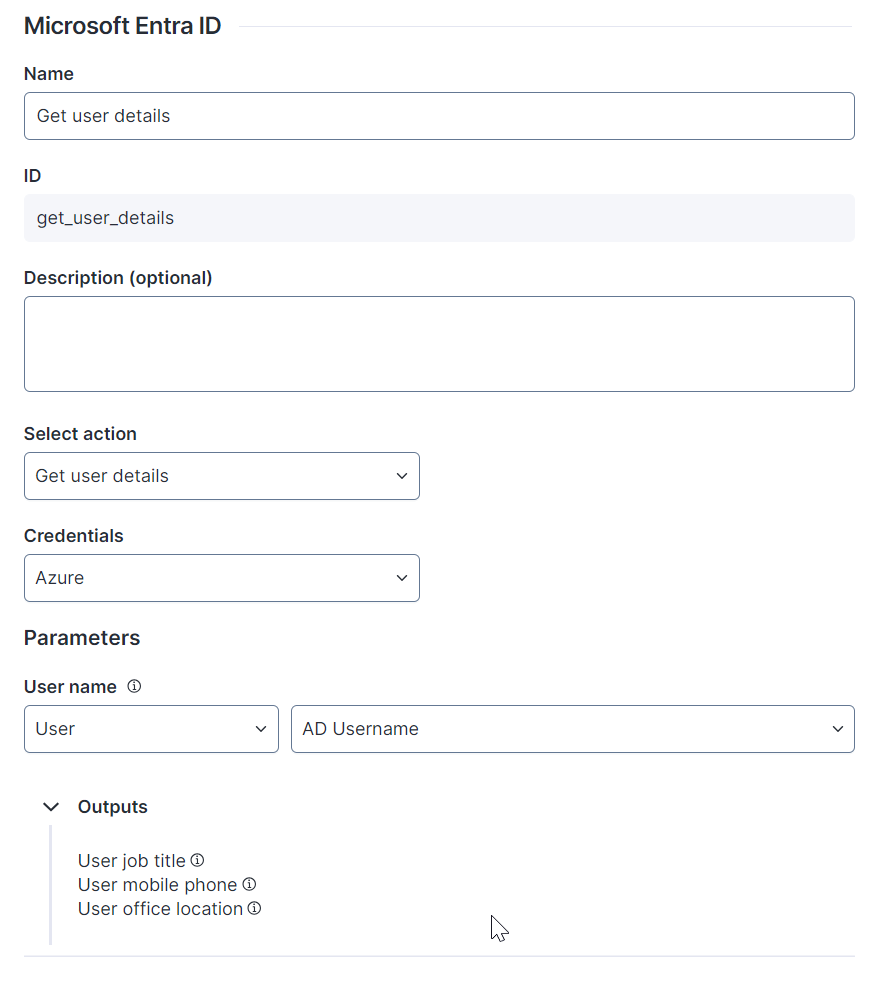
## Action: Get user details <a href="#microsoftentraidconnectorthinklet-action-getuserdetails" id="microsoftentraidconnectorthinklet-action-getuserdetails"></a>

**Get user details** retrieves user details such as job title, mobile phone number and office location.

The Microsoft Entra ID connector thinklet relies on the [Get user](https://learn.microsoft.com/en-gb/graph/api/intune-mam-user-get?view=graph-rest-1.0\&tabs=http) API endpoint provided by Microsoft Graph.

<figure><img src="https://268444917-files.gitbook.io/~/files/v0/b/gitbook-x-prod.appspot.com/o/spaces%2FxJSUDk9NTtCHYPG5EWs3%2Fuploads%2Fgit-blob-98451bdf6d7c52e27d0b3f4ea1e3c0e0ff2c5bae%2Fimage-20240531-151328.png?alt=media" alt="image-20240531-151328.png" width="419"><figcaption></figcaption></figure>

* **Parameters:** Configure the data used as parameters for this action. Hover over the tooltip icon for more information on how the parameter is mapped and what data is required.
  * **AD user name**: Active Directory username
* **Outputs:** View the outputs of the connector thinklet.
  * **User job title** (`UserJobTitle`): User job title
  * **User mobile phone** (`UserMobilePhone`): User mobile phone
  * **User office location** (`UserOfficeLocation`): User office location

The table below shows the API Service connector details needed when recreating the connector:

<table><thead><tr><th width="272">Field</th><th>Value</th><th data-hidden></th></tr></thead><tbody><tr><td>Resource Path</td><td>/users/{{adUsername}}</td><td></td></tr><tr><td>Method</td><td>GET</td><td></td></tr><tr><td>Payload</td><td></td><td></td></tr><tr><td>Outputs</td><td><p><code>UserJobTitle $.jobTitle</code></p><p><code>UserMobilePhone $.mobilePhone</code></p><p><code>UserOfficeLocation $.officeLocation</code></p></td><td></td></tr></tbody></table>

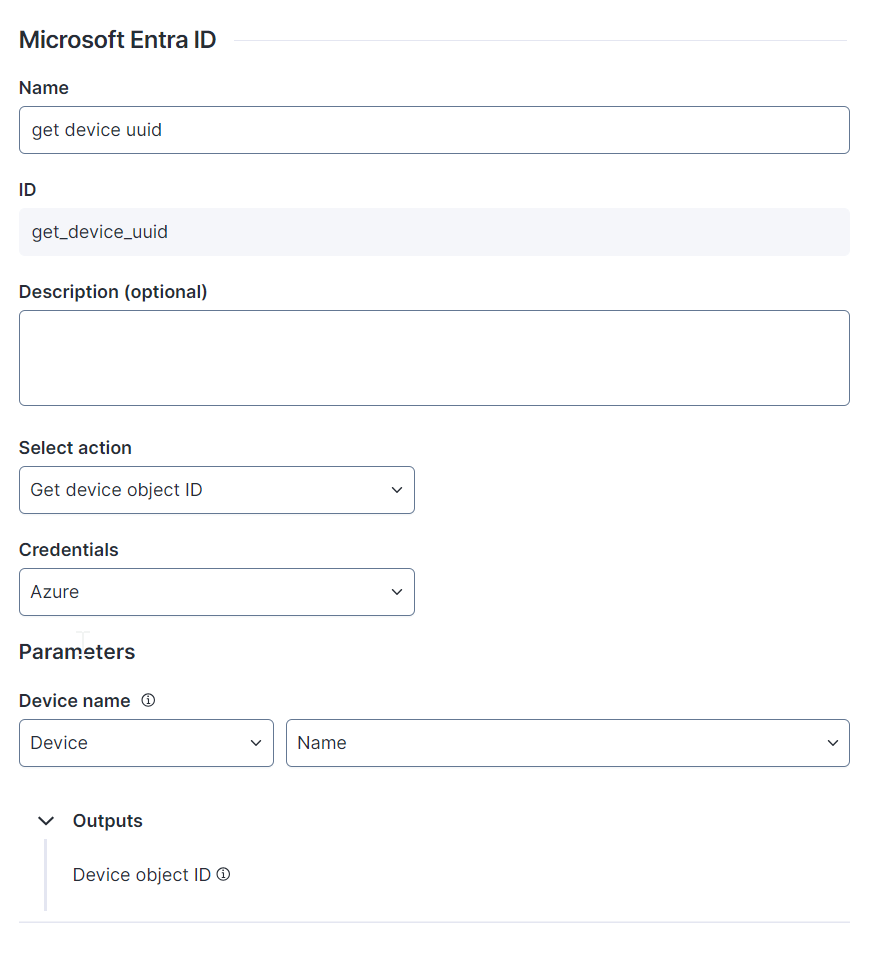
## Action: Get device object ID <a href="#microsoftentraidconnectorthinklet-action-getdeviceobjectid" id="microsoftentraidconnectorthinklet-action-getdeviceobjectid"></a>

**Get device object ID** retrieves the device UUID.

The Microsoft Entra ID connector thinklet relies on the [List devices](https://learn.microsoft.com/en-us/graph/api/device-list?view=graph-rest-1.0\&tabs=http) API endpoint provided by Microsoft Graph.

<figure><img src="https://268444917-files.gitbook.io/~/files/v0/b/gitbook-x-prod.appspot.com/o/spaces%2FxJSUDk9NTtCHYPG5EWs3%2Fuploads%2Fgit-blob-27a283f08215c9d126323dbe8a32bbdedbd57413%2Fimage-20240531-152149.png?alt=media" alt="image-20240531-152149.png" width="425"><figcaption></figcaption></figure>

* **Parameters:** Configure the data used as parameters for this action. Hover over the tooltip icon for more information on how the parameter is mapped and what data is required.
  * **Device name**: Active Directory device name
* **Outputs:** View the outputs of the connector thinklet.
  * **Device object ID** (`DeviceObjectID`): Device object ID

The table below shows the API Service connector details needed when recreating the connector:

<table><thead><tr><th width="272">Field</th><th>Value</th><th data-hidden></th></tr></thead><tbody><tr><td>Resource Path</td><td><code>/devices?$filter=displayName+eq+'{{DeviceName}}'</code></td><td></td></tr><tr><td>Method</td><td>GET</td><td></td></tr><tr><td>Payload</td><td></td><td></td></tr><tr><td>Outputs</td><td><code>DeviceObjectID $.value[0].id</code></td><td></td></tr></tbody></table>

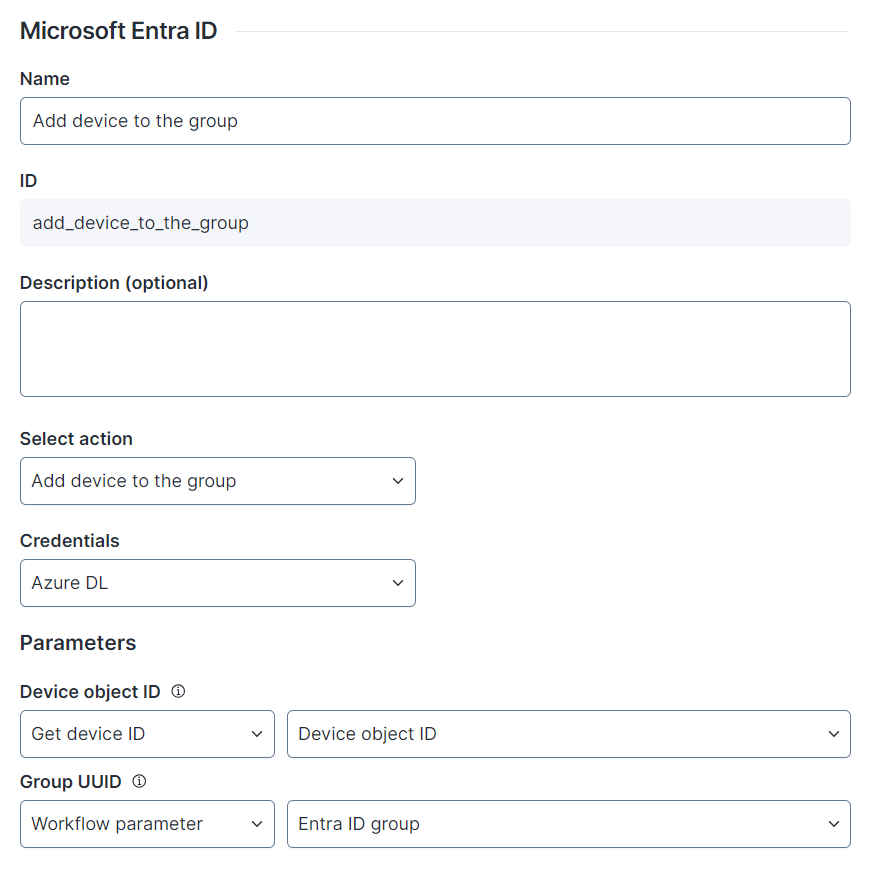
## Action: Add device to the group <a href="#microsoftentraidconnectorthinklet-action-adddevicetothegroup" id="microsoftentraidconnectorthinklet-action-adddevicetothegroup"></a>

**Add device to the group** adds the device to the group.

The Microsoft Entra ID connector thinklet relies on the [Add members](https://learn.microsoft.com/en-gb/graph/api/group-post-members?view=graph-rest-1.0\&tabs=http) API endpoint provided by Microsoft Graph.

<figure><img src="https://268444917-files.gitbook.io/~/files/v0/b/gitbook-x-prod.appspot.com/o/spaces%2FxJSUDk9NTtCHYPG5EWs3%2Fuploads%2Fgit-blob-261ffe8f33c0c55f25f2a5b212a1f756fbe04a7a%2Fimage-20240604-105948.png?alt=media" alt="image-20240604-105948.png" width="448"><figcaption></figcaption></figure>

* **Parameters:** Configure the data used as parameters for this action. Hover over the tooltip icon for more information on how the parameter is mapped and what data is required.
  * **Device object ID**: Entra ID device ID
  * **Group UUID**: UUID of the Entra ID group to which you want to add the device
* **Outputs:** View the outputs of the connector thinklet.

The table below shows the API Service connector details needed when recreating the connector:

<table><thead><tr><th width="272">Field</th><th>Value</th><th data-hidden></th></tr></thead><tbody><tr><td>Resource Path</td><td><code>/groups/{{groupUuid}}/members/$ref</code></td><td></td></tr><tr><td>Method</td><td>POST</td><td></td></tr><tr><td>Payload</td><td><code>{"@odata.id": "https://graph.microsoft.com/v1.0/directoryObjects/{{DeviceObjectID}}"}</code></td><td></td></tr><tr><td>Outputs</td><td></td><td></td></tr></tbody></table>

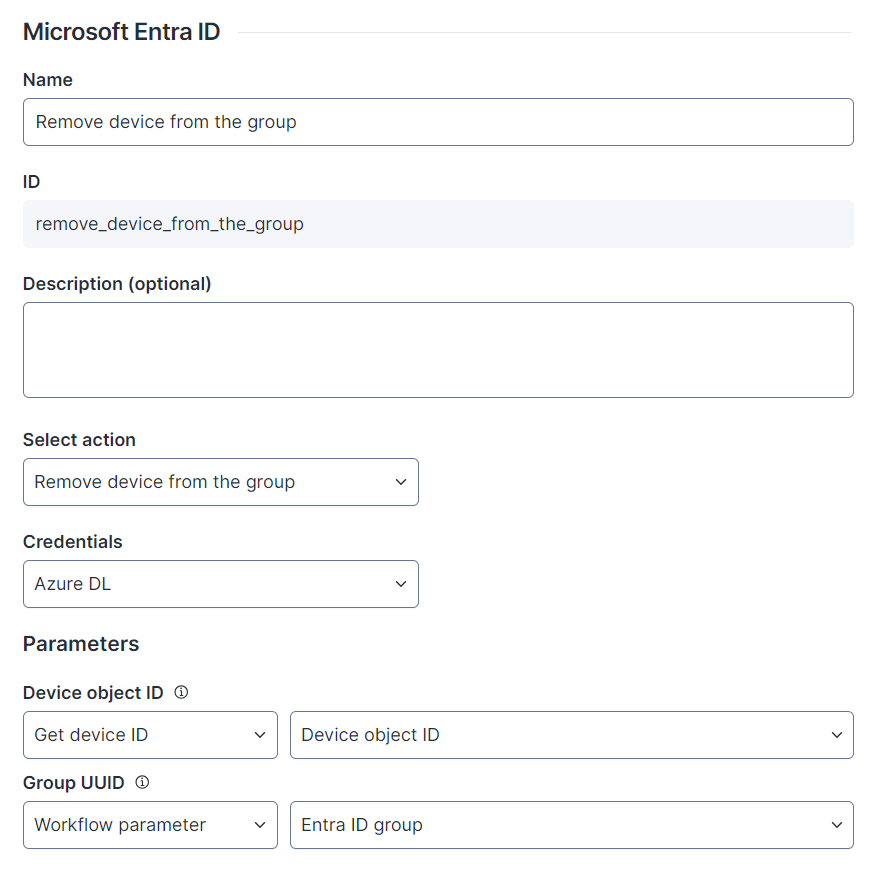
## Action: Remove device from the group <a href="#microsoftentraidconnectorthinklet-action-removedevicefromthegroup" id="microsoftentraidconnectorthinklet-action-removedevicefromthegroup"></a>

**Remove device from the group** removes the device from the group.

The Microsoft Entra ID connector thinklet relies on the [Remove member](https://learn.microsoft.com/en-gb/graph/api/group-delete-members?view=graph-rest-1.0\&tabs=http) API endpoint provided by Microsoft Graph.

<figure><img src="https://268444917-files.gitbook.io/~/files/v0/b/gitbook-x-prod.appspot.com/o/spaces%2FxJSUDk9NTtCHYPG5EWs3%2Fuploads%2Fgit-blob-fae1bfa094610ee27828ee71dc8b6ff8bc1e6e84%2Fimage-20240604-110920.png?alt=media" alt="image-20240604-110920.png" width="415"><figcaption></figcaption></figure>

* **Parameters:** Configure the data used as parameters for this action. Hover over the tooltip icon for more information on how the parameter is mapped and what data is required.
  * **Device object ID**: Entra ID device ID
  * **Group UUID**: UUID of the Entra ID group from which you want to remove the device

The table below shows the API Service connector details needed when recreating the connector:

<table><thead><tr><th width="272">Field</th><th>Value</th><th data-hidden></th></tr></thead><tbody><tr><td>Resource Path</td><td><code>/groups/{{GroupUUID}}/members/{{DeviceObjectID}}/$ref</code></td><td></td></tr><tr><td>Method</td><td>DELETE</td><td></td></tr><tr><td>Payload</td><td></td><td></td></tr><tr><td>Outputs</td><td></td><td></td></tr></tbody></table>

Refer to the [Configuring connector thinklets](https://docs.nexthink.com/platform/user-guide/workflows/creating-workflows/configuring-connector-thinklet) documentation for more information about connector thinklets.