> For the complete documentation index, see [llms.txt](https://docs.nexthink.com/llms.txt). Markdown versions of documentation pages are available by appending `.md` to page URLs; this page is available as [Markdown](https://docs.nexthink.com/platform/ja/user-guide/workflows/creating-workflows/configuring-thinklets/update-custom-fields-thinklet.md).
# カスタムフィールドThinkletの更新
**カスタムフィールドの更新**Thinkletは、既存の手動カスタムフィールドである**デバイス**または**ユーザー**オブジェクトに値を書き込みます。手動カスタムフィールドの作成方法と設定方法については、[カスタムフィールド管理](/platform/ja/user-guide/administration/content-management/custom-fields-management.md)を参照してください。
このThinkletを使用して、ワークフロー実行の結果として、あるいはユーザーの応答として得られた結果をカスタムフィールドに格納し、後の利用や自動化を実現します。
* コンプライアンス、オンボーディング、資産追跡などのメタデータを更新します。
* Nexthinkのダッシュボードや調査を更新します。
* 更新されたカスタムフィールドの値に基づいて追跡ワークフローをトリガーします。
{% hint style="info" %}
**カスタムフィールドの更新**Thinkletのユースケース例については、[ワークフローの作成](/platform/ja/user-guide/workflows/creating-workflows.md#updating-custom-fields-in-workflows-for-downstream-use)を参照してください。
{% endhint %}
## カスタムフィールドの更新Thinkletの設定
次の設定フィールドに記入してください。
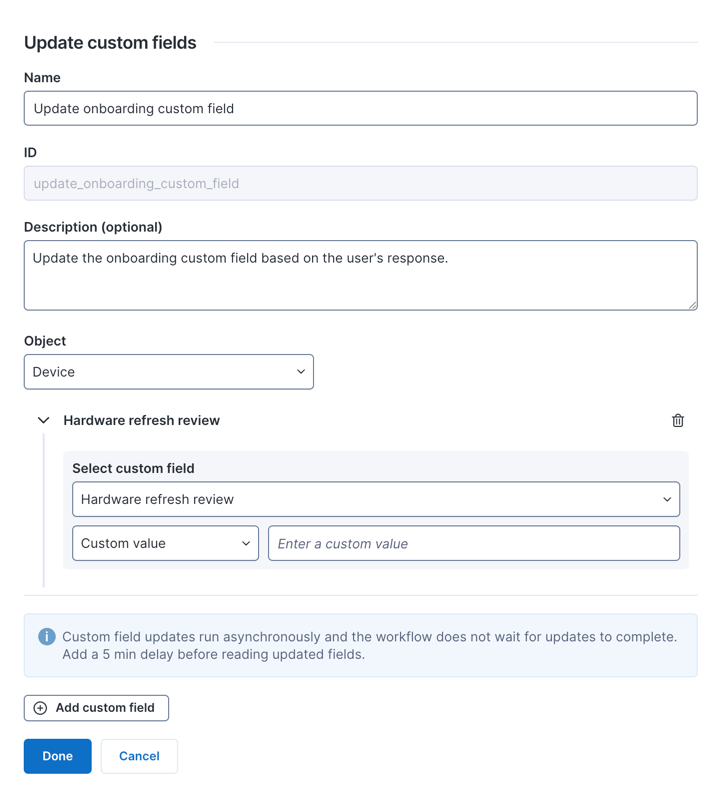
* **名前**:Thinkletに一意の名前を入力します。
* **ID**:名前に基づいて自動生成されます。
* **説明(オプション)**:コラボレーションを促進するためにThinkletの目的を説明します。
* **オブジェクト**:**デバイス**または**ユーザー**のどちらかを選択します。オブジェクトは、どのカスタムフィールドが利用可能かを定義します。
* **デバイス**および**ユーザー**オブジェクトの両方を更新するには、複数のThinkletを連鎖させます。
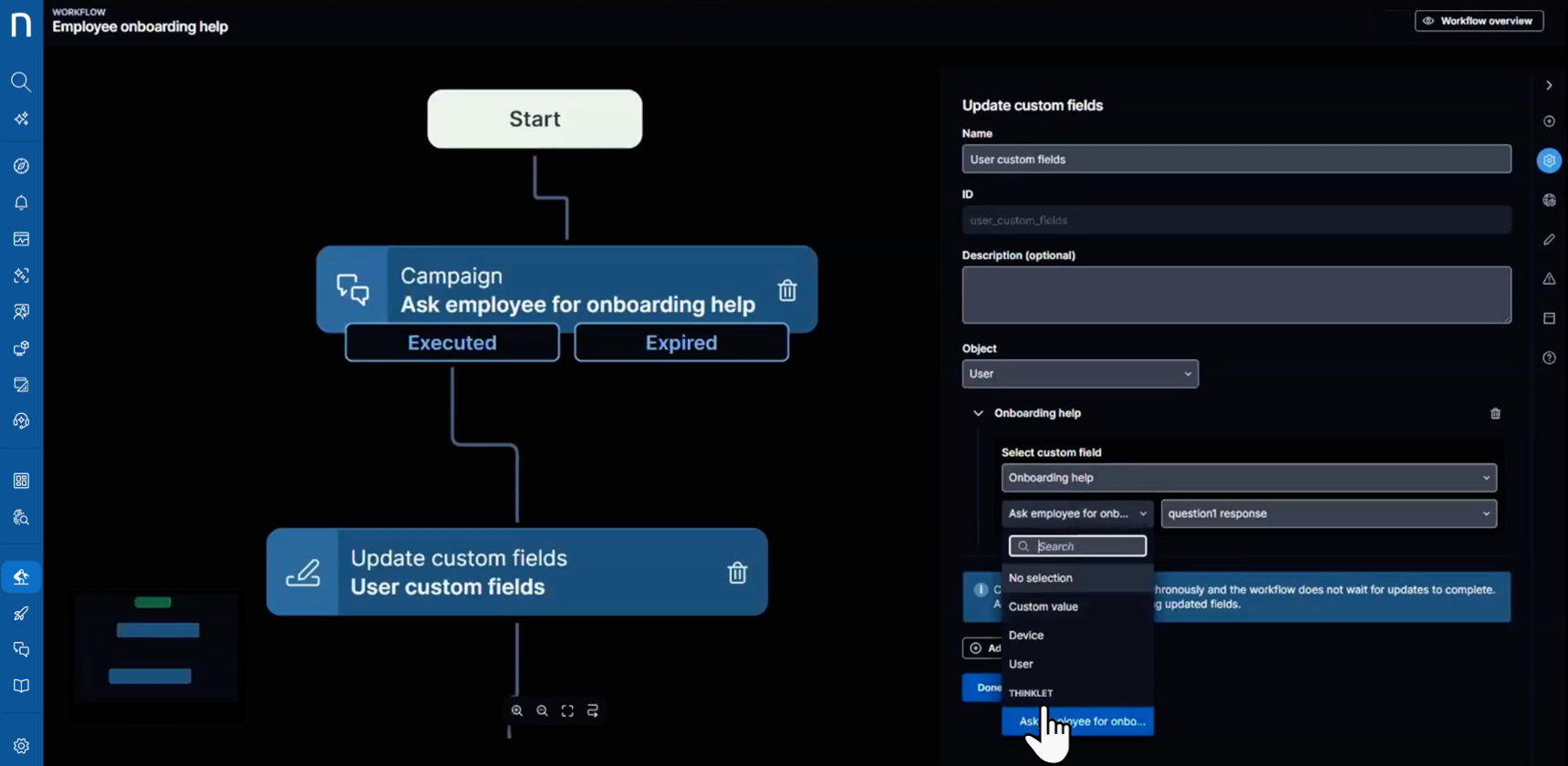
* **カスタムフィールドを選択**:更新する手動カスタムフィールドを1つ以上(最大10個)選択します。どのように値を割り当てるかを選択します。
* **カスタム値**:固定値を入力します。
* **デバイス**または**ユーザー**プロパティ、例として**CPU**または**エンティティ**。
* **Thinklet**:以前のThinkletからの出力を使用します。例えば、キャンペーンの応答。
{% hint style="warning" %}
カスタムフィールドの更新は非同期で、最大5分かかることがあります。後続のワークフローステップで更新された値を読み取る必要がある場合は、**待機**Thinkletを追加してください。
特定のオブジェクトに対して、Thinkletごとに最大10個のカスタムフィールドを更新できます。[ワークフロー実行タイムライン](/platform/ja/user-guide/workflows/monitoring-workflows-dashboard/troubleshooting-workflows.md#update-custom-fields)から更新結果の状況を確認できます。
{% endhint %}
---
# Agent Instructions
This documentation is published with GitBook. GitBook is the documentation platform designed so that both humans and AI agents can read, navigate, and reason over technical content effectively. Learn more at gitbook.com.
## Querying This Documentation
If you need additional information that is not directly available in this page, you can query the documentation by asking a question.
Perform an HTTP GET request on the following URL with the `ask` and `goal` query parameters:
```
GET https://docs.nexthink.com/platform/ja/user-guide/workflows/creating-workflows/configuring-thinklets/update-custom-fields-thinklet.md?ask=&goal=
```
`ask` is the immediate question: it should be specific, self-contained, and written in natural language.
`goal` is what the user is ultimately trying to achieve, the reason they need the answer. Sharing it helps GitBook give you a better, more relevant answer. A goal is most helpful when it describes the outcome the user wants rather than restating the question. For example, with `ask=how do I create an API token`, a goal like `automate deployments from our CI pipeline` lets GitBook tailor the answer to that use case.
The response will contain a direct answer to the question and relevant excerpts and sources from the documentation.
Use this mechanism when the answer is not explicitly present in the current page, you need clarification or additional context, or you want to retrieve related documentation sections.