> For the complete documentation index, see [llms.txt](https://docs.nexthink.com/platform/llms.txt). Markdown versions of documentation pages are available by appending `.md` to page URLs; this page is available as [Markdown](https://docs.nexthink.com/platform/ja/configuring_nexthink/bringing-data-into-your-nexthink-instance/integrating-nexthink-with-third-party-tools/outbound-connectors/webhooks.md).
# Webhook
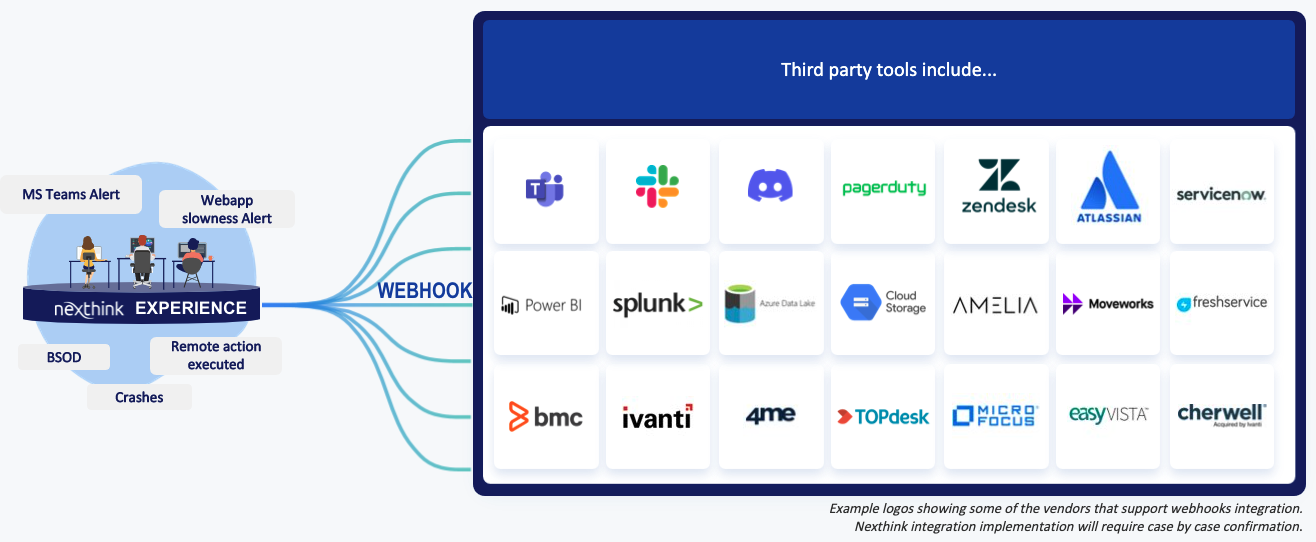
Webhook統合機能は、ITサポートチームの積極的な取り組みを支える主要な要素の一つです。これにより、Nexthinkは自動通知を介して多くのサードパーティツールとコミュニケーションをとり、ITの事故、問題、変更、メッセージ、リクエスト、アラートを迅速に報告し、ITエコシステム内の様々なチームにこれらの通知を可視化します。
Webhookは、イベントが発生したときにアプリケーションから送信される自動メッセージです。それにはメッセージやペイロードが含まれており、アプリケーションのユニークなアドレスとして機能する特定のURLに送信されます。
これはNexthinkがサードパーティツールと通信し、イベントが発生したときに自動通知を送信する簡単な方法です。このような通知を活用するには、Webhookを使用して1つのアプリケーションから別のアプリケーションにデータを自動的にプッシュする方法を知っておく必要があります。
Nexthinkは出力Webhookを定義することができます。これは、Nexthink上でイベントが発生した際に、サードパーティのURL、リソース、ペイロードを利用してアクションを実行するように設定できます。その時点で、アラートがトリガーされます。アラートやイベントがトリガーされた際にサードパーティ製品へメッセージを送信するように設定することができます。
* [Webhookの管理](https://docs.nexthink.com/platform/ja/managing-webhooks/)
* [Webhookユースケースのセットアップ](https://docs.nexthink.com/platform/ja/webhook-use-cases-setup/)
* [Webhookに関するFAQ](https://docs.nexthink.com/platform/ja/webhooks-faq.md)
---
# Agent Instructions
This documentation is published with GitBook. GitBook is the documentation platform designed so that both humans and AI agents can read, navigate, and reason over technical content effectively. Learn more at gitbook.com.
## Querying This Documentation
If you need additional information that is not directly available in this page, you can query the documentation by asking a question.
Perform an HTTP GET request on the following URL with the `ask` and `goal` query parameters:
```
GET https://docs.nexthink.com/platform/ja/configuring_nexthink/bringing-data-into-your-nexthink-instance/integrating-nexthink-with-third-party-tools/outbound-connectors/webhooks.md?ask=&goal=
```
`ask` is the immediate question: it should be specific, self-contained, and written in natural language.
`goal` is what the user is ultimately trying to achieve, the reason they need the answer. Sharing it helps GitBook give you a better, more relevant answer. A goal is most helpful when it describes the outcome the user wants rather than restating the question. For example, with `ask=how do I create an API token`, a goal like `automate deployments from our CI pipeline` lets GitBook tailor the answer to that use case.
The response will contain a direct answer to the question and relevant excerpts and sources from the documentation.
Use this mechanism when the answer is not explicitly present in the current page, you need clarification or additional context, or you want to retrieve related documentation sections.