> For the complete documentation index, see [llms.txt](https://docs.nexthink.com/platform/llms.txt). Markdown versions of documentation pages are available by appending `.md` to page URLs; this page is available as [Markdown](https://docs.nexthink.com/platform/library-packs/security-and-compliance/employee-onboarding-dashboard/usage-guide-employee-onboarding-dashboard.md).
# Usage guide: Employee onboarding dashboard
{% hint style="warning" %}
This page outlines various ways to use the pack, including use case examples.
Administrators can refer to the [Configuration Guide: Employee onboarding dashboard](/platform/library-packs/security-and-compliance/employee-onboarding-dashboard/configuration-guide-employee-onboarding-dashboard.md) to set up and customize the installed content.
{% endhint %}
The **Employee onboarding dashboard** library pack helps you monitor, manage, and improve the onboarding experience for new joiners by combining technical readiness, application adoption, and employee sentiment in a single place.
It enables you to:
* Track new employees and their distribution by department and location.
* Monitor onboarding digital experience using DEX scores.
* Measure adoption of key onboarding guides and applications.
* Detect common technical blockers impacting new joiners.
* Collect early employee feedback during onboarding.
## Library pack uses
{% hint style="info" %}
Jump to [Use cases](#use-cases) on this page to see relevant scenario applications.
{% endhint %}
Use the library pack content for the following purposes.
### Providing onboarding visibility
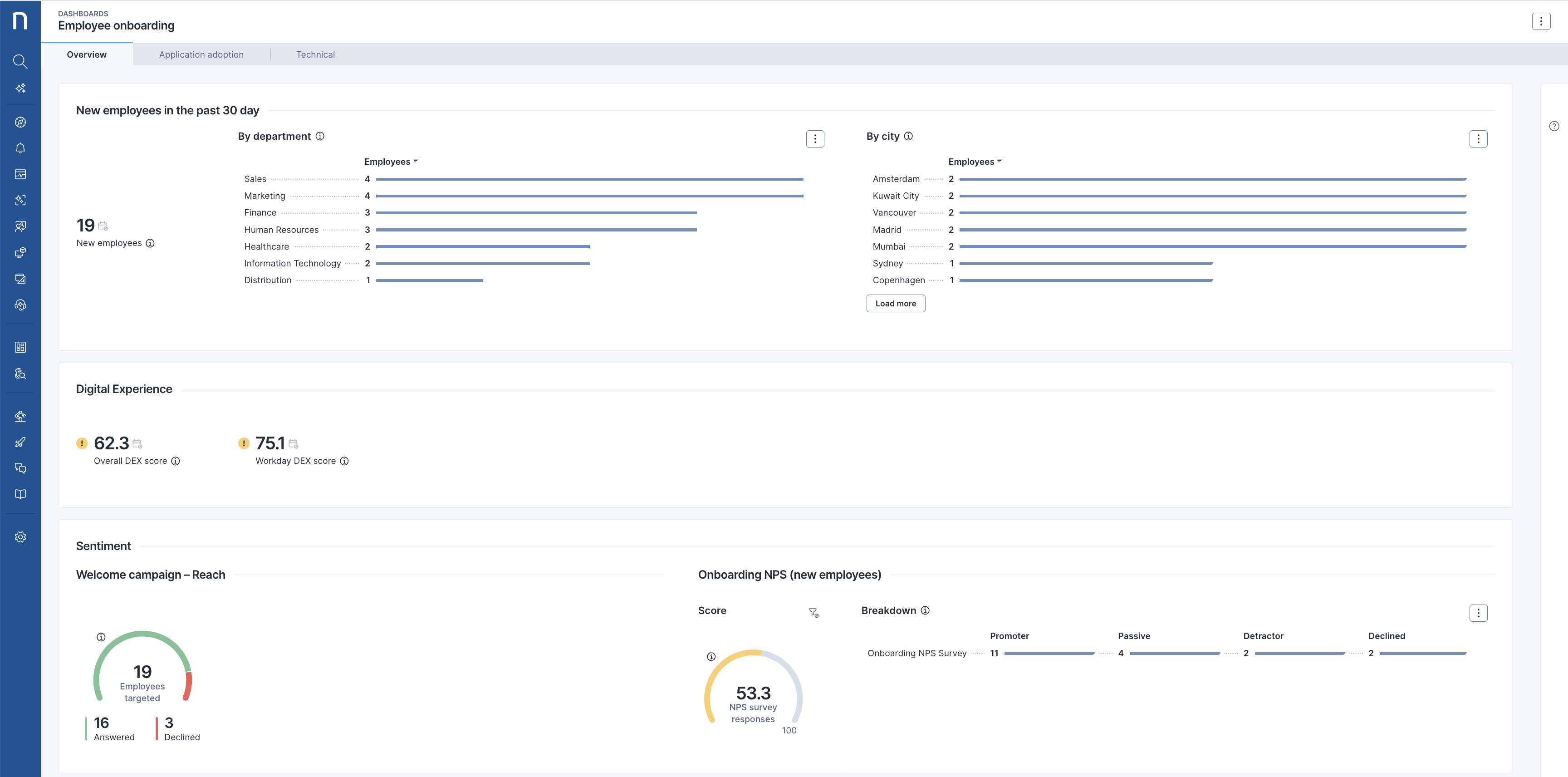
The **Employee onboarding** live dashboard is the central entry point of this library pack.\
It provides an end-to-end view of the onboarding journey, from day one readiness to early feedback.
From the **Overview** tab, you can:
* Monitor the number of **new employees** over time.
* Analyze distribution by **department** and **city**.
* Review onboarding-focused **DEX scores**, such as **Overall DEX score** and **Workday DEX score**.
* Track onboarding sentiment through **Welcome campaign – Reach** and **Onboarding NPS**.
This visibility helps you quickly understand whether new joiners are starting with the right conditions.
### Measuring guide and application adoption
The **Application adoption** tab helps you understand how new employees engage with onboarding guidance and key applications.
You can use it to:
* Measure **employees engaged** and **guides started**.
* Review **engagement**, **completion rate**, and **drop rate**, where available.
* Analyze **guide duration** to understand effort and friction.
* Track trends using **Daily active users** and **Guides started** over time.
This data helps you assess whether onboarding guidance is effective and where users may drop off.
### Detecting technical onboarding blockers
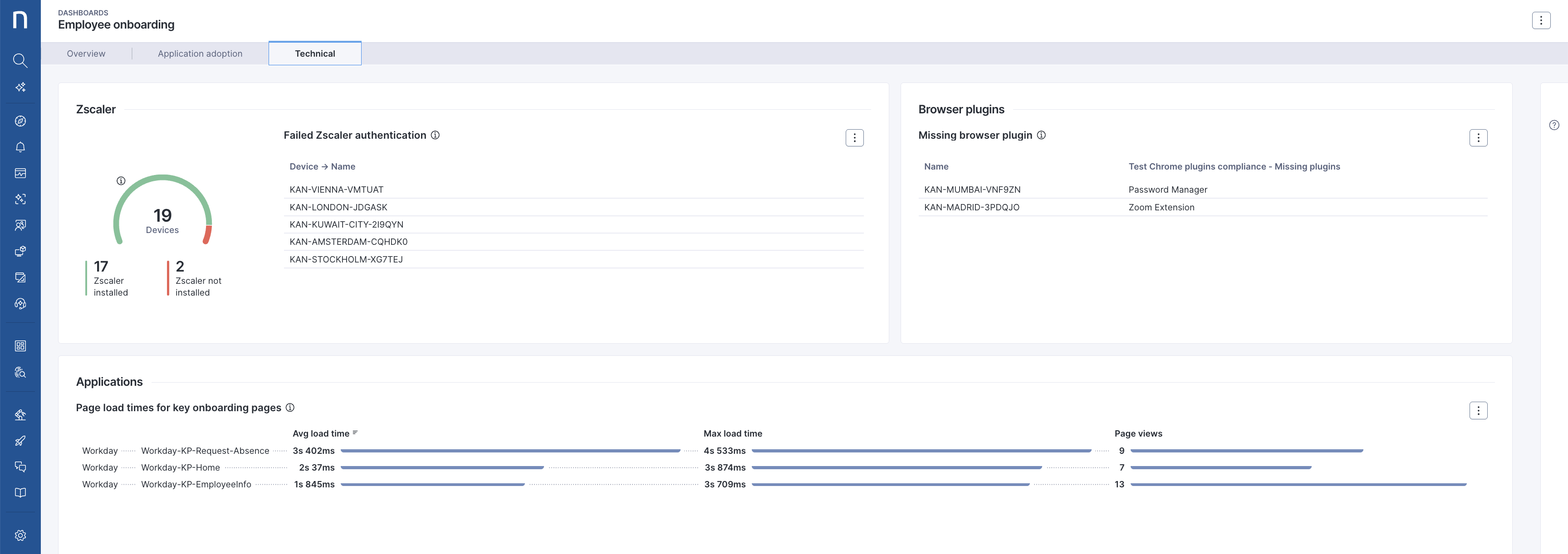
The **Technical** tab helps you identify common technical issues that delay or block onboarding.
Depending on your configuration, you can monitor:
* Secure access readiness, such as **Zscaler installation** and **failed authentication**.
* Compliance with required **browser plugins**.
* Performance of key onboarding applications, such as **page load times** for **Workday** pages.
This view allows you to detect problems early and act before they impact productivity.
### Supporting remediation and improvement
The library pack is designed to be highly configurable.\
You can adapt it to your environment by replacing examples such as **Workday** or **Zscaler** with your own HR platforms, secure access tools, and technical checks.
Where needed, you can:
* Trigger targeted **campaigns** to guide new joiners.
* Use **remote actions** or **workflows** to automate remediation.
* Refine onboarding steps based on technical health, adoption metrics, and **NPS feedback**.
This continuous loop helps improve onboarding over time.
## Use cases
In addition to the relevant use cases covered below, you may uncover other troubleshooting scenarios specific to your environment.
### Monitoring onboarding readiness for new joiners
This use case helps you ensure new employees are technically ready from their first day.
From the **Employee onboarding** dashboard:
1. Open the **Overview** tab.
2. Review the **New employees** widget to confirm onboarding volume.
3. Check **Overall DEX score** and application-specific scores, such as **Workday DEX score**.
4. Identify departments or locations with lower scores.
5. Prioritize follow-up actions for impacted groups.
### Identifying onboarding guide drop-offs
This use case helps you detect where new joiners struggle with onboarding guidance.
From the **Application adoption** tab:
1. Review **Employees engaged** and **Guides started**.
2. Compare **Engagement**, **Completion rate**, and **Drop rate** across guides.
3. Identify guides with high drop rates or long **Guide duration**.
4. Refine guide content or sequencing to reduce friction.
### Detecting secure access issues during onboarding
This use case helps you reduce delays caused by access or authentication problems.
From the **Technical** tab:
1. Review secure access widgets, such as **Zscaler installation** status.
2. Identify devices with **failed authentication**.
3. Drill down to affected devices or users.
4. Trigger remediation using **campaigns**, **remote actions**, or **workflows** as needed.
***
RELATED TOPICS
* [Manage live dashboards](https://nexthink.gitbook.io/opd/user-guide/live-dashboards/managing-live-dashboards)
* [Manage remote actions](https://nexthink.gitbook.io/opd/user-guide/remote-actions/managing-remote-actions)
* [Manage campaigns](https://nexthink.gitbook.io/opd/user-guide/campaigns/managing-campaigns)
* [Manage workflows](https://nexthink.gitbook.io/opd/user-guide/workflows/managing-workflows)
* [Manage custom fields](https://nexthink.gitbook.io/opd/user-guide/administration/content-management/custom-fields-management)
* [Manage ratings](https://nexthink.gitbook.io/opd/user-guide/administration/content-management/ratings-management)
* [Manage custom trends](https://nexthink.gitbook.io/opd/user-guide/administration/content-management/custom-trends-management)
* [Manage applications](https://nexthink.gitbook.io/opd/user-guide/applications/managing-applications)
* [Manage software metering rules](https://nexthink.gitbook.io/opd/user-guide/software-metering/managing-software-metering)
* [Employee onboarding dashboard](/platform/library-packs/security-and-compliance/employee-onboarding-dashboard.md)
* [Configuration Guide: Employee onboarding dashboard](/platform/library-packs/security-and-compliance/employee-onboarding-dashboard/configuration-guide-employee-onboarding-dashboard.md)
---
# Agent Instructions
This documentation is published with GitBook. GitBook is the documentation platform designed so that both humans and AI agents can read, navigate, and reason over technical content effectively. Learn more at gitbook.com.
## Querying This Documentation
If you need additional information that is not directly available in this page, you can query the documentation by asking a question.
Perform an HTTP GET request on the following URL with the `ask` and `goal` query parameters:
```
GET https://docs.nexthink.com/platform/library-packs/security-and-compliance/employee-onboarding-dashboard/usage-guide-employee-onboarding-dashboard.md?ask=&goal=
```
`ask` is the immediate question: it should be specific, self-contained, and written in natural language.
`goal` is what the user is ultimately trying to achieve, the reason they need the answer. Sharing it helps GitBook give you a better, more relevant answer. A goal is most helpful when it describes the outcome the user wants rather than restating the question. For example, with `ask=how do I create an API token`, a goal like `automate deployments from our CI pipeline` lets GitBook tailor the answer to that use case.
The response will contain a direct answer to the question and relevant excerpts and sources from the documentation.
Use this mechanism when the answer is not explicitly present in the current page, you need clarification or additional context, or you want to retrieve related documentation sections.