> For the complete documentation index, see [llms.txt](https://docs.nexthink.com/platform/llms.txt). Markdown versions of documentation pages are available by appending `.md` to page URLs; this page is available as [Markdown](https://docs.nexthink.com/platform/ja/configuring_nexthink/bringing-data-into-your-nexthink-instance/deploying-nexthink-in-vdi-environment.md).
# VDI環境でのNexthinkの展開
このページでは、仮想デスクトップインフラストラクチャ(VDI)環境で Nexthink を展開および構成する方法の概要を提供します。
VDI環境は、エンドポイントエージェントのデプロイおよびユーザーセッションデータの取得時に特定の技術的考慮が必要です。このガイドのいくつかのステップでは、Nexthinkとの仮想デスクトップインフラストラクチャ(VDI)環境の統合に焦点を当てており、その他のステップでは全てのNexthink導入に適用可能な一般的な設定タスクが概説されています。
* このページにある [#identifying-your-vdi-deployment-path](#identifying-your-vdi-deployment-path "mention") を参照して、VDI に特化した展開パスの概要を確認してください。
* このページにある [#step-by-step-deployment-procedure](#step-by-step-deployment-procedure "mention") を参照して、VDI に特化した設定タスクと一般的な Nexthink 設定タスクを含む手順を確認してください。
## VDI インフラストラクチャコンポーネントの理解
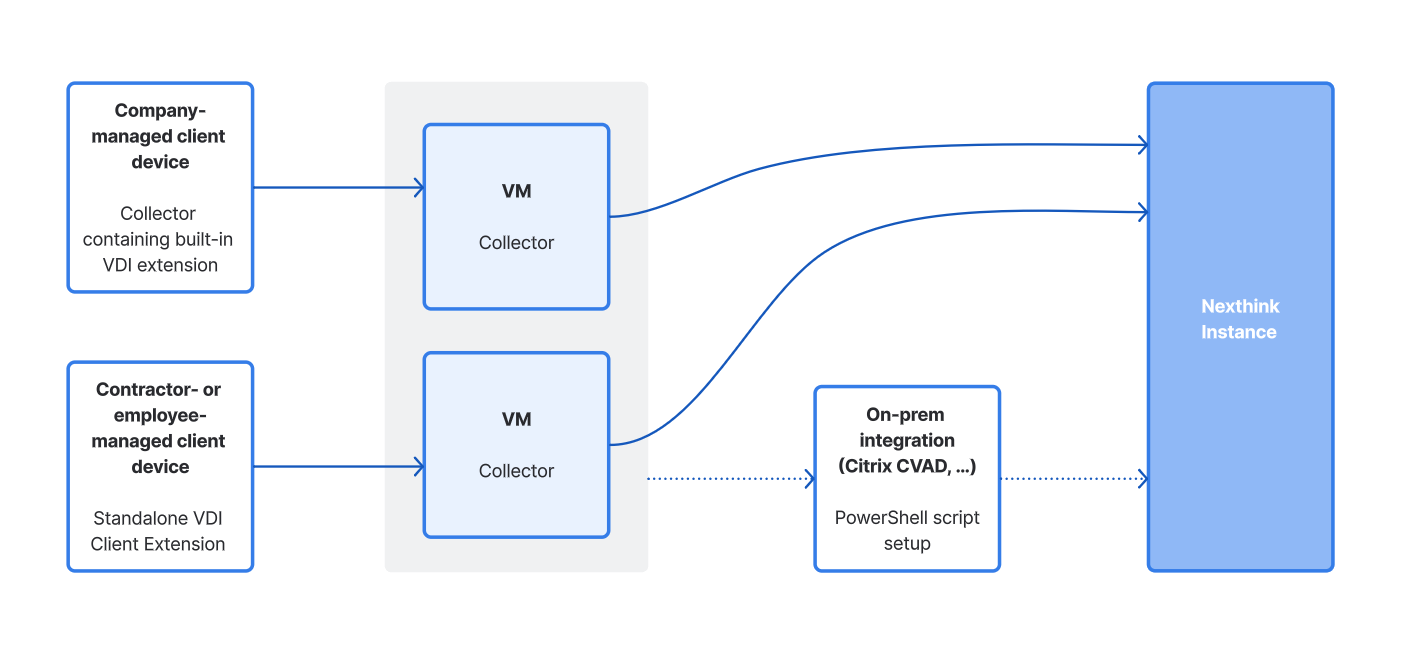
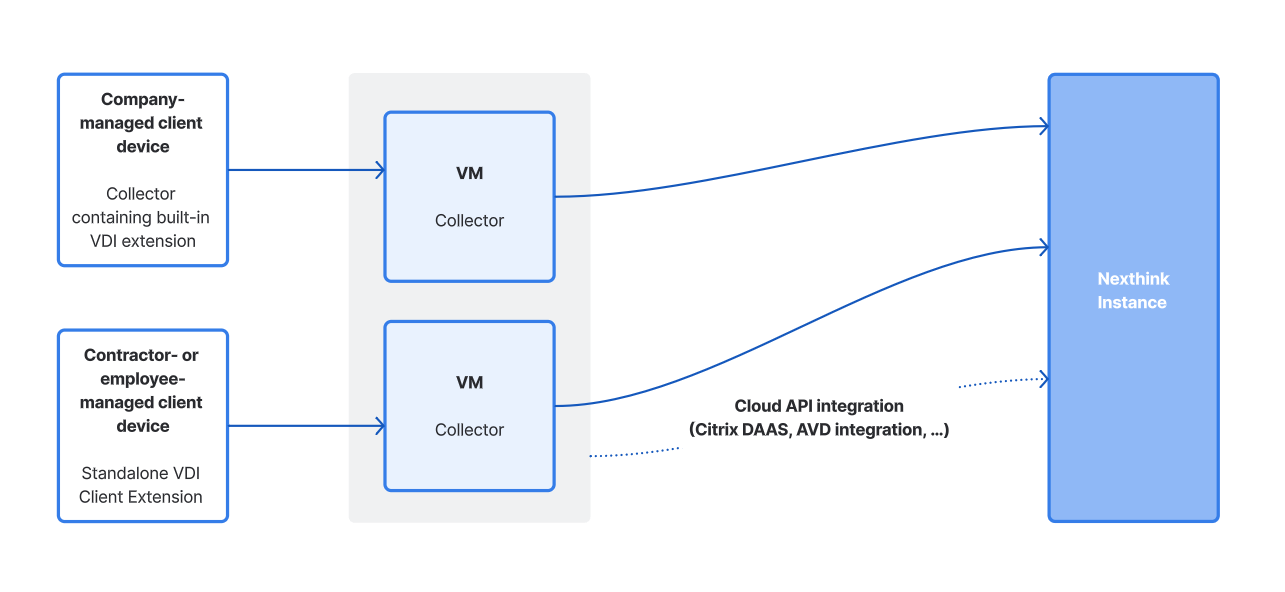
次の図は、オンプレミスおよびクラウドホスティングされた一般的なVDIインフラストラクチャの簡略化された表現を示し、各ノードにどのコンポーネントをインストールする必要があるかを強調しています。
{% ヒント スタイル="info" %}
接続ラインは、VDIエクスペリエンスに特化した `vdi_session` および `vdi_event` テーブルで収集されたメトリックの経路を示しています。これらのメトリクスについて学ぶには、[VDIエクスペリエンスNQLの機能](/platform/ja/user-guide/vdi-experience/desktop-virtualization-nql-capabilities.md) および [NQLデータモデル](/platform/ja/understanding-key-data-platform-concepts/nql-data-model.md) ドキュメントを参照してください。
{% hint style="info" %}
インストールするコンポーネントによって、システムが収集するメトリクスが異なります。各インストールシナリオによって提供されるメトリックについては、[VDIエクスペリエンスNQLの機能](/platform/ja/user-guide/vdi-experience/desktop-virtualization-nql-capabilities.md)ドキュメントを参照してください。
{% endhint %}
## VDI 展開パスの決定
以下のチャートは、デスクトップブローカー、デスクトップタイプ、および仮想マシン上で Nexthink Collector を展開するために使用される方法に基づいて利用可能な VDI 展開パスを示しています。
```mermaid
flowchart TD
DB(デスクトップブローカー)
subgraph brokers
direction LR
DB --> MS(Microsoft)
DB --> CTX(Citrix)
DB --> AWS(Amazon AWS)
DB --> OM(Omnissa Horizon)
DB -.-> VSPH("VMware vSphere ハイパーバイザー")
DB --> OTH(その他)
end
%% Microsoft branch
subgraph ms
direction LR
MS --> RDSH(RDSH)
MS --> AVD(Microsoft AVD)
MS --> W365(Windows 365 CloudPC)
end
%% Connectors branch
subgraph results
direction LR
AVD --> AVD1("Microsoft AVD コネクターのセットアップ")
RDSH --> WX1(基本 Nexthink ライセンス*)
AWS --> AWSDaaS("AWS WorkSpaces DaaS コネクターのセットアップ")
AWS --> AWSapps("AWS WorkSpaces アプリケーションコネクターのセットアップ")
CTX --> CVAD("Citrix CVAD (オンプレミス) コネクターのセットアップ")
CTX --> DaaS("Citrix DaaS (クラウド) コネクターのセットアップ")
OM --> OM2("Omnissa Horizon (オンプレミス) コネクターのセットアップ")
VSPH -. 必要な場合 .-> VSPC("vSphere ハイパーバイザー コネクター")
OTH --> WX2(基本 Nexthink ライセンス*)
end
W365 --> |コネクターは不要| VDItype(仮想デスクトップタイプ)
AVD1 --> VDItype(仮想デスクトップタイプ)
AWSDaaS --> VDItype(仮想デスクトップタイプ)
AWSapps --> VDItype(仮想デスクトップタイプ)
CVAD --> VDItype(仮想デスクトップタイプ)
DaaS --> VDItype(仮想デスクトップタイプ)
OM2 --> VDItype(仮想デスクトップタイプ)
VSPC -.-> VDItype
subgraph desktop_type
direction LR
VDItype --> PER("パーソナル (永続型)")
VDItype --> POOL("プール (非永続型)")
VDItype --> SHA("共有 (マルチセッション)")
end
SHA --> DEPL(Collector デプロイメント 方法)
%%'Shared' branch
subgraph deployment
direction LR
DEPL --> IMG(イメージベース)
DEPL --> UNATT(無人インストール)
end
subgraph install
direction LR
PER --> REG(Collector インストール UEM または VDI プラットフォーム経由)
POOL --> REF(Collector インストール 参照イメージ経由)
UNATT --> REG2(Collector インストール UEM または VDI プラットフォーム経由)
IMG --> REF2(Collector インストール 参照イメージ経由)
end
REG --> EXC(例外)
REF --> EXC(例外)
REG2 --> EXC(例外)
REF2 --> EXC(例外)
EXC --> |なし| DONE(なし)
EXC --> Citrix(Windows 365 上で 実行される Citrix)
Citrix --> Force_Citrix("Citrix 収集を強制")
Force_Citrix --> DONE(完了)
%%links
%%click AVD1 "https://docs.nexthink.com/platform/ja/configuring_nexthink/bringing-data-into-your-nexthink-instance/integrating-nexthink-with-third-party-tools/inbound-connectors/connector-for-microsoft-azure-virtual-desktop" _blank
%%click CVAD "https://docs.nexthink.com/platform/ja/configuring_nexthink/bringing-data-into-your-nexthink-instance/integrating-nexthink-with-third-party-tools/inbound-connectors/connector-for-citrix-virtual-apps-and-desktops" _blank
%%click DaaS "https://docs.nexthink.com/platform/ja/configuring_nexthink/bringing-data-into-your-nexthink-instance/integrating-nexthink-with-third-party-tools/inbound-connectors/connector-for-citrix-daas" _blank
%%click OM2 "https://docs.nexthink.com/platform/ja/configuring_nexthink/bringing-data-into-your-nexthink-instance/deploying-nexthink-in-vdi-environment/vdi-platform-specific-deployment-scenarios/omnissa-horizon-on-prem" _blank
%%click REG "https://docs.nexthink.com/platform/ja/configuring_nexthink/bringing-data-into-your-nexthink-instance/deploying-nexthink-in-non-vdi-environment/installing-collector/installing-collector-on-windows#installingcollectoronwindows-deployingcollectorusingactivedirectorygrouppolicy-1" _blank
%%click REG2 "https://docs.nexthink.com/platform/ja/configuring_nexthink/bringing-data-into-your-nexthink-instance/deploying-nexthink-in-non-vdi-environment/installing-collector/installing-collector-on-windows#installingcollectoronwindows-deployingcollectorusingactivedirectorygrouppolicy-1" _blank
%%click REF "https://docs.nexthink.com/platform/ja/configuring_nexthink/bringing-data-into-your-nexthink-instance/deploying-nexthink-in-non-vdi-environment/installing-collector/installing-collector-on-windows#installingcollectoronwindows-deployingcollectorwithinawindowsreferenceimage" _blank
%%click REF2 "https://docs.nexthink.com/platform/ja/configuring_nexthink/bringing-data-into-your-nexthink-instance/deploying-nexthink-in-non-vdi-environment/installing-collector/installing-collector-on-windows#installingcollectoronwindows-deployingcollectorwithinawindowsreferenceimage" _blank
%%click Force_Citrix "https://docs.nexthink.com/platform/ja/configuring_nexthink/bringing-data-into-your-nexthink-instance/deploying-nexthink-in-non-vdi-environment/installing-collector/installing-collector-on-windows#windows-installer-mst" _blank
%%style
classDef default fill:#d8edff,color:#221F20, stroke:#a8c8ee,stroke-width:2px
classDef nexthink_blue fill:#1046A8,color:white,stroke-width:0px
classDef nexthink_blue_stroke fill:#FFF,color:#1046A8,font-weight: bold,stroke:#1046A8,stroke-width:3px
classDef nexthink_dark_blue fill:#011130,color:white, stroke:#1E88E5,stroke-width:0px
classDef nexthink_dark_blue_stroke fill:#545A7A,color:white, stroke:#384065,stroke-width:2px
classDef nexthink_light_blue fill:#3194F7,color:white,stroke-width:0px
classDef nexthink_light_blue_stroke fill:#FFF,color:#3194F7,font-weight: bold,stroke:#3194F7,stroke-width:3px
classDef gray fill:gray,color:white,stroke-width:0px
classDef invisible fill:#FFF,color:white,stroke-width:0px
classDef green fill:#00B1A9,color:white,stroke-width:0px
classDef red fill:#FF7461,color:white,stroke-width:0px
classDef subgraph_ fill:#00000000,color:white,stroke-width:0px
classDef light fill:#DAE3EC,color:#221F20, stroke:#1E88E5,stroke-width:0px
linkStyle default stroke:gray
%%nodes style
class DB nexthink_dark_blue_stroke
class VDItype nexthink_dark_blue_stroke
class EXC nexthink_dark_blue_stroke
class AVD1 nexthink_light_blue
class AWSDaaS nexthink_light_blue
class AWSapps nexthink_light_blue
class CVAD nexthink_light_blue
class DaaS nexthink_light_blue
class OM2 nexthink_light_blue
class VSPC nexthink_light_blue
class WX1 light
class WX2 light
class REG nexthink_blue
class REG2 nexthink_blue
class REF nexthink_light_blue
class REF2 nexthink_light_blue
class NONE gray
class Force_Citrix nexthink_light_blue
%%subgraph style
class brokers subgraph_
class ms subgraph_
class results subgraph_
class desktop_type subgraph_
class deployment subgraph_
class install subgraph_
```
\*Microsoft リモートデスクトップセッションホスト (RDSH) やこのチャートにない他のデスクトップブローカーについては、Nexthink は基本的な Nexthink ライセンスで利用できる機能、例として **アラートと診断** モジュールの [追加のダッシュボード](/platform/ja/user-guide/alerts-and-diagnostics/getting-started-with-diagnostics/additional-dashboards.md#additionaldashboards-desktopvirtualization) などを使用することを推奨します。
## ステップバイステップのデプロイメント手順
このセクションでは、VDI環境でNexthinkコンポーネントをインストールおよび構成するための大まかな順序について説明しています。VDI特有と一般のNexthink設定タスクが含まれています。
Nexthinkは、スムーズで一貫性のあるセットアップのためにこの手順に従うことを推奨し、データが正しく各ノードから次のノードに送信されることを保証します。
VDIプラットフォームに特有の詳細なガイドラインについては、[VDIプラットフォーム固有の展開シナリオ](/platform/ja/configuring_nexthink/bringing-data-into-your-nexthink-instance/deploying-nexthink-in-vdi-environment/vdi-platform-specific-deployment-scenarios.md)ドキュメントに記載されているいずれかのデプロイメントシナリオを参照してください。
{% stepper %}
{% step %}
**VDIプラットフォーム特有のインバウンドコネクタを設定する**
該当する場合は、ご使用のVDIプラットフォーム用の適切なインバウンドコネクタをインストールしてください。
* [AWS AppStream](/platform/ja/configuring_nexthink/bringing-data-into-your-nexthink-instance/integrating-nexthink-with-third-party-tools/inbound-connectors/connector-for-aws-appstream.md)
* [AWS WorkSpaces](/platform/ja/configuring_nexthink/bringing-data-into-your-nexthink-instance/integrating-nexthink-with-third-party-tools/inbound-connectors/connector-for-aws-workspaces.md)
* [Citrix Virtual Apps and Desktops (CVAD)](/platform/ja/configuring_nexthink/bringing-data-into-your-nexthink-instance/integrating-nexthink-with-third-party-tools/inbound-connectors/connector-for-citrix-virtual-apps-and-desktops.md)
* [Citrix DaaS](https://github.com/nexthink/documentation.online-product-documentation/tree/develop/integrating-nexthink-with-third-party-tools/inbound-connectors/connector-for-citrix-daas.md)
* [VMware vSphere ハイパーバイザー](/platform/ja/configuring_nexthink/bringing-data-into-your-nexthink-instance/integrating-nexthink-with-third-party-tools/inbound-connectors/connector-for-vmware-vsphere-hypervisor.md)
* [Microsoft Azure Virtual Desktop (AVD)](/platform/ja/configuring_nexthink/bringing-data-into-your-nexthink-instance/integrating-nexthink-with-third-party-tools/inbound-connectors/connector-for-microsoft-azure-virtual-desktop.md)
* [Omnissa Horizon](https://github.com/nexthink/documentation.online-product-documentation/tree/develop/integrating-nexthink-with-third-party-tools/inbound-connectors/connector-for-omnissa-horizon.md)
{% endstep %}
{% step %}
{% endstep %}
{% step %}
\*\*仮想マシン(VM)用のCollectorを設定する\*\*
{% endstep %}
{% step %}
* 必要に応じて、VM 固有の MST パラメータを含めるために [Nexthink Collector Installer (MST)](/platform/ja/configuring_nexthink/bringing-data-into-your-nexthink-instance/deploying-nexthink-in-non-vdi-environment/installing-collector/installing-collector-on-windows/configuring-collector-for-endpoint-devices.md#nexthink-collector-installer) を使用します。
* Collector の VDI Client Extension コンポーネントはデフォルトで含まれています。
{% endstep %}
{% step %}
詳細については、[VM向けCollectorの構成と展開](/platform/ja/configuring_nexthink/bringing-data-into-your-nexthink-instance/deploying-nexthink-in-non-vdi-environment/installing-collector/installing-collector-on-windows/configuring-and-deploying-collector-for-vms.md) を参照してください。 {% ステップを終了 %}
{% endstep %}
{% step %}
**仮想マシン(VM)にCollectorを導入する**
VMへのコレクターのデプロイ方法は、デスクトップの種類によって異なります。
* **永続デスクトップ**: **UEM**または**VDIプラットフォーム固有のツール**を使ってコレクターをデプロイします。
* **非永続デスクトップ**: ゴールデンイメージを準備し、Collectorを**VDIプラットフォーム特有のツール**でデプロイします。
* **共有デスクトップ**: **VDIプラットフォーム固有のツール**を使ってコレクターをデプロイします。
{% hint style="warning" %}
VM 上で Connector と Collector の両方を設定したら、テナントが VDI メトリクスを受信していることを確認してください。
1. **Investigations** に移動して新しいテーブルをクエリし、インストールを確認します。 [VDIエクスペリエンスNQLの機能](/platform/ja/user-guide/vdi-experience/desktop-virtualization-nql-capabilities.md) を参照してください。
2. **Desktop Virtualization** ダッシュボードでセッションデータが利用可能であることを確認します。
{% endhint %}
{% endstep %}
{% step %}
**クライアントデバイス用のCollectorを設定する**
[Nexthink Collector Installer (MST)](/platform/ja/configuring_nexthink/bringing-data-into-your-nexthink-instance/deploying-nexthink-in-non-vdi-environment/installing-collector/installing-collector-on-windows/configuring-collector-for-endpoint-devices.md#nexthink-collector-installer) または [Windows Installer](/platform/ja/configuring_nexthink/bringing-data-into-your-nexthink-instance/deploying-nexthink-in-non-vdi-environment/installing-collector/installing-collector-on-windows/configuring-collector-for-endpoint-devices.md#windows-installer) を使用して Collector を構成します。
* コレクタのVDIクライアントエクステンションコンポーネントはデフォルトで含まれています。
{% endstep %}
{% step %}
**クライアントデバイスにエンドポイントエージェントを導入する**
* お好みの方法 (UEM、MECM、GPO) を使用して従業員デバイスに [Nexthink Collector を展開](/platform/ja/configuring_nexthink/bringing-data-into-your-nexthink-instance/deploying-nexthink-in-non-vdi-environment/installing-collector/installing-collector-on-windows/deploying-collector-on-windows-tp.md) します。
* オプションとして、コレクタをインストールできないプライベートまたは管理外のデバイスに [VDI クライアントエクステンションを展開](/platform/ja/configuring_nexthink/bringing-data-into-your-nexthink-instance/deploying-nexthink-in-vdi-environment/installing-the-nexthink-vdi-client-extension.md) します。
{% hint style="info" %}
Citrixを使用している場合、[https://github.com/nexthink/documentation.online-product-documentation/tree/develop/deploying-nexthink-in-non-vdi-environment/installing-collector/windows-collector-references/citrix-virtual-channel-allowlist-configuration.md](https://github.com/nexthink/documentation.online-product-documentation/tree/develop/deploying-nexthink-in-non-vdi-environment/installing-collector/windows-collector-references/citrix-virtual-channel-allowlist-configuration.md "mention") のドキュメントを参照してください。
{% endhint %}
{% hint style="warning" %}
CollectorとVDIクライアント拡張機能が導入された後、Nexthinkに関連するVDIクライアントデータが利用できるかを確認するために調査モジュールを使用します。
{% endhint %}
{% endstep %}
{% step %}
**クライアントデバイスにブラウザ拡張機能を導入する**
* 従業員のデバイスに[Nexthink ブラウザー拡張機能を展開](/platform/ja/configuring_nexthink/bringing-data-into-your-nexthink-instance/deploying-nexthink-in-non-vdi-environment/installing-the-nexthink-browser-extension.md)します。
* Amplifyを購入している場合は、Amplifyブラウザ拡張機能を展開します:
* [Amplifyをインストールして設定する](/platform/ja/configuring_nexthink/bringing-data-into-your-nexthink-instance/deploying-nexthink-in-non-vdi-environment/configure-amplify/installation-and-configuration.md)
* [複数のデバイスにAmplifyを配布する](/platform/ja/configuring_nexthink/bringing-data-into-your-nexthink-instance/deploying-nexthink-in-non-vdi-environment/configure-amplify/extension-deployment.md)
{% endstep %}
{% step %}
**ITインフラストラクチャおよびNexthinkライセンスに従って他のインバウンドコネクタを構成する**
エンドポイントエージェントとブラウザ拡張機能からのデータに外部ベンダーからの追加のコンテキストを加えるために、[Microsoft Entra ID](/platform/ja/configuring_nexthink/bringing-data-into-your-nexthink-instance/integrating-nexthink-with-third-party-tools/inbound-connectors/connector-for-microsoft-entra-id-azure-ad.md)や[Salesforce](/platform/ja/configuring_nexthink/bringing-data-into-your-nexthink-instance/integrating-nexthink-with-third-party-tools/inbound-connectors/connector-for-salesforce.md)など、他の[インバウンドコネクタ](/platform/ja/configuring_nexthink/bringing-data-into-your-nexthink-instance/integrating-nexthink-with-third-party-tools/inbound-connectors.md)を構成します。
{% endstep %}
{% step %}
**Desktop Virtualization の権限を有効にする**
**管理 > ロール**で、デスクトップ仮想化ダッシュボードの権限を有効にします。詳細については、[ロール](/platform/ja/user-guide/administration/account-management/roles.md#roles-diagnostics-1)を参照してください。
{% endstep %}
{% endstepper %}
特定の仮想インフラストラクチャに合わせてコンポーネントをインストールおよび構成する方法を理解するには、あなたのVDIプラットフォームに適用されるトピックを読み進めてください:
* [aws-workspaces-applications.md](/platform/ja/configuring_nexthink/bringing-data-into-your-nexthink-instance/deploying-nexthink-in-vdi-environment/vdi-platform-specific-deployment-scenarios/aws-workspaces-applications.md)
* [aws-workspaces-daas.md](/platform/ja/configuring_nexthink/bringing-data-into-your-nexthink-instance/deploying-nexthink-in-vdi-environment/vdi-platform-specific-deployment-scenarios/aws-workspaces-daas.md)
* [Citrix DaaS (クラウド)](/platform/ja/configuring_nexthink/bringing-data-into-your-nexthink-instance/deploying-nexthink-in-vdi-environment/vdi-platform-specific-deployment-scenarios/citrix-daas-cloud.md)
* [Citrix CVAD (オンプレミス)](/platform/ja/configuring_nexthink/bringing-data-into-your-nexthink-instance/deploying-nexthink-in-vdi-environment/vdi-platform-specific-deployment-scenarios/citrix-cvad-on-prem.md)
* [Microsoft AVD](/platform/ja/configuring_nexthink/bringing-data-into-your-nexthink-instance/deploying-nexthink-in-vdi-environment/vdi-platform-specific-deployment-scenarios/microsoft-avd.md)
* [Microsoft Windows 365](/platform/ja/configuring_nexthink/bringing-data-into-your-nexthink-instance/deploying-nexthink-in-vdi-environment/vdi-platform-specific-deployment-scenarios/microsoft-windows-365.md)
* [Omnissa Horizon (オンプレミス)](/platform/ja/configuring_nexthink/bringing-data-into-your-nexthink-instance/deploying-nexthink-in-vdi-environment/vdi-platform-specific-deployment-scenarios/omnissa-horizon-on-prem.md)
---
# Agent Instructions
This documentation is published with GitBook. GitBook is the documentation platform designed so that both humans and AI agents can read, navigate, and reason over technical content effectively. Learn more at gitbook.com.
## Querying This Documentation
If you need additional information that is not directly available in this page, you can query the documentation by asking a question.
Perform an HTTP GET request on the following URL with the `ask` and `goal` query parameters:
```
GET https://docs.nexthink.com/platform/ja/configuring_nexthink/bringing-data-into-your-nexthink-instance/deploying-nexthink-in-vdi-environment.md?ask=&goal=
```
`ask` is the immediate question: it should be specific, self-contained, and written in natural language.
`goal` is what the user is ultimately trying to achieve, the reason they need the answer. Sharing it helps GitBook give you a better, more relevant answer. A goal is most helpful when it describes the outcome the user wants rather than restating the question. For example, with `ask=how do I create an API token`, a goal like `automate deployments from our CI pipeline` lets GitBook tailor the answer to that use case.
The response will contain a direct answer to the question and relevant excerpts and sources from the documentation.
Use this mechanism when the answer is not explicitly present in the current page, you need clarification or additional context, or you want to retrieve related documentation sections.