> For the complete documentation index, see [llms.txt](https://docs.nexthink.com/llms.txt). Markdown versions of documentation pages are available by appending `.md` to page URLs; this page is available as [Markdown](https://docs.nexthink.com/platform/ja/configuring_nexthink/bringing-data-into-your-nexthink-instance/deploying-nexthink-in-non-vdi-environment/installing-collector/macos-collector-references/mac-collector-proxy-support.md).
# macOS Collectorのプロキシサポート
## 概要
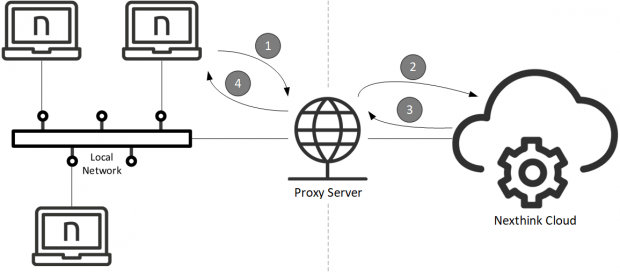
企業ネットワーク内のデバイスは通常、直接接続を使用するのではなく、プロキシサーバーを通じてインターネットに接続します。プロキシサーバーは、単にプロキシとも呼ばれ、企業デバイス上のクライアントアプリケーションのリクエストをインターネット上のサーバーへ転送します。プロキシ自身がリクエストを出しているかのように振る舞います。その後、プロキシはサーバーからの応答をクライアントに送信します。プロキシサーバーは仲介役として機能し、コンテンツフィルタリング(セキュリティ向上のため)やコンテンツキャッシュ(パフォーマンス向上のため)などの様々な機能を提供します。
プロキシサーバーが備え付けられた企業ネットワーク内のコレクターは、通常、Nexthinkインスタンスにアクセスするためにプロキシを通じてトラフィックを送信する必要があります。この記事では、コレクターがサポートするプロキシの種類および設定について学びます。
## サポートされるプロキシの種類
コレクターは以下の種類のプロキシをサポートします:
* **HTTP**
* **SOCKS5**
コレクターは、企業ネットワークからインターネットに向かうネットワークトラフィックを自動的にインターセプトする透明プロキシと、すぐに動作するはずです。クライアントシステムは、自身のトラフィックがプロキシを通過していることに気づきません。
## サポートされるプロキシ設定
macOS用のコレクターは、アプリケーションレベルでプロキシ設定の構成をサポートしています。システムからプロキシ設定を取得するのではなく、独自のカスタム設定から取得します。 Collector の[インストール](/platform/ja/configuring_nexthink/bringing-data-into-your-nexthink-instance/deploying-nexthink-in-non-vdi-environment/installing-collector/installing-collector-on-macos.md)中にプロキシ設定を必ず指定してください。
### コレクターのカスタム設定
インストール中にコレクターのプロキシ設定をアプリケーションレベルで指定するには、以下のいずれかの方法を選択します:
* **自動プロキシ**\
指定されたURLからPACファイルを取得し、プロキシ設定を自動的に決定します。プロキシ自動構成(PAC)ファイルは、各クライアント接続に対して使用すべきプロキシを決定する単一関数を持つJavaScriptファイルです。
* **手動プロキシ**\
プロキシのアドレスとポートを手動で提供します。
## プロキシ設定を選択するためのコレクターのロジック
macOS用のコレクターは、試行錯誤に基づいてプロキシ設定の取得方法を選択します。各方法の有効性を順番にテストし、Nexthinkインスタンスへの接続を可能にするプロキシ設定を導く最初の方法を保持します。以下の順序で方法を試し、1つ成功するまで続けます:
1. 選択されている場合、自動構成を試します。
* PACファイルを取得し、実行してプロキシを決定します。
2. 選択されている場合、手動構成を試します。
3. プロキシなしの直接接続。
***
関連タスク
* [macOS で Collector をインストールする](/platform/ja/configuring_nexthink/bringing-data-into-your-nexthink-instance/deploying-nexthink-in-non-vdi-environment/installing-collector/installing-collector-on-macos.md)
---
# Agent Instructions
This documentation is published with GitBook. GitBook is the documentation platform designed so that both humans and AI agents can read, navigate, and reason over technical content effectively. Learn more at gitbook.com.
## Querying This Documentation
If you need additional information that is not directly available in this page, you can query the documentation by asking a question.
Perform an HTTP GET request on the following URL with the `ask` and `goal` query parameters:
```
GET https://docs.nexthink.com/platform/ja/configuring_nexthink/bringing-data-into-your-nexthink-instance/deploying-nexthink-in-non-vdi-environment/installing-collector/macos-collector-references/mac-collector-proxy-support.md?ask=&goal=
```
`ask` is the immediate question: it should be specific, self-contained, and written in natural language.
`goal` is what the user is ultimately trying to achieve, the reason they need the answer. Sharing it helps GitBook give you a better, more relevant answer. A goal is most helpful when it describes the outcome the user wants rather than restating the question. For example, with `ask=how do I create an API token`, a goal like `automate deployments from our CI pipeline` lets GitBook tailor the answer to that use case.
The response will contain a direct answer to the question and relevant excerpts and sources from the documentation.
Use this mechanism when the answer is not explicitly present in the current page, you need clarification or additional context, or you want to retrieve related documentation sections.