> For the complete documentation index, see [llms.txt](https://docs.nexthink.com/llms.txt). Markdown versions of documentation pages are available by appending `.md` to page URLs; this page is available as [Markdown](https://docs.nexthink.com/platform/ja/understanding-key-data-platform-concepts/nexthink-query-language-nql.md).
# Nexthink Query Language (NQL)
Nexthink クエリ言語 (NQL) は、Nexthink によって開発されたプログラミング言語であり、データストレージ層から情報を要求し取得するために設計されています。 NQL クエリはデータを抽出し、人間が読みやすい形式にフォーマットします。
## データストレージ
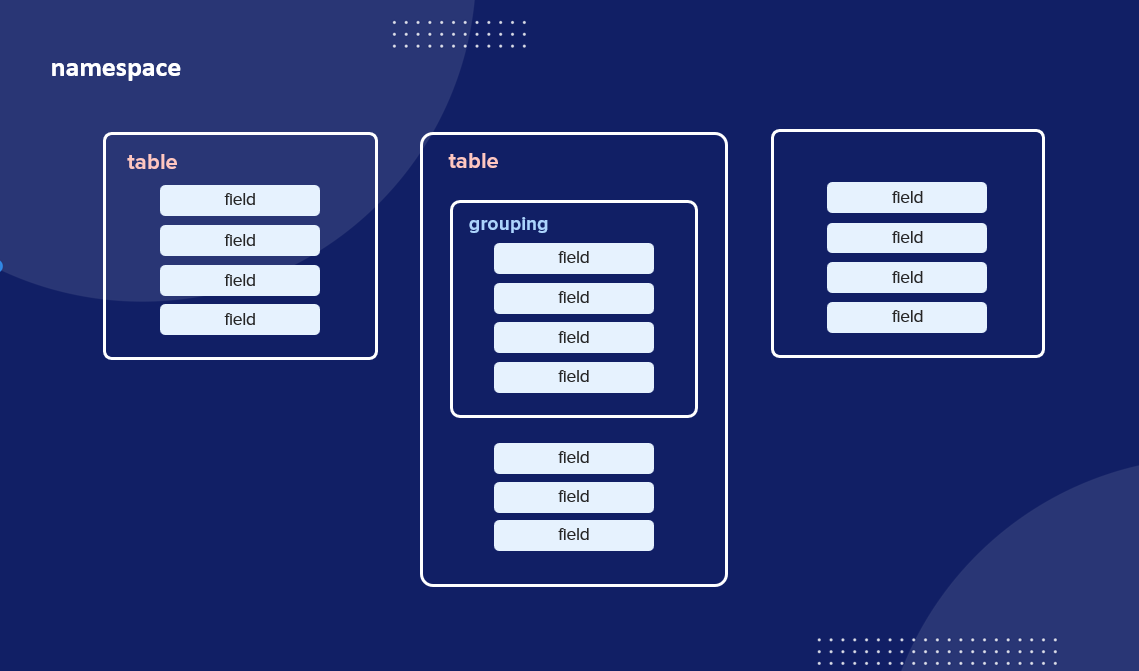
Nexthink インスタンスは情報をパフォーマンスと効率のために最適化された様々な方法で保存します。データのクエリを実行する際、システムは Nexthink クエリ言語 (NQL) を使用して書かれたステートメント、コマンド群、文句を受け取ります。情報は様々なコンテナを使って構成され、フィールドと呼ばれるひとつまたは複数のレコードに保存されます。
フィールドは直接テーブル(コレクションと呼ばれる)にグループ化されるか、構造化フィールドにカプセル化されます。 1つ以上のコレクションは1つのネームスペースにのみ含まれますが、製品は複数のネームスペースに依存しています。
## データクエリ
Nexthink クエリ言語 (NQL) により、Nexthink プラットフォームから任意のデータを調査してクエリできます。データにアクセスすることはできますが、新たなレコードの作成や既存のレコードの変更はできません。
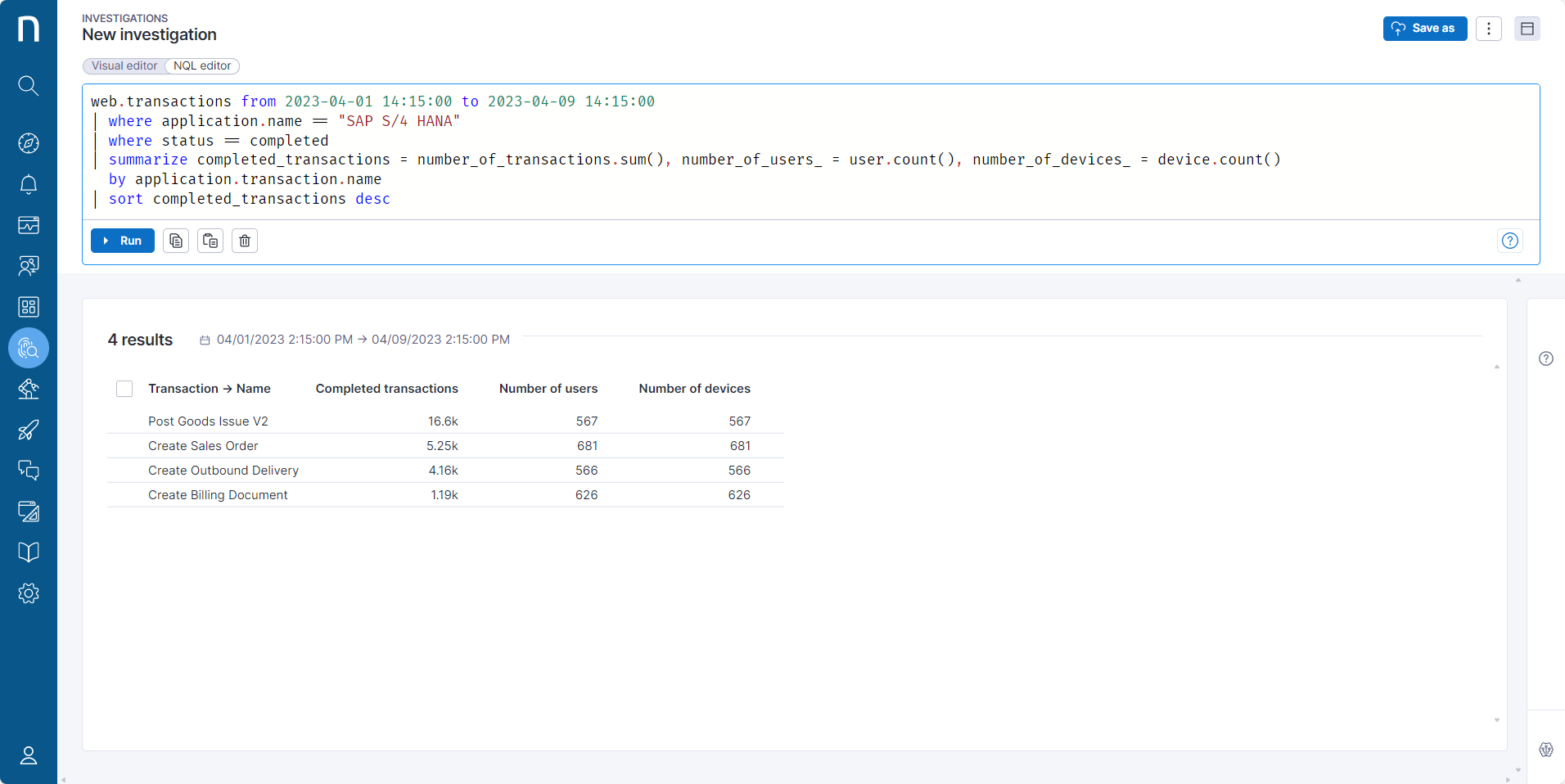
NQL クエリを実行するには、調査エディターでクエリを書き、**実行** ボタンをクリックします。
{% hint style="info" %}
NQL クエリの最大長は 16000 文字です。
{% endhint %}
デフォルトで50件の結果が表示されます。さらに結果を確認するには、ページの下部にある **さらに読み込む** ボタンをクリックして、別の50件の結果をロードします。
システムには、お客様のアカウントに割り当てられた[ロール](/platform/ja/user-guide/administration/account-management/roles.md)に定義されている[ドメインを表示](/platform/ja/user-guide/administration/account-management/roles/view-domain.md)権限に基づいて、お客様がアクセスできるデータのみが表示されます。
## NQL 用語
Nexthink は NQL 周辺の様々な概念を定義するために特定の専門用語を使用します。
### **クエリー**
NQL クエリは、コマンドを正常に実行してデータを返す特定のタイプの NQL ステートメントです。
{% code overflow="wrap" lineNumbers="true" %}
```
binaries
```
{% endcode %}
{% code overflow="wrap" lineNumbers="true" %}
```
web.events during past 24h
| where application.name == "Confluence"
| summarize usage_hours = duration.sum() / 3600 by device.name, device.operating_system.platform, device.entity
| list device.name, usage_hours, device.operating_system.platform, device.entity
| sort usage_hours desc
```
{% endcode %}
NQL ステートメントはデータやスキーマを変更可能なコマンドを正常に実行する命令です。一般向けに利用可能な現在の NQL の実装は、データの取得のみを許可しています。
### **句**
NQL 句はデータをフィルタして分析するためのコマンドです。
`| where application.name == "Confluence"`
`| list device.name, usage_hours, device.operating_system.platform, device.entity`
### **キーワード**
NQL キーワードはステートメントや句を構築するために使用される予約語です。たとえば:
`where` `summarize` `list`
### **オペレーター**
NQL オペレーターは、ステートメントや句内の1つ以上の項目にアクションを実行するための記号です。たとえば:
`/` `=` `>`
すべてのオペレーターのリストについては、[NQL オペレーター](/platform/ja/understanding-key-data-platform-concepts/nexthink-query-language-nql/nql-operators.md) ページをご覧ください。
* [NQL 構文の概要](/platform/ja/understanding-key-data-platform-concepts/nexthink-query-language-nql/nql-syntax-overview.md)
* [NQL キーワード](/platform/ja/understanding-key-data-platform-concepts/nexthink-query-language-nql/nql-keywords.md)
* [NQL operators](/platform/ja/understanding-key-data-platform-concepts/nexthink-query-language-nql/nql-operators.md)
* [NQL functions](/platform/ja/understanding-key-data-platform-concepts/nexthink-query-language-nql/nql-functions.md)
* [NQL カタログ](/platform/ja/understanding-key-data-platform-concepts/nexthink-query-language-nql/nql-catalog.md)
* [NQL データモデル](/platform/ja/understanding-key-data-platform-concepts/nql-data-model.md)
* [NQL FAQ](/platform/ja/understanding-key-data-platform-concepts/nexthink-query-language-nql/nql-faq.md)
---
# Agent Instructions
This documentation is published with GitBook. GitBook is the documentation platform designed so that both humans and AI agents can read, navigate, and reason over technical content effectively. Learn more at gitbook.com.
## Querying This Documentation
If you need additional information that is not directly available in this page, you can query the documentation by asking a question.
Perform an HTTP GET request on the following URL with the `ask` and `goal` query parameters:
```
GET https://docs.nexthink.com/platform/ja/understanding-key-data-platform-concepts/nexthink-query-language-nql.md?ask=&goal=
```
`ask` is the immediate question: it should be specific, self-contained, and written in natural language.
`goal` is what the user is ultimately trying to achieve, the reason they need the answer. Sharing it helps GitBook give you a better, more relevant answer. A goal is most helpful when it describes the outcome the user wants rather than restating the question. For example, with `ask=how do I create an API token`, a goal like `automate deployments from our CI pipeline` lets GitBook tailor the answer to that use case.
The response will contain a direct answer to the question and relevant excerpts and sources from the documentation.
Use this mechanism when the answer is not explicitly present in the current page, you need clarification or additional context, or you want to retrieve related documentation sections.