> For the complete documentation index, see [llms.txt](https://docs.nexthink.com/llms.txt). Markdown versions of documentation pages are available by appending `.md` to page URLs; this page is available as [Markdown](https://docs.nexthink.com/platform/ja/understanding-key-data-platform-concepts/data-organization.md).
# データの編成
## データ編成階層
Nexthinkデータモデルは、ネームスペースを含むテーブルによる階層的な編成に従っています。これらのテーブルは、フィールド内に情報を保存します。
### ネームスペース
名前空間は、デバイス、キャンペーン、リモートアクション、セッションなど、特定の機能またはカテゴリに関する情報をグループ化し、データの一貫性と明確性を確保します。
### テーブル
ネームスペースには、オブジェクトやイベントのセットとその特徴がフィールドに保存されたテーブルが含まれています。
### フィールド
フィールドは、オブジェクトやイベントに付随するプロパティやメトリックです。フィールドは、テーブル内で独立して保存されるか、トピックごとにグループ化されます。
フィールドは次のように示すことができます:
* **プロパティ**: 名前、サイズ、時刻などの特性を表します。
* **メトリック**: `cpu_time`、メモリ使用量、実行中のプロセスに関連するトラフィックなどの数値。イベントテーブルのフィールドのみがメトリックである可能性があります。システムがメトリクスをどのように集計するかについては、[収集および保存されるデータ](/platform/ja/understanding-key-data-platform-concepts/data-we-collect-and-store.md)ページを参照してください。
フィールドには以下の属性があります:
* **名前**: NQL クエリ内で `snake_case` として表示される名前。
* **ラベル**: 名称の自然な言語バージョン。
* **説明**: 値の詳細な説明とその計算方法。
* **データ型**: フィールドに格納される値の属性。これにより、フィールドが保持できるデータの種類が決まります。データ型の詳細については、[NQLデータ型](/platform/ja/understanding-key-data-platform-concepts/nexthink-query-language-nql/nql-syntax-overview/nql-data-types.md)のドキュメントを参照してください。
### 例
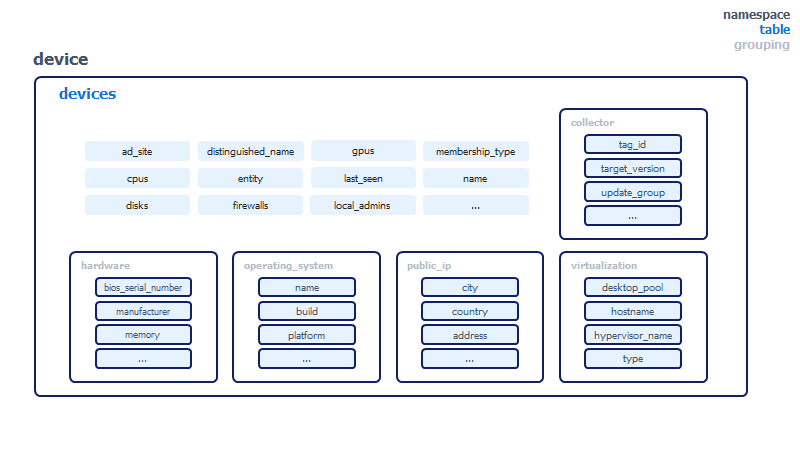
以下の `device` 名前空間の視覚的な表現を参照してください。これは `devices` という名前のテーブルを含み、デバイスと呼ばれるオブジェクトが一覧表示されます。 `name`、`local_admins`、`firewalls` など、一部のデバイスプロパティはどのグループにも属しません。互いに関連するその他のプロパティは、`collector`、`hardware`、`operating_system`、`public_ip`、`virtualization` などの**グループ**にまとめられます。
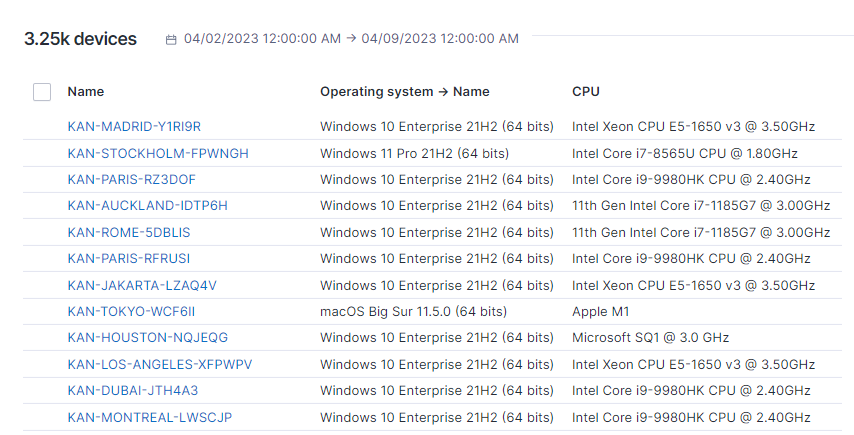
この階層は、NQLクエリに反映されています。例えば、それぞれのデバイスに対してCPUとオペレーティングシステムの名前を取得するために、デバイスをNQLでクエリすることができます。これらの NQL クエリのルートでは、`devices` は `device.devices` のエイリアスです。**名前空間**は暗黙的に指定されています。この構造は他のテーブルにも適用されます。
```sql
devices 過去 7d
| list device.name, device.operating_system.name, device.cpus
```
以下のクエリ結果では、テーブルの列はフィールドを表しています。
名前空間、テーブル、フィールドの完全な概要については、[NQLデータモデル](/platform/ja/understanding-key-data-platform-concepts/nql-data-model.md)ページを参照してください。
## テーブルの関連付け
テーブルは関連付けられており、1つのテーブルと別のテーブルのデータを組み合わせて、IT環境や社員のデジタルエクスペリエンスに関する有意義な情報や結論を得ることができます。 NQLデータモデルを用いて、クエリするテーブルと関連付けられたテーブルの両方のフィールドを含むクエリを作成します。
### 関連付けの方向
関連付けは、一方向に一方のテーブルを別のテーブルにリンクします。テーブル A がテーブル B に関連付けられている場合、テーブル A に対するクエリではテーブル B のフィールドを使用できます。逆は成り立ちません。同じ関連付けを介して、テーブル B に対するクエリでテーブル A のフィールドを使用することはできません。
たとえば、`execution.events` テーブルは `device.devices` テーブルに関連付けられています。 `execution.events` に対するクエリでは、各イベントが発生したデバイスの名前など、そのデバイスのフィールドを使用できます。
```sql
execution.events 過去 7 日間
| summarize total_freezes = number_of_freezes.sum() by device.name
```
`device.devices` テーブルは `execution.events` に関連付けられていません。 `devices` に対するクエリではデバイスのフィールドのみが返されるため、そこから実行イベントのフィールドを直接一覧表示することはできません。
{% hint style="info" %}
[NQLデータモデル](/platform/ja/understanding-key-data-platform-concepts/nql-data-model.md)ページには、各テーブルの関連付けが一覧表示されています。たとえば、`execution.events` には「events are associated to user, binary, device, real\_binary, application」と表示されます。このリストは、そのテーブルから到達できるテーブルとして解釈してください。そのテーブルに到達できるテーブルではありません。
{% endhint %}
デバイスなどのインベントリオブジェクトに対するクエリにイベントデータを取り込むには、`with` または `include` 句を追加し、イベントから値を計算します。
```sql
devices
| with execution.events 過去 7 日間
| compute total_freezes = number_of_freezes.sum()
| list device.name, total_freezes
```
詳細については、[NQLウィズ](/platform/ja/understanding-key-data-platform-concepts/nexthink-query-language-nql/nql-keywords/nql-with.md)および[NQLインクルード](/platform/ja/understanding-key-data-platform-concepts/nexthink-query-language-nql/nql-keywords/nql-include.md)を参照してください。
### テーブル関連付けガイドライン
* **イベントテーブルは、関連するインベントリオブジェクトに関連付けられています。** たとえば、`device_performance.events` テーブルは `devices` テーブルに関連付けられています。
{% hint style="info" %}
例外: `remote_action` 名前空間の `executions_summary` テーブルは、どのインベントリオブジェクトにも関連付けられていません。
{% endhint %}
* **イベントテーブルは、同じ名前空間の設定オブジェクトに関連付けられています。** たとえば、`alerts` イベントテーブルは `monitors` 設定オブジェクトテーブルに関連付けられています。
* **`execution`、`software_metering`、`web` 名前空間のイベントテーブルは、`application` 名前空間の関連テーブルに関連付けられています。** たとえば、`web.errors` テーブルは `application.applications` に、`web.page_views` テーブルは `application.pages` に関連付けられています。
* **`device` 名前空間のインベントリオブジェクトテーブルは、`devices` テーブルに関連付けられています。** たとえば、`antiviruses`、`cpus`、`disks` は `devices` に関連付けられています。
### コンテキスト
イベントのコンテキストには、イベント発生時の関連オブジェクトのいくつかのプロパティが含まれています。
たとえば、所在地に基づく遅延を発見するために、状態ごとの平均起動時間の内訳を以下に示します。
```sql
device_performance.boots
| summarize average_boot_duration_per_state = duration.avg()
by context.location.country, context.location.state
```
| 所在地の国 | 所在地の州 | 州ごとの平均起動時間 |
| ----- | ----- | ---------- |
| カナダ | アルバータ | 26秒 634ミリ秒 |
| カナダ | オンタリオ | 29秒 518ミリ秒 |
| カナダ | ケベック | 43秒 672ミリ秒 |
---
# Agent Instructions
This documentation is published with GitBook. GitBook is the documentation platform designed so that both humans and AI agents can read, navigate, and reason over technical content effectively. Learn more at gitbook.com.
## Querying This Documentation
If you need additional information that is not directly available in this page, you can query the documentation by asking a question.
Perform an HTTP GET request on the following URL with the `ask` and `goal` query parameters:
```
GET https://docs.nexthink.com/platform/ja/understanding-key-data-platform-concepts/data-organization.md?ask=&goal=
```
`ask` is the immediate question: it should be specific, self-contained, and written in natural language.
`goal` is what the user is ultimately trying to achieve, the reason they need the answer. Sharing it helps GitBook give you a better, more relevant answer. A goal is most helpful when it describes the outcome the user wants rather than restating the question. For example, with `ask=how do I create an API token`, a goal like `automate deployments from our CI pipeline` lets GitBook tailor the answer to that use case.
The response will contain a direct answer to the question and relevant excerpts and sources from the documentation.
Use this mechanism when the answer is not explicitly present in the current page, you need clarification or additional context, or you want to retrieve related documentation sections.