> For the complete documentation index, see [llms.txt](https://docs.nexthink.com/llms.txt). Markdown versions of documentation pages are available by appending `.md` to page URLs; this page is available as [Markdown](https://docs.nexthink.com/user-guide/remote-actions/using-remote-actions/monitoring-remote-actions-execution-statistics.md).
# Monitoring remote actions execution statistics
## Accessing Remote actions overview
* Select the Remote Actions module from the main menu.
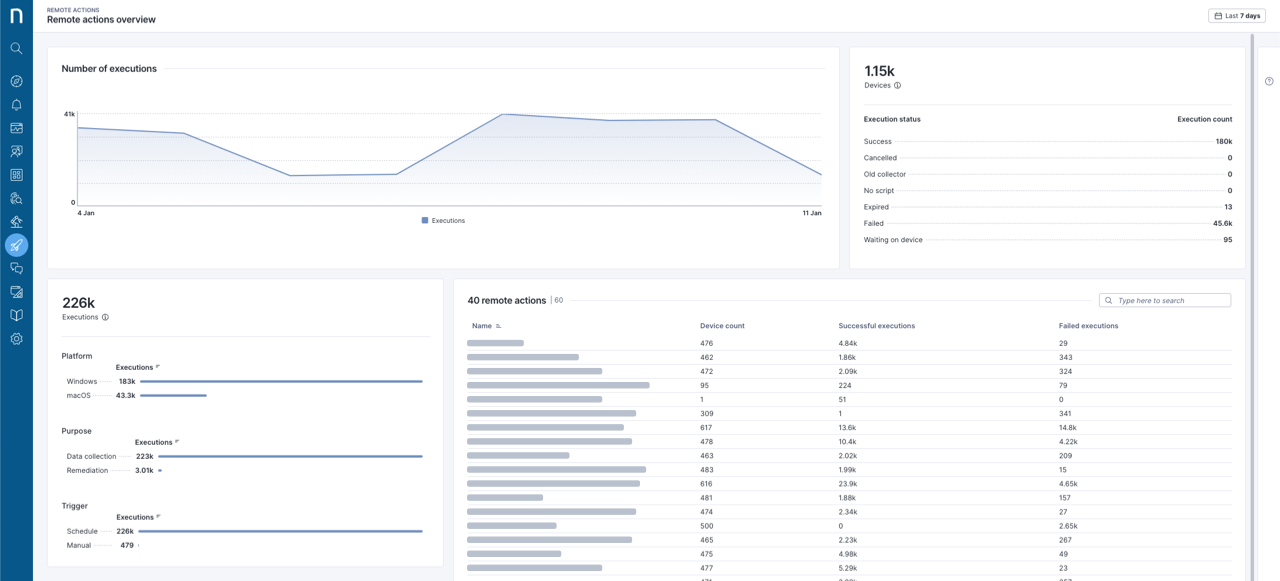
* Select **Remote actions overview** from the navigation panel to view statistics relevant to the performance of all remote actions.
## Timeframe picker and filtering considerations
Use the timeframe picker in the top-right corner of the page to select a preset timeframe or a custom time period. The system applies the chosen timeframe to all widgets on the page. If you do not specify a timeframe, the default is **Last 7 days**.
## Exploring Remote actions overview page
### Number of executions on a timeline
An area chart visually illustrates the dynamic changes in the number of executions.
### Remote actions statuses
The associated **Devices** table shows the total number of devices targeted by at least one remote action and offers a breakdown by status:
* **Success**\
Executions that were completed successfully.
* **Cancelled**\
Executions that were canceled due to the deletion of a remote action.
* **Old collector**\
Executions that were not performed due to an older version of Collector.
* **No script**\
Executions that were not performed due to the missing script for the device platform, `.ps` for Windows and `.bash` for macOS.
* **Expired**\
Executions that expired due to the targeted device continuing to be offline while a new execution request was received.
* **Failed**\
Executions that failed.
* **Waiting on device**\
Executions that are waiting for the device to come online.
* **Waiting on user**\
Executions that are waiting for a user to log in to the device. Remote actions that run in the context of the interactive user report this status until a user logs in, and expire one week after the request is created.
### Remote actions executions breakdown
The execution charts table displays the total execution count of all remote actions and a breakdown by **Platform**, **Purpose** and **Trigger**. You can filter the execution details of a remote action by clicking on the bars. Filters appear in the filtering bar at the top of the page.
### Remote actions table
The **remote actions** table organizes remote actions by **Name**, **Device count**, **Successful executions**, and **Failed executions**. Click on the column title to sort the content.
Click on a remote action in the table to open the [**Remote Actions** details page](/user-guide/remote-actions/using-remote-actions/monitoring-specific-remote-action-executions.md). Previously selected filters automatically apply.
---
# Agent Instructions
This documentation is published with GitBook. GitBook is the documentation platform designed so that both humans and AI agents can read, navigate, and reason over technical content effectively. Learn more at gitbook.com.
## Querying This Documentation
If you need additional information that is not directly available in this page, you can query the documentation by asking a question.
Perform an HTTP GET request on the following URL with the `ask` and `goal` query parameters:
```
GET https://docs.nexthink.com/user-guide/remote-actions/using-remote-actions/monitoring-remote-actions-execution-statistics.md?ask=&goal=
```
`ask` is the immediate question: it should be specific, self-contained, and written in natural language.
`goal` is what the user is ultimately trying to achieve, the reason they need the answer. Sharing it helps GitBook give you a better, more relevant answer. A goal is most helpful when it describes the outcome the user wants rather than restating the question. For example, with `ask=how do I create an API token`, a goal like `automate deployments from our CI pipeline` lets GitBook tailor the answer to that use case.
The response will contain a direct answer to the question and relevant excerpts and sources from the documentation.
Use this mechanism when the answer is not explicitly present in the current page, you need clarification or additional context, or you want to retrieve related documentation sections.