> For the complete documentation index, see [llms.txt](https://docs.nexthink.com/llms.txt). Markdown versions of documentation pages are available by appending `.md` to page URLs; this page is available as [Markdown](https://docs.nexthink.com/user-guide/campaigns/working-with-campaigns/triggering-campaigns.md).
# Sending campaigns
Depending on the use case, campaign administrators must set up different campaign triggers:
* **Manual**
* **Scheduled**
* **Remote action**
* **API**
* **Workflows**
These settings determine how you can send a campaign to employees.
{% hint style="info" %}
Only published campaigns are available to target employees.
{% endhint %}
## Campaign sending methods
### Sending a campaign manually
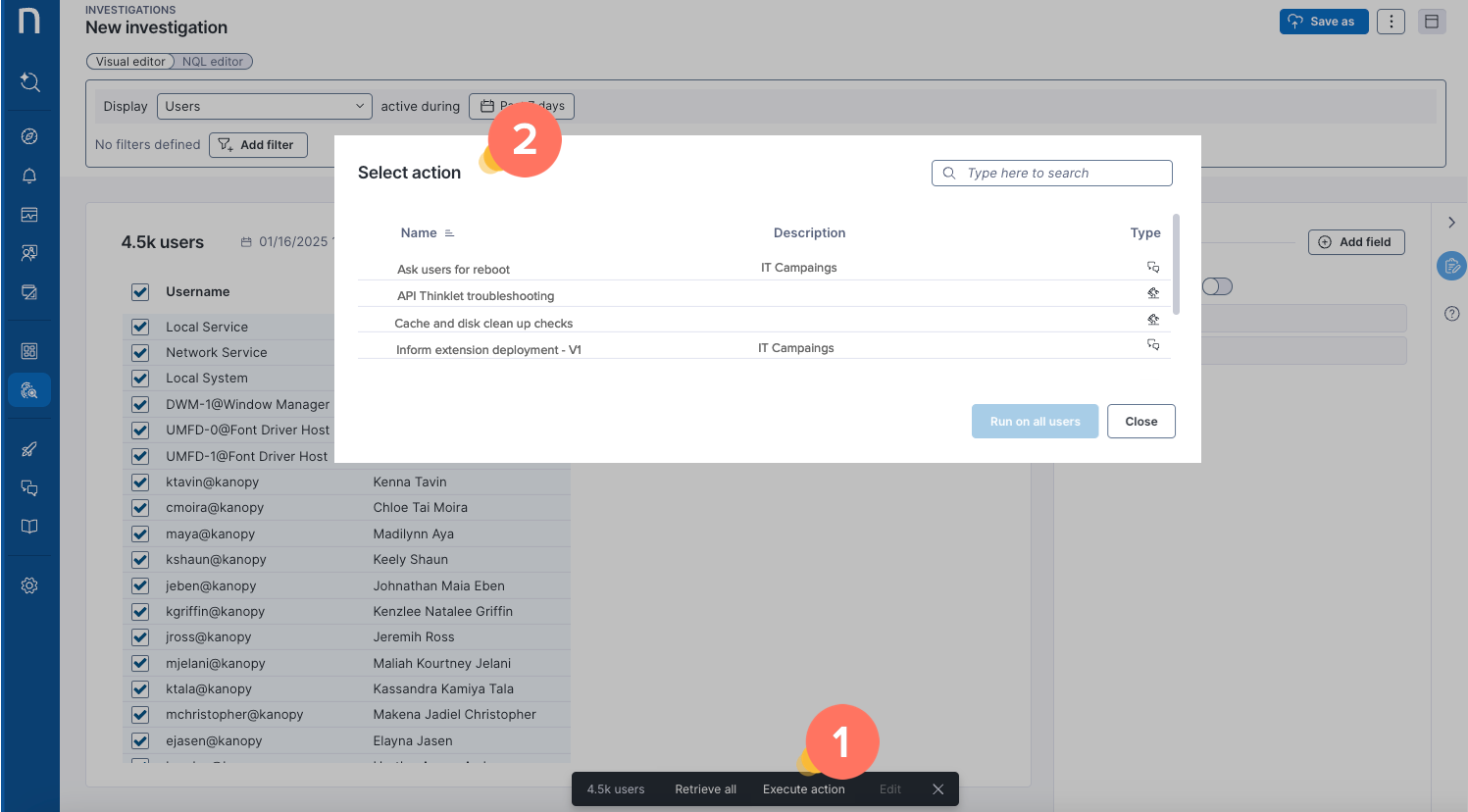
From the [Investigations](/user-guide/investigations.md) page, after running an [NQL investigation query](/user-guide/investigations/creating-investigations/nql-editor.md) listing **Users**:
1. Select a user or a set of users from the investigation results table.
2. **Execute actions** from the action bar at the bottom of the page. The **Select action** pop-up displays the list of available actions, including campaigns.
3. Select the campaign and **Run on user(s)**.
* The **Send campaign** pop-up displays the number of targeted employees. If the campaign has parameters, you must provide a value for each parameter before confirming **Yes, send to user(s).**
* If all employees have a valid user SID, a validation message confirms the system has triggered the campaign.
* If there is a mix of employees with valid or invalid SIDs, a warning message confirms that the system can only trigger the campaign for those employees with valid SIDs.
* If all employees have an invalid SID, an error message confirms that the system cannot trigger the campaign.
#### Sending a campaign manually on VDI sessions
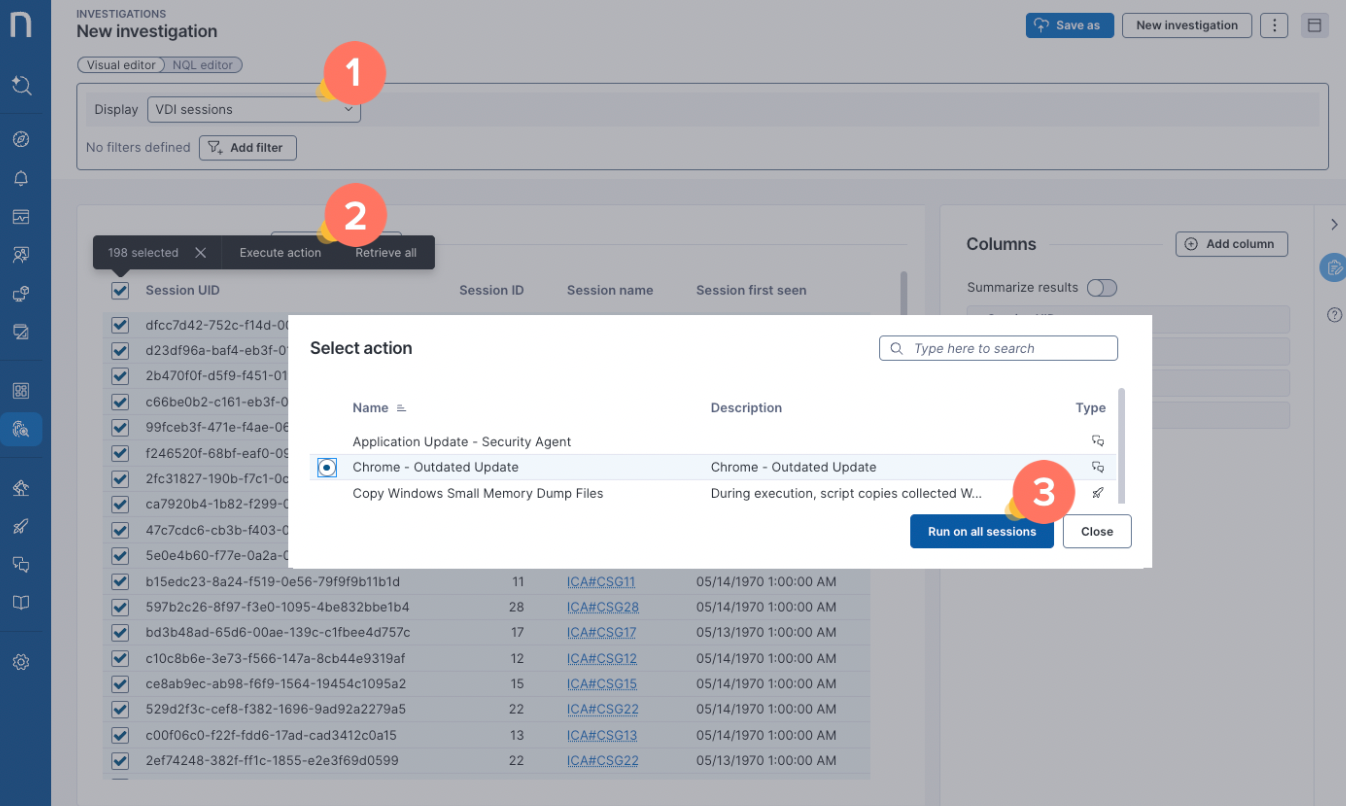
If you are using VDI, run an investigation using the [NQL editor](/user-guide/investigations/creating-investigations/nql-editor.md) or [Visual editor](/user-guide/investigations/creating-investigations/visual-editor.md):
1. Query a list of **VDI sessions**.
2. Select one or multiple sessions from the investigation results table, and **Execute actions**—using the [action bar](/user-guide/investigations/analyzing-investigations.md#visualeditor-actionbar).
3. Select the campaign of interest, identifiable by a chat icon, and run on the selected sessions.
* Only [campaigns configured for VDI ](/user-guide/campaigns/managing-campaigns/creating-campaigns.md#targeting-query)can run on sessions.
### Sending a scheduled campaign
Scheduled campaigns do not require manual triggering. Once the campaign is published, it is sent automatically according to the configuration defined in the **Schedule** tab.
The system evaluates the defined NQL query based on the selected schedule and sends the campaign to the resulting employees.
Depending on the configured campaign retargeting rule, the query will be re-evaluated relative to the time it was first published, **daily** or **hourly.**
For more information on scheduling and reevaluation, refer to the [Understanding campaign targeting models](/user-guide/campaigns/managing-campaigns/creating-campaigns/types-of-campaigns.md#campaign-scheduling) documentation.
### Sending a remote action campaign
After a remote action campaign is published, add its NQL ID to the remote action’s scripts to trigger the campaign.
Refer to [Understanding campaign targeting models](/user-guide/campaigns/managing-campaigns/creating-campaigns/types-of-campaigns.md#typesofcampaigns-targetevaluationandre-evaluation) documentation.
### Sending a campaign using the API
Trigger campaigns using the Nexthink Campaigns API, which enables integrations with external applications.
Refer to [developer.nexthink.com](https://developer.nexthink.com) for more information.
### Sending a campaign using a workflow
Trigger campaigns using the Nexthink Workflow API to notify employees about remediations that are taking place, or to prompt for permission or additional information that a workflow needs to continue running an automated remediation.
Refer to [Understanding campaign targeting models](/user-guide/campaigns/managing-campaigns/creating-campaigns/types-of-campaigns.md#triggeringcampaigns-triggeringacampaignusingtheapi-1) for more information.
## Parametrized campaigns
Manual, API, and workflow campaigns can be parameterized. In such cases, users who trigger the campaign manually or systems that execute it via an API call must provide the required input values.
Refer to [Configuring campaign parameters](/user-guide/campaigns/managing-campaigns/creating-campaigns/configuring-campaign-parameters.md)for more information.
***
RELATED TOPICS:
* [Creating and configuring campaigns](/user-guide/campaigns/managing-campaigns/creating-campaigns.md)
* [Understanding campaign targeting models](/user-guide/campaigns/managing-campaigns/creating-campaigns/types-of-campaigns.md)
---
# Agent Instructions
This documentation is published with GitBook. GitBook is the documentation platform designed so that both humans and AI agents can read, navigate, and reason over technical content effectively. Learn more at gitbook.com.
## Querying This Documentation
If you need additional information that is not directly available in this page, you can query the documentation by asking a question.
Perform an HTTP GET request on the following URL with the `ask` and `goal` query parameters:
```
GET https://docs.nexthink.com/user-guide/campaigns/working-with-campaigns/triggering-campaigns.md?ask=&goal=
```
`ask` is the immediate question: it should be specific, self-contained, and written in natural language.
`goal` is what the user is ultimately trying to achieve, the reason they need the answer. Sharing it helps GitBook give you a better, more relevant answer. A goal is most helpful when it describes the outcome the user wants rather than restating the question. For example, with `ask=how do I create an API token`, a goal like `automate deployments from our CI pipeline` lets GitBook tailor the answer to that use case.
The response will contain a direct answer to the question and relevant excerpts and sources from the documentation.
Use this mechanism when the answer is not explicitly present in the current page, you need clarification or additional context, or you want to retrieve related documentation sections.