> For the complete documentation index, see [llms.txt](https://docs.nexthink.com/llms.txt). Markdown versions of documentation pages are available by appending `.md` to page URLs; this page is available as [Markdown](https://docs.nexthink.com/user-guide/campaigns/managing-campaigns/creating-campaigns/limiting-the-reception-rate-of-campaigns.md).
# Limiting the reception rate of campaigns
{% hint style="info" %}
Refer to the [Launching campaign programs](/user-guide/campaigns/managing-campaigns/launching-campaign-programs.md) documentation for guidelines on planning, gaining approval, testing and launching your campaign within your organization.
{% endhint %}
## Urgency of campaigns
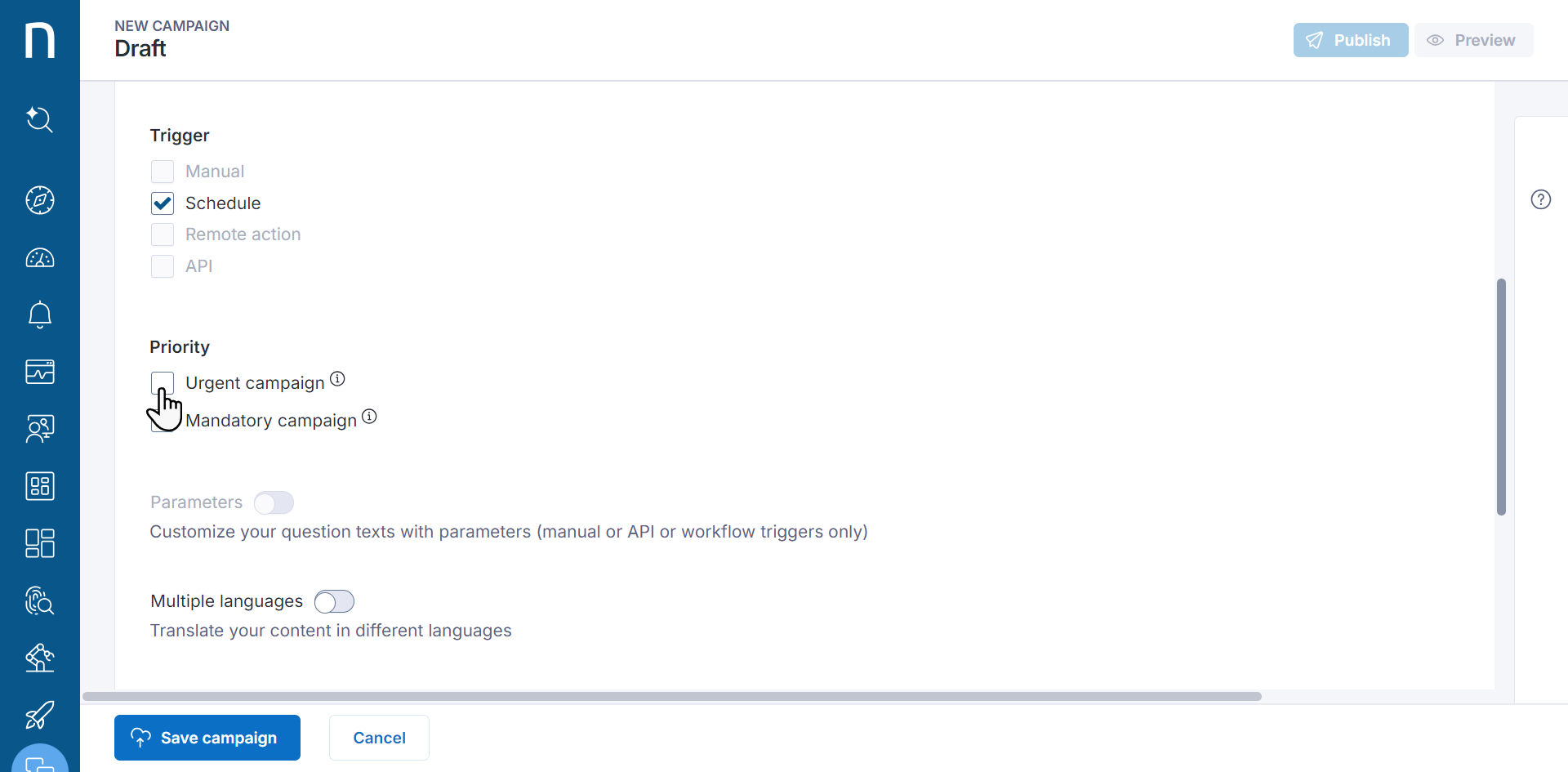
To prevent disrupting employees with bursts of campaigns, distinguish between urgent and non-urgent campaigns.
Protection periods control the rate at which employees can receive campaigns:
* The do not disturb period is set, by default, to 6 hours.
* The non-negotiable protection period is set, by default, to 20 minutes.
The do not disturb period can be configured inside the **Manage campaign branding** screen. Refer to the [Campaigns branding](/user-guide/campaigns/managing-campaigns/campaigns-branding.md) documentation for more information.
### Non-urgent campaigns
Targeted employees receive a non-urgent campaign only if they are not in focus protection mode. Focus protection mode prevents employees from interruption at critical or high-focus moments, such as:
* During audio and video calls
* When screen sharing and when in presentation (Windows) or do-not-disturb (macOS) mode
* When an application is running in full-screen mode (Windows and macOS Sonoma or earlier)
* When in offline mode, screensaver is active or session is locked
Non-urgent campaigns also include protection against bursts of campaigns:
* If the targeted employee previously received a non-urgent campaign, a do not disturb period must elapse before they can receive another non-urgent campaign.
* If the targeted employee previously received an urgent campaign, the non-negotiable protection period of 20 minutes must elapse before they can receive a non-urgent campaign.
{% hint style="info" %}
Nexthink recommends using non-urgent campaigns as they protect employees from notification overload.
{% endhint %}
Refer to the [Examples](#limitingthereceptionrateofcampaigns-examplesofprotectionagainstcampaignburstsexamples) section below.
### Urgent campaigns
Urgent campaigns are delivered to users as soon as they are published. They do not adhere to protection rules against campaign bursts or focus protection rules.
{% hint style="info" %}
Select urgent campaigns to deliver only the most critical information to employees.
{% endhint %}
Evaluation of the targeting query results in several factors that can impact the time it takes for users to receive the campaign. To receive the campaign:
* A device has to be online.
* Collector has to be installed on the device and marked as **connected**.
* The campaign target has to be logged in with an interactive session.
* No other campaign can be displayed on the screen, as campaigns can overlap and block one another.
If any of these conditions are not met, Collector will query the pending campaigns after 3 hours. A pending campaign query can be triggered by publishing a new campaign or exiting the focus protection status during the 3-hour period.
When Collector receives the list of pending campaigns:
* If urgent campaigns are on the list, it displays the most recently published urgent campaign.
* If no urgent campaigns are on the list, it displays the least recently published non-urgent campaign.
#### **Urgent remote action campaigns**
Employees receive urgent remote action campaigns when a remote action triggers them.
## Examples of protection against campaign bursts
The following examples show how the protection periods function for a particular user receiving different campaign types. The examples use the default values for the do not disturb period (6 hours) and the non-negotiable protection period (20 min).
### Non-overlapping case
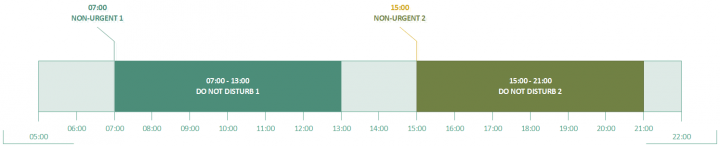
In this example, the system publishes two non-urgent campaigns within an interval greater than the do not disturb period, resulting in an employee receiving both campaigns at the time of their publication:
* Campaign **Non-urgent 1** is published and received at 07:00.
* Campaign **Non-urgent 2** is published and received at 15:00.
### Overlapping case
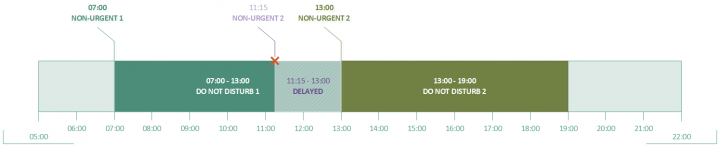
The system publishes two non-urgent campaigns within an interval shorter than the do not disturb period, resulting in an employee receiving the second campaign only after the do not disturb period of the first campaign has elapsed:
* Campaign **Non-urgent 1** is published and received at 07:00.
* Campaign **Non-urgent 2** is published at 11:15 but received at 13:00.
#### Overlapping case with an urgent campaign
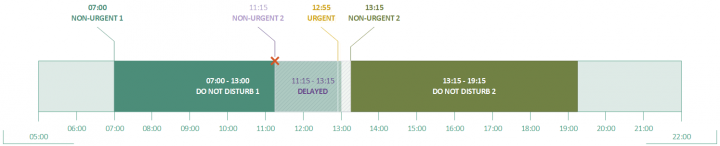
Consider the two non-urgent campaigns of the previous example and add a third campaign that is urgent. The system publishes the urgent campaign just five minutes before the do not disturb period of the first campaign ends, and because the campaign is urgent the user receives it without delay. The second non-urgent campaign is delayed not only by the do not disturb period of the first campaign, but also by the non-negotiable protection period of the urgent campaign:
* Campaign **Non-urgent 1** is published and received at 07:00.
* Campaign **Urgent** is published and received at 12:55.
* Campaign **Non-urgent 2** is published at 11:15 but received at 13:15.
---
# Agent Instructions
This documentation is published with GitBook. GitBook is the documentation platform designed so that both humans and AI agents can read, navigate, and reason over technical content effectively. Learn more at gitbook.com.
## Querying This Documentation
If you need additional information that is not directly available in this page, you can query the documentation by asking a question.
Perform an HTTP GET request on the following URL with the `ask` and `goal` query parameters:
```
GET https://docs.nexthink.com/user-guide/campaigns/managing-campaigns/creating-campaigns/limiting-the-reception-rate-of-campaigns.md?ask=&goal=
```
`ask` is the immediate question: it should be specific, self-contained, and written in natural language.
`goal` is what the user is ultimately trying to achieve, the reason they need the answer. Sharing it helps GitBook give you a better, more relevant answer. A goal is most helpful when it describes the outcome the user wants rather than restating the question. For example, with `ask=how do I create an API token`, a goal like `automate deployments from our CI pipeline` lets GitBook tailor the answer to that use case.
The response will contain a direct answer to the question and relevant excerpts and sources from the documentation.
Use this mechanism when the answer is not explicitly present in the current page, you need clarification or additional context, or you want to retrieve related documentation sections.