# NQL as()

The `as()` function allows you to display the output from NQL queries in a formatted manner by assigning specific formatting information to the metrics. The Nexthink interface displays the data with the unit specified.​ The `as()` function is supported in the [list](https://docs.nexthink.com/platform/understanding-key-data-platform-concepts/nexthink-query-language-nql/nql-keywords/nql-list) and [sort](https://docs.nexthink.com/platform/understanding-key-data-platform-concepts/nexthink-query-language-nql/nql-keywords/nql-sort) clauses.

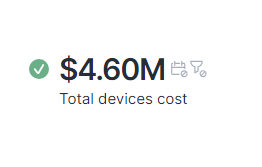
Example:

{% code overflow="wrap" lineNumbers="true" %}

```
devices
| summarize total_cost = count() * 2000
| list total_cost.as(format = currency, code  = USD)
```

{% endcode %}

<figure><img src="https://268444917-files.gitbook.io/~/files/v0/b/gitbook-x-prod.appspot.com/o/spaces%2FxJSUDk9NTtCHYPG5EWs3%2Fuploads%2Fgit-blob-bc4497c8eed3f24a7c1a4ac122f1ef3160beedeb%2Fimage.png?alt=media" alt=""><figcaption></figcaption></figure>

Use the following formatting options:

<table data-full-width="true"><thead><tr><th width="113">Formatter</th><th width="180">Unit</th><th>Example query</th></tr></thead><tbody><tr><td>energy</td><td><p>Wh</p><p>kWh</p><p>MWh</p><p>GWh</p></td><td><pre data-overflow="wrap" data-line-numbers><code>device_performance.events during past 1d
| where device.operating_system.platform = macos
| where hardware.type == laptop
| summarize estimated_energy = ((8 * 0.070) * device.count())
| list estimated_energy.as( format = energy )
</code></pre></td></tr><tr><td>weight</td><td><p>g</p><p>kg</p><p>t</p><p>kt</p></td><td><pre data-overflow="wrap" data-line-numbers><code>devices
| where hardware.type = laptop or hardware.type = desktop
| summarize no_of_devices = (count()^1) * 422.5
| list no_of_devices.as( format = weight )
</code></pre></td></tr><tr><td>currency</td><td><p>Specify the currency using the additional <code>code</code> parameter.</p><p><code>CAD</code>: CA$</p><p><code>CHF</code>: CHF</p><p><code>GBP</code>: £<br><code>EUR</code>: €</p><p><code>USD</code>: $</p></td><td><pre data-overflow="wrap" data-line-numbers><code>devices
| summarize total_cost = count() * 2000
| list total_cost.as(format = currency, code  = USD)
</code></pre><pre data-overflow="wrap" data-line-numbers><code>devices
| summarize total_cost = count() * 2000
| list total_cost.as(format = currency, code  = EUR)
</code></pre></td></tr><tr><td>percent</td><td>%<br><br>To compute the percentage, the system multiplies the value by 100 and appends the % symbol. For example, a value of 0.47 is converted to 47%.</td><td><pre data-overflow="wrap" data-line-numbers><code>devices
| with execution.crashes
| summarize impacted_devices = countif(operating_system.name == "Windows 10 Pro 22H2 (66 bits)")/count()
| list impacted_devices.as(format = percent)
</code></pre></td></tr><tr><td>bitrate</td><td><p>bps</p><p>Kbps</p><p>Mbps</p><p>Gbps</p></td><td><pre data-overflow="wrap" data-line-numbers><code>connectivity.events during past 30d
| where primary_physical_adapter.type == wifi
| where wifi.signal_strength.avg &#x3C;= -67 or (context.device_platform == "macOD" and wifi.noise_level.avg >= -80)
| summarize average_receive_rate = wifi.receive_rate.avg()
| list average_receive_rate.as(format = bitrate)
</code></pre></td></tr></tbody></table>


---

# Agent Instructions: Querying This Documentation

If you need additional information that is not directly available in this page, you can query the documentation dynamically by asking a question.

Perform an HTTP GET request on the current page URL with the `ask` query parameter:

```
GET https://docs.nexthink.com/platform/understanding-key-data-platform-concepts/nexthink-query-language-nql/nql-functions/nql-as.md?ask=<question>
```

The question should be specific, self-contained, and written in natural language.
The response will contain a direct answer to the question and relevant excerpts and sources from the documentation.

Use this mechanism when the answer is not explicitly present in the current page, you need clarification or additional context, or you want to retrieve related documentation sections.