# NQL FAQ

### What is the difference between 'with' and 'include'? Which one should I use?

A `with` clause returns data only when there is at least one event recorded. Use it to query inventory objects with conditions on events.

An `include` clause returns data even when there is no event recorded. Use it to ensure that you’ve taken into account all data when computing a value for all objects.

### What is the difference between 'compute' and 'summarize'? Which one should I use?

The `compute` keyword is used when querying objects to calculate metrics from events and append them to an object. You have the option of using it after `with` and it is mandatory after `include`.

The `summarize` keyword is used to calculate a KPI metric, or to have a breakdown of metrics by properties and/or by period.

### What is the difference between 'during past 2d' and 'during past 48h'? Which one should I use?

The time selection is expressed using different units, which for NQL means different precision. Even if 2d equals 48h, because of internal optimization, Nexthink resolves this time selection differently.

* With `during past 2d`, NQL retrieves daily data, taking the cloud instance timezone as the reference time.
* With `during past 48h`, NQL retrieves higher resolution data, 5-minute or 15-minute samples, taking the user timezone as the reference time.

Consider the following example:

* The local time of the user when investigating the data is November 11, 11:26:15 Central European Time (CET).
* The cloud instance is set to the timezone for New York, Eastern Time (ET).
* Here is what the two time selections will retrieve:

<table><thead><tr><th width="259">User’s time selection</th><th width="251">Cloud instance time (Eastern Time)</th><th>User time (Central European Time)</th></tr></thead><tbody><tr><td><code>during past 2d</code></td><td>Nov 10, 00:00:00 –<br>Nov 12 00:00:00 ET</td><td>Nov 10, 6:00:00 –<br>Nov 12, 6:00:00 CET​</td></tr><tr><td><code>during past 48h</code></td><td>Nov 9, 06:00:00 –<br>Nov 11, 06:00:00 ET</td><td>Nov 9, 12:00:00 –<br>Nov 11, 12:00:00 CET</td></tr></tbody></table>

### What is the difference between 'from 2023-01-19 00:00:00 to 2023-01-21 00:00:00' vs 'from 2023-01-19 to 2023-01-21'? Which one should I use?

The time selection is expressed using different precision. Additionally, full-day timeframes use the cloud instance timezone, while hours and minutes use the user timezone.

For example, if the user is in the CET timezone and the cloud instance is set to ET time zone, this is how the system resolves the time selection:

<table data-full-width="false"><thead><tr><th width="257">time selection</th><th width="225">Cloud instance time (ET):</th><th>User time (CET):</th></tr></thead><tbody><tr><td><code>from 2023-01-19 00:00:00 to 2023-01-21 00:00:00</code><br>(until midnight, so NQL excludes 2023-01-21)</td><td>Jan 18, 18:00:00 –<br>Jan 20, 18:00:00 ET</td><td>Jan 19, 00:00:00 –<br>Jan 21, 00:00:00 CET​</td></tr><tr><td><code>from 2023-01-19 to 2023-01-21</code> (includes the full day, 2023-01-21, so this is data from three full days)</td><td>Jan 19, 00:00:00 –<br>Jan 22, 00:00:00 ET​</td><td>Jan 19, 06:00:00 –<br>Jan 22, 06:00:00 CET​</td></tr></tbody></table>

It is important to bear in mind timezones while using `during past <period>` in the query.

Consider the following use case:

* The cloud instance is in ET time and the Nexthink admin is based in New York. This means his timezone is the same as the cloud instance zone.
* A crash occurred on an employee device based in Paris on Feb 27 at 11:10 CET and was saved in the Nexthink database as occurring on Feb 27 at 10:10 UTC.
* The Nexthink admin queries the data on Feb 27 at 05:12:00 his time:
  * He sees this crash occurring at 05:10:00 on Feb 27.
  * Using the `during past 24h` query, displays Feb 26, 06:00:00 – Feb 27, 06:00:00 in the web interface.
  * Using the `during past 1d` query, displays Feb 27, 00:00:00 – Feb 28 00:00:00 in the web interface.
* The IT Support team is located in Madrid (CET). They query the data on Feb 27 at 11:12:00 their time:
  * They see this crash in the Nexthink web interface as taking place at 11:10:00 on Feb 27.
  * Using the `during past 24h` query, displays Feb 26, 12:00:00 – Feb 27, 12:00:00 in the web interface.
  * Using the `during past 1d` query, displays Feb 27, 06:00:00 – Feb 28 06:00:00 in the web interface.
* Everything the Nexthink admin sees in the Nexthink web interface is equal to the cloud instance timezone as he is in the same timezone as the cloud instance. For the IT support team in Madrid, the difference will be 6 hours. They query in local time, and Nexthink transforms the cloud instance time, ET in this case, to local time which is CET for Madrid.

### What is the 'context'? When do we use it, and why?

Under `context`, Nexthink stores properties that are relevant when doing breakdowns and trend analysis. When a device generates an event, `context` stores the device property values that the device had at the time of the event. Use `context` to retrieve properties a device had at the time of an event.

```
execution.crashes during past 31d
| where application.name == "Microsoft 365: Teams"
| summarize number_of_crashes_ = number_of_crashes.sum() by context.os_name
```

### What is the difference between 'context.os\_name' vs 'device.operating\_system.name'?

Often, these two fields have the same value. However, imagine that a device upgraded its OS to a newer version earlier today. If you list both `context.os_name` and `device.operating_system.name`:

* when querying events from **yesterday**, you see that `context.os_name` shows the old OS while `device.operating_system.name` shows the new version.
* when querying events from **today**, you see the that both `context.os_name` and `device.operating_system.name` show most current OS version.

### What is the difference between '.avg' vs '.avg()' vs '.avg.avg()' vs '.avg.max()'?

* `.avg` is a database field that stores average values. Use it in the `where` clause.
* `.avg()` is an aggregate function. It is an actual average of the data stored, considering the *true* number of events. It relies on the cardinality behind the scenes. Use it with `compute` or `summarize`.
* `.avg.avg()` is the average of the samples. This number varies depending on the time selection. For `during past 2d`, it will create an average of 2 samples. For `during past 48h`, it will create an average of over 192 (=48\*4) 15min samples. The product team does not recommend using this function.
* `.avg.max()` use this function if you want to view peaks, for example, the peak percentage of normalized CPU usage. You can also use it when querying 15min samples (`during past 48h`) but it is not recommended when querying daily samples (`during past 2d`).

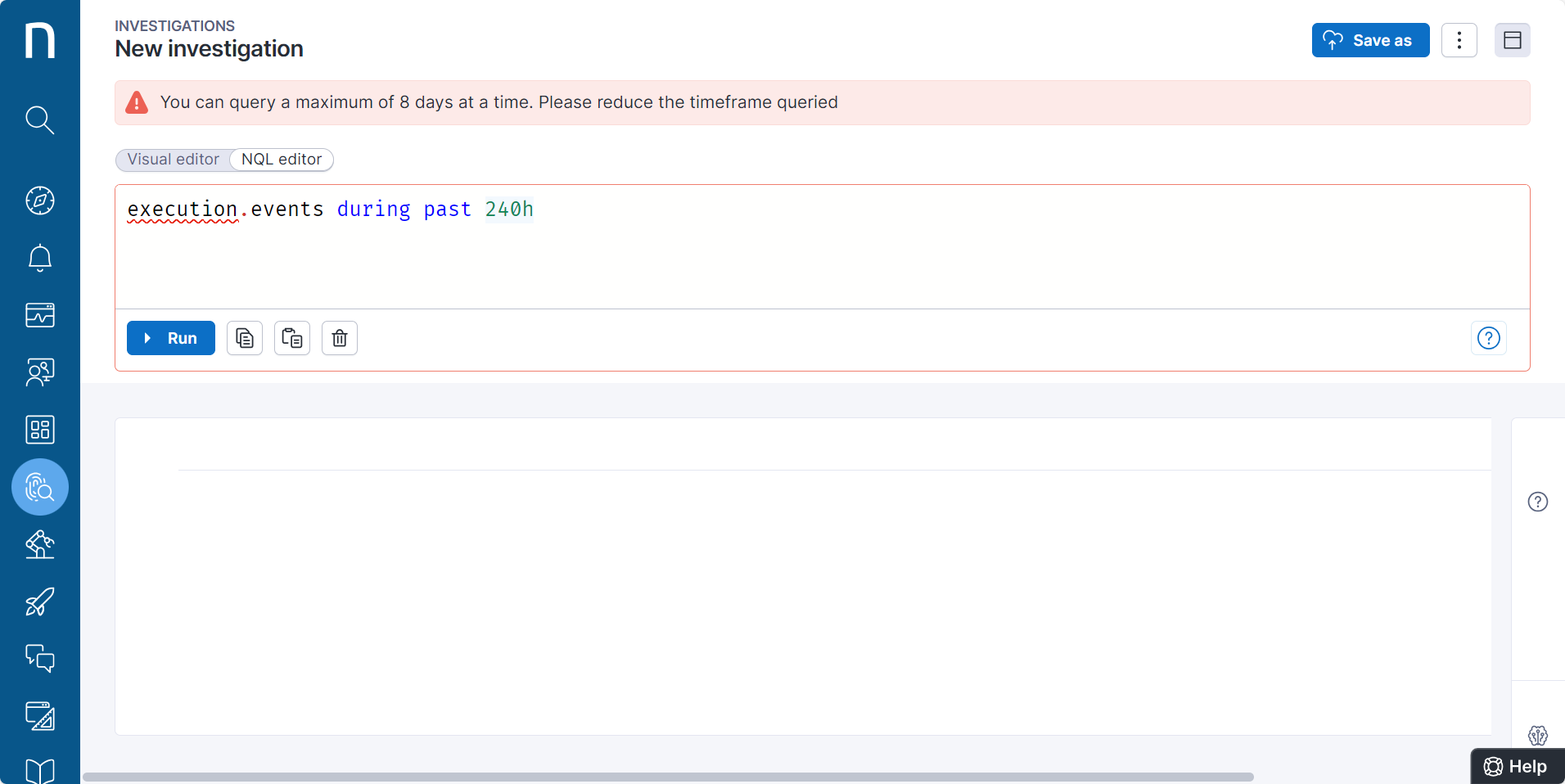
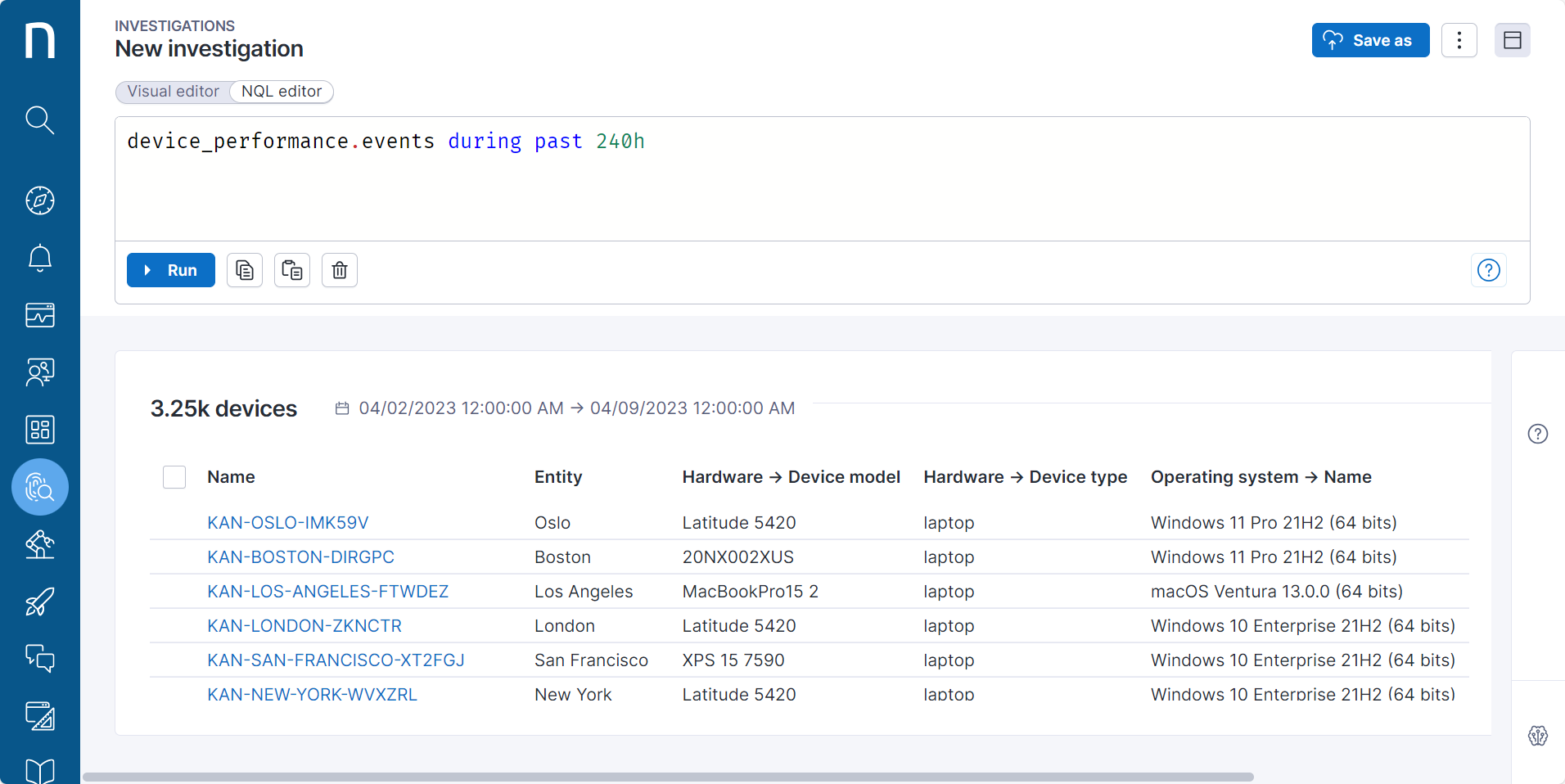
### Why do some queries on 'execution.events' or 'connection.events' fail, while for all other events they succeed?

<figure><img src="https://268444917-files.gitbook.io/~/files/v0/b/gitbook-x-prod.appspot.com/o/spaces%2FxJSUDk9NTtCHYPG5EWs3%2Fuploads%2Fgit-blob-d2a60cab80c9336944c9397d89897e5fd30e77f0%2Fquery1.png?alt=media" alt=""><figcaption></figcaption></figure>

<figure><img src="https://268444917-files.gitbook.io/~/files/v0/b/gitbook-x-prod.appspot.com/o/spaces%2FxJSUDk9NTtCHYPG5EWs3%2Fuploads%2Fgit-blob-ba0546a99d0703d6ac81572a2757bc99d5b141aa%2Fquery2.png?alt=media" alt=""><figcaption></figcaption></figure>

Devices produce a high volume of samples for specific types of events, for example `execution.events` or `connection.events`, making them the largest tables in the dataset. Therefore, this data is stored for a limited duration. For high-resolution samples, with timeframes expressed in hours or minutes, you can query data from a period of up to 8 days in the past. For low-resolution samples, where the timeframe is expressed in days, the retention period aligns with that of most other tables, lasting for 30 days.

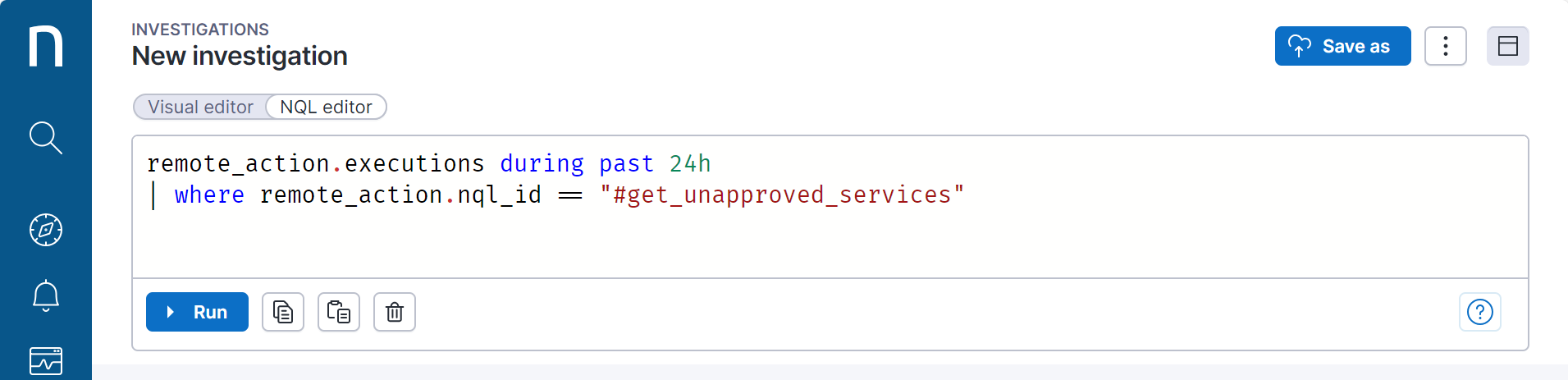
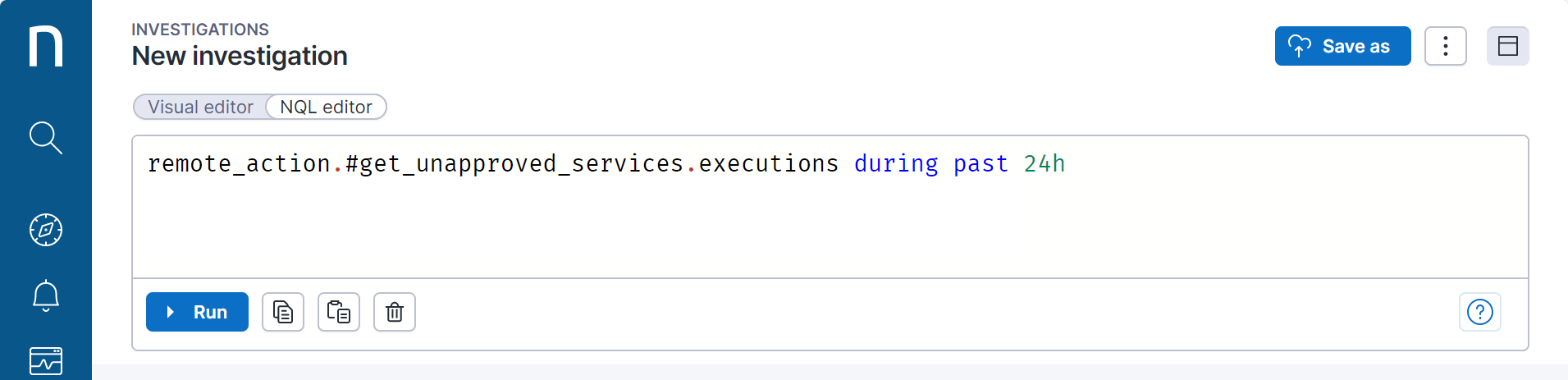
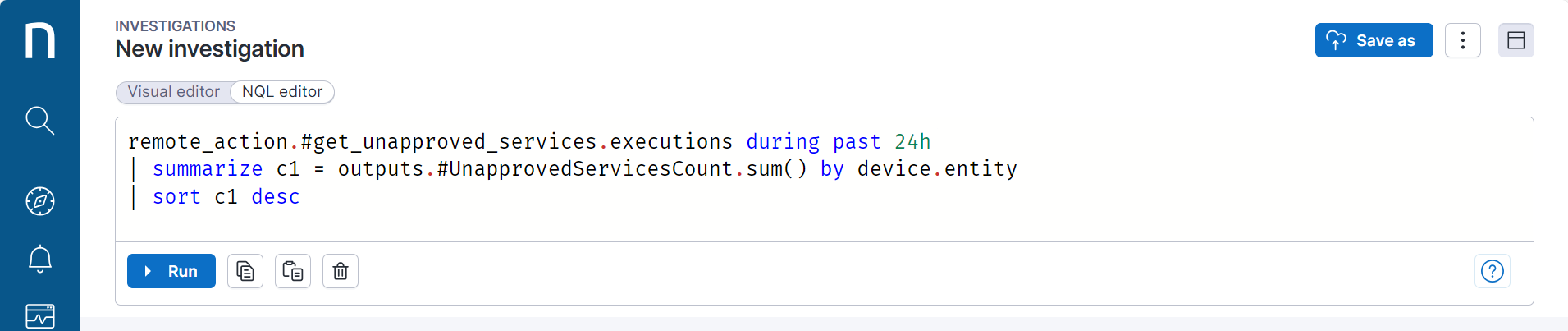
### What is the difference between the two queries below retrieving remote action executions?

<figure><img src="https://268444917-files.gitbook.io/~/files/v0/b/gitbook-x-prod.appspot.com/o/spaces%2FxJSUDk9NTtCHYPG5EWs3%2Fuploads%2Fgit-blob-36497cf88a9c663546cfbf90637310772b9551cf%2Fra_query1.png?alt=media" alt=""><figcaption></figcaption></figure>

<figure><img src="https://268444917-files.gitbook.io/~/files/v0/b/gitbook-x-prod.appspot.com/o/spaces%2FxJSUDk9NTtCHYPG5EWs3%2Fuploads%2Fgit-blob-17d9f34c5ad8fc192150dc5fe729de229de5e474%2Fra_query2.png?alt=media" alt=""><figcaption></figcaption></figure>

Both queries return the same number of results.

If you use the first query, the system returns the parameters as one JSON string. This means that only string operations are possible. In such queries, it is impossible to do additional computations or leverage the actual data type of the parameter.

The second query uses the dynamic data model. It allows you to directly access the parameters of the inputs and outputs and transparently use appropriate operations based on the data types of the parameters, e.g., bool, integer, byte.

<figure><img src="https://268444917-files.gitbook.io/~/files/v0/b/gitbook-x-prod.appspot.com/o/spaces%2FxJSUDk9NTtCHYPG5EWs3%2Fuploads%2Fgit-blob-8a00df55fca04dc74f05a724536266781b06756d%2Fra_query3.png?alt=media" alt=""><figcaption></figcaption></figure>

### Why is it not good practice to calculate 'count()' on sampled events?

Using `count()` on sampled events returns a number of samples, which usually doesn’t bring any business value except to give you a sense of the size of the data stored.
