> For the complete documentation index, see [llms.txt](https://docs.nexthink.com/platform/llms.txt). Markdown versions of documentation pages are available by appending `.md` to page URLs; this page is available as [Markdown](https://docs.nexthink.com/platform/understanding-key-data-platform-concepts/nexthink-query-language-nql.md).
# Nexthink Query Language (NQL)
Nexthink Query Language (NQL) is the programming language developed by Nexthink and designed to request and retrieve information from the data storage layer. NQL queries extract data and format it into a human-readable form.
## Data storage
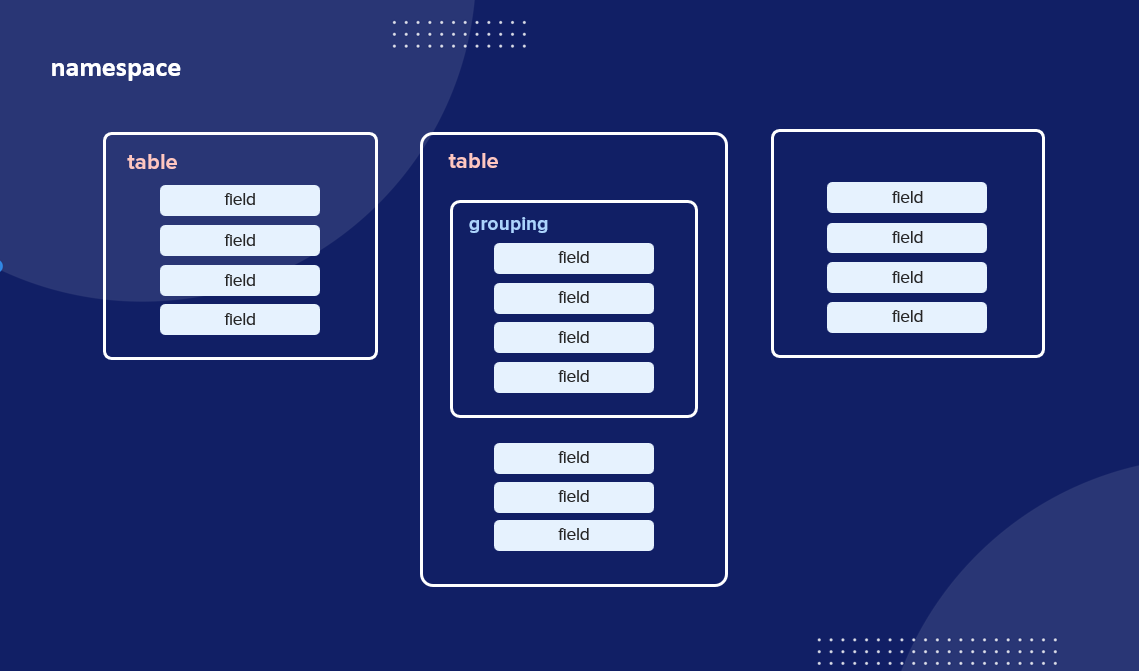
The Nexthink instance stores the information in various ways optimized for performance and efficiency. When querying data, the system receives statements, groups of commands and clauses written using the Nexthink Query Language (NQL). The information is organized using various containers and stored in one or multiple records called fields.
Fields are either grouped directly in a table, called a collection, or encapsulated in a structured field. One or more collections are contained in only one namespace, but the product relies on several namespaces.
## Querying data
Nexthink Query Language (NQL) allows you to investigate and query any data from the Nexthink platform. You can only access the data, you cannot create new records or modify existing ones.
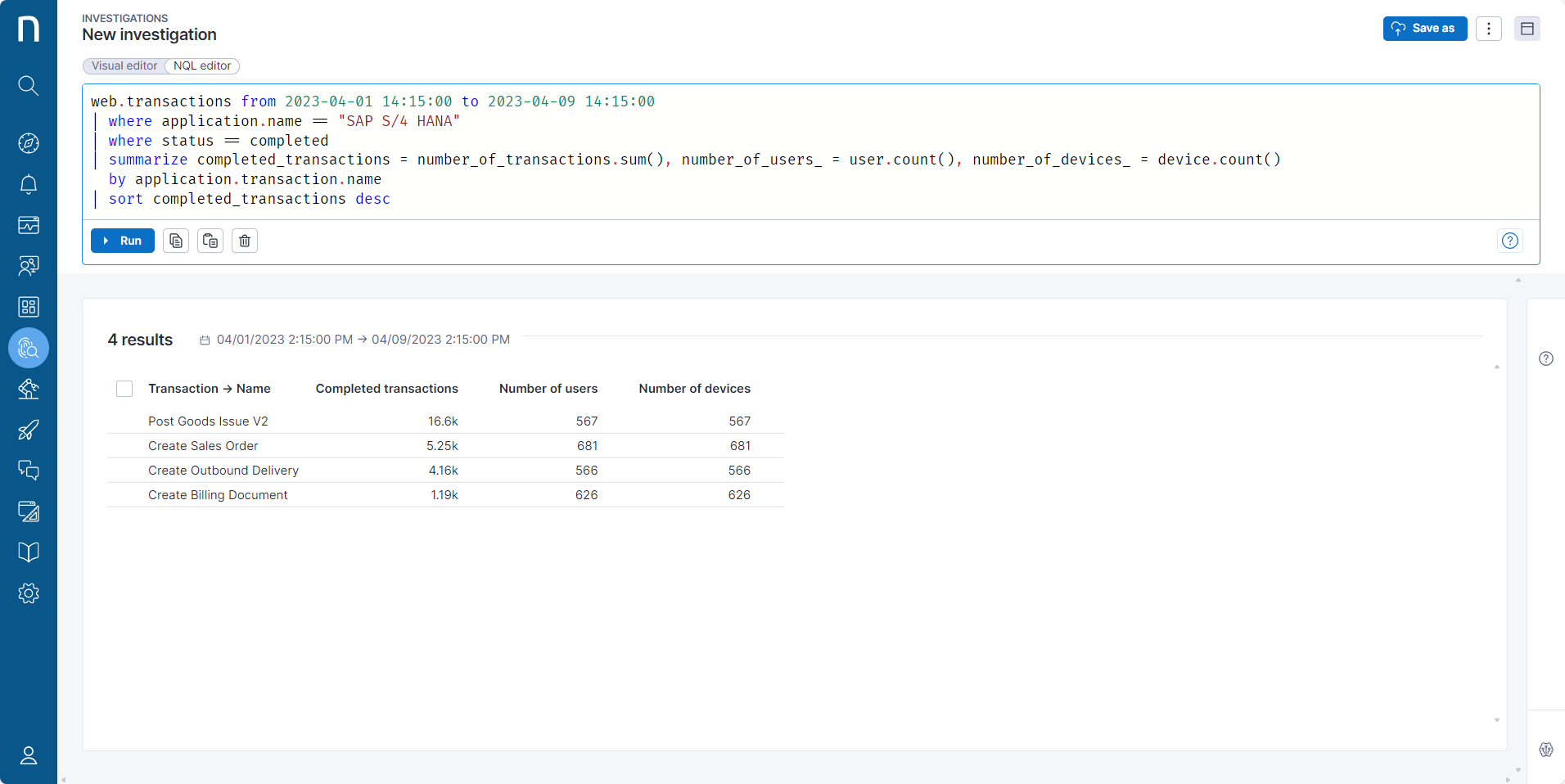
To execute an NQL query, write it in the investigations editor and click the **Run** button.
{% hint style="info" %}
The maximum length of an NQL query is 16000 characters.
{% endhint %}
50 results are displayed by default. To reveal more results click on the **Load more** button at the bottom of the page to load another set of 50 results.
The system only displays the data you have access to, based on the [View domain](/platform/user-guide/administration/account-management/roles/view-domain.md) permission defined for the [Role](/platform/user-guide/administration/account-management/roles.md) assigned to your account.
## NQL terminology
Nexthink uses a specific vocabulary of technical terms to define the various concepts around NQL.
### **Query**
An NQL query is a specific type of NQL statement that successfully executes commands to return data.
{% code overflow="wrap" lineNumbers="true" %}
```
binaries
```
{% endcode %}
{% code overflow="wrap" lineNumbers="true" %}
```
web.events during past 24h
| where application.name == "Confluence"
| summarize usage_hours = duration.sum() / 3600 by device.name, device.operating_system.platform, device.entity
| list device.name, usage_hours, device.operating_system.platform, device.entity
| sort usage_hours desc
```
{% endcode %}
An NQL statement is an instruction that successfully executes commands capable of changing data or the schema. The current implementation of NQL available to the public only allows to retrieve data.
### **Clause**
An NQL clause is a command used to filter and analyze data.
`| where application.name == "Confluence"`
`| list device.name, usage_hours, device.operating_system.platform, device.entity`
### **Keyword**
An NQL keyword is a reserved term used to construct a statement or a clause. For example:
`where` `summarize` `list`
### **Operator**
An NQL operator is a symbol used to perform an action on one or more items in a statement or a clause. For example:
`/` `=` `>`
For a list of all the possible operators, have a look at the [NQL operators](/platform/understanding-key-data-platform-concepts/nexthink-query-language-nql/nql-operators.md) page.
* [NQL syntax overview](/platform/understanding-key-data-platform-concepts/nexthink-query-language-nql/nql-syntax-overview.md)
* [NQL keywords](/platform/understanding-key-data-platform-concepts/nexthink-query-language-nql/nql-keywords.md)
* [NQL operators](/platform/understanding-key-data-platform-concepts/nexthink-query-language-nql/nql-operators.md)
* [NQL functions](/platform/understanding-key-data-platform-concepts/nexthink-query-language-nql/nql-functions.md)
* [NQL catalog](/platform/understanding-key-data-platform-concepts/nexthink-query-language-nql/nql-catalog.md)
* [NQL data model](/platform/understanding-key-data-platform-concepts/nql-data-model.md)
* [NQL FAQ](/platform/understanding-key-data-platform-concepts/nexthink-query-language-nql/nql-faq.md)
---
# Agent Instructions
This documentation is published with GitBook. GitBook is the documentation platform designed so that both humans and AI agents can read, navigate, and reason over technical content effectively. Learn more at gitbook.com.
## Querying This Documentation
If you need additional information that is not directly available in this page, you can query the documentation by asking a question.
Perform an HTTP GET request on the following URL with the `ask` and `goal` query parameters:
```
GET https://docs.nexthink.com/platform/understanding-key-data-platform-concepts/nexthink-query-language-nql.md?ask=&goal=
```
`ask` is the immediate question: it should be specific, self-contained, and written in natural language.
`goal` is what the user is ultimately trying to achieve, the reason they need the answer. Sharing it helps GitBook give you a better, more relevant answer. A goal is most helpful when it describes the outcome the user wants rather than restating the question. For example, with `ask=how do I create an API token`, a goal like `automate deployments from our CI pipeline` lets GitBook tailor the answer to that use case.
The response will contain a direct answer to the question and relevant excerpts and sources from the documentation.
Use this mechanism when the answer is not explicitly present in the current page, you need clarification or additional context, or you want to retrieve related documentation sections.