# Data we collect and store

## Data categories <a href="#datawecollectandstore-datacategories" id="datawecollectandstore-datacategories"></a>

Nexthink distinguishes between two types of data: **objects** and **events**.

### Objects <a href="#datawecollectandstore-objects" id="datawecollectandstore-objects"></a>

#### **Inventory objects**

Inventory objects represent physical or virtual items related to the digital environment. Objects contain elements that, once captured, rarely change.

| Object | Properties                    |
| ------ | ----------------------------- |
| binary | name, size, version, …        |
| user   | name, username, department, … |
| device | name, CPU, OS, …              |
| …      | …                             |

#### **Configuration objects**

Configuration objects refer to all objects that Nexthink users configure, such as alerts, applications, campaigns and remote actions.

| Object          | Properties                    |
| --------------- | ----------------------------- |
| monitors        | name, threshold, priority, …  |
| campaigns       | name, status, trigger\_method |
| remote\_actions | name, …                       |
| …               | …                             |

### Events <a href="#datawecollectandstore-events" id="datawecollectandstore-events"></a>

The main characteristic of an event is that it is time-linked. In other words, events represent occurrences of something that happened at a given time within your IT environment, for example, `execution.events`*,* `web.errors`.

Event data can serve various purposes, with the primary distinction lying in **operational** use and **trend** observation.

#### **Operational data**

Use operational data to detect, diagnose and resolve specific problems. These include live events captured from employee devices and alerts triggered by monitors.

Examples:

* `execution.events`
* `execution.crashes`
* `device_performance.events`
* `remote_action.executions`
* `alert.alerts`

Operational data is granular and extensive. Nexthink stores this data for up to 30 days. Access operational data through various Nexthink modules and use the drill-down capabilities to view it in Investigations. Alternatively, access Investigations directly and use the Visual editor or write an NQL query to retrieve operational data.

#### **Trends**

Trends allow you to analyze changes in metrics over a long period to observe patterns and support strategic decisions. Trends are less granular and are stored for up to 13 months. They comprise operational event data aggregated into 1-day or 7-day samples and reduced to relevant metrics and properties.

Various Nexthink modules store trend data by default. Configure module content and observe trends after the system has collected related operational data over a sufficiently long period.

Examples:

* In the Software metering module, view data for a period of up to 90 days. You can also query this data in Investigations: `software_metering.events`.
* In the Remote Actions module, view data for a period of up to 13 months and query this data in Investigations: `remote_action.executions_summary`.
* In the Applications module, view application-specific data for a period of up to 90 days.
* In the Digital Experience module, view DEX scores for a period of up to 13 months (See also [Precomputed metrics](#precomputed-metrics) on this page).

Create your own custom trends to capture long-term data that is relevant to you, query it in Investigations and create dashboards to get valuable insights. Go to the [Custom trends management](https://docs.nexthink.com/platform/user-guide/administration/content-management/custom-trends-management) documentation page for more information.

## Event collection types <a href="#datawecollectandstore-eventcollectiontypes" id="datawecollectandstore-eventcollectiontypes"></a>

There are two types of event collections: **punctual** and **sampled**.

### Punctual events <a href="#datawecollectandstore-punctualevents" id="datawecollectandstore-punctualevents"></a>

Punctual events reflect occurrences at their exact time. They include crashes, boots or logins.

| Event                     | Description              | Associations         | Properties         | Metrics                                                    |
| ------------------------- | ------------------------ | -------------------- | ------------------ | ---------------------------------------------------------- |
| `execution.crash`         | A crash of a binary      | user, device, binary | time, binary\_path | cardinality                                                |
| `session.login`           | A user login on a device | user, device         | time, session\_uid | time\_until\_desktop\_ready, time\_until\_desktop\_visible |
| `device_performance.boot` | A device booting         | device               | time, type         | boot\_duration                                             |
| …                         | …                        | …                    | …                  | …                                                          |

### Sampled events <a href="#datawecollectandstore-sampledevents" id="datawecollectandstore-sampledevents"></a>

Sampled events refer to a data collection method essential for monitoring dynamic metrics associated with continuous and long-term activities. This is particularly important for metrics such as CPU utilization, memory usage, and process traffic, which constantly fluctuate and require regular sampling and aggregation to represent data accurately.

The Collector sampling process occurs frequently, every 20-30 seconds, resulting in high-resolution data. This data is then structured into aggregated time slices, which can either be 5 minutes or 15 minutes long, depending on the specific requirements of the data collection. These time slices make it easier to analyze the data.

| Event                       | Description                                              | Associations         | Properties               | Metrics                                                   |
| --------------------------- | -------------------------------------------------------- | -------------------- | ------------------------ | --------------------------------------------------------- |
| `session.events`            | Sample indicating when a device is reporting to Nexthink | user, device         | protocol, session\_ID, … | RTT, latency, interaction\_time, …                        |
| `execution.events`          | Executions of a process with resources consumed          | user, device, binary |                          | CPU\_time, outgoing\_traffic, memory\_used, …             |
| `device_performance.events` | Resources consumed by a device                           | device               |                          | CPU\_usage, read\_operation\_per\_second, used\_memory, … |
| …                           | …                                                        | …                    | …                        | …                                                         |

#### **Aggregation of sampled events**

During aggregation, the system merges similar events and combines their metrics using different functions depending on the data type (sum, average, percentile, etc.). Nexthink picks the most meaningful aggregate function to keep the data point’s value intact.

To illustrate, `outgoing_traffic` is summed while `connection_etablishment_time` is averaged.

**Example 1 - Multiple processes**

Consider `chrome.exe` running on the same device with the same users but with three processes.

| time          | binary.name | outgoing\_traffic | connection\_establishment\_time.avg |
| ------------- | ----------- | ----------------- | ----------------------------------- |
| 08:00 - 08:12 | chrome.exe  | 15 MB             | 6ms                                 |
| 08:05 - 08:12 | chrome.exe  | 5 MB              | 10ms                                |
| 08:10 - 08:14 | chrome.exe  | 10 MB             | 20ms                                |

Data would be aggregated and stored as a 15-minute sampled event starting at 08:00 and finishing at 08:15

| start\_time | end\_time | binary.name | outgoing\_traffic       | connection\_establishment\_time.avg |
| ----------- | --------- | ----------- | ----------------------- | ----------------------------------- |
| 08:00       | 08:15     | chrome.exe  | **30 MB** (15 + 5 + 10) | **12ms** ( (6 + 10 + 20) / 3 )      |

Query with NQL in the following way:

<table data-header-hidden><thead><tr><th></th></tr></thead><tbody><tr><td><pre><code>execution.events during past 15min
| where binary.name == "chrome.exe"
| list start_time, end_time , outgoing_traffic, connection_establishment_time.avg 
</code></pre></td></tr></tbody></table>

**Example 2 - Device CPU**

To store the `cpu_usage` of a particular device, Nexthink Collector takes samples of the CPU load every 30 seconds.

| time     | cpu\_usage |
| -------- | ---------- |
| 08:00:00 | 80%        |
| 08:00:30 | 55%        |
| 08:01:00 | 75%        |
| …        | …          |
| 08:04:00 | 90%        |
| 08:04:30 | 95%        |

For a device running from 08:00 to 08:05, ten samples are generated and sent to the Nexthink instance, which aggregates it into a new value.

| start\_time | end\_time | cpu\_usage.avg                              |
| ----------- | --------- | ------------------------------------------- |
| 08:00       | 08:05     | **82%** (80 + 55 + 75 + ... + 90 + 95) / 10 |

Query with NQL in the following way:

<table data-header-hidden><thead><tr><th></th></tr></thead><tbody><tr><td><pre><code>device_performance.events during past 5min
| list start_time, end_time, cpu_usage.avg 
</code></pre></td></tr></tbody></table>

Aggregation allows the system to store data over extended periods and retrieve it quickly, without compromising its ability to generate insights.

## Precomputed metrics

The precomputed metrics currently used in DEX score computation are based on data from the past 7 days. The DEX score is computed daily and saved in the database as a punctual event corresponding to the computation time, even though it factors in data from the entire 7-day period.

To retrieve the DEX score value computed today, based on data from the past 7 days, use: `dex.scores during past 24h`.

**Example**

Your company introduced automated remediation of SharePoint issues using workflows on June 1, 2024. To retrieve the application DEX score that includes only the events occurring after the remediation started, start querying the score after June 8, 2024:

```
users
| include dex.application_scores on Jul 8, 2024
| where application.name in ["Sharepoint"] and node.type == application
| compute sharepoint_score_per_user = node.value.avg()
| summarize sharepoint_score = sharepoint_score_per_user.avg()
```

## Nexthink usage data

Nexthink exposes platform telemetry through the `usage.account_actions` NQL table to measure usage activity per product and account role, without relying on assumptions from IT employees.&#x20;

This platform usage dataset enables you to:

* Track which modules and features are used
* Measure usage trends over time&#x20;
* Detect enablement gaps
* Compare usage across roles
* Support adoption tracking initiatives for ROI.

The ability to query Nexthink usage telemetry requires user roles with **Data model visibility** into **Nexthink Usage**. Refer to [#data-model-visibility](https://docs.nexthink.com/platform/user-guide/administration/account-management/roles#data-model-visibility "mention").

You can use platform `usage` data in all NQL-supported features, such as **Investigations** or Live Dashboards.&#x20;

<details>

<summary>Listing overall Nexthink product usage from <strong>Investigations</strong> </summary>

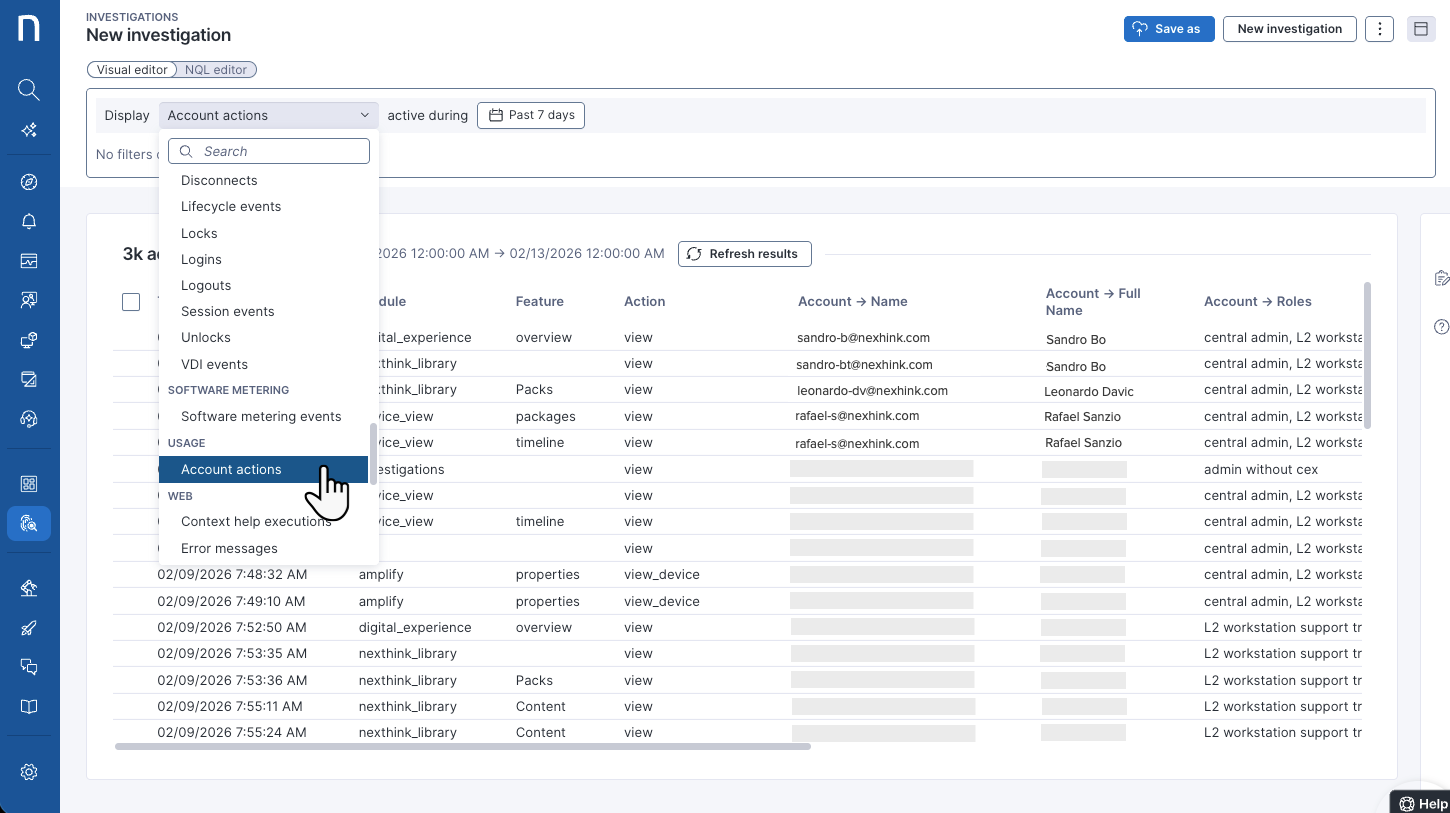
To list Nexthink usage and product-specific adoption, from **Investigations,** query the `usage.account_actions`  NQL table, for a specific timeframe.  See the query and image below.\
Refer to [#usage](https://docs.nexthink.com/platform/nql-data-model#usage "mention") for NQL field details.

```
usage.account_actions during past 7d
```

After getting the `usage.account_actions` investigation results:&#x20;

1. Review/export the table field columns to determine how often Nexthink modules and features are used to perform specific tasks, and by whom.&#x20;
2. Search for adoption gaps in roles and features, and correlate potential high-friction processes in your IT organization.&#x20;

If adoption issues are present, you should implement a digital adoption strategy that leverages learning paths, assessments, and certification programs in [Nexthink Learn](https://learn.nexthink.com/).&#x20;

{% hint style="info" %}
Refer to [creating-investigations](https://docs.nexthink.com/platform/user-guide/investigations/creating-investigations "mention")  to run an investigation.&#x20;
{% endhint %}

<figure><img src="https://268444917-files.gitbook.io/~/files/v0/b/gitbook-x-prod.appspot.com/o/spaces%2FxJSUDk9NTtCHYPG5EWs3%2Fuploads%2F6K9PNuIYhPUANoT7Q0dM%2Fimage.png?alt=media&#x26;token=5df57a92-a1da-4da9-be81-66d7a7a8b2f4" alt=""><figcaption></figcaption></figure>

</details>

<details>

<summary>Visualizing Nexthink usage and adoption from <strong>Live dashboards</strong> </summary>

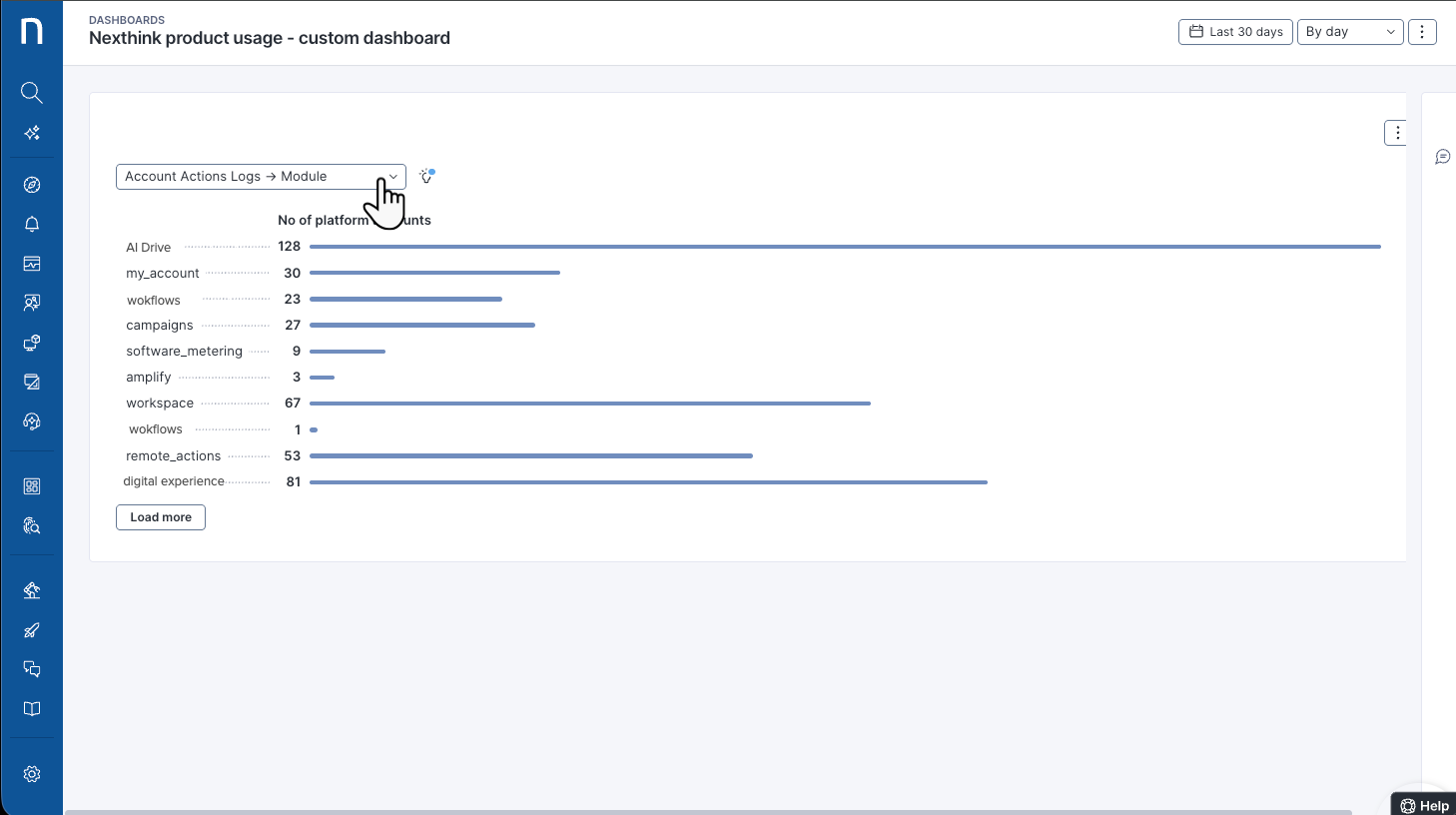
To visualize Nexthink usage and product-specific adoption, from **Live dashboards**, configure a widget to set a custom representation of Nexthink `usage.account_actions`.&#x20;

The following example displays a **Bar chart** widget that breaks down the number of platform accounts by fields such as product module. Refer to [#usage](https://docs.nexthink.com/platform/nql-data-model#usage "mention") for NQL field details.

See the bar-chart example query:

```
usage.account_actions during past 60d
| summarize no_of_platform_accounts = account.count() by module
```

{% hint style="info" %}
Refer to [widget-types](https://docs.nexthink.com/platform/user-guide/live-dashboards/widget-types "mention") to learn how to configure the available dashboard widgets for visualizations.
{% endhint %}

<figure><img src="https://268444917-files.gitbook.io/~/files/v0/b/gitbook-x-prod.appspot.com/o/spaces%2FxJSUDk9NTtCHYPG5EWs3%2Fuploads%2F8aIwuVSgKaHndMlX8A0e%2Fimage.png?alt=media&#x26;token=ff3f7c00-6fd3-4360-9aad-02f5d501cd3f" alt=""><figcaption></figcaption></figure>

</details>

{% hint style="warning" %}
The `usage.account_actions` dataset reflects Nexthink platform adoption. For security-related content auditing, use [audit logs](https://docs.nexthink.com/platform/security/exporting-audit-logs) instead.

For details on `usage.account_actions` data retention, refer to [#dataresolutionandretention-retentionperdatacategory](https://docs.nexthink.com/platform/data-resolution-and-retention#dataresolutionandretention-retentionperdatacategory "mention").
{% endhint %}

**Examples**

You can use platform `usage` data in all NQL-supported features, such as Investigations or Live Dashboards. Explore the examples below.

Other use cases for the `usage.account_actions` NQL dataset include:

<details>

<summary>Displaying the total number of active users from <strong>Investigations</strong> </summary>

Display the total number of "active users in the last 30 days, from **Investigations,** query the `usage.account_actions`  NQL table:

```
usage.account_actions during past 30d
| summarize active_user = account.name.count()
```

{% hint style="info" %}
Refer to [#usage](https://docs.nexthink.com/platform/nql-data-model#usage "mention") for NQL field details.

Refer to [creating-investigations](https://docs.nexthink.com/platform/user-guide/investigations/creating-investigations "mention")  to run an investigation.&#x20;
{% endhint %}

</details>

<details>

<summary>Listing active users and actions by feature from <strong>Investigations</strong> </summary>

To display active users and actions by features in the last 90 days, from **Investigations,**  query the `usage.account_actions`  NQL table:

```
usage.account_actions during past 90d
| summarize active_users = platform.account.account_uuid.count(), actions_per_feature = count() by feature
| sort active_users desc
```

{% hint style="info" %}
Refer to [#usage](https://docs.nexthink.com/platform/nql-data-model#usage "mention") for NQL field details.

Refer to [creating-investigations](https://docs.nexthink.com/platform/user-guide/investigations/creating-investigations "mention")  to run an investigation.&#x20;
{% endhint %}

</details>

{% hint style="info" %}
You can also leverage the `usage.account_actions` NQL table to [track usage specific to Nexthink Amplify](https://docs.nexthink.com/platform/user-guide/amplify/tracking-amplify-usage).
{% endhint %}