> For the complete documentation index, see [llms.txt](https://docs.nexthink.com/platform/llms.txt). Markdown versions of documentation pages are available by appending `.md` to page URLs; this page is available as [Markdown](https://docs.nexthink.com/platform/understanding-key-data-platform-concepts/data-organization.md).
# Data organization
## Data organization layers
The Nexthink data model follows a hierarchical organization with tables comprising namespaces. These tables, in turn, store information in fields.
### Namespace
A namespace groups information around a particular functionality or category, such as devices, campaigns, remote actions and sessions, ensuring consistency and clarity of data.
### Table
Namespaces include tables, which are sets of objects or events and their characteristics stored in fields.
### Field
A field is a property or a metric attached to an object or event. Fields are stored independently in a table or grouped by topics within the table.
A field can refer to:
* **Property**: describes characteristics such as the name, size or time.
* **Metric**: numerical value such as `cpu_time`, memory usage, or traffic related to a running process. Only fields from the event tables can be metrics. Refer to the [Data we collect and store](/platform/understanding-key-data-platform-concepts/data-we-collect-and-store.md) page for information about how the system aggregates metrics.
Fields have the following attributes:
* **Name**: name as it appears in the NQL query in `snake_case`.
* **Label**: natural language version of the name.
* **Description**: longer explanation of the value and how it is computed.
* **Data type**: attribute of the value stored in a field. This dictates what type of data a field can store. Refer to the [NQL data types](/platform/understanding-key-data-platform-concepts/nexthink-query-language-nql/nql-syntax-overview/nql-data-types.md) documentation for more information regarding data types.
### Example
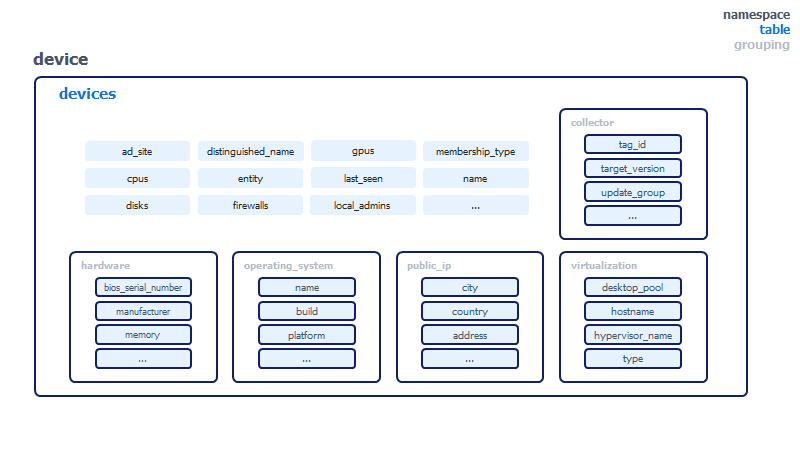
Refer to the visual representation of the `device` namespace below. It contains one table named `devices`, which lists objects referred to as devices. Some device properties do not belong to any grouping, such as `name`, `local_admins` and `firewalls`. Other properties that belong together are captured in **groupings** such as `collector`, `hardware`, `operating_system`, `public_ip` and `virtualization`.
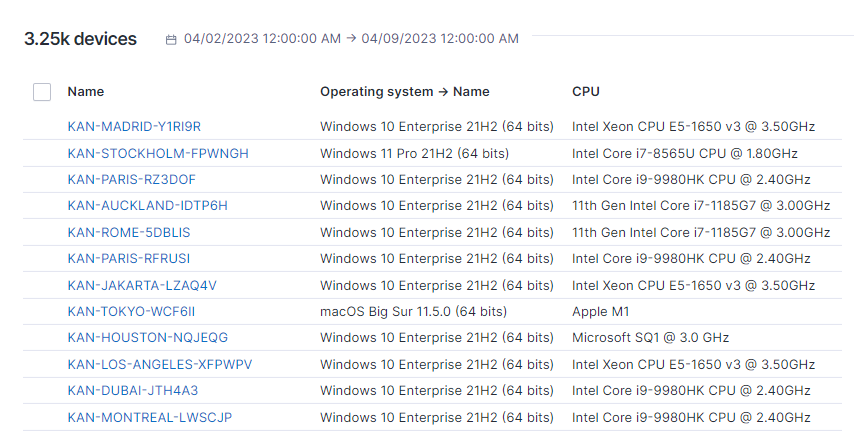
The hierarchy is reflected in the NQL queries. For example, you can query devices with NQL to get a list of CPUs and operating system names for each device. At the root of these NQL queries, `devices` is an alias for `device.devices`. The **namespace** is implicit. The structure applies to other tables.
```sql
devices during past 7d
| list device.name, device.operating_system.name, device.cpus
```
In the query results below, table columns represent the fields.
Refer to the [NQL data model](/platform/understanding-key-data-platform-concepts/nql-data-model.md) page for a complete overview of namespaces, tables and fields.
## Table associations
Tables are associated, allowing you to combine the data from one table with another to gather meaningful information and conclusions about your IT environment and employee digital experience. With the NQL data model, create queries that include fields from both the table you query and the associated table.
### Association direction
An association links one table to another in a single direction. When table A is associated with table B, a query on table A can use fields from table B. The reverse does not apply: a query on table B cannot use fields from table A through the same association.
For example, the `execution.events` table is associated with the `device.devices` table. A query on `execution.events` can use the fields of the device where each event occurred, such as its name:
```sql
execution.events during past 7d
| summarize total_freezes = number_of_freezes.sum() by device.name
```
The `device.devices` table is not associated with `execution.events`. A query on `devices` returns only device fields, so you cannot list execution event fields directly from it.
{% hint style="info" %}
The [NQL data model](/platform/understanding-key-data-platform-concepts/nql-data-model.md) page lists the associations of each table. For example, `execution.events` shows "events are associated to user, binary, device, real\_binary, application". Read this list as the tables you can reach from that table, not the tables that can reach it.
{% endhint %}
To bring event data into a query on an inventory object, such as devices, add a `with` or `include` clause and compute a value from the events:
```sql
devices
| with execution.events during past 7d
| compute total_freezes = number_of_freezes.sum()
| list device.name, total_freezes
```
Refer to [NQL with](/platform/understanding-key-data-platform-concepts/nexthink-query-language-nql/nql-keywords/nql-with.md) and [NQL include](/platform/understanding-key-data-platform-concepts/nexthink-query-language-nql/nql-keywords/nql-include.md) for more information.
### Table association guidelines
* **Events tables are associated with one or more inventory objects they relate to.** For example, the `device_performance.events` table is associated with the `devices` table.
{% hint style="info" %}
Exception: The `executions_summary` table from the `remote_action` namespace is not associated with any inventory objects.
{% endhint %}
* **Events tables are associated with configuration objects from the same namespace.** For example, the `alerts` events table is associated with the `monitors` configuration objects table.
* **Events tables from the `execution`, `software_metering` and `web` namespaces are associated with related tables from the `application` namespace.** For example, the `web.errors` table is associated with `application.applications`, and the `web.page_views` table is associated with `application.pages`.
* **Inventory object tables from the `device` namespace are associated with the `devices` table.** For example, `antiviruses`, `cpus` or `disks` are associated with `devices`.
### Context
The context of an event contains some properties of the associated objects at the time the event happened.
To illustrate, here is a breakdown of the average boot times per state to discover location-based slowness.
```sql
device_performance.boots
| summarize average_boot_duration_per_state = duration.avg()
by context.location.country, context.location.state
```
| Location Country | Location State | Average boot duration per state |
| ---------------- | -------------- | ------------------------------- |
| Canada | Alberta | 26s 634ms |
| Canada | Ontario | 29s 518ms |
| Canada | Quebec | 43s 672ms |
---
# Agent Instructions
This documentation is published with GitBook. GitBook is the documentation platform designed so that both humans and AI agents can read, navigate, and reason over technical content effectively. Learn more at gitbook.com.
## Querying This Documentation
If you need additional information that is not directly available in this page, you can query the documentation by asking a question.
Perform an HTTP GET request on the following URL with the `ask` and `goal` query parameters:
```
GET https://docs.nexthink.com/platform/understanding-key-data-platform-concepts/data-organization.md?ask=&goal=
```
`ask` is the immediate question: it should be specific, self-contained, and written in natural language.
`goal` is what the user is ultimately trying to achieve, the reason they need the answer. Sharing it helps GitBook give you a better, more relevant answer. A goal is most helpful when it describes the outcome the user wants rather than restating the question. For example, with `ask=how do I create an API token`, a goal like `automate deployments from our CI pipeline` lets GitBook tailor the answer to that use case.
The response will contain a direct answer to the question and relevant excerpts and sources from the documentation.
Use this mechanism when the answer is not explicitly present in the current page, you need clarification or additional context, or you want to retrieve related documentation sections.