# Library Applications - ServiceNow

## Overview <a href="#libraryapplications-servicenow-overview" id="libraryapplications-servicenow-overview"></a>

The ServiceNow application for Nexthink Applications includes a library configuration based on the Tokyo UI for both the classic and modern versions. This library can be accessed through the Library section of Infinity, like any other content type. Upon installation, a configuration with a dummy URL pattern is created, and it is required to update this pattern with the specific instance or tenant ID.

Here are some frequently asked questions for the reference: [Library Applications FAQ (nexthink.com)](https://docs.nexthink.com/platform/library-packs/faq/library-applications-faq)

## Key pages <a href="#libraryapplications-servicenow-keypages" id="libraryapplications-servicenow-keypages"></a>

The key pages in the library cover the standard ServiceNow pages for both the Workplace and Classic UIs. These include:

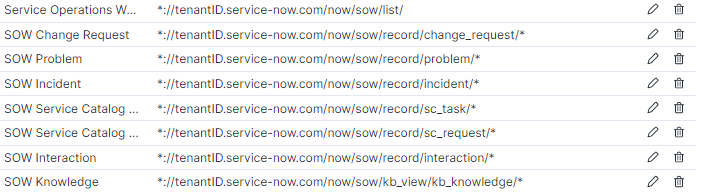
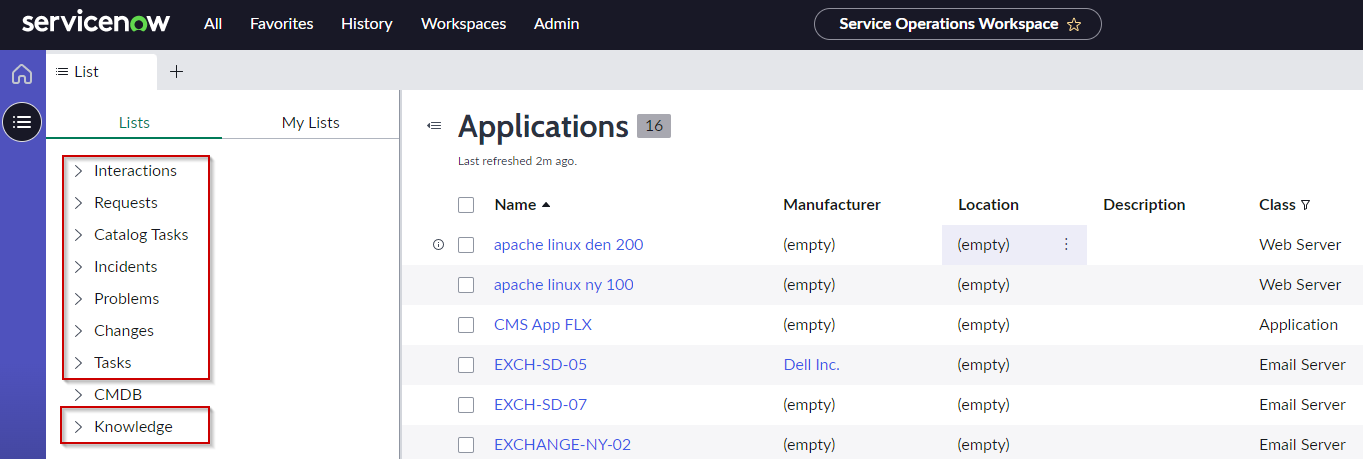
* Service Operations Workspace (SOW): This section contains standard pages for the SOW workspace.
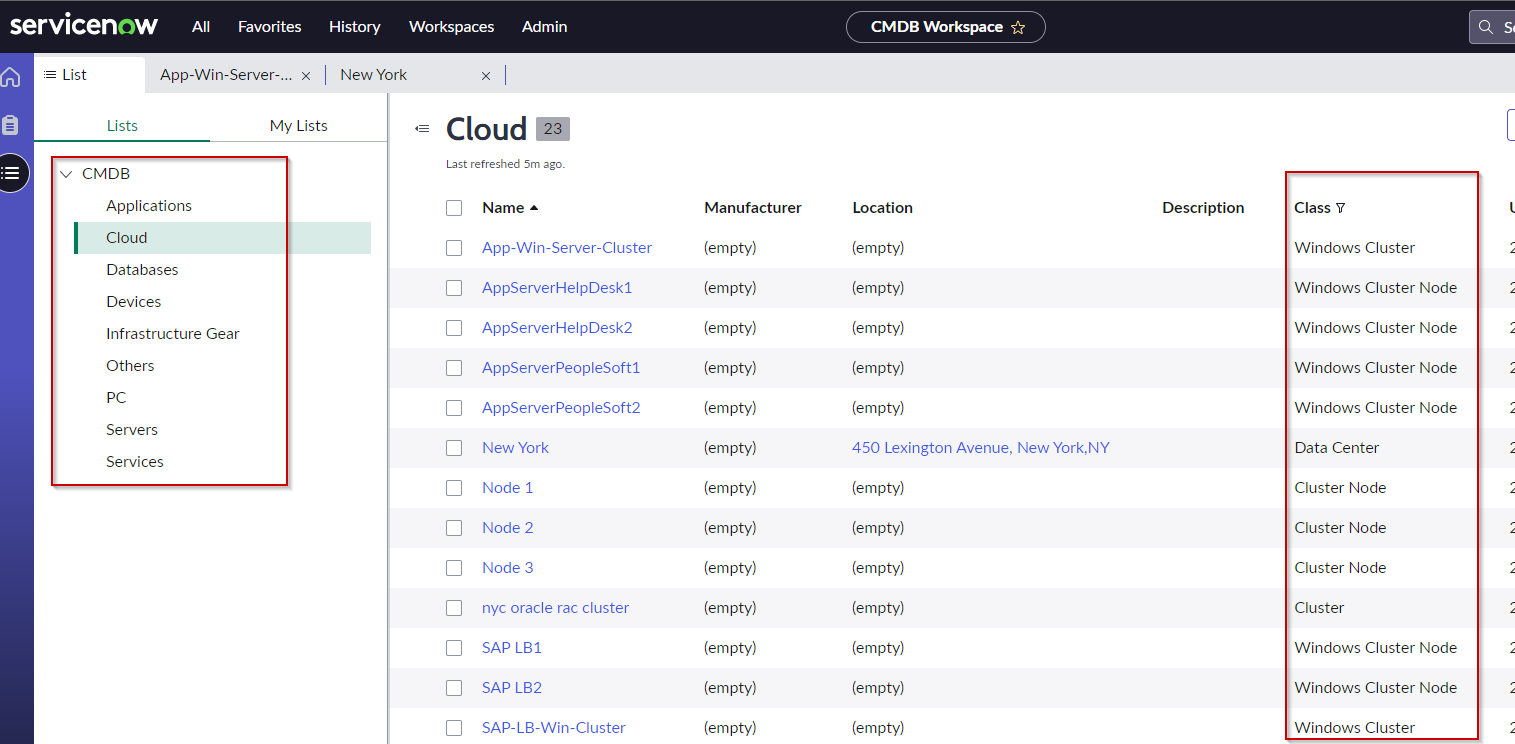
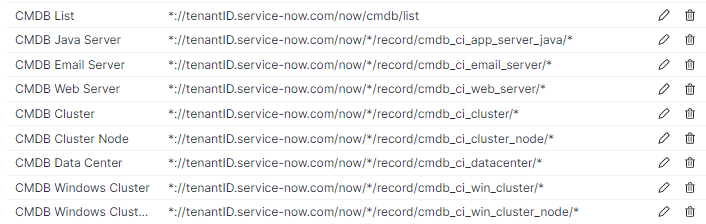
* CMDB Workspace: This section includes all Configuration Item (CI) categories down to the level of CI Class. This includes URLs from both the CMDB workspace and SOW.
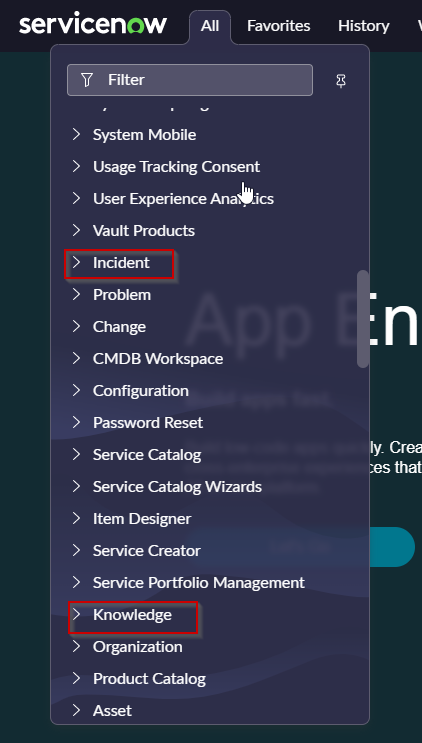
* Classic UI: this part contains some of the examples from wide range of ServiceNow classic menu.

Following screenshots showing some details of key pages from these 3 sections.

### Service Operations Workspace (SOW) <a href="#libraryapplications-servicenow-serviceoperationsworkspace-sow" id="libraryapplications-servicenow-serviceoperationsworkspace-sow"></a>

<div data-full-width="true"><figure><img src="https://268444917-files.gitbook.io/~/files/v0/b/gitbook-x-prod.appspot.com/o/spaces%2FxJSUDk9NTtCHYPG5EWs3%2Fuploads%2Fgit-blob-5d00c137e0315d5a86e8c0f29f62df8f1d962423%2Fimage-20230425-113443.png?alt=media" alt="" width="563"><figcaption><p>ServiceNow Service Operations Workspace (SOW)</p></figcaption></figure></div>

<figure><img src="https://268444917-files.gitbook.io/~/files/v0/b/gitbook-x-prod.appspot.com/o/spaces%2FxJSUDk9NTtCHYPG5EWs3%2Fuploads%2Fgit-blob-32435dfeafb2b54fe31e984e409f602786fbb2f0%2Fimage-20230425-113304.png?alt=media" alt="" width="680"><figcaption><p>Service Operations Workspace (SOW) mapping in Infinity Applications Library configuration</p></figcaption></figure>

### ServiceNow Configuration Management Database (CMDB) <a href="#libraryapplications-servicenow-servicenowconfigurationmanagementdatabase-cmdb" id="libraryapplications-servicenow-servicenowconfigurationmanagementdatabase-cmdb"></a>

<div data-full-width="false"><figure><img src="https://268444917-files.gitbook.io/~/files/v0/b/gitbook-x-prod.appspot.com/o/spaces%2FxJSUDk9NTtCHYPG5EWs3%2Fuploads%2Fgit-blob-806c269777b0bdfbe33782fda0925903a0e83396%2Fimage-20230425-114335.png?alt=media" alt=""><figcaption><p>ServiceNow Configuration Management Database (CMDB) Workspace</p></figcaption></figure></div>

<div data-full-width="true"><figure><img src="https://268444917-files.gitbook.io/~/files/v0/b/gitbook-x-prod.appspot.com/o/spaces%2FxJSUDk9NTtCHYPG5EWs3%2Fuploads%2Fgit-blob-6aaed1d31ea1be73d969048195dbc1ed9542054f%2Fimage-20230425-121800.png?alt=media" alt=""><figcaption><p>Configuration Managemen Database (CMDB) Workspace Infinity Applications Library configuration</p></figcaption></figure></div>

### Classic UI <a href="#libraryapplications-servicenow-classicui" id="libraryapplications-servicenow-classicui"></a>

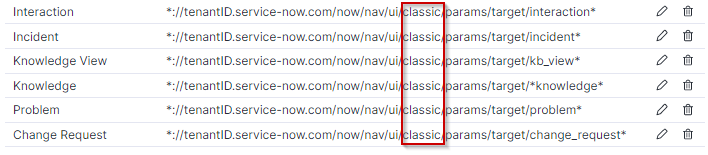
<div data-full-width="true"><figure><img src="https://268444917-files.gitbook.io/~/files/v0/b/gitbook-x-prod.appspot.com/o/spaces%2FxJSUDk9NTtCHYPG5EWs3%2Fuploads%2Fgit-blob-c9a3bc4d152f5c410e8d295ee7932fb9eb258318%2Fimage-20230425-121433.png?alt=media" alt=""><figcaption><p>Classic UI menu</p></figcaption></figure></div>

<div data-full-width="true"><figure><img src="https://268444917-files.gitbook.io/~/files/v0/b/gitbook-x-prod.appspot.com/o/spaces%2FxJSUDk9NTtCHYPG5EWs3%2Fuploads%2Fgit-blob-6e69ac66f84c3a7e7d2b2f97d56116b345df5b3a%2Fimage-20230425-120038.png?alt=media" alt=""><figcaption><p>Classic ServiceNow UI Library configuration</p></figcaption></figure></div>

## Transactions <a href="#libraryapplications-servicenow-transactions" id="libraryapplications-servicenow-transactions"></a>

There are several examples of transaction provided in this Library Pack. They are set up on parts of application where there is no URL change for user interaction.

These examples can be used to create similar transactions if needed.

### Transactions “Incident Task SLAs Tab” and “Incident ‘Impact’ Tab“ <a href="#libraryapplications-servicenow-transactions-incidenttaskslastab-and-incidentimpacttab" id="libraryapplications-servicenow-transactions-incidenttaskslastab-and-incidentimpacttab"></a>

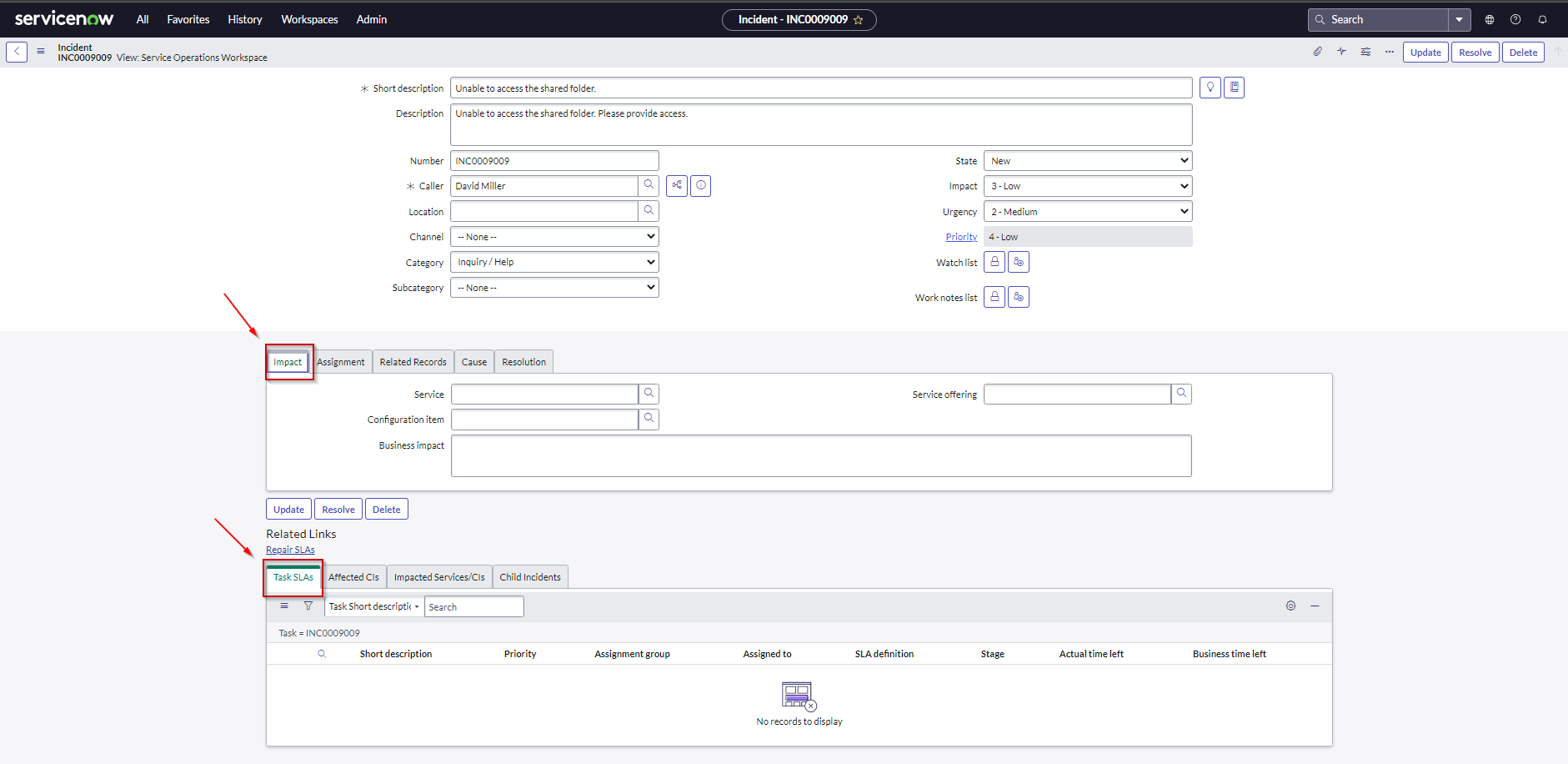
Transactions “Incident Task SLAs Tab” and “Incident ‘Impact’ Tab“ were defined to monitor employee experience specifically related to Incident form tabs. The same tabs may be used for different view forms (e.g. “Service Operations Workspace” and “Default view” contain the same “Task SLAs” tabs). It's worth noting that these tabs can be used in different view forms, and if a tab has the same unique selector as the pre-defined tabs, the transactions will automatically monitor those tabs as well. This allows for a more comprehensive understanding of employee experience across various forms and contexts.

<div data-full-width="false"><figure><img src="https://268444917-files.gitbook.io/~/files/v0/b/gitbook-x-prod.appspot.com/o/spaces%2FxJSUDk9NTtCHYPG5EWs3%2Fuploads%2Fgit-blob-e1f7073251b087f4919b1ee0a238ebc5c636f2c4%2Fimage-20230426-134659.png?alt=media" alt=""><figcaption><p>Click on those 2 tabs is monitored with transactions</p></figcaption></figure></div>

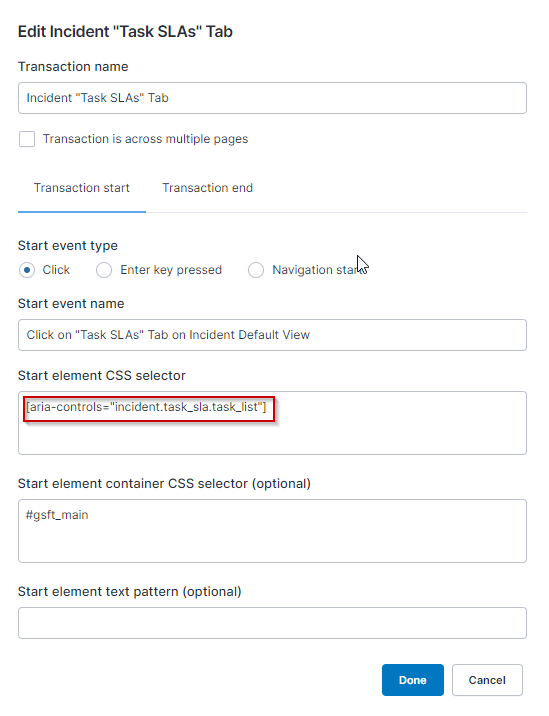
<div data-full-width="true"><figure><img src="https://268444917-files.gitbook.io/~/files/v0/b/gitbook-x-prod.appspot.com/o/spaces%2FxJSUDk9NTtCHYPG5EWs3%2Fuploads%2Fgit-blob-3dd2a820d9e9e4cb0ce5739455b607b6193c824c%2Fimage-20230426-135739.png?alt=media" alt=""><figcaption><p>Example of selector used</p></figcaption></figure></div>

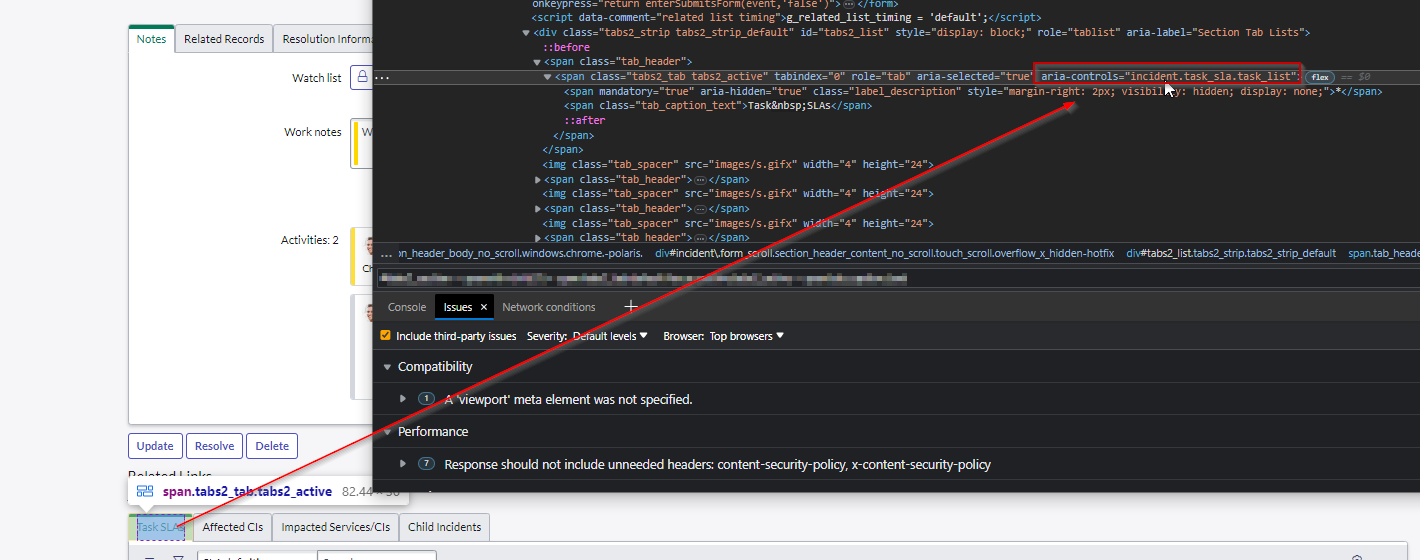
<div data-full-width="false"><figure><img src="https://268444917-files.gitbook.io/~/files/v0/b/gitbook-x-prod.appspot.com/o/spaces%2FxJSUDk9NTtCHYPG5EWs3%2Fuploads%2Fgit-blob-543bf9c43ddc5aa8b8097cb4435ca0b3ac595297%2Fimage-20230426-140045.png?alt=media" alt=""><figcaption><p>Selector was identified by using Chrome Developer Tools</p></figcaption></figure></div>

### Transaction “Nexthink Amplify“ <a href="#libraryapplications-servicenow-transaction-nexthinkamplify" id="libraryapplications-servicenow-transaction-nexthinkamplify"></a>

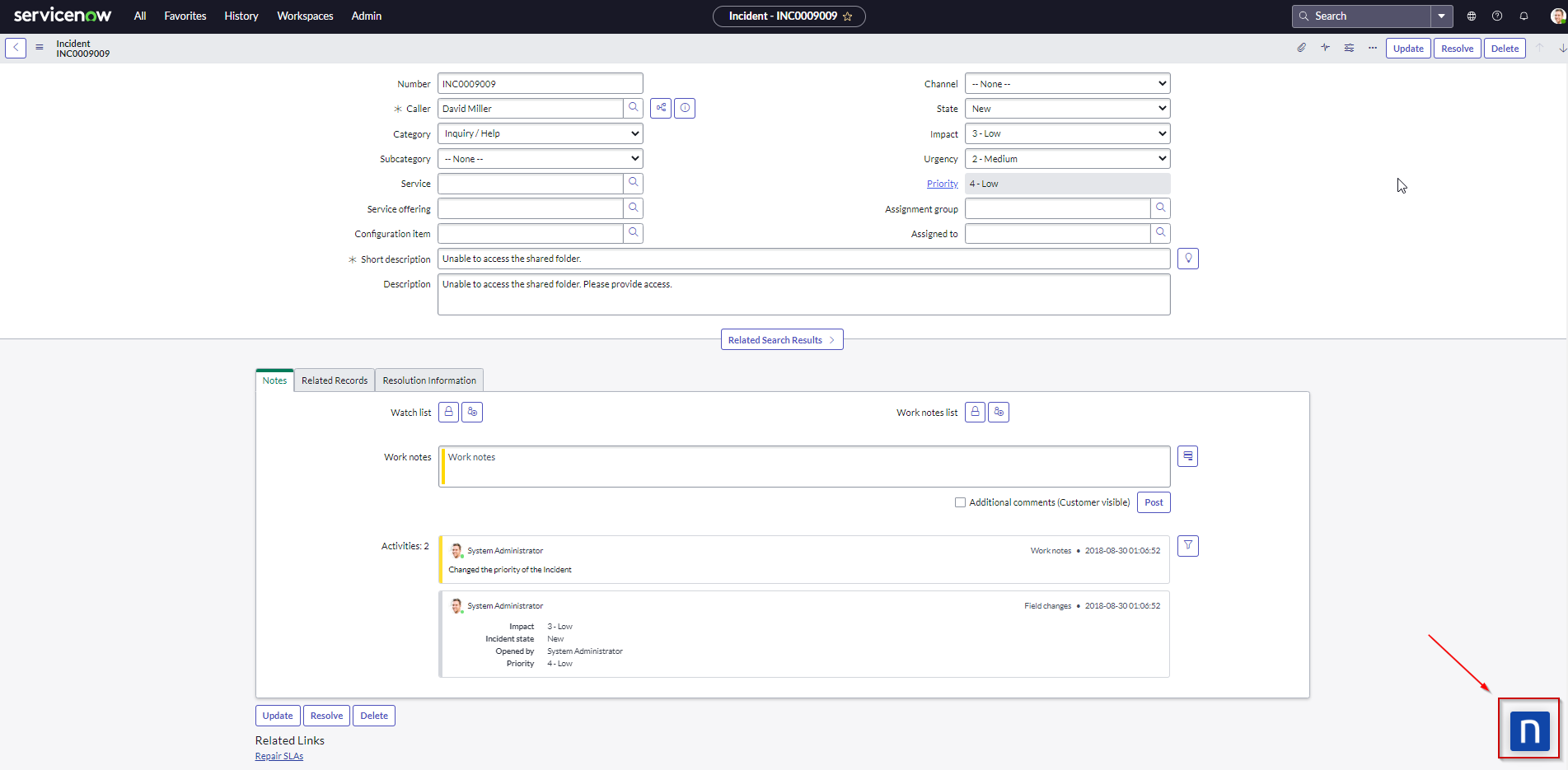
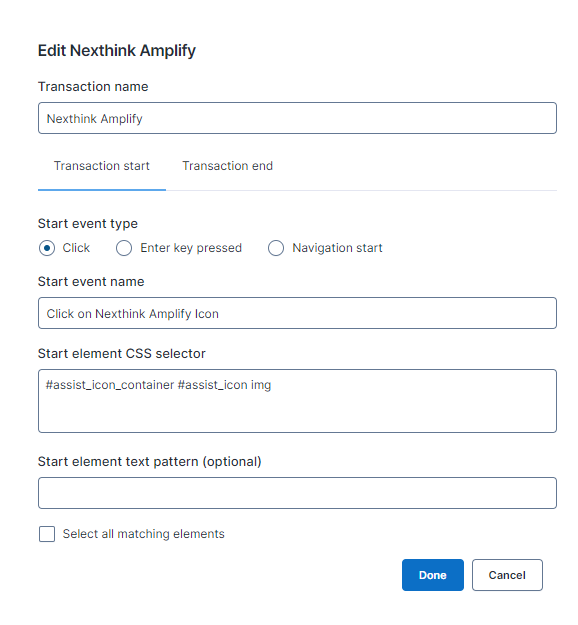
The "Nexthink Amplify" transaction is designed to monitor the adoption and performance of Nexthink Amplify. It's important to note that this transaction will only provide useful data if Nexthink Amplify is being used within the organization.

<div data-full-width="false"><figure><img src="https://268444917-files.gitbook.io/~/files/v0/b/gitbook-x-prod.appspot.com/o/spaces%2FxJSUDk9NTtCHYPG5EWs3%2Fuploads%2Fgit-blob-fabe4bb3c6c4d97b8c12dc33cb9c022fa7b8ffb0%2Fimage-20230427-072107.png?alt=media" alt=""><figcaption><p>Nexthink Amplify icon on the ServiceNow Incident page</p></figcaption></figure></div>

<figure><img src="https://268444917-files.gitbook.io/~/files/v0/b/gitbook-x-prod.appspot.com/o/spaces%2FxJSUDk9NTtCHYPG5EWs3%2Fuploads%2Fgit-blob-9e36867ce05efecb94172e894ea0fb056cc18ee6%2FAmplify%20correction.png?alt=media" alt=""><figcaption></figcaption></figure>


---

# Agent Instructions: Querying This Documentation

If you need additional information that is not directly available in this page, you can query the documentation dynamically by asking a question.

Perform an HTTP GET request on the current page URL with the `ask` query parameter:

```
GET https://docs.nexthink.com/platform/library-packs/applications/library-applications-servicenow.md?ask=<question>
```

The question should be specific, self-contained, and written in natural language.
The response will contain a direct answer to the question and relevant excerpts and sources from the documentation.

Use this mechanism when the answer is not explicitly present in the current page, you need clarification or additional context, or you want to retrieve related documentation sections.