> For the complete documentation index, see [llms.txt](https://docs.nexthink.com/llms.txt). Markdown versions of documentation pages are available by appending `.md` to page URLs; this page is available as [Markdown](https://docs.nexthink.com/platform/ja/whats-new/2023/whats-new-2023.4.md).
# 2023年4月の新着情報
**バージョン 2023.4 のリリース日は 2023年5月1日です。** リリースノートとダウンロードリンクについては、私たちのコミュニティウェブサイトのリリースノートセクションを参照してください。[リリースノート](https://community.nexthink.com/s/knowledge#release_notes)。
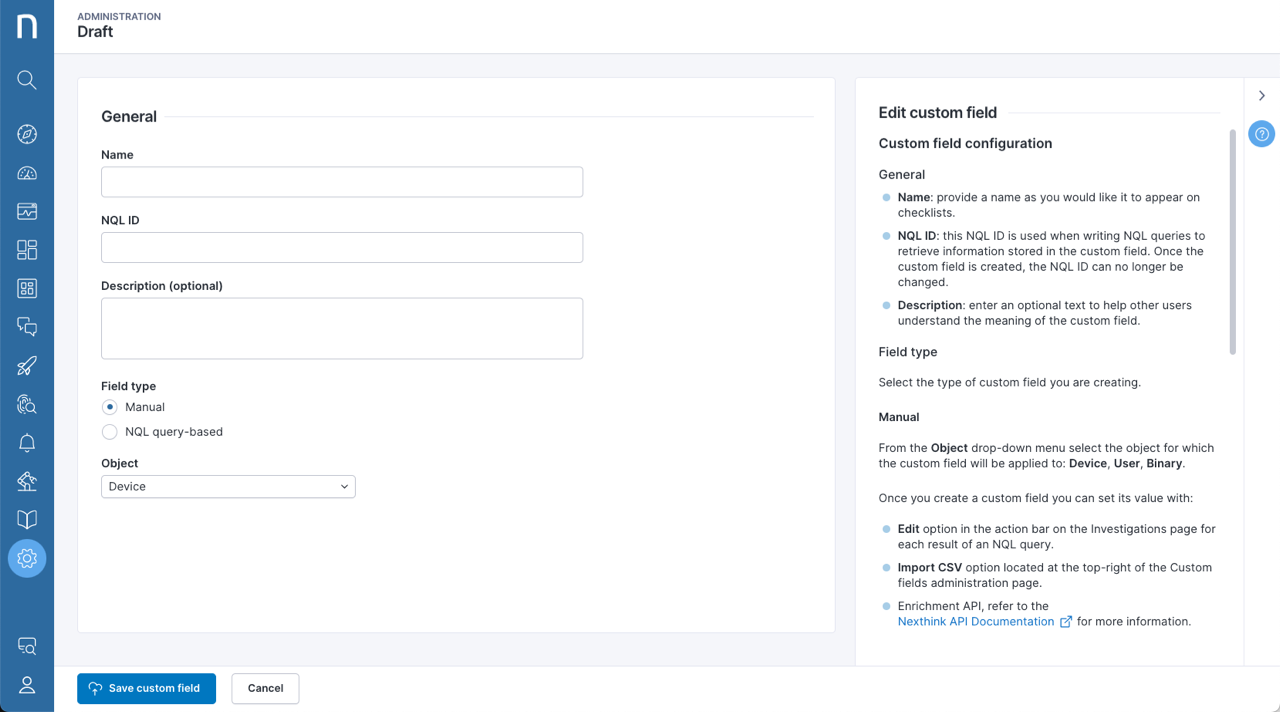
## 手動カスタムフィールド
手動カスタムフィールドでNexthinkデータモデルを拡張し、外部ソースから直接Nexthinkデータを強化します。 NexthinkウェブインターフェースやCSVファイル、Nexthink Enrichment APIを使用して、カスタムフィールドを直接追加します。詳細については、[カスタムフィールド](/platform/ja/user-guide/administration/content-management/custom-fields-management.md)のドキュメントを参照してください。
リリース完了後にEnrichment APIを公開します。
## Nexthinkライブラリパックのプレビュー
新しいスクリーンショットによって、Nexthinkライブラリパックに含まれる内容をより良く理解することができます。詳細については、[Nexthinkライブラリ](/platform/ja/user-guide/nexthink-library.md)のドキュメントを参照してください。
## ライブラリからのチェックリストのインポート、エクスポート、インストール
チェックリストをインポートおよびエクスポートして、Nexthinkクラウドインスタンス間で簡単に共有できます。 Nexthinkライブラリモジュールから直接チェックリストをインストールします。詳細については、[チェックリスト](/platform/ja/user-guide/administration/content-management/checklists-management.md)のドキュメントを参照してください。
## アプリケーション: 新しいSaaSアプリケーションのプリビルト設定
ServiceNow、Microsoft Office 365、Salesforce、Microsoft Outlookなどの人気SaaSアプリケーションのプリビルト設定を利用して、より迅速にアプリケーションをセットアップできます。詳細については、[Nexthinkライブラリ](/platform/ja/user-guide/nexthink-library.md)のドキュメントを参照してください。
## アプリケーション: 開いたタブの数を監視
ブラウザでのナビゲーションやトランザクションイベントにおける開いたタブの数に関する新しい情報を用いて、webアプリケーションの遅さに関連する問題を分析します。この新しいメトリックは、メモリ消費の高さやパフォーマンスの低下を特定する上で重要です。詳細は、[NQLデータモデル](/platform/ja/understanding-key-data-platform-concepts/nql-data-model.md)のドキュメントを参照してください。
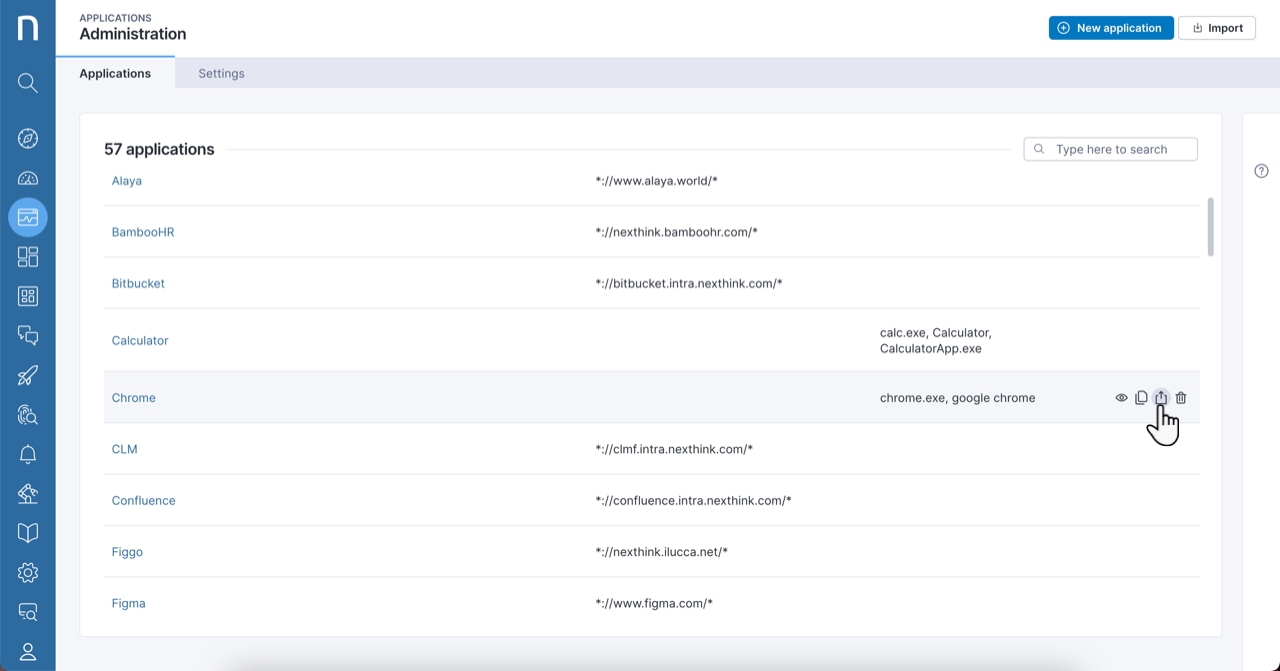
## アプリケーション: 設定のインポートとエクスポート
Nexthinkクラウドインスタンス間で簡単に共有および再利用できるように、アプリケーション設定をインポートおよびエクスポートします。詳細については、[Manage Applications](/platform/ja/user-guide/applications/setting-up-and-managing-applications/managing-applications.md)ドキュメントを参照してください。
## 調査から多数のユーザーにキャンペーンを送信
調査モジュールから多くの従業員にワンショットで通信を迅速に送信します。今、NQLクエリが多くの結果を返しても、調査から返されたすべてのユーザーを対象としたキャンペーンをターゲットにします。詳細については、[キャンペーンのトリガー](/platform/ja/user-guide/campaigns/working-with-campaigns/triggering-campaigns.md)のドキュメントを参照してください。
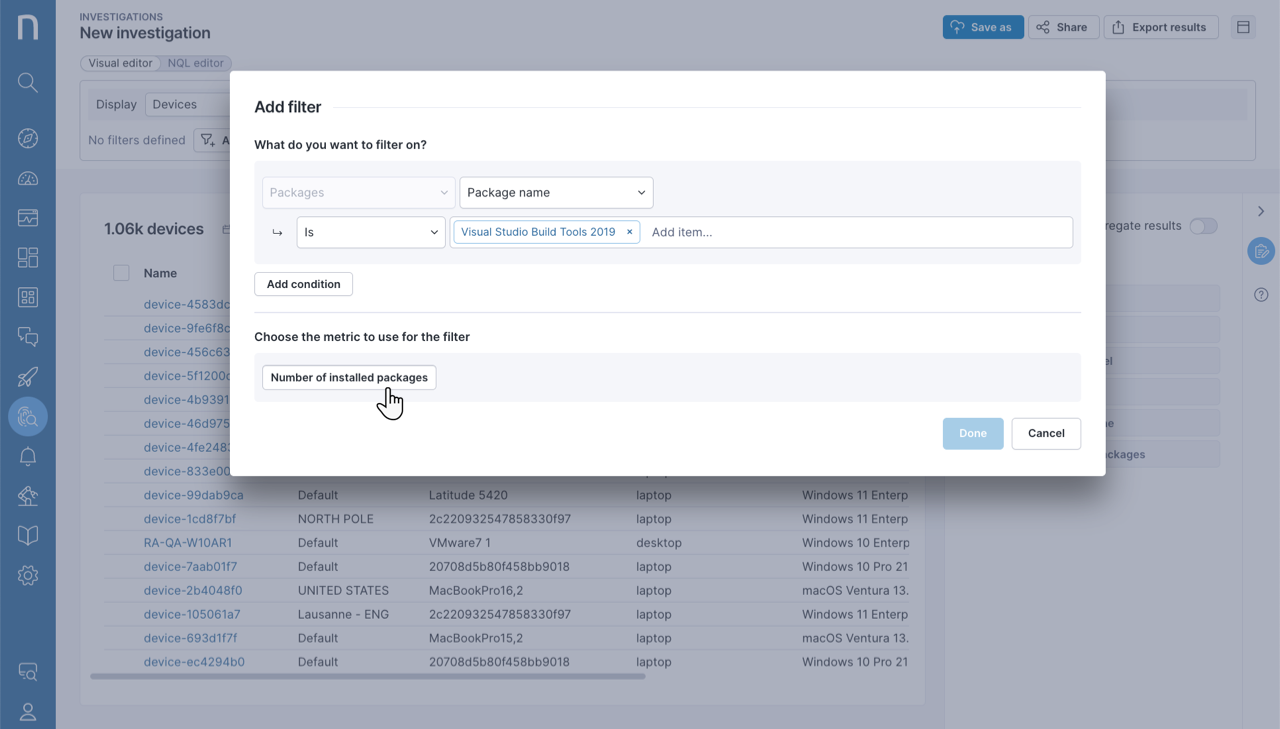
## ビジュアルエディターでソフトウェアパッケージでフィルタリング
今、調査モジュールのビジュアルエディターでソフトウェアパッケージで簡単にフィルタリングし、パッケージを含む任意の調査を詳細化することができます。詳細については、[ビジュアルエディター](/platform/ja/user-guide/investigations/creating-investigations/visual-editor.md)のドキュメントを参照してください。
## ウェブアプリケーションの高度なトラブルシューティング用ライブラリパック
新しいダッシュボードを含むウェブアプリケーションの高度なトラブルシューティングライブラリパックで、デバイス、ユーザー、URLのフィルタリングを含む複数の次元でウェブエラーを分析します。リリースの展開完了後にこのライブラリ更新を利用可能にします。詳細については、[Nexthinkライブラリ](/platform/ja/user-guide/nexthink-library.md)のドキュメントを参照してください。
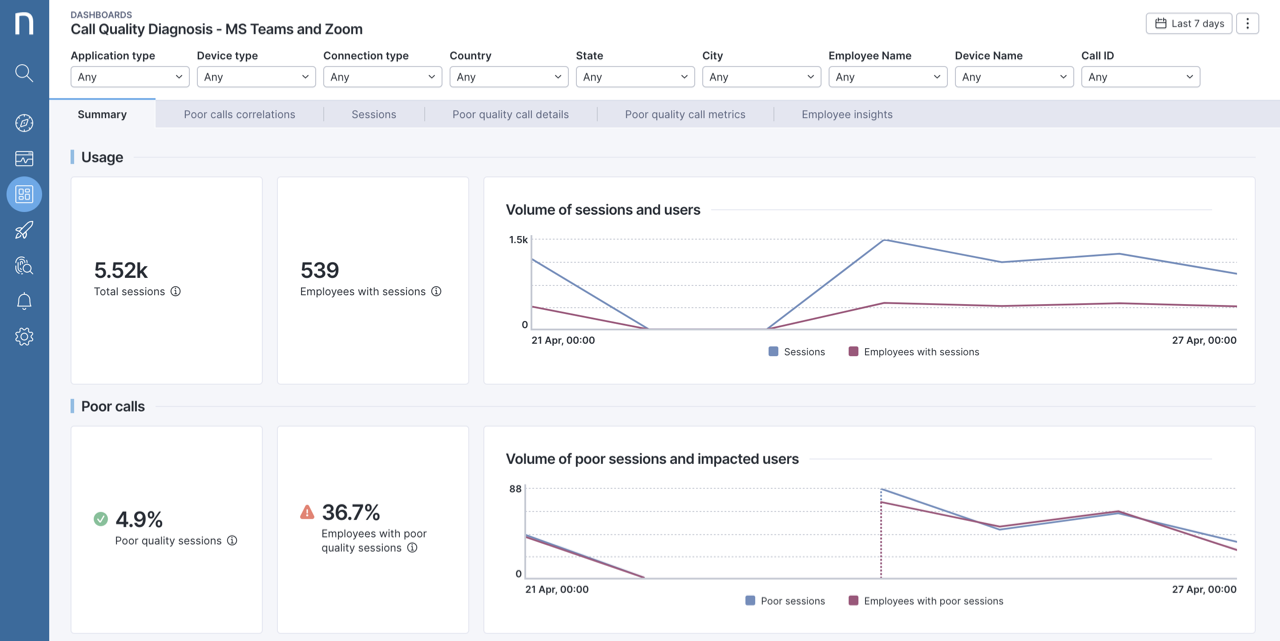
## コラボレーション体験ライブラリパック
新しいコラボレーション体験ライブラリパックで、コール品質問題をもっと効果的に把握し、トラブルシューティングします。このパックは、チェックリスト、ダッシュボード、組み込みアプリケーション設定、リモートアクションなどの主要なNexthink機能を使用して、問題を可視化し、診断し、修正します。コラボレーション体験拡張製品の一部として、ライブダッシュボードは以下を提供します:
* コール品質問題の拡張された概要
* 相関の悪い通話品質を表示する新しいタブ
* 特定の通話または従業員のセッションリストを表示する新しいタブ
コール品質データへのアクセスには[コラボレーション体験](https://nexthink.com/platform/collaboration-experience)ライセンスが必要です。
## 学習: システム設定に関する新しいコース
[Nexthink Infinityの設定方法](https://learn.nexthink.com/courses/how-to-configure-nexthink-infinity)コースを完了して、コレクターのステータス確認、コレクター設定の更新、デバイスと組織構造との関係の定義、デバイスの位置を決定する方法を学びます。
## 学習: NexthinkによるDEX最適化に関する新しい学習パス
新しい[DEX最適化とNexthink](https://learn.nexthink.com/learn/learning-path/dex-optimization-with-nexthink)学習パスを使用して、DEX駆動の組織を構築する手順を定義し、Nexthinkがどのようにデジタルエクスペリエンスを測定して従業員の生産性を継続的に改善するかを学びます。
## 特定のユーザープロファイルとライブダッシュボードを共有
ユーザーが彼らの日々の活動に関連性のあるダッシュボードだけを閲覧できるようにします。ライブダッシュボードの管理者は、個々のダッシュボードを閲覧準備が整うまで非公開にし、その後、選択したユーザープロファイルと共有することができます。詳細については、[ライブダッシュボードの管理](/platform/ja/user-guide/live-dashboards/managing-live-dashboards.md)のドキュメントを参照してください。
## デバイスビューツールラインからウェブアプリケーションダッシュボードを開く
デバイスに影響を及ぼすアプリケーションの問題が単一のデバイスに特有なものか、または組織内の他のデバイスにも幅広い影響があるかを調査するために、デバイスビューツールラインタブの右側パネルから関連するウェブアプリケーションダッシュボードを開きます。詳細については、[デバイスビュー](/platform/ja/user-guide/device-view.md)のドキュメントを参照してください。
## デバイスビューのメモリ使用量に対する新しいパラメータ
デバイスビューでキャッシュメモリ、スワップレート、スワップサイズなどの新しいメモリ使用量のメトリクスを表示し、トラブルシューティングの改善と潜在的な問題の可視化を向上させます。詳細については、[デバイスビュー](/platform/ja/user-guide/device-view.md)のドキュメントを参照してください。
## Amplifyの互換性向上
Amplifyは現在、ServiceNowのバージョンTokyoおよびUtahに対応しています。 Amplifyセレクターは、ServiceNowエージェントワークスペースおよびサービスオペレーションワークスペースのインターフェースを含む、これらのバージョンからデバイスまたはユーザー識別子を自動的に読み取ります。詳細については、[Amplifyのインストールと設定ガイド](/platform/ja/configuring_nexthink/bringing-data-into-your-nexthink-instance/deploying-nexthink-in-non-vdi-environment/configure-amplify/installation-and-configuration.md)ドキュメントを参照してください。
## ルールベースの組織: エンティティとカスタム分類
デバイスをそれぞれの組織エンティティに割り当てるルールを設定し、エンティティをより高いレベルの組織単位に分類してデバイス管理を効率化します。調査とレポートで組織の分類データにアクセスして、追加の洞察を得て、より効果的に行動に移します。詳細については、[Product configuration](/platform/ja/user-guide/administration/system-configuration/data-management/environment/product-configuration.md)ドキュメントを参照してください。
## キャンペーンのインポートとエクスポート
Nexthink管理者は、キャンペーンをJSONファイルフォーマットでインポートおよびエクスポートできるようになり、他のNexthinkクラウドインスタンスでコンテンツを再利用できます。詳細については、[キャンペーンの管理](/platform/ja/user-guide/campaigns/managing-campaigns.md)のドキュメントを参照してください。
## Nexthink APIを介したキャンペーンのトリガー
新しいキャンペーンAPIを介して、例えばITSMなどのサードパーティツールから特定の従業員にキャンペーンをトリガーします。これは、サードパーティイベントに応答して従業員からフィードバックを集める必要がある場合に特に便利です。
リリース完了後のアップデートでキャンペーンAPIを提供します。詳細については、[Nexthink API](https://developer.nexthink.com/)ポータルを参照してください。
## コレクターはユーザープリンシパル名(UPN)をレポートします
コレクターを設定して、メールアドレス形式でのユーザーアカウントの識別子であるユーザープリンシパル名(UPN)をレポートします。 UPNはシステム間でのユーザーを識別し、Nexthinkでサードパーティサービスのデータでユーザーオブジェクトを強化するために使用できます。さらに、UPNのプライバシーレベルの新しい設定パラメータを提供します。デフォルトでは、NexthinkはUPNをインポートしません。UPNをレポートしたい場合は、コレクターのUPNプライバシーレベルを変更する必要があります。
## Zoom用コネクタのサーバ間OAuth
Nexthinkコネクタは、Zoomが2023年6月1日からJWT認証を廃止することに応じてサーバ間OAuthに移行しました。すでにZoom用コネクタを使用している場合は、6月1日までに更新する必要があります。詳細については、[Zoomのコネクタ](/platform/ja/configuring_nexthink/bringing-data-into-your-nexthink-instance/integrating-nexthink-with-third-party-tools/inbound-connectors/connector-for-zoom.md)にリファーしてください。
---
# Agent Instructions
This documentation is published with GitBook. GitBook is the documentation platform designed so that both humans and AI agents can read, navigate, and reason over technical content effectively. Learn more at gitbook.com.
## Querying This Documentation
If you need additional information that is not directly available in this page, you can query the documentation by asking a question.
Perform an HTTP GET request on the following URL with the `ask` and `goal` query parameters:
```
GET https://docs.nexthink.com/platform/ja/whats-new/2023/whats-new-2023.4.md?ask=&goal=
```
`ask` is the immediate question: it should be specific, self-contained, and written in natural language.
`goal` is what the user is ultimately trying to achieve, the reason they need the answer. Sharing it helps GitBook give you a better, more relevant answer. A goal is most helpful when it describes the outcome the user wants rather than restating the question. For example, with `ask=how do I create an API token`, a goal like `automate deployments from our CI pipeline` lets GitBook tailor the answer to that use case.
The response will contain a direct answer to the question and relevant excerpts and sources from the documentation.
Use this mechanism when the answer is not explicitly present in the current page, you need clarification or additional context, or you want to retrieve related documentation sections.