> For the complete documentation index, see [llms.txt](https://docs.nexthink.com/llms.txt). Markdown versions of documentation pages are available by appending `.md` to page URLs; this page is available as [Markdown](https://docs.nexthink.com/platform/ja/user-guide/search-and-workspace/using-workspace/creating-campaigns-with-workspace.md).
# Workspace でキャンペーンを作成する
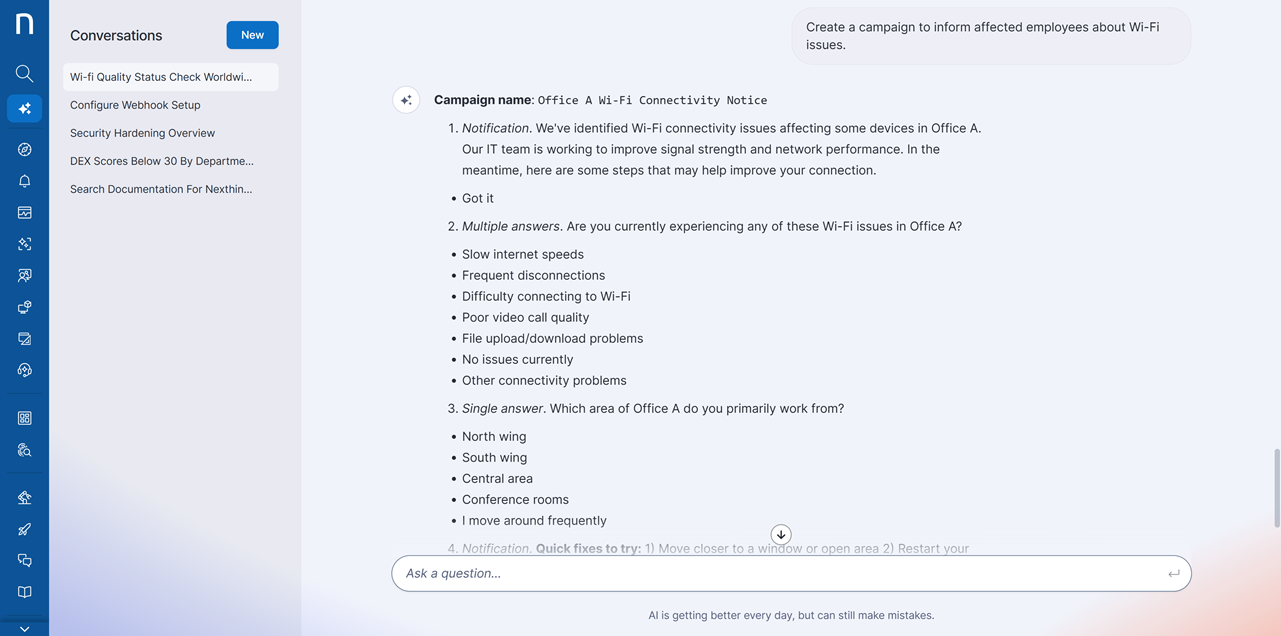
Workspaceでは、自然言語による指示を使用してキャンペーンコンテンツを作成できます。フォローアッププロンプトを使用して、生成されたキャンペーンを改善および拡張できます。
## できること
* キャンペーンの質問と回答を生成する。
* 追加の指示でメッセージングを改善する。
* キャンペーンを**Campaigns**モジュールに下書きとして保存する。
* モジュールからオーディエンスとトリガーを確定する。
接続の問題を特定した後、たとえば次のようにリクエストできます。「Wi-Fiの問題について、影響を受ける従業員に通知するキャンペーンを作成してください。」。 Workspaceがキャンペーンコンテンツを生成し、それを改善してから下書きとして保存できます。
## 作成できるキャンペーンのタイプ
* デバイス使用状況調査
* サービス中断に関する通知
* IT満足度調査
{% hint style="info" %}
組織内でキャンペーンを計画、承認取得、テスト、開始するためのガイドラインについては、[キャンペーンプログラムの開始](/platform/ja/user-guide/campaigns/managing-campaigns/launching-campaign-programs.md)のドキュメントを参照してください。
{% endhint %}
***
関連トピック
* [ワークスペース](/platform/ja/user-guide/search-and-workspace.md)
* [Workspaceの使用](/platform/ja/user-guide/search-and-workspace/using-workspace.md)
---
# Agent Instructions
This documentation is published with GitBook. GitBook is the documentation platform designed so that both humans and AI agents can read, navigate, and reason over technical content effectively. Learn more at gitbook.com.
## Querying This Documentation
If you need additional information that is not directly available in this page, you can query the documentation by asking a question.
Perform an HTTP GET request on the following URL with the `ask` and `goal` query parameters:
```
GET https://docs.nexthink.com/platform/ja/user-guide/search-and-workspace/using-workspace/creating-campaigns-with-workspace.md?ask=&goal=
```
`ask` is the immediate question: it should be specific, self-contained, and written in natural language.
`goal` is what the user is ultimately trying to achieve, the reason they need the answer. Sharing it helps GitBook give you a better, more relevant answer. A goal is most helpful when it describes the outcome the user wants rather than restating the question. For example, with `ask=how do I create an API token`, a goal like `automate deployments from our CI pipeline` lets GitBook tailor the answer to that use case.
The response will contain a direct answer to the question and relevant excerpts and sources from the documentation.
Use this mechanism when the answer is not explicitly present in the current page, you need clarification or additional context, or you want to retrieve related documentation sections.