> For the complete documentation index, see [llms.txt](https://docs.nexthink.com/platform/llms.txt). Markdown versions of documentation pages are available by appending `.md` to page URLs; this page is available as [Markdown](https://docs.nexthink.com/platform/ja/user-guide/remote-actions/using-remote-actions/monitoring-specific-remote-action-executions.md).
# 特定のリモートアクション実行を監視する
詳細ページでは、特定のリモートアクションの実行詳細が表示されます。
## リモートアクション概要へのアクセス
実行詳細ページにアクセスするには、次の操作を行います:
* **リモートアクションの管理** を選択します。
* リモートアクションにカーソルを合わせると、テーブル左側にアクションメニューが表示されます。
* **詳細** をクリックして実行詳細ページを表示します。
* ナビゲーションパネルの一覧から既存のリモートアクションを選択します。
* **リモートアクション概要** ページから既存のリモートアクションを選択します。
## タイムフレームピッカーとフィルタリングの考慮事項
ページ右上のタイムフレームピッカーを使用して、プリセットタイムフレームまたはカスタム期間を選択します。選択したタイムフレームはページ上のすべてのウィジェットに適用されます。タイムフレームを指定しない場合、デフォルトは **過去 7 日間** です。
**リモートアクション概要** からリモートアクション詳細ページにアクセスした場合、以前に選択したタイムフレームとフィルターが適用されます。
## リモートアクション詳細ページの探索
### リモートアクションの実行
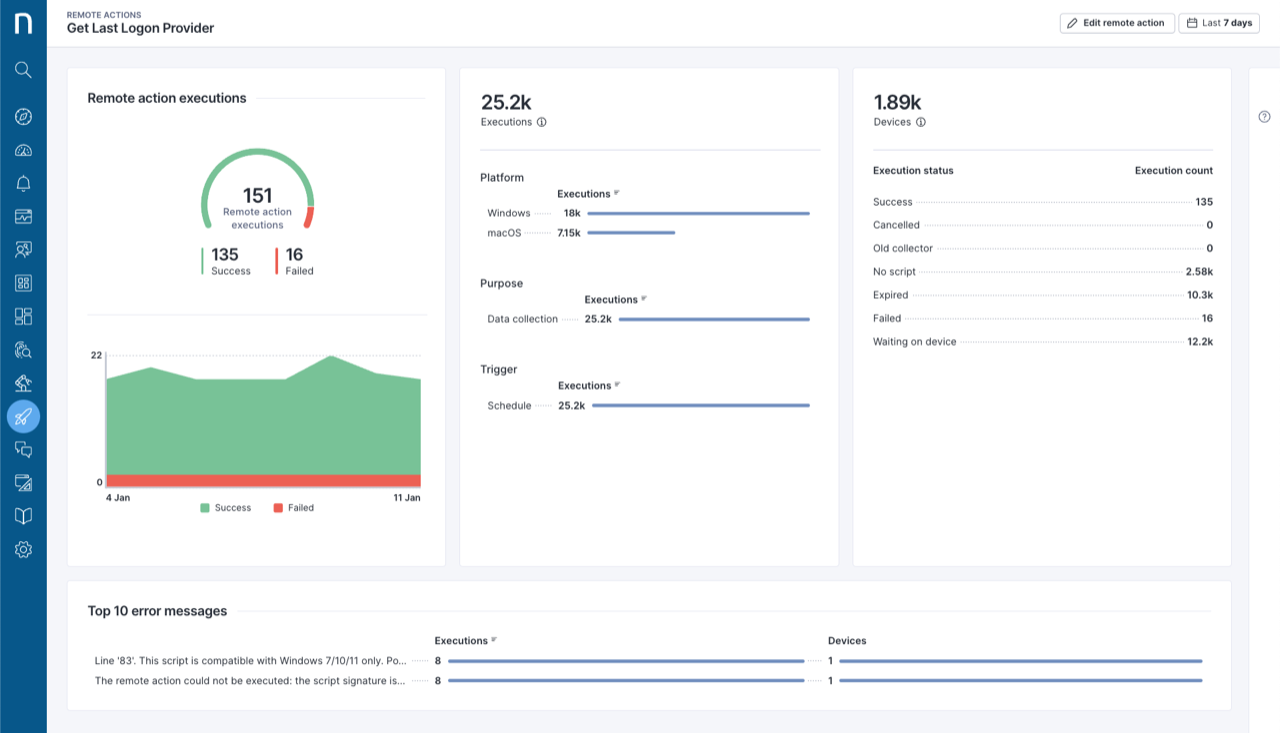
**リモートアクション実行** のゲージとタイムラインには、**成功** および **失敗** した実行が表示されます。ゲージラベルをクリックすると、ページ全体にフィルターが適用されます。
### リモートアクション実行の内訳
**実行** バーチャートは、**プラットフォーム**、**目的**、**トリガー** 別の内訳を表示します。合計実行数にカーソルを合わせてアクションメニューをクリックすると、次の項目にドリルダウンできます:
* デバイス詳細なしの実行サマリー統計。
* デバイス情報と出力を含む実行詳細。
### リモートアクションのステータス
**デバイス** テーブルでは、実行ステータス別の内訳が表示されます。デバイスの合計数にカーソルを合わせてアクションメニューをクリックすると、次の項目にドリルダウンできます:
* リモートアクションのデバイスごとの最後の成功した実行。
* デバイス情報と出力を含む実行詳細。
{% hint style="info" %}
実行詳細および最後の成功実行のドリルダウンは、ダッシュボードから削除されていない Infinity リモートアクションに対してのみ利用できます。
{% endhint %}
### トップ10エラーメッセージ
失敗した実行に関連する上位 10 件のエラーメッセージを確認します。説明にカーソルを合わせると、完全なエラーメッセージが表示されます。
---
# Agent Instructions
This documentation is published with GitBook. GitBook is the documentation platform designed so that both humans and AI agents can read, navigate, and reason over technical content effectively. Learn more at gitbook.com.
## Querying This Documentation
If you need additional information that is not directly available in this page, you can query the documentation dynamically by asking a question.
Perform an HTTP GET request on the current page URL with the `ask` query parameter, and the optional `goal` query parameter:
```
GET https://docs.nexthink.com/platform/ja/user-guide/remote-actions/using-remote-actions/monitoring-specific-remote-action-executions.md?ask=&goal=
```
`ask` is the immediate question: it should be specific, self-contained, and written in natural language.
`goal` is optional and describes the broader end goal you are ultimately trying to accomplish on behalf of the user. GitBook uses it to tailor the answer towards what is most useful for that goal.
The response will contain a direct answer to the question and relevant excerpts and sources from the documentation.
Use this mechanism when the answer is not explicitly present in the current page, you need clarification or additional context, or you want to retrieve related documentation sections.