> For the complete documentation index, see [llms.txt](https://docs.nexthink.com/platform/llms.txt). Markdown versions of documentation pages are available by appending `.md` to page URLs; this page is available as [Markdown](https://docs.nexthink.com/platform/ja/user-guide/remote-actions/using-remote-actions/monitoring-remote-actions-execution-statistics.md).
# リモートアクションの実行統計を監視する
## リモートアクションの概要へアクセスする
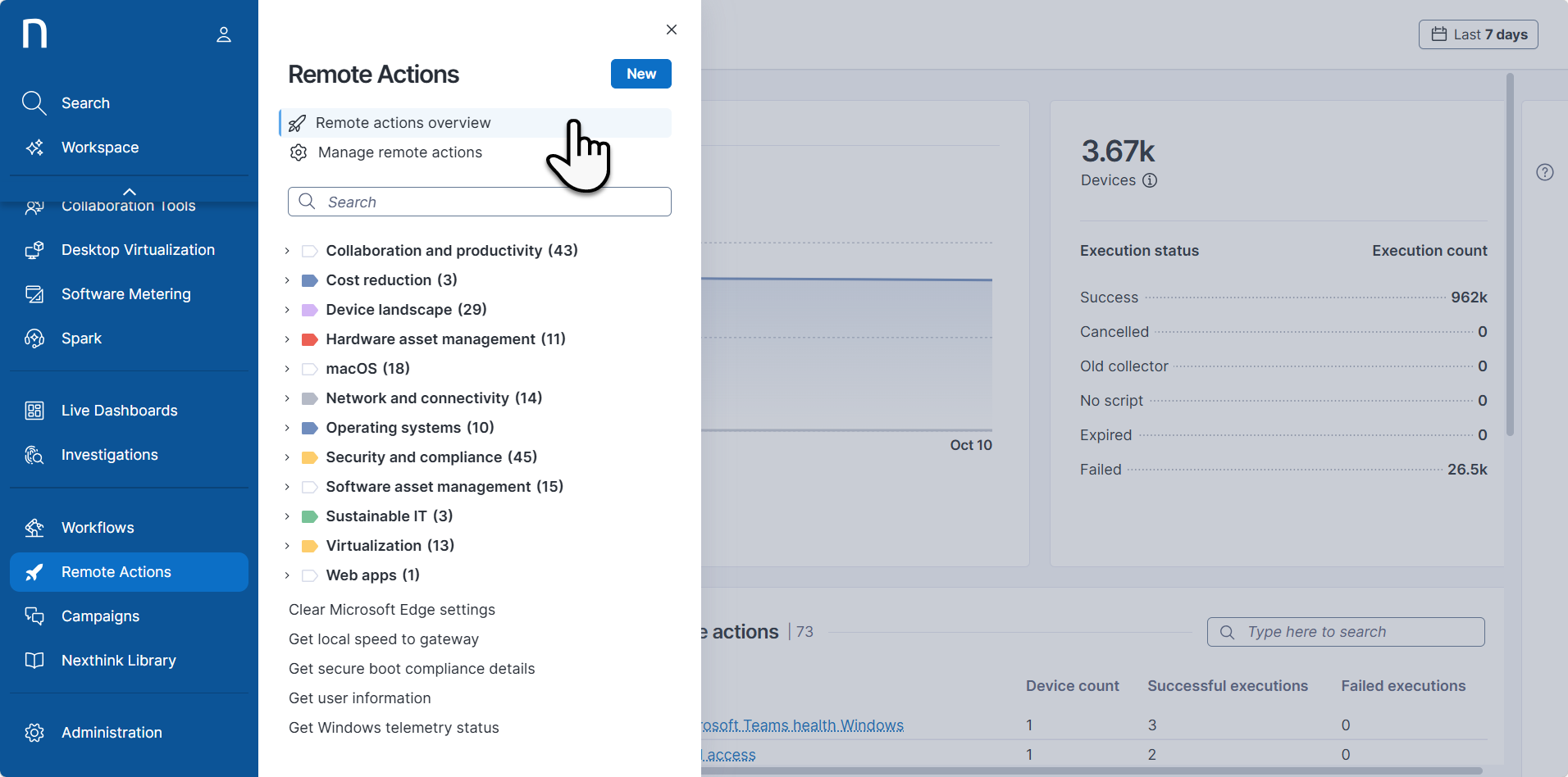
* メインメニューから[リモートアクション]モジュールを選択します。
* ナビゲーションパネルから**リモートアクションの概要**を選択して、すべてのリモートアクションのパフォーマンスに関連する統計を表示します。
## タイムフレームピッカーとフィルタリングに関する注意事項
ページ右上のタイムフレームピッカーを使用して、プリセットのタイムフレームまたはカスタム期間を選択します。選択したタイムフレームはページ上のすべてのウィジェットに適用されます。タイムフレームを指定しない場合、デフォルトは**直近7日間**です。
## リモートアクションの概要ページを探索する
### タイムライン上の実行数
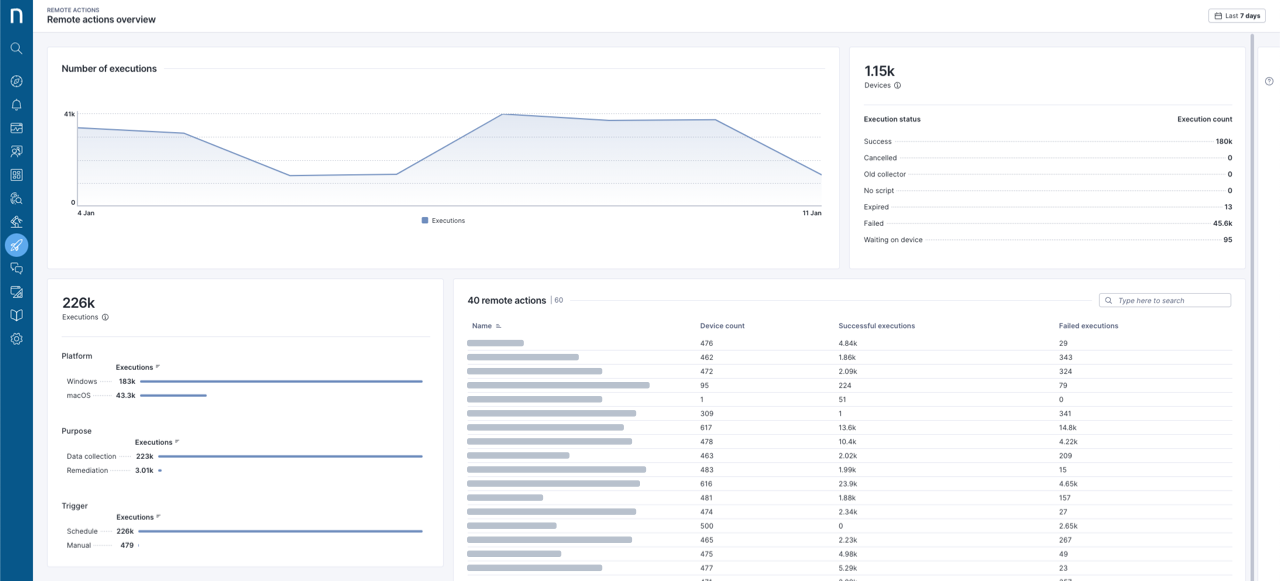
エリアチャートは、実行数の動的な変化を視覚的に示します。
### リモートアクションのステータス
関連する**デバイス**テーブルには、少なくとも1つのリモートアクションの対象となったデバイスの総数と、ステータス別の内訳が表示されます:
* **成功**\
正常に完了した実行。
* **キャンセル済み**\
リモートアクションの削除によりキャンセルされた実行。
* **古いCollector**\
Collectorの旧バージョンのため実行されなかったもの。
* **スクリプトなし**\
デバイスプラットフォーム用のスクリプト(Windowsは `.ps`、macOSは `.bash`)が存在しないために実行されなかったもの。
* **期限切れ**\
対象デバイスがオフラインのままで、新しい実行リクエストが受信されたために期限切れとなったもの。
* **失敗**\
失敗した実行。
* **デバイス待ち**\
デバイスがオンラインになるのを待っている実行。
* **ユーザーのログイン待ち**\
ユーザーがデバイスにログインするのを待機している実行。対話型ユーザーのコンテキストで実行されるリモートアクションは、ユーザーがログインするまでこのステータスになります。また、リクエストの作成から1週間後に期限切れになります。
### リモートアクションの実行内訳
実行チャートテーブルには、すべてのリモートアクションの総実行数と、**プラットフォーム**、**目的**、**トリガー**別の内訳が表示されます。バーをクリックすると、リモートアクションの実行詳細をフィルタリングできます。フィルターはページ上部のフィルターバーに表示されます。
### リモートアクションテーブル
**リモートアクション**テーブルでは、リモートアクションが**名前**、**デバイス数**、**成功した実行**、**失敗した実行**で整理されています。列タイトルをクリックすると内容を並べ替えできます。
テーブル内のリモートアクションをクリックすると、[**リモートアクション**詳細ページ](/platform/ja/user-guide/remote-actions/using-remote-actions/monitoring-specific-remote-action-executions.md)が開きます。以前に選択したフィルターは自動的に適用されます。
---
# Agent Instructions
This documentation is published with GitBook. GitBook is the documentation platform designed so that both humans and AI agents can read, navigate, and reason over technical content effectively. Learn more at gitbook.com.
## Querying This Documentation
If you need additional information that is not directly available in this page, you can query the documentation by asking a question.
Perform an HTTP GET request on the following URL with the `ask` and `goal` query parameters:
```
GET https://docs.nexthink.com/platform/ja/user-guide/remote-actions/using-remote-actions/monitoring-remote-actions-execution-statistics.md?ask=&goal=
```
`ask` is the immediate question: it should be specific, self-contained, and written in natural language.
`goal` is what the user is ultimately trying to achieve, the reason they need the answer. Sharing it helps GitBook give you a better, more relevant answer. A goal is most helpful when it describes the outcome the user wants rather than restating the question. For example, with `ask=how do I create an API token`, a goal like `automate deployments from our CI pipeline` lets GitBook tailor the answer to that use case.
The response will contain a direct answer to the question and relevant excerpts and sources from the documentation.
Use this mechanism when the answer is not explicitly present in the current page, you need clarification or additional context, or you want to retrieve related documentation sections.