> For the complete documentation index, see [llms.txt](https://docs.nexthink.com/llms.txt). Markdown versions of documentation pages are available by appending `.md` to page URLs; this page is available as [Markdown](https://docs.nexthink.com/platform/ja/user-guide/mobile-experience/using-nexthink-mobile.md).
# Nexthink Mobile アプリの使用
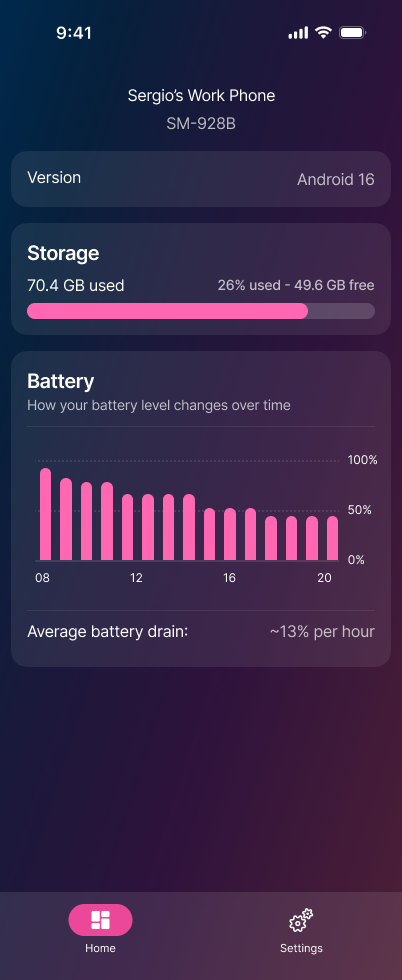
Nexthink Mobile は、iOS と Android におけるモバイルデバイスのヘルスとアクティビティを、明確かつリアルタイムに表示します。モダンで直感的なインターフェイスにより、ストレージ、バッテリー使用状況、パフォーマンス、ネットワークアクティビティなどの主要なデバイス指標を簡単に理解できます。
日常的なユーザーだけでなく、ITに関心の高いチームにも向けて設計されたNexthink Mobileは、技術的なデバイスデータをシンプルで有用なインサイトに変換します。
## iOS と Android の利用可能な機能
Nexthink Mobileは、重要なシステム情報や使用状況情報を提示することで、ユーザーが自分のデバイスの動作状況を把握できるよう支援します。例えば、次のような情報です:
* デバイス名やオペレーティングシステムの**バージョン**などのデバイス詳細
* どれだけの容量が使用されているかを把握するための**ストレージ**使用状況
* バッテリーレベルの経時変化や1時間あたりの平均バッテリー消費量などの**バッテリー**に関するインサイト
## iOS の追加機能
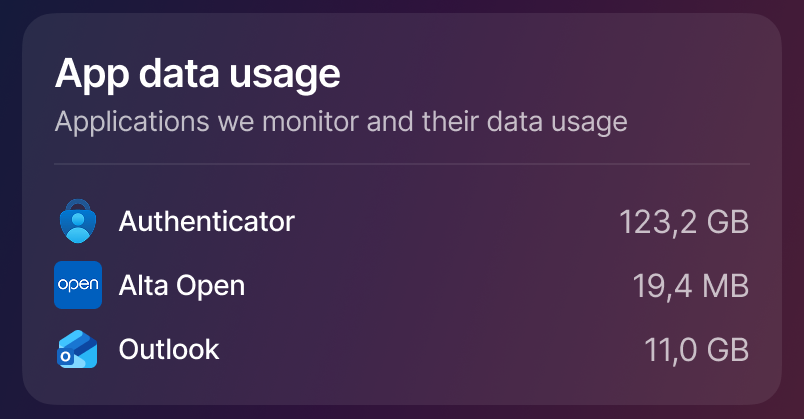
iOS では、Nexthink Mobile は **アプリのデータ使用量** の可視化も提供し、アプリケーションごとのデータ消費を表示します。ユーザーはアプリ監視を設定して監視対象のアプリを選択でき、アプリがデバイスリソースをどのように使用しているかについて、より高いコントロールと深い理解を得られます。 Nexthink Mobile は、データ使用量が最も多い上位 3 つのアプリケーションを強調表示します。
---
# Agent Instructions
This documentation is published with GitBook. GitBook is the documentation platform designed so that both humans and AI agents can read, navigate, and reason over technical content effectively. Learn more at gitbook.com.
## Querying This Documentation
If you need additional information that is not directly available in this page, you can query the documentation by asking a question.
Perform an HTTP GET request on the following URL with the `ask` and `goal` query parameters:
```
GET https://docs.nexthink.com/platform/ja/user-guide/mobile-experience/using-nexthink-mobile.md?ask=&goal=
```
`ask` is the immediate question: it should be specific, self-contained, and written in natural language.
`goal` is what the user is ultimately trying to achieve, the reason they need the answer. Sharing it helps GitBook give you a better, more relevant answer. A goal is most helpful when it describes the outcome the user wants rather than restating the question. For example, with `ask=how do I create an API token`, a goal like `automate deployments from our CI pipeline` lets GitBook tailor the answer to that use case.
The response will contain a direct answer to the question and relevant excerpts and sources from the documentation.
Use this mechanism when the answer is not explicitly present in the current page, you need clarification or additional context, or you want to retrieve related documentation sections.