> For the complete documentation index, see [llms.txt](https://docs.nexthink.com/platform/llms.txt). Markdown versions of documentation pages are available by appending `.md` to page URLs; this page is available as [Markdown](https://docs.nexthink.com/platform/ja/user-guide/applications/monitoring-applications/monitoring-web-applications/performance/reliability.md).
# 信頼性
さまざまなエラータイプによるページ読み込みの失敗を監視および追跡することも、Nexthink Applicationsの重要な側面です。
## 信頼性メトリクス
* エラー数は、Nexthinkブラウザ拡張機能によって検出されたすべてのブラウザエラーおよびHTTPエラーを表します。
* 従業員数は、特定の期間に少なくとも一つのエラーに遭遇した従業員を表します。
***
## 信頼性ダッシュボードの解釈
**信頼性**ダッシュボードには、次のウィジェットがセクション別にグループ化されています:
* [#performance](#performance "mention")
* [#top-breakdowns](#top-breakdowns "mention")
* [#other-breakdowns](#other-breakdowns "mention")
{% hint style="info" %}
事前定義されたドリルダウンオプションを提供する右側の**さらに調査**パネルを使用します。これらのリンクから、現在のダッシュボードコンテキストに関連する調査結果に移動できます。
{% endhint %}
### パフォーマンス
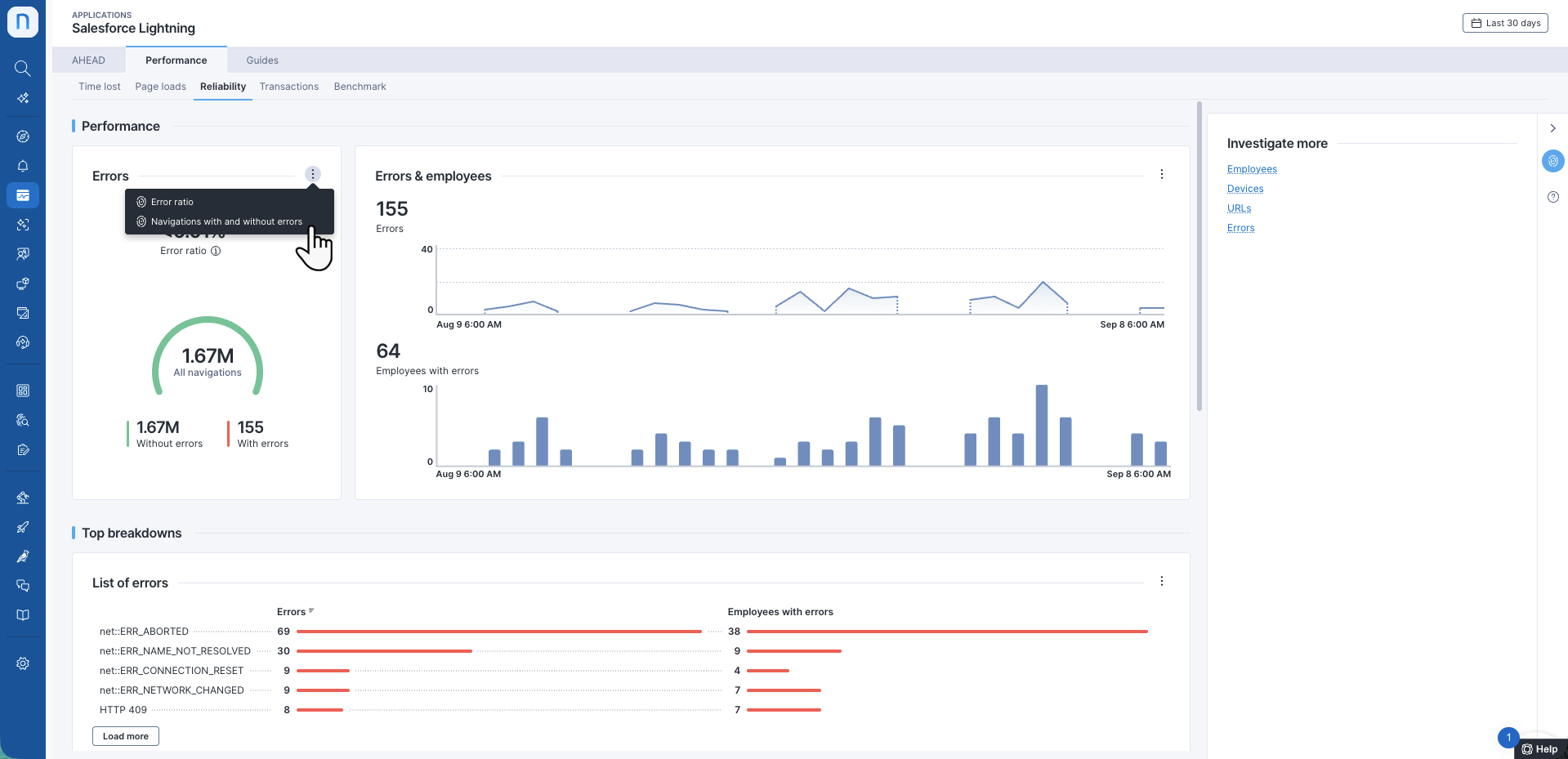
**パフォーマンス**セクションでは、エラーメトリクスの観点からアプリケーションの概要を示します。
エラー
エラーが発生したナビゲーションの割合、および良好、平均的、不満足なナビゲーションの内訳を簡単に確認できます。
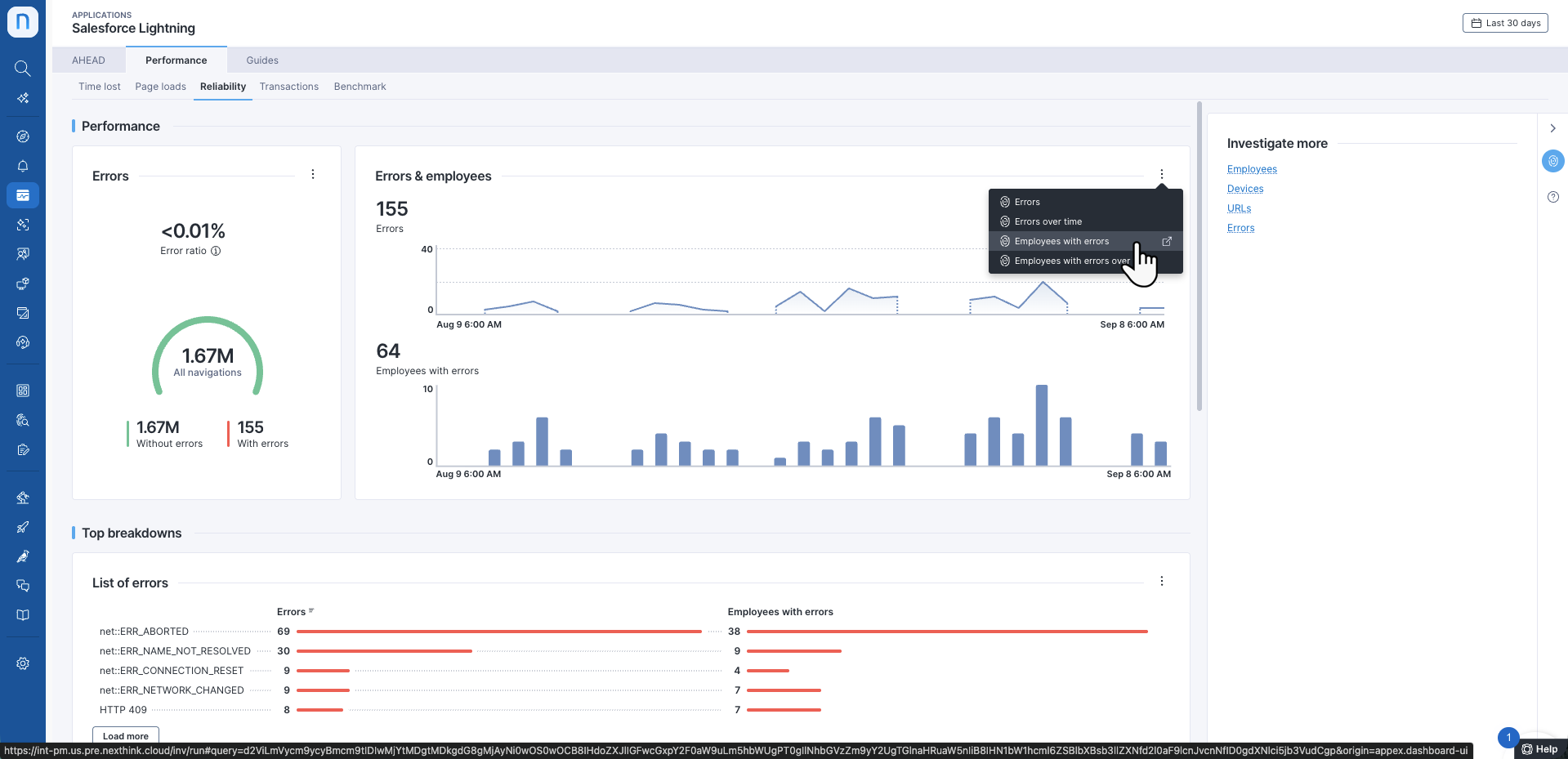
エラー & 従業員
選択した期間に記録された**エラー**数と、このメトリクスの経時的な変化を確認します。
**エラーが発生した従業員**は、エラーの影響を受けた従業員数を示します。
### 主な内訳
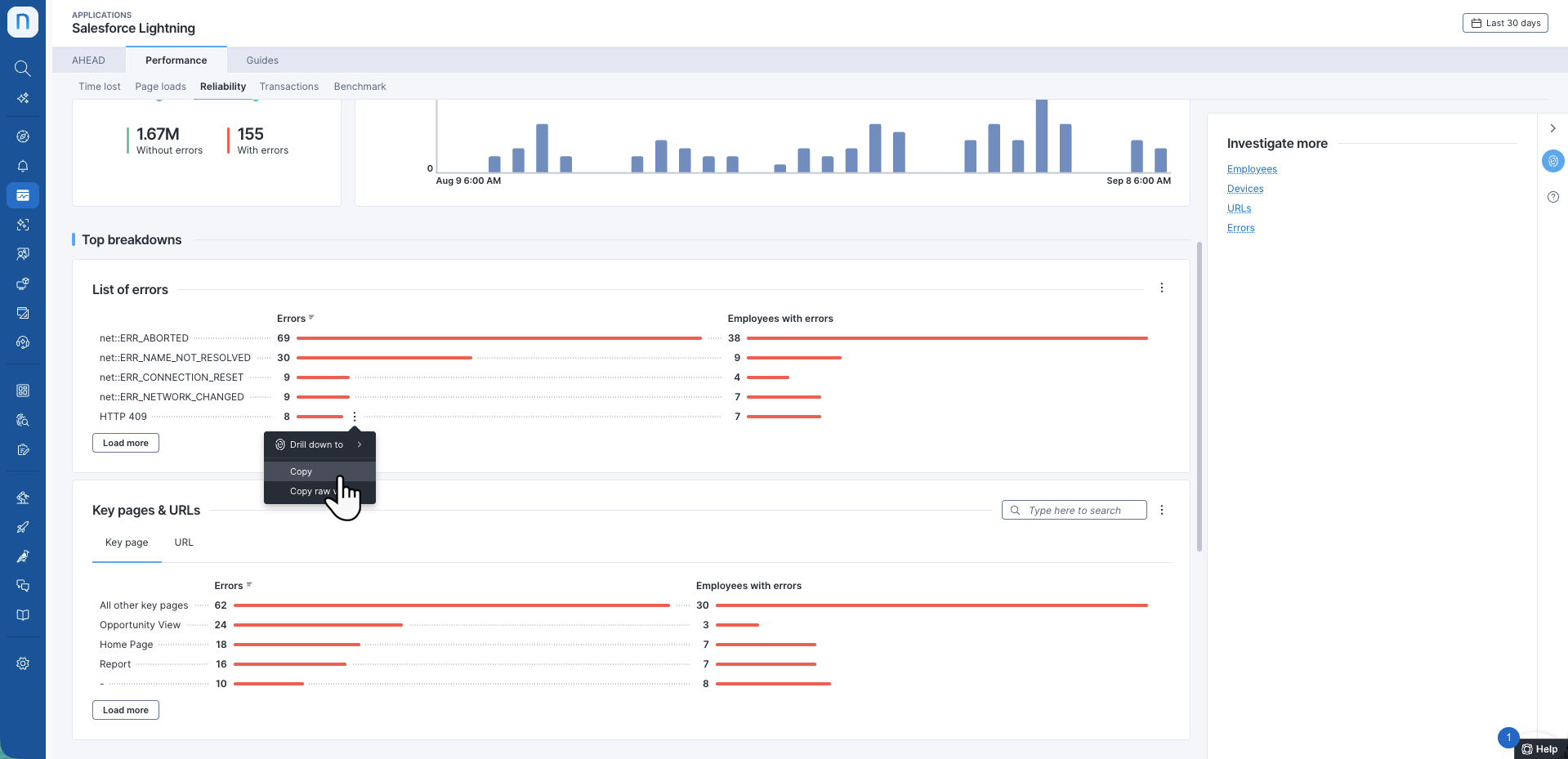
**主な内訳**セクションには、関連するブラウザエラーおよびHTTPエラーの数が最も多いエラー、主要ページ、URL、およびデバイスのリストが表示されます。
#### エラーのリスト
Nexthinkブラウザ拡張機能によって検出されたさまざまな種類のブラウザエラーおよびHTTPエラーを調査します。 Webブラウザは幅広いネットワークエラータイプを報告し、Nexthinkブラウザ拡張機能はそれらを検出してNexthink Webプラットフォームに報告します。
* ブラウザエラー - Google ChromeおよびMicrosoft ChromiumベースのEdgeブラウザのNETエラーの公式リストは、[googlesource.com](https://chromium.googlesource.com/chromium/src/+/master/net/base/net_error_list.h)のWebサイトで確認できます。 Firefoxは独自のブラウザエラーセットを使用しています。詳細については、[ドキュメント](https://developer.mozilla.org/)を参照してください。
* HTTPエラーは、次の標準レスポンスコードに含まれます: 4xxクライアントエラー、5xxサーバーエラー。ステータスコードの詳細なリストは、[wikipedia.org](https://en.wikipedia.org/wiki/List_of_HTTP_status_codes)のWebサイトで確認できます。
詳細については、[一般的なWebアプリケーションエラー](/platform/ja/user-guide/applications/setting-up-and-managing-applications/configuring-applications/configuring-web-applications/common-web-application-errors.md)のドキュメントを参照してください。
#### 主要ページとURL
このセクションでは、エラー数が最も多い主要ページとURLを表示します。各主要ページとURLについて、エラー数と影響を受けた従業員数を確認できます。
### その他の内訳
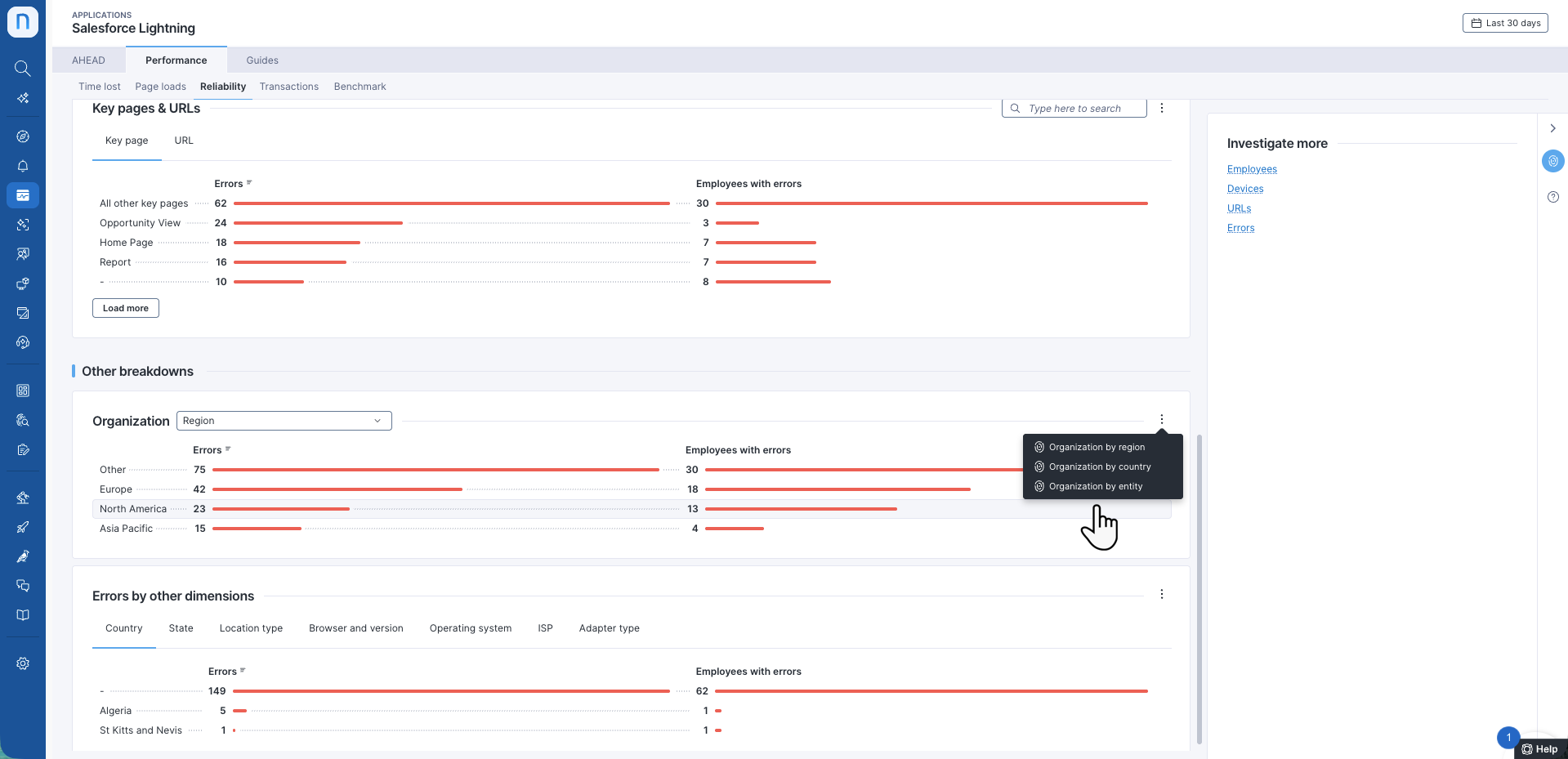
**その他の内訳**セクションには、**組織**および**他の次元別エラー**ウィジェットが含まれます。
#### 組織
**組織**テーブルには、組織の分類別にメトリクスが表示されます。ドロップダウンリストから組織レベルを選択します。詳細については、[製品設定](https://docs.nexthink.com/platform/ja/user-guide/administration/system-configuration/product-configuration)ドキュメントを参照して、エンティティとカスタム分類を定義する方法について学んでください。
#### 他の次元別エラー
**ブラウザとバージョン**、**オペレーティングシステム**、**ロケーションタイプ**などの追加の次元別にエラーを表示およびフィルタリングします。
ジオロケーション機能の詳細については、[ジオロケーションの設定](/platform/ja/user-guide/administration/system-configuration/data-management/environment/product-configuration.md#productconfiguration-geolocationtab)のドキュメントを参照してください。
---
# Agent Instructions
This documentation is published with GitBook. GitBook is the documentation platform designed so that both humans and AI agents can read, navigate, and reason over technical content effectively. Learn more at gitbook.com.
## Querying This Documentation
If you need additional information that is not directly available in this page, you can query the documentation by asking a question.
Perform an HTTP GET request on the following URL with the `ask` and `goal` query parameters:
```
GET https://docs.nexthink.com/platform/ja/user-guide/applications/monitoring-applications/monitoring-web-applications/performance/reliability.md?ask=&goal=
```
`ask` is the immediate question: it should be specific, self-contained, and written in natural language.
`goal` is what the user is ultimately trying to achieve, the reason they need the answer. Sharing it helps GitBook give you a better, more relevant answer. A goal is most helpful when it describes the outcome the user wants rather than restating the question. For example, with `ask=how do I create an API token`, a goal like `automate deployments from our CI pipeline` lets GitBook tailor the answer to that use case.
The response will contain a direct answer to the question and relevant excerpts and sources from the documentation.
Use this mechanism when the answer is not explicitly present in the current page, you need clarification or additional context, or you want to retrieve related documentation sections.