> For the complete documentation index, see [llms.txt](https://docs.nexthink.com/platform/llms.txt). Markdown versions of documentation pages are available by appending `.md` to page URLs; this page is available as [Markdown](https://docs.nexthink.com/platform/platform/ja/user-guide/alerts-and-diagnostics/setting-up-and-managing-monitors/configuring-email-and-webhook-notifications-for-alerts.md).

# アラートのメール通知とWebhook通知の設定

## メール通知 <a href="#configuringemailandwebhooknotificationsforalerts-emailnotifications" id="configuringemailandwebhooknotificationsforalerts-emailnotifications"></a>

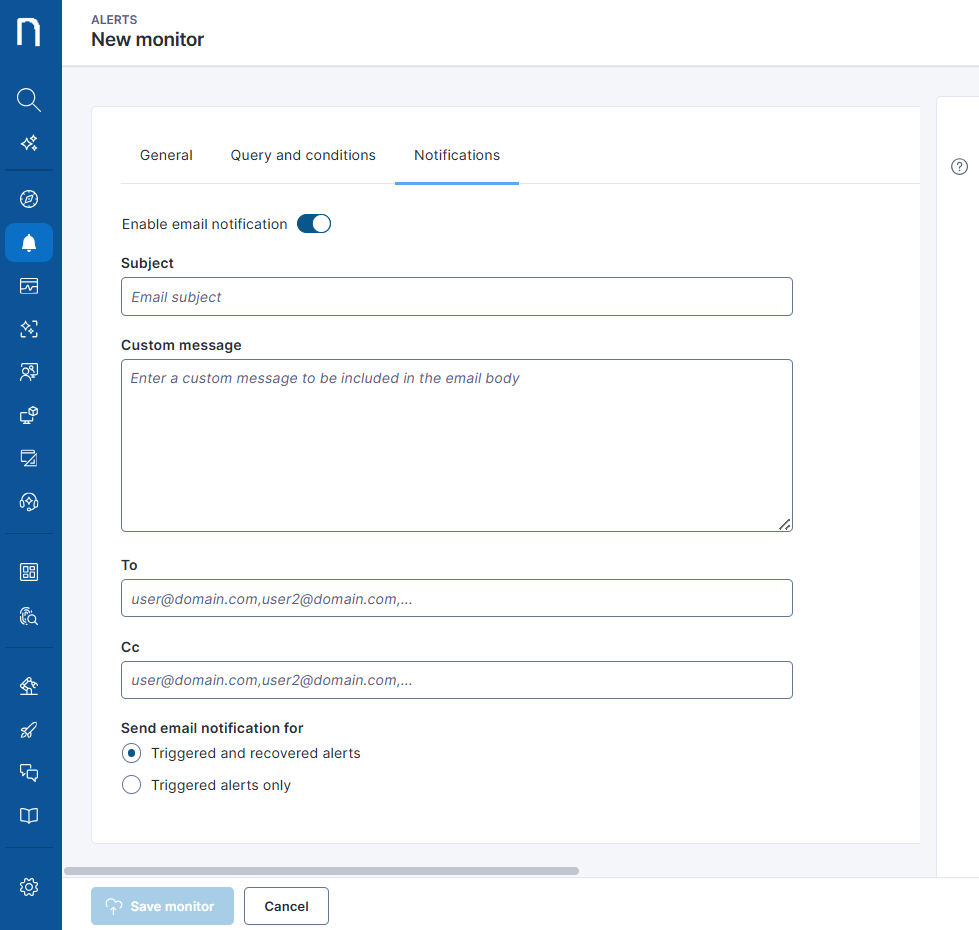
システムでアラートがトリガーされたときに適切なチームに通知するメールチャネルを設定するには、**通知** タブを使用します。

アラートのしきい値に達すると、アラートシステムからメールが送信されます。設定に応じて、アラートがアクティブでなくなったときに、システムから別途復旧メールが送信される場合があります。システムがアラートを復旧した場合、またはアラートが自動復旧された場合、そのアラートはアクティブではなくなります。

* 復旧は、システムが特定された異常を検出しなくなった場合、つまり超過していたしきい値が超過しなくなった場合に発生します。
* Nexthinkがイベントを検出しなくなると、自動復旧が発生します。

グローバル障害が発生すると、プラットフォームで複数のアラートが同時にトリガーされる場合があります。メールサーバーの過負荷を防ぐため、Nexthinkはモニターごとに最初の30件のトリガーに対してのみメール通知を送信し、その旨をメール受信者に通知します。アラートの完全なリストは引き続きNexthinkのWebインターフェイスで確認できます。モニターのトリガーあたりのアラート数は最大500件です。

<figure><img src="https://3549141153-files.gitbook.io/~/files/v0/b/gitbook-x-prod.appspot.com/o/spaces%2FeLm8O7QKZDn6z806e7Sv%2Fuploads%2Fgit-blob-b95819504b5c4b6add284db9e3f7c13aef9e32bb%2Falerts-Y3YWV9tkqvWT85Gl.png?alt=media" alt=""><figcaption></figcaption></figure>

### メール通知の設定方法

* **件名**：メールの内容を適切に表す件名を入力します。
* **カスタムメッセージ**：メール通知のメッセージを入力します。このフィールドは任意です。メッセージは、監視名、トリガー時刻、条件、アラートのコンテキストを含むデフォルトのアラート情報に追加されます。
* **宛先**：受信者のメールアドレスを入力します。複数のメールアドレスを追加するには、コンマで区切ります。このフィールドは必須です。
* **Cc**：アラートのカーボンコピーを受信する追加のメールアドレスを入力します。
* **メール通知の送信対象**：両方のイベントについて個別のメールを受信するには、**トリガーおよび復旧したアラート**を選択します。トリガーされたアラートのみに絞り、受信メール数を減らすには、**トリガーされたアラートのみ**を選択します。

## Webhook通知 <a href="#configuringemailandwebhooknotificationsforalerts-webhooknotifications" id="configuringemailandwebhooknotificationsforalerts-webhooknotifications"></a>

Webhookを使用して、Nexthinkプラットフォームから他のサードパーティツールに通知を送信します。詳細については、[Webhook](/platform/platform/ja/configuring_nexthink/bringing-data-into-your-nexthink-instance/integrating-nexthink-with-third-party-tools/outbound-connectors/webhooks.md)のドキュメントを参照してください。

以下の手順に従って、外部システムに通知を送信します。

* 監視を作成します。
* アウトバウンドWebhookコネクタを作成します。詳細については、[Webhookの管理](/platform/platform/ja/configuring_nexthink/bringing-data-into-your-nexthink-instance/integrating-nexthink-with-third-party-tools/outbound-connectors/webhooks/managing-webhooks.md)ページを参照してください。
* アラートからのペイロードを使用してWebhook通知を作成します。

### 通知内のアラートペイロード <a href="#configuringemailandwebhooknotificationsforalerts-alertpayloadinthenotification" id="configuringemailandwebhooknotificationsforalerts-alertpayloadinthenotification"></a>

NQL監視クエリによって、通知で使用できるペイロードも決まります。

<table><thead><tr><th width="372">監視NQLクエリ</th><th>メール通知</th><th>Webhook通知</th></tr></thead><tbody><tr><td><pre><code>devices
...
| compute 
</code></pre></td><td>デバイス名とメトリックのペイロード</td><td>デバイス名とメトリックのペイロード。さらに、関連付けられたデバイスのすべてのプロパティを通知ペイロードに追加できます。</td></tr><tr><td><pre><code>users
...
| compute 
</code></pre></td><td>ユーザー名とメトリックのペイロード</td><td>ユーザー名とメトリックのペイロード。さらに、関連付けられたデバイスのすべてのプロパティを通知ペイロードに追加できます。</td></tr><tr><td><pre><code>...
| summarize , ...
  by device.collector.ui
</code></pre></td><td>デバイス名とメトリックのペイロード</td><td><p>デバイス名とメトリックのペイロード。</p><p>さらに、すべてのデバイスプロパティを通知ペイロードに追加できます。</p></td></tr><tr><td><pre><code>...
| summarize , ...
  by , 
</code></pre></td><td>dimension1の値、dimension2の値、およびメトリックのペイロード</td><td>dimension1の値、dimension2の値、およびメトリックのペイロード</td></tr><tr><td><pre><code>...
| summarize , 
</code></pre></td><td>metric1、metric2のペイロード値</td><td>metric1、metric2のペイロード値</td></tr></tbody></table>

***

関連トピック

* [Webhook](/platform/platform/ja/configuring_nexthink/bringing-data-into-your-nexthink-instance/integrating-nexthink-with-third-party-tools/outbound-connectors/webhooks.md)
* [Webhookの管理](/platform/platform/ja/configuring_nexthink/bringing-data-into-your-nexthink-instance/integrating-nexthink-with-third-party-tools/outbound-connectors/webhooks/managing-webhooks.md)
* [Nexthink Library](/platform/platform/ja/user-guide/nexthink-library.md)


---

# Agent Instructions
This documentation is published with GitBook. GitBook is the documentation platform designed so that both humans and AI agents can read, navigate, and reason over technical content effectively. Learn more at gitbook.com.

## Querying This Documentation
If you need additional information that is not directly available in this page, you can query the documentation by asking a question.

Perform an HTTP GET request on the following URL with the `ask` and `goal` query parameters:

```
GET https://docs.nexthink.com/platform/platform/ja/user-guide/alerts-and-diagnostics/setting-up-and-managing-monitors/configuring-email-and-webhook-notifications-for-alerts.md?ask=<question>&goal=<user_goal>
```

`ask` is the immediate question: it should be specific, self-contained, and written in natural language.
`goal` is what the user is ultimately trying to achieve, the reason they need the answer. Sharing it helps GitBook give you a better, more relevant answer. A goal is most helpful when it describes the outcome the user wants rather than restating the question. For example, with `ask=how do I create an API token`, a goal like `automate deployments from our CI pipeline` lets GitBook tailor the answer to that use case.

The response will contain a direct answer to the question and relevant excerpts and sources from the documentation.

Use this mechanism when the answer is not explicitly present in the current page, you need clarification or additional context, or you want to retrieve related documentation sections.
